- Don’t miss your chance to experience Discovery Summit Europe at our best available rate! Early bird registration through 31 Oct.
- Graph Builder Toolbar streamlines interactive graphing. Creates shortcuts on Report and GraphBuilder Helpers toolbars. Download and install the extension.
- JMP will suspend normal business operations for our Rest and Recharge Day on Friday, October 2, 2026.
Regular business hours will resume on Monday, October 5, 2026.
- Subscribe to RSS Feed
- Mark Topic as New
- Mark Topic as Read
- Float this Topic for Current User
- Bookmark
- Subscribe
- Mute
- Printer Friendly Page
Discussions
Solve problems, and share tips and tricks with other JMP users.- User Community
- :
- Discussions
- :
- Combine charts

- Mark as New
- Bookmark
- Subscribe
- Mute
- Subscribe to RSS Feed
- Get Direct Link
- Report Inappropriate Content
Combine charts
Hello,
can I have combine chart on X axis when 1 part will have boxplot - no X axis and second part will be fit with X axis additional data. Charts created separately in attached file
Accepted Solutions


- Mark as New
- Bookmark
- Subscribe
- Mute
- Subscribe to RSS Feed
- Get Direct Link
- Report Inappropriate Content
Re: Combine charts
I think you have to have additional X-axis (you can for example create transform column or use existing one) and then modify it as needed. In this example I have used Days in Operations as the x-axis but I have removed it from the BoxPlot variables
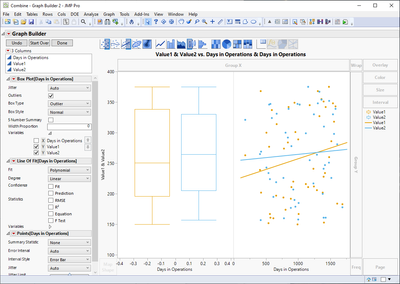
From here you can remove tick marks and the label
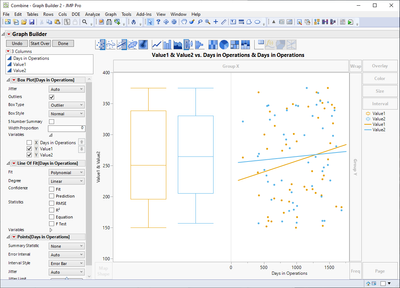
Graph Builder(
	Size(706, 589),
	Show Control Panel(0),
	Variables(X(:Days in Operations), X(:Days in Operations), Y(:Value1), Y(:Value2, Position(1))),
	Elements(Position(1, 1), Box Plot(Y(1), Y(2), Legend(20))),
	Elements(Position(2, 1), Line Of Fit(X, Y(1), Y(2), Legend(16), Confidence of Fit(0)), Points(X, Y(1), Y(2), Legend(17))),
	SendToReport(
		Dispatch(
			{},
			"Days in Operations",
			ScaleBox,
			{Label Row({Automatic Font Size(0), Automatic Tick Marks(0), Show Major Labels(0), Show Major Ticks(0), Show Minor Ticks(0)})}
		),
		Dispatch({}, "X title", TextEditBox, {Set Text("")})
	)
)- Mark as New
- Bookmark
- Subscribe
- Mute
- Subscribe to RSS Feed
- Get Direct Link
- Report Inappropriate Content
Re: Combine charts
I think you have to have additional X-axis (you can for example create transform column or use existing one) and then modify it as needed. In this example I have used Days in Operations as the x-axis but I have removed it from the BoxPlot variables
From here you can remove tick marks and the label
Graph Builder(
	Size(706, 589),
	Show Control Panel(0),
	Variables(X(:Days in Operations), X(:Days in Operations), Y(:Value1), Y(:Value2, Position(1))),
	Elements(Position(1, 1), Box Plot(Y(1), Y(2), Legend(20))),
	Elements(Position(2, 1), Line Of Fit(X, Y(1), Y(2), Legend(16), Confidence of Fit(0)), Points(X, Y(1), Y(2), Legend(17))),
	SendToReport(
		Dispatch(
			{},
			"Days in Operations",
			ScaleBox,
			{Label Row({Automatic Font Size(0), Automatic Tick Marks(0), Show Major Labels(0), Show Major Ticks(0), Show Minor Ticks(0)})}
		),
		Dispatch({}, "X title", TextEditBox, {Set Text("")})
	)
)- Mark as New
- Bookmark
- Subscribe
- Mute
- Subscribe to RSS Feed
- Get Direct Link
- Report Inappropriate Content
Re: Combine charts
Thank you. I was able to replicate.
Recommended Articles
- © 2026 JMP Statistical Discovery LLC. All Rights Reserved.
- Terms of Use
- Privacy Statement
- Contact Us