- Don’t miss your chance to experience Discovery Summit Europe at our best available rate! Early bird registration through 31 Oct.
- Graph Builder Toolbar streamlines interactive graphing. Creates shortcuts on Report and GraphBuilder Helpers toolbars. Download and install the extension.
- Subscribe to RSS Feed
- Mark Topic as New
- Mark Topic as Read
- Float this Topic for Current User
- Bookmark
- Subscribe
- Mute
- Printer Friendly Page
Discussions
Solve problems, and share tips and tricks with other JMP users.- User Community
- :
- Discussions
- :
- Re: Column switcher in JMP 16

- Mark as New
- Bookmark
- Subscribe
- Mute
- Subscribe to RSS Feed
- Get Direct Link
- Report Inappropriate Content
Column switcher in JMP 16
Hi,
I'm following the video linked here about the column switcher function in JMP, but I don't see that option in my JMP... I have JMP 16 installed, and I only have the Save Script option, I don't see a menu for just Script.
Is there something I'm missing?
Thanks.
Accepted Solutions


- Mark as New
- Bookmark
- Subscribe
- Mute
- Subscribe to RSS Feed
- Get Direct Link
- Report Inappropriate Content
Re: Column switcher in JMP 16
In JMP 16, Graph Builder, the Column Switcher is available under the Red Triangle @
Redo=>Column Switcher
- Mark as New
- Bookmark
- Subscribe
- Mute
- Subscribe to RSS Feed
- Get Direct Link
- Report Inappropriate Content
Re: Column switcher in JMP 16
In JMP 16, Graph Builder, the Column Switcher is available under the Red Triangle @
Redo=>Column Switcher

- Mark as New
- Bookmark
- Subscribe
- Mute
- Subscribe to RSS Feed
- Get Direct Link
- Report Inappropriate Content
Re: Column switcher in JMP 16
Surprisingly hard to find and remember. Why remove it from the Mac toolbar?


- Mark as New
- Bookmark
- Subscribe
- Mute
- Subscribe to RSS Feed
- Get Direct Link
- Report Inappropriate Content
Re: Column switcher in JMP 16
Here are some other options...
On Windows, if you have the toolbar visible, you can click on the Column Switcher button.

if you are building a Dashboard or JMP Application, you can drag the Column Switcher from under Boxes to the report and have it affect multiple graphs!
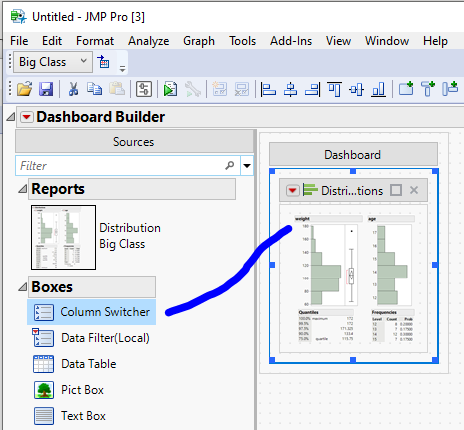
Read more about editing Dashboards here: https://www.jmp.com/support/help/en/16.1/?os=win&source=application&utm_source=helpmenu&utm_medium=a...
Enjoy switching columns.
~John
- Mark as New
- Bookmark
- Subscribe
- Mute
- Subscribe to RSS Feed
- Get Direct Link
- Report Inappropriate Content
Re: Column switcher in JMP 16
Recommended Articles
- © 2026 JMP Statistical Discovery LLC. All Rights Reserved.
- Terms of Use
- Privacy Statement
- Contact Us