Turn on suggestions
Auto-suggest helps you quickly narrow down your search results by suggesting possible matches as you type.
- Don’t miss your chance to experience Discovery Summit Europe at our best available rate! Early bird registration through 31 Oct.
- Graph Builder Toolbar streamlines interactive graphing. Creates shortcuts on Report and GraphBuilder Helpers toolbars. Download and install the extension.
Options
- Subscribe to RSS Feed
- Mark Topic as New
- Mark Topic as Read
- Float this Topic for Current User
- Bookmark
- Subscribe
- Mute
- Printer Friendly Page
Discussions
Solve problems, and share tips and tricks with other JMP users.- User Community
- :
- Discussions
- :
- Column is missing from GR&R table

Level II
- Mark as New
- Bookmark
- Subscribe
- Mute
- Subscribe to RSS Feed
- Get Direct Link
- Report Inappropriate Content
Column is missing from GR&R table
Created:
Dec 5, 2022 11:43 AM
| Last Modified: Jun 8, 2023 5:58 PM
(1834 views)
Hi
I am working with the GR&R analysis tool and need to get the % of Tolerance column in the results table. Something like this
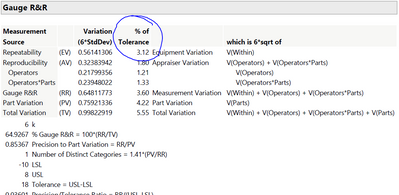
But when I right-click on the Gauge R&R to show this column, the only available columns to are these items
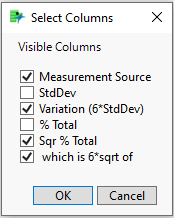
Do you have any idea how to get the % of Tolerance column?
Thank you
1 ACCEPTED SOLUTION
Accepted Solutions


Super User
Solution
- Mark as New
- Bookmark
- Subscribe
- Mute
- Subscribe to RSS Feed
- Get Direct Link
- Report Inappropriate Content
Re: Column is missing from GR&R table
You need to specify the tolerance range prior to running the Measurement System Analysis.
"All models are wrong, some are useful" G.E.P. Box
1 REPLY 1
Super User
Solution
- Mark as New
- Bookmark
- Subscribe
- Mute
- Subscribe to RSS Feed
- Get Direct Link
- Report Inappropriate Content
Re: Column is missing from GR&R table
You need to specify the tolerance range prior to running the Measurement System Analysis.
"All models are wrong, some are useful" G.E.P. Box
Recommended Articles
- © 2026 JMP Statistical Discovery LLC. All Rights Reserved.
- Terms of Use
- Privacy Statement
- Contact Us