- JMP will suspend normal business operations for our Winter Holiday beginning on Wednesday, Dec. 24, 2025, at 5:00 p.m. ET (2:00 p.m. ET for JMP Accounts Receivable).
Regular business hours will resume at 9:00 a.m. EST on Friday, Jan. 2, 2026. - We’re retiring the File Exchange at the end of this year. The JMP Marketplace is now your destination for add-ins and extensions.
- Subscribe to RSS Feed
- Mark Topic as New
- Mark Topic as Read
- Float this Topic for Current User
- Bookmark
- Subscribe
- Mute
- Printer Friendly Page
Discussions
Solve problems, and share tips and tricks with other JMP users.- JMP User Community
- :
- Discussions
- :
- Column header naming

- Mark as New
- Bookmark
- Subscribe
- Mute
- Subscribe to RSS Feed
- Get Direct Link
- Report Inappropriate Content
Column header naming
Hi,
I have a datasheet from my workplace with different parameters. Each parameter has different column properties to it such as A, B, C. The parameter is XYZ. However, the column header itself has the title XYZ (A). There seemed to be a way to concatenate the parameter name to the column property value but I'm not sure how to do it. When i double click on the column header, it just shows XYZ, without the column property attached to it.
Thanks!


- Mark as New
- Bookmark
- Subscribe
- Mute
- Subscribe to RSS Feed
- Get Direct Link
- Report Inappropriate Content
Re: Column header naming
The value attached is coming from the Units column property.
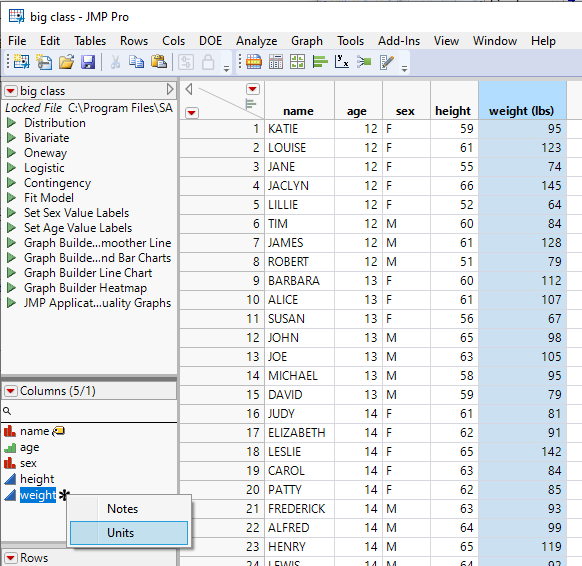
Either right click on the column header and choose
Column Properties=>Units
Or click on the * and then on the Units selection to see the actual Column Property
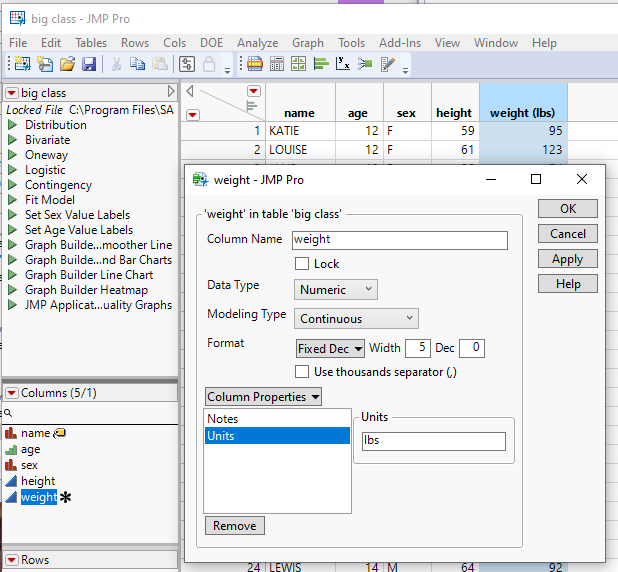

- Mark as New
- Bookmark
- Subscribe
- Mute
- Subscribe to RSS Feed
- Get Direct Link
- Report Inappropriate Content
Re: Column header naming
In addition to the post of @txnelson, it is documented here:
Properties That Control the Display of Columns (jmp.com)
Recommended Articles
- © 2025 JMP Statistical Discovery LLC. All Rights Reserved.
- Terms of Use
- Privacy Statement
- Contact Us