- JMP Statement Regarding Critical PHP Remote Code Execution Vulnerabilities (CVE-2026-109618, CVE-2026-109619)
- Don’t miss your chance to experience Discovery Summit Europe at our best available rate! Early bird registration through 31 Oct.
- Graph Builder Toolbar streamlines interactive graphing. Creates shortcuts on Report and GraphBuilder Helpers toolbars. Download and install the extension.
- Subscribe to RSS Feed
- Mark Topic as New
- Mark Topic as Read
- Float this Topic for Current User
- Bookmark
- Subscribe
- Mute
- Printer Friendly Page
Discussions
Solve problems, and share tips and tricks with other JMP users.- User Community
- :
- Discussions
- :
- Re: Column formula dependency cycle error

- Mark as New
- Bookmark
- Subscribe
- Mute
- Subscribe to RSS Feed
- Get Direct Link
- Report Inappropriate Content
Column formula dependency cycle error
Hi all,
Just wonder how we can do circular references in JSL.For example, I have a population qty and failure rate. But the failure rate for each year depends on the survive parts.
Year Original equipment Failed Survive
1 100 1 99
2 99 2 97
3 97 3 94
I know JMP doesn't allow a column to have a formula depends on the other formulated column. Is there a trick to work around for this case?
Thanks
Thanks
Accepted Solutions


- Mark as New
- Bookmark
- Subscribe
- Mute
- Subscribe to RSS Feed
- Get Direct Link
- Report Inappropriate Content
Re: Column formula dependency cycle error
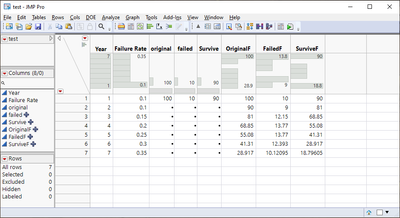
Calculate new Original column and use that for your calculations
Names Default To Here(1);

dt = New Table("test",
	Add Rows(7),
	New Column("Year", Set Values([1, 2, 3, 4, 5, 6, 7])),
	New Column("Failure Rate", Set Values([0.1, 0.1, 0.15, 0.2, 0.25, 0.3, 0.35])),
	New Column("original", Set Values([100, ., ., ., ., ., .])),
	New Column("failed", formula(:Failure Rate * :original)),
	New Column("Survive", formula(:original - :failed))
);

dt << New Column("OriginalF", Numeric, Continuous, Formula(
	If(Row() == 1,
		:original
	,
		Lag(:OriginalF) - Lag(:OriginalF) * Lag(:Failure Rate)
	);
));

dt << New Column("FailedF", Numeric, Continuous, Formula(
	:OriginalF * :Failure Rate;
));

dt << New Column("SurviveF", Numeric, Continuous, Formula(
	:OriginalF - :FailedF
));
- Mark as New
- Bookmark
- Subscribe
- Mute
- Subscribe to RSS Feed
- Get Direct Link
- Report Inappropriate Content
Re: Column formula dependency cycle error
You can have formula columns in JMP which use other formula columns.
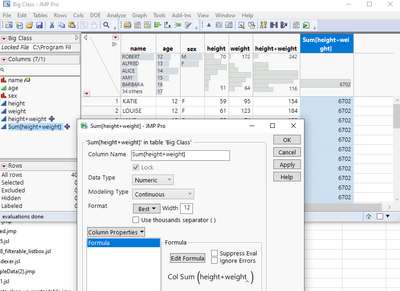
How would you input new data in your case? Which columns should be calculated and based on which column(s)?

- Mark as New
- Bookmark
- Subscribe
- Mute
- Subscribe to RSS Feed
- Get Direct Link
- Report Inappropriate Content
Re: Column formula dependency cycle error
With the original qty and the fails values you can fill in all values. (*)
So you could set up a script which is triggered every time a value is keyed in.
You have to click once on **)
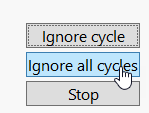
... then everything will be fine:
If rows are added or an input value (*) is changed, the table gets updated - all the other changes will be ignored.
New Table( "test",
	Add Rows( 7 ),
	New Column( "original", Set Values( [100, ., ., ., ., ., .] ) ),
	New Column( "failed", Set Values( [1, 2, 3, 5, 32, 2, 6] ) ),
	New Column( "Survive" )
);

:survive << set	Formula(
	If( Row() != 1,
		:original = Lag( :Survive )
	);
	:original - :failed;
);

Wait( 0 );

:survive << set	Formula(
	If( Row() != 1,
		:original = Lag( :Survive )
	);
	:original - :failed;
);
edit:
hm, I don't know the difference to last time, but now the auto-update doesn't work at first place
--> so just trigger it twice ;)
[I hope that tomorrow I won't need 3 trials ...]
edit:
unnecessary For each row removed.
**)
- any idea how to get rid of this message? ->
- any idea why the last :survive entry is missing [at least this is better today: not missing anymore :]
- any idea why today I need the formula command 2x ???
- Mark as New
- Bookmark
- Subscribe
- Mute
- Subscribe to RSS Feed
- Get Direct Link
- Report Inappropriate Content
Re: Column formula dependency cycle error
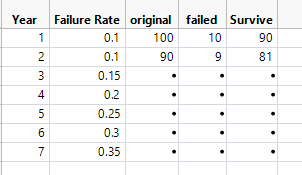
Thanks for your suggestion. This is how I would set it up, but it only iterates for 2 rows and would take to long for just that row.
New Table( "test",
	Add Rows( 7 ),
	New Column ("Year", Set Values ([1,2,3,4,5,6,7])),
	New Column ("Failure Rate", Set Values ([0.1,0.1,0.15,0.2,0.25,0.3,0.35])),
	New Column( "original", Set Values( [100, ., ., ., ., ., .] ) ),
	New Column( "failed", formula (:Failure Rate *:original) ),
	New Column( "Survive", formula (:original - :failed ))
);

Wait( 2 );

For Each Row(
			If( Row() != 1,
				:original = Lag( :Survive )
			)
);
- Mark as New
- Bookmark
- Subscribe
- Mute
- Subscribe to RSS Feed
- Get Direct Link
- Report Inappropriate Content
Re: Column formula dependency cycle error
Calculate new Original column and use that for your calculations
Names Default To Here(1);

dt = New Table("test",
	Add Rows(7),
	New Column("Year", Set Values([1, 2, 3, 4, 5, 6, 7])),
	New Column("Failure Rate", Set Values([0.1, 0.1, 0.15, 0.2, 0.25, 0.3, 0.35])),
	New Column("original", Set Values([100, ., ., ., ., ., .])),
	New Column("failed", formula(:Failure Rate * :original)),
	New Column("Survive", formula(:original - :failed))
);

dt << New Column("OriginalF", Numeric, Continuous, Formula(
	If(Row() == 1,
		:original
	,
		Lag(:OriginalF) - Lag(:OriginalF) * Lag(:Failure Rate)
	);
));

dt << New Column("FailedF", Numeric, Continuous, Formula(
	:OriginalF * :Failure Rate;
));

dt << New Column("SurviveF", Numeric, Continuous, Formula(
	:OriginalF - :FailedF
));
- Mark as New
- Bookmark
- Subscribe
- Mute
- Subscribe to RSS Feed
- Get Direct Link
- Report Inappropriate Content
Re: Column formula dependency cycle error
Thank you @jthi. That's a very clever way to break the reference cycle.
- Mark as New
- Bookmark
- Subscribe
- Mute
- Subscribe to RSS Feed
- Get Direct Link
- Report Inappropriate Content
Re: Column formula dependency cycle error
funny, like an old car :)
good that it starts after the 2nd try.
same on your side?
New Table( "test",
	Add Rows( 7 ),
	New Column( "Year", Set Values( [1, 2, 3, 4, 5, 6, 7] ) ),
	New Column( "Failure Rate",
		Set Values( [0.1, 0.1, 0.15, 0.2, 0.25, 0.3, 0.35] )
	),
	New Column( "original", Set Values( [100, ., ., ., ., ., .] ) ),
	New Column( "failed" ),
	New Column( "survive" )
);

start = Function( {},
	:survive << set formula(
			If( Row() != 1,
				:original = Lag( :Survive )
			);
			:failed = :Failure Rate * :original;
		:original - :failed;
	)
);

start();


start();
- Mark as New
- Bookmark
- Subscribe
- Mute
- Subscribe to RSS Feed
- Get Direct Link
- Report Inappropriate Content
Re: Column formula dependency cycle error
@jthi wrote:Calculate new Original column and use that for your calculations
and then: switch back to the old column names.
So, the trick is: don't use the "fails" to calculate the original values :)
Names Default To Here(1);

New Table( "test",
	Add Rows( 7 ),
	New Table Variable( "original", 100 ),
	New Column( "Year", Numeric, "Continuous", Format( "Best", 10 ), Set Values( [1, 2, 3, 4, 5, 6, 7] ) ),
	New Column( "Failure Rate",
		Numeric,
		"Continuous",
		Format( "Best", 10 ),
		Set Values( [0.1, 0.1, 0.15, 0.2, 0.25, 0.3, 0.35] )
	)
);


New Column("Original", Numeric, Continuous, Formula(
	If(Row() == 1,
		:original
	,
		Lag(:Original) - Lag(:Original) * Lag(:Failure Rate)
	);
));

New Column("Failed", Numeric, Continuous, Formula(
	:Original * :Failure Rate;
));

New Column("Survive", Numeric, Continuous, Formula(
	:Original - :Failed
));
Recommended Articles
- © 2026 JMP Statistical Discovery LLC. All Rights Reserved.
- Terms of Use
- Privacy Statement
- Contact Us