- Don’t miss your chance to experience Discovery Summit Europe at our best available rate! Early bird registration through 31 Oct.
- Graph Builder Toolbar streamlines interactive graphing. Creates shortcuts on Report and GraphBuilder Helpers toolbars. Download and install the extension.
- Subscribe to RSS Feed
- Mark Topic as New
- Mark Topic as Read
- Float this Topic for Current User
- Bookmark
- Subscribe
- Mute
- Printer Friendly Page
Discussions
Solve problems, and share tips and tricks with other JMP users.- User Community
- :
- Discussions
- :
- Re: Coloring only some data in the graph builder

- Mark as New
- Bookmark
- Subscribe
- Mute
- Subscribe to RSS Feed
- Get Direct Link
- Report Inappropriate Content
Coloring only some data in the graph builder
I am trying to color only part of the data in a plot by a certain color. To be more specific, I start with such a graph builder:
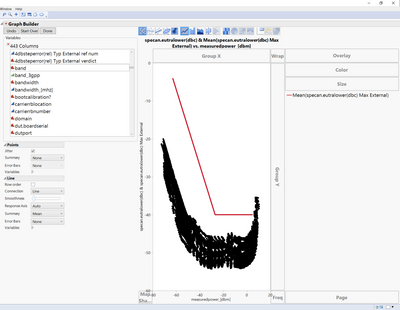
Now I would like to color the black data for example by the column "band". So I drag the band column over 'Color'. However, then also the red line gets colored as in:
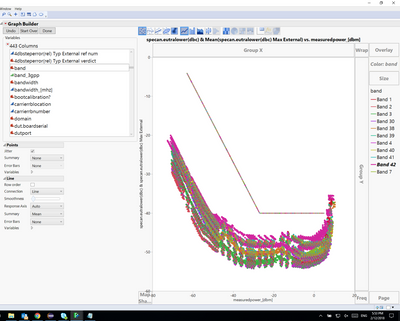
Is there any way of coloring only the black points without affecting the red line? And if so how would I do that?
Accepted Solutions


- Mark as New
- Bookmark
- Subscribe
- Mute
- Subscribe to RSS Feed
- Get Direct Link
- Report Inappropriate Content
Re: Coloring only some data in the graph builder
You might also try Rows > Color or Mark by Column... from your data table and select your color column. This should make the points colored by that column, and leave your line red. It does this by adding Color Row States to your rows.

- Mark as New
- Bookmark
- Subscribe
- Mute
- Subscribe to RSS Feed
- Get Direct Link
- Report Inappropriate Content
Re: Coloring only some data in the graph builder
Another solution is to open up the Variables section under line and uncheck the variable assigned to Color.

- Mark as New
- Bookmark
- Subscribe
- Mute
- Subscribe to RSS Feed
- Get Direct Link
- Report Inappropriate Content
Re: Coloring only some data in the graph builder
If you hover your cursor over the legend entry for any one curve, and right click, you should be able to select from a color pallette then for that chosen curve.
- Mark as New
- Bookmark
- Subscribe
- Mute
- Subscribe to RSS Feed
- Get Direct Link
- Report Inappropriate Content
Re: Coloring only some data in the graph builder
You might also try Rows > Color or Mark by Column... from your data table and select your color column. This should make the points colored by that column, and leave your line red. It does this by adding Color Row States to your rows.
- Mark as New
- Bookmark
- Subscribe
- Mute
- Subscribe to RSS Feed
- Get Direct Link
- Report Inappropriate Content
Re: Coloring only some data in the graph builder
Another solution is to open up the Variables section under line and uncheck the variable assigned to Color.
Recommended Articles
- © 2026 JMP Statistical Discovery LLC. All Rights Reserved.
- Terms of Use
- Privacy Statement
- Contact Us