- Don’t miss your chance to experience Discovery Summit Europe at our best available rate! Early bird registration through 31 Oct.
- Graph Builder Toolbar streamlines interactive graphing. Creates shortcuts on Report and GraphBuilder Helpers toolbars. Download and install the extension.
- Subscribe to RSS Feed
- Mark Topic as New
- Mark Topic as Read
- Float this Topic for Current User
- Bookmark
- Subscribe
- Mute
- Printer Friendly Page
Discussions
Solve problems, and share tips and tricks with other JMP users.- User Community
- :
- Discussions
- :
- Re: Changing/reading a specific value from a JMP generated (capability) summary ...

- Mark as New
- Bookmark
- Subscribe
- Mute
- Subscribe to RSS Feed
- Get Direct Link
- Report Inappropriate Content
Changing/reading a specific value from a JMP generated (capability) summary table
Hello!
I'm working on a script for an automated CPV exercise. So far I can already generate a report with control charts, a capability summary together with a conclusion for each parameter/attribute for any X amount of columns from the original JMP table (for-loop for each column).
My question here deals with the capability summary.
In the script, I use the "Process Capability(..)" functionality - from this, afterwards, I use the following line to only export the summary table (from the capability output) to my final report: "nw << append( Report( CAPREP )[Outline Box( 3 )] );" (where nw is my report and CAPREP was the process cability window).
This works fine - I get the following output:

For further optimization, I was hoping to:
- be able to "read" the individual values from the table to a parameter in my script. (reason: I want to write a conditional conclusion depending on the actual values of the ppl/ppu).
-> so I would like to have something like
PPL_VALUE = ....
PPU_VALUE = ...
- alter the value of the overall sigma to its value multiplied by three (so reading it to a parameter in my script, where I can change the value and then write it back to the summary)
-> so I would like to have something like
SIGMA_VALUE = ....
NEW_SIGMA=3*SIGMA_VALUE
... = NEW_SIGMA
I noticed from the "tree structure" following structure (for the table above):
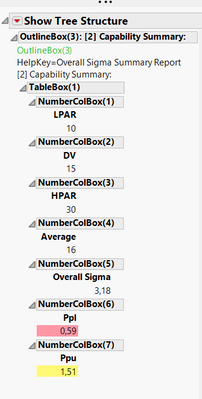
So I'm guessing the line would incorporate something like the following: "Report(CAPREP)[OutlineBox(3),NumberColBox(5)] << ...", however so far without success.
Any thoughts?
Thanks in advance!
Kind regards
Jonas
Accepted Solutions


- Mark as New
- Bookmark
- Subscribe
- Mute
- Subscribe to RSS Feed
- Get Direct Link
- Report Inappropriate Content
Re: Changing/reading a specific value from a JMP generated (capability) summary table
Hi Jonas,
You're very close. In this case, you referencing the NumberColBox is sufficient, you don't need to reference the OutlineBox. Try this:
PPL_VALUE = Report(CAPREP)[NumberColBox(6)][1];
PPU_VALUE = Report(CAPREP)[NumberColBox(7)][1];
- Mark as New
- Bookmark
- Subscribe
- Mute
- Subscribe to RSS Feed
- Get Direct Link
- Report Inappropriate Content
Re: Changing/reading a specific value from a JMP generated (capability) summary table
Hi Jonas,
You're very close. In this case, you referencing the NumberColBox is sufficient, you don't need to reference the OutlineBox. Try this:
PPL_VALUE = Report(CAPREP)[NumberColBox(6)][1];
PPU_VALUE = Report(CAPREP)[NumberColBox(7)][1];
- Mark as New
- Bookmark
- Subscribe
- Mute
- Subscribe to RSS Feed
- Get Direct Link
- Report Inappropriate Content
Re: Changing/reading a specific value from a JMP generated (capability) summary table
Thanks Hadley!
Script works.
Note: I noticed different values were generated with NumberColBox 6 and 7... With some trial & error I came up to this;
SIGMA_VALUE = Report( CAPREP )[Number Col Box( 9 )][1];
PPL_VALUE = Round( Report( CAPREP )[Number Col Box( 12 )][1], 2 );
PPU_VALUE = Round( Report( CAPREP )[Number Col Box( 18 )][1], 2 );Recommended Articles
- © 2026 JMP Statistical Discovery LLC. All Rights Reserved.
- Terms of Use
- Privacy Statement
- Contact Us