- Don’t miss your chance to experience Discovery Summit Europe at our best available rate! Early bird registration through 31 Oct.
- Graph Builder Toolbar streamlines interactive graphing. Creates shortcuts on Report and GraphBuilder Helpers toolbars. Download and install the extension.
- Subscribe to RSS Feed
- Mark Topic as New
- Mark Topic as Read
- Float this Topic for Current User
- Bookmark
- Subscribe
- Mute
- Printer Friendly Page
Discussions
Solve problems, and share tips and tricks with other JMP users.- User Community
- :
- Discussions
- :
- Re: Changing color of shading in histograms (when values are selected in data ta...

- Mark as New
- Bookmark
- Subscribe
- Mute
- Subscribe to RSS Feed
- Get Direct Link
- Report Inappropriate Content
Changing color of shading in histograms (when values are selected in data table)
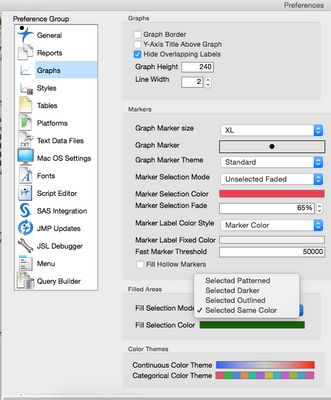
When I create a histogram and then select certain values in my in data table, the values are shaded in the histogram. I want this shading, but, by default, the shading appears as a light gray, with darker gray diagonal lines. I would rather the shading be in one solid color that I could change if necessary. Is it possible to make that change? I can see how I can change the colors of the bars in the histogram, but making that change has no impact on the shading that appears when data values are highlighted, and I can't figure out if I have any control over the way the highlighted data values are shaded. If it's possible to change the defaults, can someone provide directions?
Thank you!
Accepted Solutions


- Mark as New
- Bookmark
- Subscribe
- Mute
- Subscribe to RSS Feed
- Get Direct Link
- Report Inappropriate Content
Re: Changing color of shading in histograms (when values are selected in data table)
- Mark as New
- Bookmark
- Subscribe
- Mute
- Subscribe to RSS Feed
- Get Direct Link
- Report Inappropriate Content
Re: Changing color of shading in histograms (when values are selected in data table)
Have you tried to change the Preferences>Graphs>Filled Areas?
- Mark as New
- Bookmark
- Subscribe
- Mute
- Subscribe to RSS Feed
- Get Direct Link
- Report Inappropriate Content
Re: Changing color of shading in histograms (when values are selected in data table)
Yes, this worked!!!! Thank you so much, Lou.
Recommended Articles
- © 2026 JMP Statistical Discovery LLC. All Rights Reserved.
- Terms of Use
- Privacy Statement
- Contact Us