- Don’t miss your chance to experience Discovery Summit Europe at our best available rate! Early bird registration through 31 Oct.
- Graph Builder Toolbar streamlines interactive graphing. Creates shortcuts on Report and GraphBuilder Helpers toolbars. Download and install the extension.
- Subscribe to RSS Feed
- Mark Topic as New
- Mark Topic as Read
- Float this Topic for Current User
- Bookmark
- Subscribe
- Mute
- Printer Friendly Page
Discussions
Solve problems, and share tips and tricks with other JMP users.- User Community
- :
- Discussions
- :
- Changing bin size for Group X variable for each level in graph builder

- Mark as New
- Bookmark
- Subscribe
- Mute
- Subscribe to RSS Feed
- Get Direct Link
- Report Inappropriate Content
Changing bin size for Group X variable for each level in graph builder
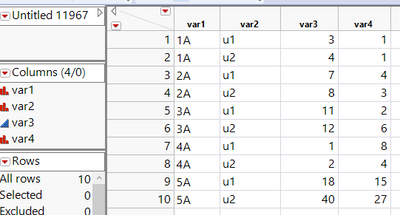
I have created a chart in graph builder using jsl script below.
Data Table("Untitled 11967")<<Graph Builder(
		Automatic Recalc( 0 ),
		Variables( X( :var1 ), Y( :var2 ), Group X(:var3), Group Y(:var4)));
Here var3 is numeric continuous and var4 is numeric nominal. var4 just counts the number of times var3 value is occurring.
How can I change the number of levels for Group X variable in JSL? Also how can I set the binning for each level? Image below shows 3 levels which I set manually by right clicking on var3 and setting No of Level value to 3. But I want 3 levels 0-10, 10-15, 15-40 to group the counts in var4. How can I script it in JSL?
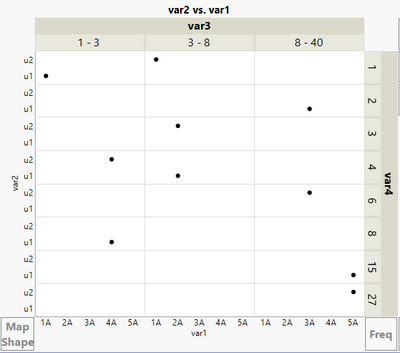
Any guidance will be highly appreciated.
Thanks
Accepted Solutions


- Mark as New
- Bookmark
- Subscribe
- Mute
- Subscribe to RSS Feed
- Get Direct Link
- Report Inappropriate Content
Re: Changing bin size for Group X variable for each level in graph builder
Hi,
A possible work around would be to create a new ordinal character column with the specific bins you need with a formula (see below)
If(
	:Var3 <= 10, "0-10",
	10 < :Var3 <= 15, "11-15",
	15 < :Var3 <= 40, "16-40",
	"N/A"
)
Of note, you cannot have bin boundaries that overlap like suggested (i.e. 0-10 and 10-15)
- Mark as New
- Bookmark
- Subscribe
- Mute
- Subscribe to RSS Feed
- Get Direct Link
- Report Inappropriate Content
Re: Changing bin size for Group X variable for each level in graph builder
Hi,
A possible work around would be to create a new ordinal character column with the specific bins you need with a formula (see below)
If(
	:Var3 <= 10, "0-10",
	10 < :Var3 <= 15, "11-15",
	15 < :Var3 <= 40, "16-40",
	"N/A"
)
Of note, you cannot have bin boundaries that overlap like suggested (i.e. 0-10 and 10-15)
Recommended Articles
- © 2026 JMP Statistical Discovery LLC. All Rights Reserved.
- Terms of Use
- Privacy Statement
- Contact Us