cancel
Showing results for 
Show  only  | Search instead for 
Did you mean: 
  • DownloadSemiconductor Toolkit: Tools to create wafer maps, add wafer geometry to graphics, explore die defects & compare wafers.
  • Discovery Summit 2026: Early User Edition - September 23-24.Register. It's free.
  • See how to design an experiment, explore factor-response relationships, assess tradeoffs, and ID best settings. Register for Sep. 11 Mastering JMP.

Discussions

Solve problems, and share tips and tricks with other JMP users.
Choose Language Hide Translation Bar
Kaik
Level III

Change , per . in Graph Builder

Hello,


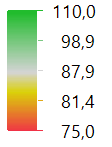
I am quite new to this as the question denotes. Comp can I replace the , by . in the decimals in the Graph Buider legend? I attach the following example:
Kaik_0-1716815716152.pngKaik_0-1716815716152.png

I want to write it like: 87.9 not as 87,9. It exist some option in preferences to change that?


Thank you in advance. 



1 REPLY 1
jthi
Super User

Re: Change , per . in Graph Builder

Those are just how your decimals are displayed in JMP.


If you are on windows you have at least these settings (I'm using JMP 17.2 on Windows 10)

jthi_0-1716815999667.pngjthi_0-1716815999667.png

https://www.jmp.com/support/help/en/17.2/#page/jmp/windows-preferences.shtml#

https://www.jmp.com/support/help/en/17.2/#page/jmp/mac-os-preferences.shtml# OS seems to have similar settings

-Jarmo

Recommended Articles
