cancel
Showing results for 
Show  only  | Search instead for 
Did you mean: 
  • JMP will suspend normal business operations for our Winter Holiday beginning on Wednesday, Dec. 24, 2025, at 5:00 p.m. ET (2:00 p.m. ET for JMP Accounts Receivable).
    Regular business hours will resume at 9:00 a.m. EST on Friday, Jan. 2, 2026.
  • We’re retiring the File Exchange at the end of this year. The JMP Marketplace is now your destination for add-ins and extensions.

Discussions

Solve problems, and share tips and tricks with other JMP users.
%3CLINGO-SUB%20id%3D%22lingo-sub-387451%22%20slang%3D%22en-US%22%20mode%3D%22NONE%22%3E%C3%84ndern%20Sie%20die%20Version%20des%20MySQL%20ODBC-Treibers%3C%2FLINGO-SUB%3E%3CLINGO-BODY%20id%3D%22lingo-body-387451%22%20slang%3D%22en-US%22%20mode%3D%22NONE%22%3E%3CP%3EIch%20versuche%2C%20JMP%20mit%20einer%20MySQL-Datenbank%20zu%20verbinden%2C%20aber%20JMP%20stellt%20mir%20nur%20die%20neueste%20Treiberversion%20zur%20Verf%C3%BCgung%2C%20selbst%20wenn%20ich%20auf%20meinem%20Computer%20die%20alte%20Version%20habe%2C%20die%20als%20einzige%20mit%20der%20Datenbank%20kompatibel%20ist.%3C%2FP%3E%3CP%3EIch%20habe%20die%20richtigen%20Treiber%20installiert%20und%20wie%20Sie%20auf%20dem%20beigef%C3%BCgten%20Bild%20in%20den%20Admin-Tools%20sehen%20k%C3%B6nnen%2C%20habe%20ich%20die%20kompatible%20Version%205.1%20und%20kann%20die%20Datenbank%20mit%20dem%20System%20verbinden.%3C%2FP%3E%3CP%3EWenn%20ich%20jedoch%20JMP%20verwende%2C%20habe%20ich%20nur%20Version%208.0%2C%20die%20nicht%20mit%20der%20Datenbank%20kompatibel%20ist.%3C%2FP%3E%3CP%3E%3CSPAN%20class%3D%22lia-inline-image-display-wrapper%20lia-image-align-inline%22%20image-alt%3D%22Picture1.png%22%20style%3D%22width%3A%20999px%3B%22%3E%3CSPAN%20class%3D%22lia-inline-image-display-wrapper%22%20image-alt%3D%22Picture1.png%22%20style%3D%22width%3A%20999px%3B%22%3E%3Cspan%20class%3D%22lia-inline-image-display-wrapper%22%20image-alt%3D%22Picture1.png%22%20style%3D%22width%3A%20999px%3B%22%3E%3Cimg%20src%3D%22https%3A%2F%2Fcommunity.jmp.com%2Ft5%2Fimage%2Fserverpage%2Fimage-id%2F33013i7113CC91F7B83210%2Fimage-size%2Flarge%3Fv%3Dv2%26amp%3Bpx%3D999%22%20role%3D%22button%22%20title%3D%22Picture1.png%22%20alt%3D%22Picture1.png%22%20%2F%3E%3C%2Fspan%3E%3C%2FSPAN%3E%3C%2FSPAN%3E%3C%2FP%3E%3CP%3E%E2%80%83Irgendeine%20Idee%2C%20wie%20ich%20in%20JMP%20eine%20andere%20Laufwerksversion%20verwenden%20kann%3F%3C%2FP%3E%3CP%3E%E2%80%83%3C%2FP%3E%3CP%3E%26nbsp%3B%3C%2FP%3E%3C%2FLINGO-BODY%3E%3CLINGO-LABS%20id%3D%22lingo-labs-387451%22%20slang%3D%22en-US%22%20mode%3D%22NONE%22%3E%3CLINGO-LABEL%3EDatenzugriff%3C%2FLINGO-LABEL%3E%3C%2FLINGO-LABS%3E%3CLINGO-SUB%20id%3D%22lingo-sub-389588%22%20slang%3D%22en-US%22%20mode%3D%22NONE%22%3EBetreff%3A%20MySQL%20ODBC-Treiberversion%20%C3%A4ndern%3C%2FLINGO-SUB%3E%3CLINGO-BODY%20id%3D%22lingo-body-389588%22%20slang%3D%22en-US%22%20mode%3D%22NONE%22%3E%3CP%3EDanke%2C%20ich%20habe%20die%2064-Bit-Version%20derselben%20Treiber%20installiert%20und%20kann%20den%20Treiber%20jetzt%20auch%20auf%20dem%20JMP-Panel%20finden.%3C%2FP%3E%3C%2FLINGO-BODY%3E%3CLINGO-SUB%20id%3D%22lingo-sub-388188%22%20slang%3D%22en-US%22%20mode%3D%22NONE%22%3EBetreff%3A%20MySQL%20ODBC-Treiberversion%20%C3%A4ndern%3C%2FLINGO-SUB%3E%3CLINGO-BODY%20id%3D%22lingo-body-388188%22%20slang%3D%22en-US%22%20mode%3D%22NONE%22%3E%3CP%3E%3CA%20href%3D%22https%3A%2F%2Fcommunity.jmp.com%2Ft5%2Fuser%2Fviewprofilepage%2Fuser-id%2F14366%22%20target%3D%22_blank%22%3E%40jthi%3C%2FA%3E%20ist%20richtig.%20Der%20ODBC-Treiber%20muss%20der%20%E2%80%9EBitness%E2%80%9C%20der%20ihn%20verwendenden%20Anwendung%20entsprechen.%20Da%20JMP%20also%2064-Bit%20ist%2C%20muss%20der%20ODBC-Treiber%20ebenfalls%2064-Bit%20sein.%3C%2FP%3E%0A%3CP%3E%26nbsp%3B%3C%2FP%3E%0A%3CP%3EEs%20sieht%20so%20aus%2C%20als%20k%C3%B6nnten%20Sie%20m%C3%B6glicherweise%20einen%2064-Bit-MySQL-ODBC-Treiber%20herunterladen%3CA%20href%3D%22https%3A%2F%2Fdev.mysql.com%2Fdownloads%2Fconnector%2Fodbc%2F%22%20target%3D%22_blank%22%20rel%3D%22noopener%20nofollow%20noreferrer%22%3E%20Hier%3C%2FA%3E%20.%3C%2FP%3E%3C%2FLINGO-BODY%3E%3CLINGO-SUB%20id%3D%22lingo-sub-388152%22%20slang%3D%22en-US%22%20mode%3D%22NONE%22%3EBetreff%3A%20MySQL%20ODBC-Treiberversion%20%C3%A4ndern%3C%2FLINGO-SUB%3E%3CLINGO-BODY%20id%3D%22lingo-body-388152%22%20slang%3D%22en-US%22%20mode%3D%22NONE%22%3E%3CP%3EIch%20denke%2C%20wenn%20Sie%2064-Bit-JMP%20haben%2C%20wird%20nur%20nach%20Treibern%20gesucht%2C%20die%20Sie%20im%2064-Bit-ODBC-Datenquellenadministrator%20finden%20k%C3%B6nnen.%20Ich%20bin%20mir%20nicht%20sicher%2C%20ob%20es%20M%C3%B6glichkeiten%20gibt%2C%20mit%2064-Bit-JMP%20nach%2032-Bit-Treibern%20zu%20suchen.%3C%2FP%3E%3CP%3E%26nbsp%3B%3C%2FP%3E%3CP%3EIch%20denke%2C%20der%20JMP-Support%20kann%20Ihnen%20dabei%20vielleicht%20weiterhelfen.%20Sie%20k%C3%B6nnen%20sie%20per%20E-Mail%20kontaktieren%20an%3A%3CA%20href%3D%22mailto%3Asupport%40jmp.com%22%20target%3D%22_blank%22%20rel%3D%22nofollow%20noopener%20noreferrer%22%3E%20support%40jmp.com%3C%2FA%3E%3C%2FP%3E%3C%2FLINGO-BODY%3E%3CLINGO-SUB%20id%3D%22lingo-sub-388134%22%20slang%3D%22en-US%22%20mode%3D%22NONE%22%3EBetreff%3A%20MySQL%20ODBC-Treiberversion%20%C3%A4ndern%3C%2FLINGO-SUB%3E%3CLINGO-BODY%20id%3D%22lingo-body-388134%22%20slang%3D%22en-US%22%20mode%3D%22NONE%22%3E%3CP%3EIm%20Admin-Tool%20befinde%20ich%20mich%20im%2032-Panel%20und%20habe%20nur%20die%2032-Version%20der%20MySQL-Treiber%20installiert%3C%2FP%3E%3C%2FLINGO-BODY%3E%3CLINGO-SUB%20id%3D%22lingo-sub-387522%22%20slang%3D%22en-US%22%20mode%3D%22NONE%22%3EBetreff%3A%20MySQL%20ODBC-Treiberversion%20%C3%A4ndern%3C%2FLINGO-SUB%3E%3CLINGO-BODY%20id%3D%22lingo-body-387522%22%20slang%3D%22en-US%22%20mode%3D%22NONE%22%3E%3CP%3EK%C3%B6nnte%20es%20sein%2C%20dass%20Sie%20versehentlich%2032-Bit-%20und%2064-Bit-Treiber%20vergleichen%3F%3C%2FP%3E%3C%2FLINGO-BODY%3E
Choose Language Hide Translation Bar
mperuffo
Level II

Change MySQL ODBC Driver version

I am trying to connect JMP to a MySQL database but JMP give me only the latest version of drivers even if on my machine I have the old version that is the only one compatible with the database.

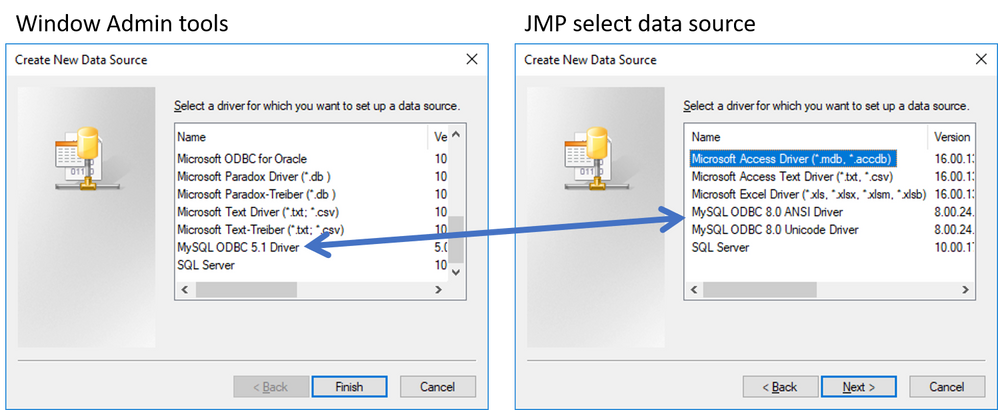
I have installed the correct drivers and as you can see on the attached picture on the Admin tools I have the the 5.1 version that is compatible and I can connect the database to the system.

However when I use JMP I have only the 8.0 that is not compatible with the database.
Picture1.png

 Any idea how I can use a different drive version within JMP?


1 ACCEPTED SOLUTION

Accepted Solutions
jthi
Super User

Re: Change MySQL ODBC Driver version

I think if you have 64bit JMP it will only look for drivers you can find from 64-bit ODBC Data Source Administrator. I'm not sure if there are any ways to look for 32bit drivers with 64bit JMP.


I think JMP support maybe be able to help you out with this one. You can contact them by sending email to: support@jmp.com

-Jarmo

View solution in original post

5 REPLIES 5
jthi
Super User

Re: Change MySQL ODBC Driver version

Could you be comparing 32bit and 64bit drivers by accident?

-Jarmo
mperuffo
Level II

Re: Change MySQL ODBC Driver version

On the admin tool I am on the 32 panel and I have installed only the 32 version of mysql drivers

jthi
Super User

Re: Change MySQL ODBC Driver version

I think if you have 64bit JMP it will only look for drivers you can find from 64-bit ODBC Data Source Administrator. I'm not sure if there are any ways to look for 32bit drivers with 64bit JMP.


I think JMP support maybe be able to help you out with this one. You can contact them by sending email to: support@jmp.com

-Jarmo
Jeff_Perkinson
Community Manager Community Manager

Re: Change MySQL ODBC Driver version

@jthi is correct. The ODBC driver must match the "bitness" of the application using it. So, since JMP is 64-bit, the ODBC driver must also be 64-bit.


It looks like you might be able to download a 64-bit MySQL ODBC driver here.

-Jeff
mperuffo
Level II

Re: Change MySQL ODBC Driver version

Thanks, I installed the 64bit version of the same drivers and now I can find the driver on the JMP panel too. 

Recommended Articles