- JMP will suspend normal business operations for our Winter Holiday beginning on Wednesday, Dec. 24, 2025, at 5:00 p.m. ET (2:00 p.m. ET for JMP Accounts Receivable).
Regular business hours will resume at 9:00 a.m. EST on Friday, Jan. 2, 2026. - We’re retiring the File Exchange at the end of this year. The JMP Marketplace is now your destination for add-ins and extensions.
- Subscribe to RSS Feed
- Mark Topic as New
- Mark Topic as Read
- Float this Topic for Current User
- Bookmark
- Subscribe
- Mute
- Printer Friendly Page
Discussions
Solve problems, and share tips and tricks with other JMP users.- JMP User Community
- :
- Discussions
- :
- Caption Box - Text Wrap Possible?

- Mark as New
- Bookmark
- Subscribe
- Mute
- Subscribe to RSS Feed
- Get Direct Link
- Report Inappropriate Content
Caption Box - Text Wrap Possible?
Is there any way to control (expand) the Caption() box text wrap?
I'm guessing not from the Scripting Guide. It would be a nice feature if ever possible. It's kind of annoying to have a line wrap where you don't want it to wrap, and if set wrap() could ever be employed, then one could choose the line break where they wanted using a normal line break escape.
thanks, DJ


- Mark as New
- Bookmark
- Subscribe
- Mute
- Subscribe to RSS Feed
- Get Direct Link
- Report Inappropriate Content
Re: Caption Box - Text Wrap Possible?
You can use the Carriage Return Line Feed escape sequence to wrap to the next line


Names Default To Here( 1 );
Caption(
	{100, 200},
	"explan\!nation",
	Font( "Arial Black" ),
	Font Size( 16 ),
	Text Color( "blue" ),
	Back Color( "yellow" ),
	Spoken( 1 )
);

- Mark as New
- Bookmark
- Subscribe
- Mute
- Subscribe to RSS Feed
- Get Direct Link
- Report Inappropriate Content
Re: Caption Box - Text Wrap Possible?
Hi DJ! I'm not sure, but is this what you are looking for? It uses one of the escape sequences for quoted strings. (See the section JSL Building Blocks > JSL Syntax Rules in the Scripting Guide.) --Marie
Names Default To Here( 1 );
Caption(
	{100, 200},
	"This is a \!Nvery \!Nvery \!Nlong sentence.",
	Font( "Arial Black" ),
	Font Size( 16 ),
	Spoken(0)
);
- Mark as New
- Bookmark
- Subscribe
- Mute
- Subscribe to RSS Feed
- Get Direct Link
- Report Inappropriate Content
Re: Caption Box - Text Wrap Possible?
I don't think that's what @djhanson is looking for. They want to control where the wrap occurs, rather than force the wrap with embedded CR/LFs.
For example:
caption("The quick brown fox jumped over the lazy dog. Hello world hello world");produces this:
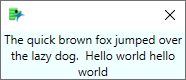
You could use a text box to control the wrap. Not quite the same as caption() though.
nw = new window("Caption",
	tb = textbox("The quick brown fox jumped over the lazy dog.  Hello world hello world")
);
tb << set wrap(500);
wait(4);
nw << close window();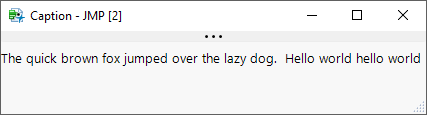
Recommended Articles
- © 2025 JMP Statistical Discovery LLC. All Rights Reserved.
- Terms of Use
- Privacy Statement
- Contact Us