- JMP will suspend normal business operations for our Winter Holiday beginning on Wednesday, Dec. 24, 2025, at 5:00 p.m. ET (2:00 p.m. ET for JMP Accounts Receivable).
Regular business hours will resume at 9:00 a.m. EST on Friday, Jan. 2, 2026. - We’re retiring the File Exchange at the end of this year. The JMP Marketplace is now your destination for add-ins and extensions.
- Subscribe to RSS Feed
- Mark Topic as New
- Mark Topic as Read
- Float this Topic for Current User
- Bookmark
- Subscribe
- Mute
- Printer Friendly Page
Discussions
Solve problems, and share tips and tricks with other JMP users.- JMP User Community
- :
- Discussions
- :
- Capability Analysis Script

- Mark as New
- Bookmark
- Subscribe
- Mute
- Subscribe to RSS Feed
- Get Direct Link
- Report Inappropriate Content
Capability Analysis Script
Hello,
Is it possible to hide some of the capability indices when using Capability Analysis? I'm trying to write a control chart script that will only display Ppk, PPM, and % Actual out of Spec. This is part of a larger script and Control Chart Builder can't be used.
Thanks.

- Mark as New
- Bookmark
- Subscribe
- Mute
- Subscribe to RSS Feed
- Get Direct Link
- Report Inappropriate Content
Re: Capability Analysis Script
Yes it is possible, you did not add Table data, however here script example:
Capability(
    Y( :DATA ),
    Spec Limits( DATA( LSL( -2 ), Target( 0.5 ), USL( 3 ) ) ),
    Capability Indices Report( 1 ),
    Individual Detail Reports( 1 ),
    Capability Box Plots( 0 ),
    Goal Plot( 0 ),
    ,
    SendToReport(
        Dispatch( {"Capability Indices"}, "CPK", NumberColBox, {Select, Visibility( "Hidden" ), Select} )
    )
);
I guess the easiest way to do it, in case you want to hide some specific area of the chart displayed, it is first create the chart as is, then right click in gray triangle, then select Edit, Show properties.
From there you can click in any area of the displayed information that you want to hide, after selecting it then go to Visibility and choose Hidden.
Regards.
- Mark as New
- Bookmark
- Subscribe
- Mute
- Subscribe to RSS Feed
- Get Direct Link
- Report Inappropriate Content
Re: Capability Analysis Script
dt = Current Data Table ();
dt << Control Chart (


- Mark as New
- Bookmark
- Subscribe
- Mute
- Subscribe to RSS Feed
- Get Direct Link
- Report Inappropriate Content
Re: Capability Analysis Script
- Mark as New
- Bookmark
- Subscribe
- Mute
- Subscribe to RSS Feed
- Get Direct Link
- Report Inappropriate Content
Re: Capability Analysis Script
Sorry about that. I hit Quick Reply instead of Reply.
I have a control chart with a two column table with "Capability" and "Index" as headers with 5 capability indices listed below. I'd like to hide some of the indices and tried the below code, but it didn't work as expected. I've omitted some of the code just to make it shorter.
dt = Current Data Table ();

dt << Control Chart (
        Sample Label (:Date),
        KSigma (3),
        Chart Col (
                 :Name ("Test")
                 XBar (Show Control Limits (0)),
                 R ( Show Control Limits (0)),
                 Capability (
                    Distribution (
                          Continuous Distribution(
                              Column ( :Name ("Test")),
                              Fit Distribution (Normal),
                              Capability Analysis (LSL (0), USL (1), Target (0.5)),
                              )
                  )
               )
           ),
SendToReport(
     Dispatch (
         {"Test", "Capability Analysis", "Long Term Sigma"
         },
        "Index"
        NumberColBox << Remove Element (3)
        {Visibility ("Collapse")}
    ),
);- Mark as New
- Bookmark
- Subscribe
- Mute
- Subscribe to RSS Feed
- Get Direct Link
- Report Inappropriate Content
Re: Capability Analysis Script
Here is my modification of your code........you are running JMP 14 apparently. Anyway, my code deletes the 3rd element in the Long Term Sigma table
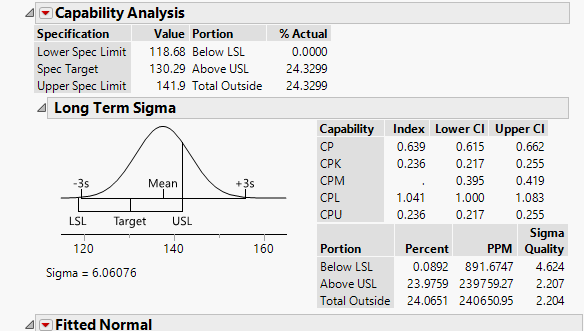
names default to here(1);
clear symbols();
dt = Current Data Table ();
cap = dt << Control Chart (
        Sample Label (:Site),
        KSigma (3),
        Chart Col (
                 :Name ("PNP3"),
                 XBar (Show Control Limits (0)),
                 R ( Show Control Limits (0)),
                 Capability (
                    Distribution (
                          Continuous Distribution(
                              Column ( :Name ("PNP3")),
                              Fit Distribution (Normal),
                              //Capability Analysis (LSL (0), USL (1), Target (0.5)),
                              )
                  )
               )
           ));

capRP = cap << report;

numList = capRP["Long Term Sigma"][NumberColBox(1)] << get;
numList[3] = .;
capRP["Long Term Sigma"][NumberColBox(1)] << set(numList);- Mark as New
- Bookmark
- Subscribe
- Mute
- Subscribe to RSS Feed
- Get Direct Link
- Report Inappropriate Content
Re: Capability Analysis Script
Thank you, @txnelson!
Is it possible to delete the sigma distribution graph?
Is it possible to delete an entire row in the Long Term Sigma, for example rows "CPL" and "CPU"?
Thanks.
- Mark as New
- Bookmark
- Subscribe
- Mute
- Subscribe to RSS Feed
- Get Direct Link
- Report Inappropriate Content
Re: Capability Analysis Script
I was able to hide some of the columns with your code, but not the rows. I'm trying to use NumberColBox << Remove Element (), but it's not working like I expected. Below is the code, any tips are appreciated.
dt = Current Data Table ();
dt << Control Chart (
- Mark as New
- Bookmark
- Subscribe
- Mute
- Subscribe to RSS Feed
- Get Direct Link
- Report Inappropriate Content
Re: Capability Analysis Script
Here is a simple script that deletes row 2 of the Capability Indices table in the report
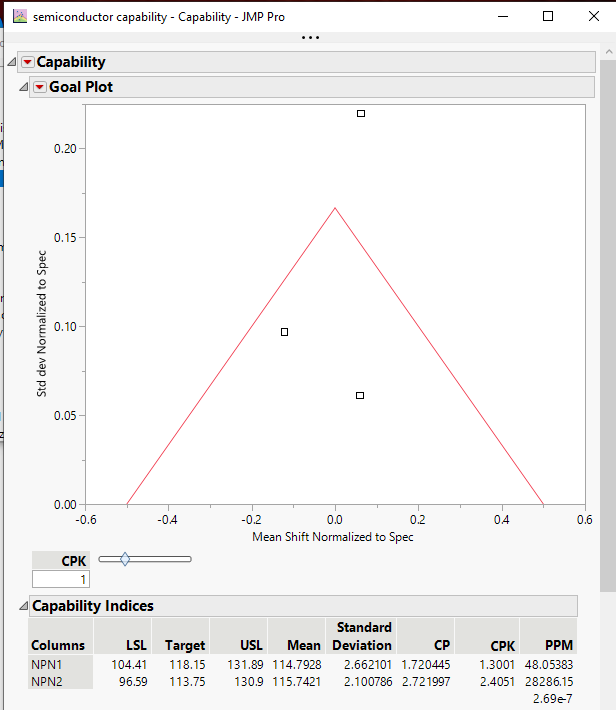
Names Default To Here( 1 );

cap = Capability(
	Y( :NPN1, PNP1, NPN2 ),
	Capability Indices Report( 1 ),
	Individual Detail Reports( 1 ),
	Capability Box Plots( 0 ),
	Goal Plot( 1 )
);
capRP = cap << report;

// Modify the Capability Indicies Table

// Delete 2nd row of the Columns column
columnsList = capRP["Capability Indices"][String Col Box( 1 )] << get;
Remove From( columnsList, 2, 1 );
capRP["Capability Indices"][String Col Box( 1 )] << Set( columnsList );

// Delete 2nd row of all of the Numeric columns in the table
For( i = 1, i < 8, i++,
	numList = capRP["Capability Indices"][Number Col Box( i )] << get;
	Remove From( numList, 2, 1 );
	capRP["Capability Indices"][Number Col Box( i )] << set( numList );
);Recommended Articles
- © 2025 JMP Statistical Discovery LLC. All Rights Reserved.
- Terms of Use
- Privacy Statement
- Contact Us