Turn on suggestions
Auto-suggest helps you quickly narrow down your search results by suggesting possible matches as you type.
- Don’t miss your chance to experience Discovery Summit Europe at our best available rate! Early bird registration through 31 Oct.
- Graph Builder Toolbar streamlines interactive graphing. Creates shortcuts on Report and GraphBuilder Helpers toolbars. Download and install the extension.
Options
- Subscribe to RSS Feed
- Mark Topic as New
- Mark Topic as Read
- Float this Topic for Current User
- Bookmark
- Subscribe
- Mute
- Printer Friendly Page
Discussions
Solve problems, and share tips and tricks with other JMP users.- User Community
- :
- Discussions
- :
- Re: Bivariate Fit - how to delete line fitting frame box

Level I
- Mark as New
- Bookmark
- Subscribe
- Mute
- Subscribe to RSS Feed
- Get Direct Link
- Report Inappropriate Content
Bivariate Fit - how to delete line fitting frame box
Feb 7, 2020 04:58 PM
(2869 views)
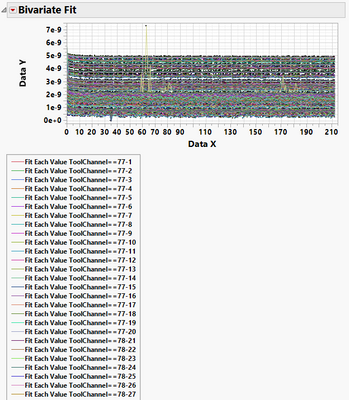
In jsl, how do I delete the box containing all of the "Fit Each Value" line items. I want to keep the plot with the fitted lines, but delete box containing all of the "Fit Each Value" lines which can be >100 items long and makes scrolling through many plots painful.
1 ACCEPTED SOLUTION
Accepted Solutions


Super User
Solution
- Mark as New
- Bookmark
- Subscribe
- Mute
- Subscribe to RSS Feed
- Get Direct Link
- Report Inappropriate Content
Re: Bivariate Fit - how to delete line fitting frame box
You simply have to delete the object from the Display Tree; Below is a simple example.
names default to here(1);
dt=open("$SAMPLE_DATA/big class.jmp");
biv = dt << Bivariate(
	Y( :height ),
	X( :weight ),
	Fit Line( {Line Color( "Medium Dark Red" )} )
);

report(biv)[PictureBox(2)]<<delete;
Jim
1 REPLY 1
Super User
Solution
- Mark as New
- Bookmark
- Subscribe
- Mute
- Subscribe to RSS Feed
- Get Direct Link
- Report Inappropriate Content
Re: Bivariate Fit - how to delete line fitting frame box
You simply have to delete the object from the Display Tree; Below is a simple example.
names default to here(1);
dt=open("$SAMPLE_DATA/big class.jmp");
biv = dt << Bivariate(
	Y( :height ),
	X( :weight ),
	Fit Line( {Line Color( "Medium Dark Red" )} )
);

report(biv)[PictureBox(2)]<<delete;
Jim
Recommended Articles
- © 2026 JMP Statistical Discovery LLC. All Rights Reserved.
- Terms of Use
- Privacy Statement
- Contact Us