- Don’t miss your chance to experience Discovery Summit Europe at our best available rate! Early bird registration through 31 Oct.
- Graph Builder Toolbar streamlines interactive graphing. Creates shortcuts on Report and GraphBuilder Helpers toolbars. Download and install the extension.
- Subscribe to RSS Feed
- Mark Topic as New
- Mark Topic as Read
- Float this Topic for Current User
- Bookmark
- Subscribe
- Mute
- Printer Friendly Page
Discussions
Solve problems, and share tips and tricks with other JMP users.- User Community
- :
- Discussions
- :
- Re: Binning by Spec limits

- Mark as New
- Bookmark
- Subscribe
- Mute
- Subscribe to RSS Feed
- Get Direct Link
- Report Inappropriate Content
Binning by Spec limits
If I have a column with spec limits defined as column properties, is there a "one-click" solution *) to bin the data into 3 groups:
x < LSL
LSL <= x <= USL
x > USL
Accepted Solutions


- Mark as New
- Bookmark
- Subscribe
- Mute
- Subscribe to RSS Feed
- Get Direct Link
- Report Inappropriate Content
Re: Binning by Spec limits
I was able to create a grouping based upon the binning of the Spec Limits
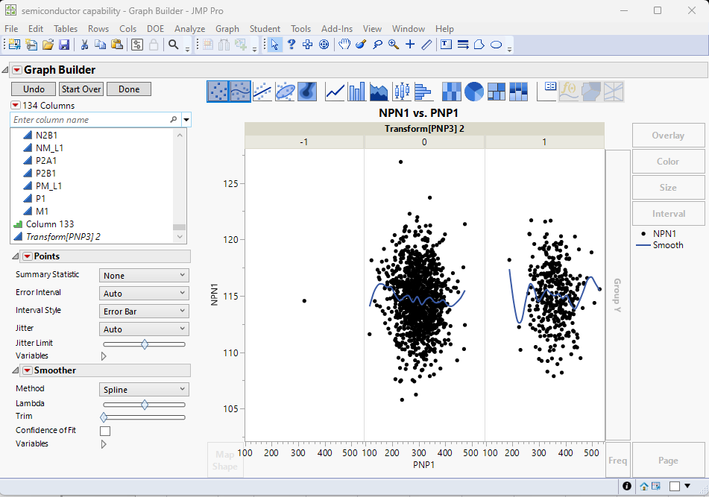
Using the Levels option, and specifying Create Transform Column
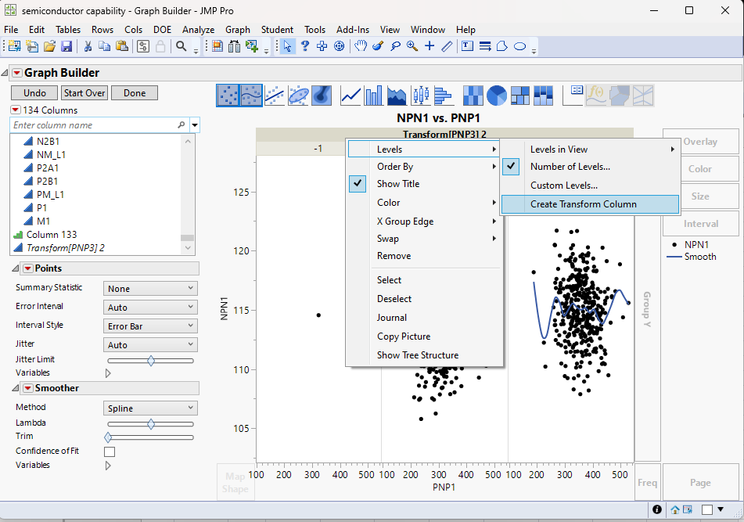
I simply created the following formula to create the binning
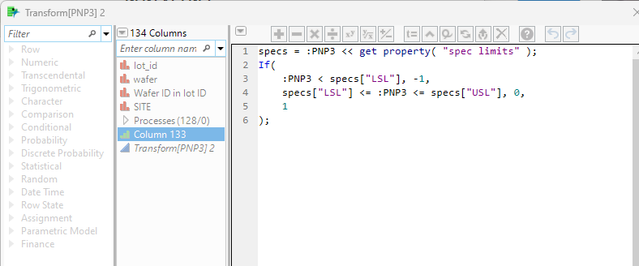
and it worked as desired.
In my example, I used the Semiconductor Capability sample data table, and the PNP3 column. It has outliers, however, it has no outliers that are less than the LSL value, so I manually changed one row to have a low value, just to test the formula.
specs = :PNP3 << get property( "spec limits" );
If(
	:PNP3 < specs["LSL"], -1,
	specs["LSL"] <= :PNP3 <= specs["USL"], 0,
	1
);
- Mark as New
- Bookmark
- Subscribe
- Mute
- Subscribe to RSS Feed
- Get Direct Link
- Report Inappropriate Content
Re: Binning by Spec limits
Here is an example of one way to handle this
Names Default To Here( 1 );

dt = // Open Data Table: semiconductor capability.jmp
// → Data Table( "semiconductor capability" )
Open( "$SAMPLE_DATA/semiconductor capability.jmp" );

dt << New Column( "bin",
	formula(
		As Constant( specs = :PNP3 << get property( "spec limits" ) );
		If( specs["LSL"] <= :PNP3 <= specs["USL"],
			1,
			0
		);
	)
);- Mark as New
- Bookmark
- Subscribe
- Mute
- Subscribe to RSS Feed
- Get Direct Link
- Report Inappropriate Content
Re: Binning by Spec limits
Thanks @txnelson for the JSL example :)
The disadvantage: a new column is added.
If I do this for all column, it gets quite crowded.
I hope a similar functionality is directly implemented in Jmp - but couldn't find it.
neither here:
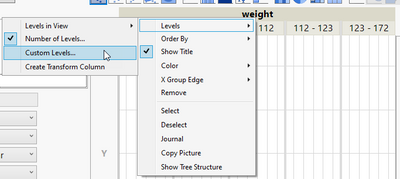
nor here:
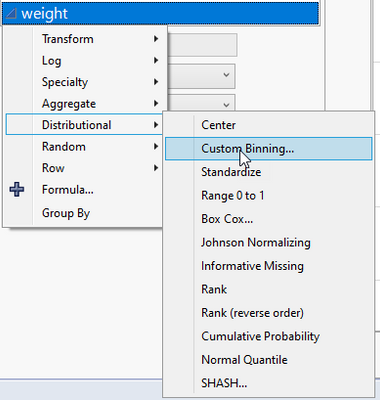
Is it hidden behind a Shift/Alt/Ctrl Click?
- Mark as New
- Bookmark
- Subscribe
- Mute
- Subscribe to RSS Feed
- Get Direct Link
- Report Inappropriate Content
Re: Binning by Spec limits
I was able to create a grouping based upon the binning of the Spec Limits
Using the Levels option, and specifying Create Transform Column
I simply created the following formula to create the binning
and it worked as desired.
In my example, I used the Semiconductor Capability sample data table, and the PNP3 column. It has outliers, however, it has no outliers that are less than the LSL value, so I manually changed one row to have a low value, just to test the formula.
specs = :PNP3 << get property( "spec limits" );
If(
	:PNP3 < specs["LSL"], -1,
	specs["LSL"] <= :PNP3 <= specs["USL"], 0,
	1
);
- Mark as New
- Bookmark
- Subscribe
- Mute
- Subscribe to RSS Feed
- Get Direct Link
- Report Inappropriate Content
Re: Binning by Spec limits
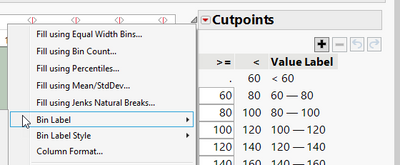
So, there is no single click solution?
I also checked the Custom Binning menu.
Several options are listed, but none to use the spec limits:
Recommended Articles
- © 2026 JMP Statistical Discovery LLC. All Rights Reserved.
- Terms of Use
- Privacy Statement
- Contact Us