- Don’t miss your chance to experience Discovery Summit Europe at our best available rate! Early bird registration through 31 Oct.
- Graph Builder Toolbar streamlines interactive graphing. Creates shortcuts on Report and GraphBuilder Helpers toolbars. Download and install the extension.
- Subscribe to RSS Feed
- Mark Topic as New
- Mark Topic as Read
- Float this Topic for Current User
- Bookmark
- Subscribe
- Mute
- Printer Friendly Page
Discussions
Solve problems, and share tips and tricks with other JMP users.- User Community
- :
- Discussions
- :
- Re: Bar charts with two Y-axis

- Mark as New
- Bookmark
- Subscribe
- Mute
- Subscribe to RSS Feed
- Get Direct Link
- Report Inappropriate Content
Bar charts with two Y-axis
Hello everybody,
I am trying to make a bar chart with two Y-axis. This post
helped me to make a secondary axis, however now the struggle is to make bars for both the sets of values. Hope someone know how to do this, as this is tricky in Exel too.
Thanks!
- Mark as New
- Bookmark
- Subscribe
- Mute
- Subscribe to RSS Feed
- Get Direct Link
- Report Inappropriate Content
Re: Bar charts with two Y-axis
I managed to make two bars, however now the challenge is to put them next to each other, and not at exactly the same place. I can only find where to change the width of the bars..


- Mark as New
- Bookmark
- Subscribe
- Mute
- Subscribe to RSS Feed
- Get Direct Link
- Report Inappropriate Content
Re: Bar charts with two Y-axis
There might be a better, simpler way to do this, but this worked with Big Class.jmp:
After putting age on X, height on left Y and weight on right Y axis,
I created two transform columns h = age - 0.2 and w = a + 0.2 and dragged them down to the X axis.
Under the Variables section of the control panel, I unchecked w on the top Bar section and h on the bottom Bar section "Bar (right)".
I set the Bar Style for both to Bullet.
This is the result:
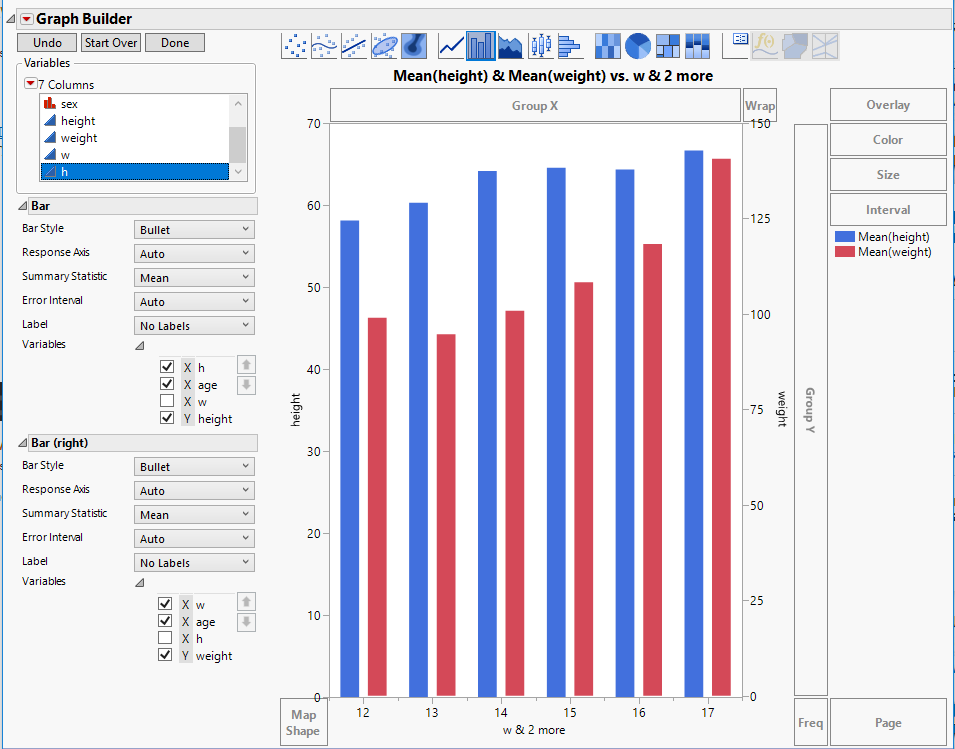
If you don't like the look of the X axis title, you can click on it and change it back to "age".
In case you want to try to automate it, here's the JSL:
Graph Builder(
	Size( 550, 682 ),
	Variables(
		X(
			Transform Column(
				"w",
				Format( "Fixed Dec", 5, 0 ),
				Formula( :age + 0.2 )
			)
		),
		X(
			Transform Column(
				"h",
				Format( "Fixed Dec", 5, 0 ),
				Formula( :age + (-0.2) )
			),
			Position( 1 )
		),
		X( :age, Position( 1 ) ),
		Y( :height, Combine( "Parallel Independent" ) ),
		Y(
			:weight,
			Position( 1 ),
			Combine( "Parallel Independent" ),
			Side( "Right" )
		)
	),
	Elements(
		Bar( X( 2 ), X( 3 ), Y( 1 ), Legend( 6 ), Bar Style( "Bullet" ) ),
		Bar( X( 1 ), X( 3 ), Y( 2 ), Legend( 8 ), Bar Style( "Bullet" ) )
	),
	SendToReport(
		Dispatch( {"Bar"}, "", OutlineBox, {Close( 0 )} ),
		Dispatch( {"Bar (right)"}, "", OutlineBox, {Close( 0 )} ),
		Dispatch(
			{},
			"weight",
			ScaleBox,
			{Min( -0.38265306122449 ), Max( 150 ), Inc( 25 ), Minor Ticks( 0 )}
		)
	)
)
Here it is on JMP Public.
It's not interactive because of:
Combine( "Parallel Independent" )If I take those lines out, it still works and it's interactive on JMP Public, but the bars are thicker and overlap.
Recommended Articles
- © 2026 JMP Statistical Discovery LLC. All Rights Reserved.
- Terms of Use
- Privacy Statement
- Contact Us