- JMP will suspend normal business operations for our Winter Holiday beginning on Wednesday, Dec. 24, 2025, at 5:00 p.m. ET (2:00 p.m. ET for JMP Accounts Receivable).
Regular business hours will resume at 9:00 a.m. EST on Friday, Jan. 2, 2026. - We’re retiring the File Exchange at the end of this year. The JMP Marketplace is now your destination for add-ins and extensions.
- Subscribe to RSS Feed
- Mark Topic as New
- Mark Topic as Read
- Float this Topic for Current User
- Bookmark
- Subscribe
- Mute
- Printer Friendly Page
Discussions
Solve problems, and share tips and tricks with other JMP users.- JMP User Community
- :
- Discussions
- :
- Autorunning the JMP script periodically

- Mark as New
- Bookmark
- Subscribe
- Mute
- Subscribe to RSS Feed
- Get Direct Link
- Report Inappropriate Content
Autorunning the JMP script periodically
Hi,
I'm trying to automate my everyday task. I want the following script to run periodically and save the output.
Can JMP auto select from the drop down list and save the output?
For ex. Selecting a Age then selecting a Name and then saving the output for all the age from 12 - 17
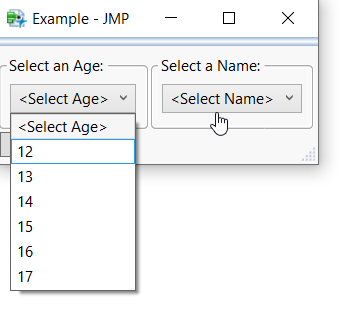
Thanks


- Mark as New
- Bookmark
- Subscribe
- Mute
- Subscribe to RSS Feed
- Get Direct Link
- Report Inappropriate Content
Re: Autorunning the JMP script periodically
Your question(s) are confusing. You ask about automating "the following script", but there is not a script, unless your picture of the display boxes is referring to the script behind the display boxes. On the automation, yes, you can use the Schedule() function to wait for a specific period of time and the run a script.
Concerning the pull down menu selection, it would be my assumption that JSL can query the lists that create the pull downs and from that get the information needed. But it would not be making the clicks, etc. in an automated script.
JSL is a very complete programming language, so you can pretty much make it do whatever you want.
- Mark as New
- Bookmark
- Subscribe
- Mute
- Subscribe to RSS Feed
- Get Direct Link
- Report Inappropriate Content
Re: Autorunning the JMP script periodically
Thanks @txnelson
Can you share a sample code to query the lists that create the pull downs and from that get the information needed
- Mark as New
- Bookmark
- Subscribe
- Mute
- Subscribe to RSS Feed
- Get Direct Link
- Report Inappropriate Content
Re: Autorunning the JMP script periodically
@txnelson any suggestion?
- Mark as New
- Bookmark
- Subscribe
- Mute
- Subscribe to RSS Feed
- Get Direct Link
- Report Inappropriate Content
Re: Autorunning the JMP script periodically
In JMP, the pull down boxes you displayed are called Combo Boxes. Below is an example taken directly from the Scripting Index that illustrates what message to pass to the Combo box for it to return to the script, what items are in the Combo Box
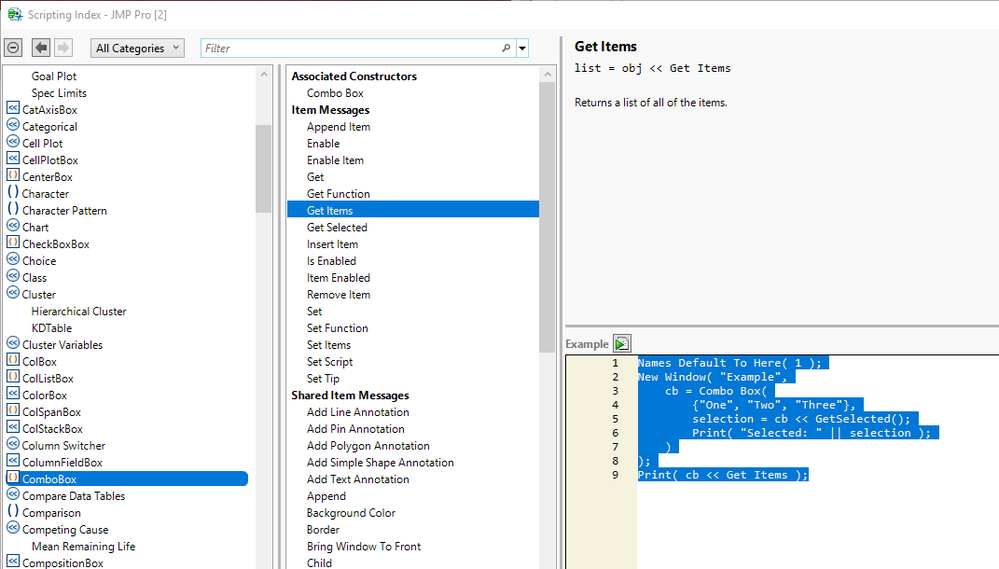
Names Default To Here( 1 );
New Window( "Example",
	cb = Combo Box(
		{"One", "Two", "Three"},
		selection = cb << GetSelected();
		Print( "Selected: " || selection );
	)
);
Print( cb << Get Items );Recommended Articles
- © 2025 JMP Statistical Discovery LLC. All Rights Reserved.
- Terms of Use
- Privacy Statement
- Contact Us