Turn on suggestions
Auto-suggest helps you quickly narrow down your search results by suggesting possible matches as you type.
- Don’t miss your chance to experience Discovery Summit Europe at our best available rate! Early bird registration through 31 Oct.
- Graph Builder Toolbar streamlines interactive graphing. Creates shortcuts on Report and GraphBuilder Helpers toolbars. Download and install the extension.
Options
- Subscribe to RSS Feed
- Mark Topic as New
- Mark Topic as Read
- Float this Topic for Current User
- Bookmark
- Subscribe
- Mute
- Printer Friendly Page
Discussions
Solve problems, and share tips and tricks with other JMP users.- User Community
- :
- Discussions
- :
- Application builder - multiple graph builders using PAGE

Level III
- Mark as New
- Bookmark
- Subscribe
- Mute
- Subscribe to RSS Feed
- Get Direct Link
- Report Inappropriate Content
Application builder - multiple graph builders using PAGE
Created:
Jan 12, 2021 02:54 PM
| Last Modified: Jun 9, 2023 3:03 PM
(2306 views)
Hi,
I've put together multiple time series plots using application builder. I've used PAGE to create a chart for each of my measurements in my data table.
The data table has been built by importing multiple csv files.
The issue I have is that only the first chart in the list is formatted as I've specified in the script (labels and axis formatting).
Any ideas why? Is this a result of using application builder vs just scripting it from scratch?
I've attached a screen grab, my script and a sample of the data.
Thanks in advance!
JMP App(
	Set Name( "Dashboard" ),
	Set Description( "Three reports arranged horizontally" ),
	Auto Launch( 1 ),
	Snap To Grid( 1 ),
	Show Grid( 1 ),
	Show Properties( 0 ),
	Show Sources( 0 ),
	Group By Category( 0 ),
	Dashboard Mode( 0 ),
	Parameters,
	Tables(
		DataTable1 = GuiTable(
			Set Path( "" ),
			Set Label( "Output Table" ),
			Set Location( "Current Data Table" ),
			Set Invisible( 0 )
		)
	),

	Script(JSL Quote(// This script is executed when the application is run.
// Named objects have been created for the application modules
// (for example, "Module1") and the pre-defined object
// "thisApplication" refers to the application object itself.
// Variables and functions declared here are scoped to the
// Application namespace.

)	),
	Allocate(
		Module1 = Plan(
			PreAllocate,
			Script(JSL Quote(				thisModuleInstance << Create Objects;				Try(MainTabPage << Set Scriptable Object(thisApplication));
)			),
			Allocate(
				Border1 = Border Box();
				Scroll1 = Scroll Box();
				List1 = H List Box();
				Report1 = Platform(
					DataTable1,
					Graph Builder(
						Size( 500, 80000 ),
						Show Control Panel( 0 ),
						Legend Position( "Inside Left" ),
						Fit to Window( "Maintain Aspect Ratio" ),
						Variables(
							X( :Date ),
							Y( :LevelObj ),
							Page(
								:Unit,
								Order By(
									:LevelObj,
									Descending,
									Order Statistic( "Mean" )
								)
							)
						),
						Elements(
							Points( X, Y, Legend( 13 ) ),
							Smoother( X, Y, Legend( 14 ) )
						),
						SendToReport(
							Dispatch(
								{},
								"Date",
								ScaleBox( 2 ),
								{Format( "y/m/d", 10 ),
								Interval( "Day" ), Inc( 14 ),
								Minor Ticks( 1 )}
							)
						)
					)
				);
				Report2 = Platform(
					DataTable1,
					Graph Builder(
						Size( 500, 80000 ),
						Show Control Panel( 0 ),
						Legend Position( "Inside Left" ),
						Fit to Window( "Maintain Aspect Ratio" ),
						Variables(
							X( :Date ),
							Y( :Scan ),
							Y( :Model, Position( 1 ) ),
							Page(
								:Unit,
								Order By(
									:LevelObj,
									Descending,
									Order Statistic( "Mean" )
								)
							)
						),
						Elements(
							Points( X, Y( 1 ), Y( 2 ), Legend( 20 ) ),
							Smoother( X, Y( 1 ), Y( 2 ), Legend( 21 ) )
						),
						SendToReport(
							Dispatch(
								{},
								"Date",
								ScaleBox( 2 ),
								{Format( "y/m/d", 10 ),
								Interval( "Day" ), Inc( 14 ),
								Minor Ticks( 1 )}
							)
						)
					)
				);
				Report3 = Platform(
					DataTable1,
					Graph Builder(
						Size( 600, 80000 ),
						Show Control Panel( 0 ),
						Legend Position( "Inside Left" ),
						Fit to Window( "Maintain Aspect Ratio" ),
						Variables(
							X( :Date ),
							Y( :Offset, Side( "Right" ) ),
							Y( :OffPctofScan, Position( 1 ) ),
								Page(
								:Unit,
								Order By(
									:LevelObj,
									Descending,
									Order Statistic( "Mean" )
								)
								)
						),
						Elements(
							Points( X, Y( 2 ), Legend( 32 ) ),
							Smoother( X, Y( 2 ), Legend( 33 ) ),
							Points( X, Y( 1 ), Legend( 34 ) ),
							Smoother( X, Y( 1 ), Legend( 35 ) )
						),
												SendToReport(
							Dispatch(
								{},
								"Date",
								ScaleBox( 2 ),
								{Format( "y/m/d", 10 ),
								Interval( "Day" ), Inc( 14 ),
								Minor Ticks( 1 )}
							)
						)
					)
				);
			),
			Organize(
				Reparent( List1( Report3 ) );
				Reparent( List1( Report2 ) );
				Reparent( List1( Report1 ) );
				Reparent( Scroll1( List1 ) );
				Reparent( Border1( Scroll1 ) );
				Relocate( Border1( 210, 60 ) );
			),
			Initialize(
				Border1 << Background Color( 2147483647 );
				Border1 << Border( {Left( 0 ), Top( 0 ), Right( 0 ), Bottom( 0 )} );
				Border1 << Enabled( 1 );
				Border1 << Horizontal Alignment( "Default" );
				Border1 << Margin( {Left( 0 ), Top( 0 ), Right( 0 ), Bottom( 0 )} );
				Border1 << Padding( {Left( 0 ), Top( 0 ), Right( 0 ), Bottom( 0 )} );
				Border1 << Text Color( 2147483647 );
				Border1 << Vertical Alignment( "Default" );
				Border1 << Visibility( "Visible" );
				Border1 << Top( 1 );
				Border1 << Bottom( 1 );
				Border1 << Left( 1 );
				Border1 << Right( 1 );
				Border1 << Sides( 0 );
				Border1 << Set Background Color( "None" );
				Border1 << Set Background Fill( 0 );
				Scroll1 << Background Color( 2147483647 );
				Scroll1 << Border( {Left( 0 ), Top( 0 ), Right( 0 ), Bottom( 0 )} );
				Scroll1 << Enabled( 1 );
				Scroll1 << Horizontal Alignment( "Default" );
				Scroll1 << Margin( {Left( 0 ), Top( 0 ), Right( 0 ), Bottom( 0 )} );
				Scroll1 << Padding( {Left( 0 ), Top( 0 ), Right( 0 ), Bottom( 0 )} );
				Scroll1 << Text Color( 2147483647 );
				Scroll1 << User Resizable( {1, 1} );
				Scroll1 << Vertical Alignment( "Default" );
				Scroll1 << Visibility( "Visible" );
				Scroll1 << Width( 1206 );
				Scroll1 << Height( 765 );
				Scroll1 << Set Auto Scrollable( 0 );
				Scroll1 << Set Scrollers( 1, 1 );
				Scroll1 << Set Show Empty( 1 );
				Scroll1 << Set Clip Printing( 0 );
				Scroll1 << Set Min Size( 72, 36 );
				Scroll1 << Set Max Size( 30000, 30000 );
				Scroll1 << Set Auto Stretching( 1, 1 );
				List1 << Background Color( 2147483647 );
				List1 << Border( {Left( 0 ), Top( 0 ), Right( 0 ), Bottom( 0 )} );
				List1 << Enabled( 1 );
				List1 << Horizontal Alignment( "Default" );
				List1 << Margin( {Left( 0 ), Top( 0 ), Right( 0 ), Bottom( 0 )} );
				List1 << Padding( {Left( 0 ), Top( 0 ), Right( 0 ), Bottom( 0 )} );
				List1 << Text Color( 2147483647 );
				List1 << Vertical Alignment( "Default" );
				List1 << Visibility( "Visible" );
				List1 << set horizontal( 1 );
				Report1 << Background Color( 2147483647 );
				Report1 << Border( {Left( 0 ), Top( 0 ), Right( 0 ), Bottom( 0 )} );
				Report1 << Enabled( 1 );
				Report1 << Horizontal Alignment( "Default" );
				Report1 << Margin( {Left( 0 ), Top( 0 ), Right( 0 ), Bottom( 0 )} );
				Report1 << Padding( {Left( 0 ), Top( 0 ), Right( 0 ), Bottom( 0 )} );
				Report1 << Text Color( 2147483647 );
				Report1 << Vertical Alignment( "Default" );
				Report1 << Visibility( "Visible" );
				Report1 << set horizontal( 0 );
				Report2 << Background Color( 2147483647 );
				Report2 << Border( {Left( 0 ), Top( 0 ), Right( 0 ), Bottom( 0 )} );
				Report2 << Enabled( 1 );
				Report2 << Horizontal Alignment( "Default" );
				Report2 << Margin( {Left( 0 ), Top( 0 ), Right( 0 ), Bottom( 0 )} );
				Report2 << Padding( {Left( 0 ), Top( 0 ), Right( 0 ), Bottom( 0 )} );
				Report2 << Text Color( 2147483647 );
				Report2 << Vertical Alignment( "Default" );
				Report2 << Visibility( "Visible" );
				Report2 << set horizontal( 0 );
				Report3 << Background Color( 2147483647 );
				Report3 << Border( {Left( 0 ), Top( 0 ), Right( 0 ), Bottom( 0 )} );
				Report3 << Enabled( 1 );
				Report3 << Horizontal Alignment( "Default" );
				Report3 << Margin( {Left( 0 ), Top( 0 ), Right( 0 ), Bottom( 0 )} );
				Report3 << Padding( {Left( 0 ), Top( 0 ), Right( 0 ), Bottom( 0 )} );
				Report3 << Text Color( 2147483647 );
				Report3 << Vertical Alignment( "Default" );
				Report3 << Visibility( "Visible" );
				Report3 << set horizontal( 0 );
			)
		)
	),
	Initialize(
		Module1 << Auto Launch( 1 );
		Module1 << Set Module Type( "Report" );
		Module1 << Set Window Title( "^TABLENAME - ^APPNAME" );
		Module1 << Set Min Size( 0, 0 );
		Module1 << Set Max Size( 30000, 30000 );
		Module1 << Set Auto Stretching( ., . );
	)
) << Run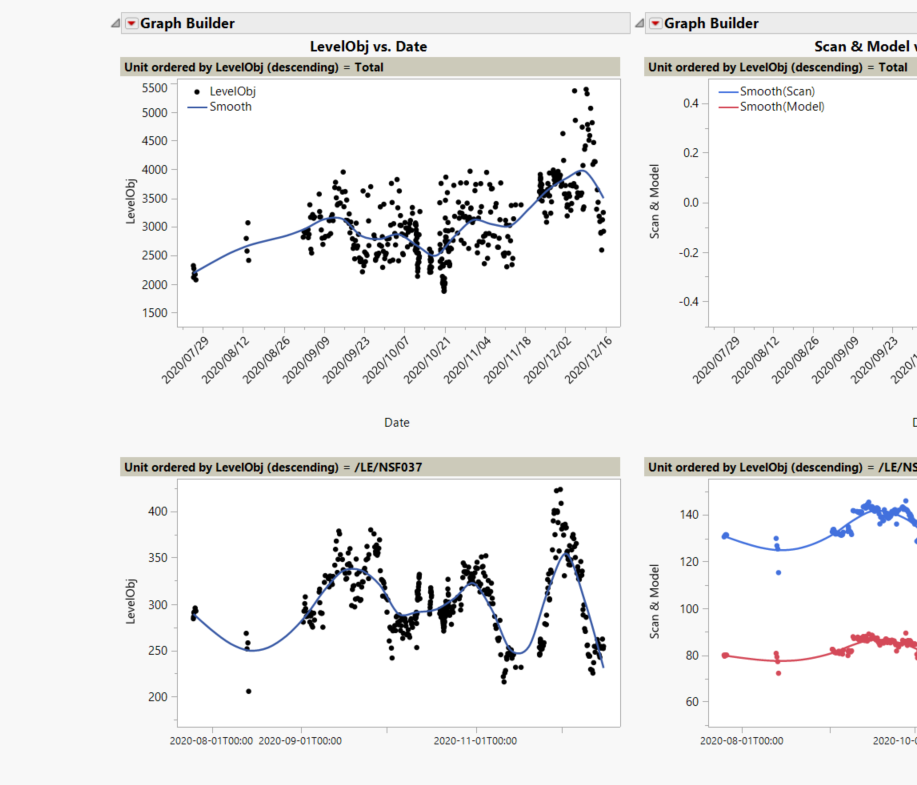
1 REPLY 1
Level III
- Mark as New
- Bookmark
- Subscribe
- Mute
- Subscribe to RSS Feed
- Get Direct Link
- Report Inappropriate Content
Re: Application builder - multiple graph builders using PAGE
Have found solution to the linked Axes. there is a link axes option in Graph builder!
Recommended Articles
- © 2026 JMP Statistical Discovery LLC. All Rights Reserved.
- Terms of Use
- Privacy Statement
- Contact Us