- JMP Statement Regarding Critical PHP Remote Code Execution Vulnerabilities (CVE-2026-109618, CVE-2026-109619)
- Don’t miss your chance to experience Discovery Summit Europe at our best available rate! Early bird registration through 31 Oct.
- Graph Builder Toolbar streamlines interactive graphing. Creates shortcuts on Report and GraphBuilder Helpers toolbars. Download and install the extension.
- Subscribe to RSS Feed
- Mark Topic as New
- Mark Topic as Read
- Float this Topic for Current User
- Bookmark
- Subscribe
- Mute
- Printer Friendly Page
Discussions
Solve problems, and share tips and tricks with other JMP users.- User Community
- :
- Discussions
- :
- Re: Append calendar box

- Mark as New
- Bookmark
- Subscribe
- Mute
- Subscribe to RSS Feed
- Get Direct Link
- Report Inappropriate Content
Append calendar box
Hi,
I am trying to create a UI to select dates. I have added a button box which will append calendar box to the panel box but every time I click, it will keep adding elements to the panel box. I want to hide the calendar box on second click. Is there a way to achieve this?
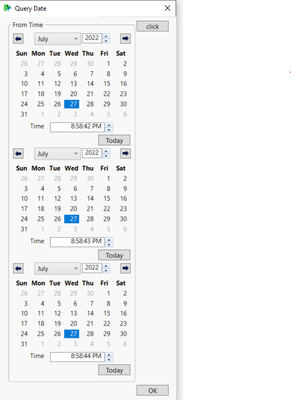
Here's my code:
sd=Today();
ed=Today();
New Window( "Query Date", <<Modal,
 HListBox(
   Panel1= PanelBox( "From Time"),
   	Button Box("click",
   	Panel1 << removeALl;
   	Panel1 << Append(scal1 = Calendar Box(, SetFunction(Function({this}, sd1=scal1<< Get Date) )));
   )

    )

);Accepted Solutions


- Mark as New
- Bookmark
- Subscribe
- Mute
- Subscribe to RSS Feed
- Get Direct Link
- Report Inappropriate Content
Re: Append calendar box
Here is one way to handle it
Names Default To Here( 1 );
sd = Today();
ed = Today();
flag = 0;
New Window( "Query Date",
	<<Modal,
	H List Box(
		Panel1 = Panel Box( "From Time" ),
		Button Box( "click",
			If( flag == 0,
				Panel1 << removeALl;
				Panel1 << Append( scal1 = Calendar Box( , SetFunction( Function( {this}, sd1 = scal1 << Get Date ) ) ) );
				flag = 1;
			,
				scal1 << visibility( "collapse" )
			)

		)
	)
);

- Mark as New
- Bookmark
- Subscribe
- Mute
- Subscribe to RSS Feed
- Get Direct Link
- Report Inappropriate Content
Re: Append calendar box
Just to expand on @txnelson's suggestion, here is another. It only illustrates a technique. It is not a complete script by any means. It also shows that using a date format with the Number Edit Box will automatically provide a calendar option.
Names Default To Here( 1 );

sd = ed = Today();
visible = 0;

New Window( "Query Date",
	<< Modal,
	Panel Box( "From Time",
		Line Up Box( N Col( 3 ),
			Text Box( "Start" ),
			Number Edit Box( sd,
				<< Set Format( Format( "m/d/y", 12 ) )
			),
			cb1 = Calendar Box( << Visibility( Collapse ) ),
			Text Box( "End" ),
			Number Edit Box( ed,
				<< Set Format( Format( "m/d/y", 12 ) )
			),
			cb2 = Calendar Box( << Visibility( Collapse ) )
		)
	),
	bb = Button Box( "Show Calendars",
		If( visible,
			{ cb1, cb2 } << Visibility( Collapse );
			bb << Set Button Name( "Show Calendars" ),
			{ cb1, cb2 } << Visibility( Visible );
			bb << Set Button Name( "Hide Calendars" );
		);
		visible = !visible;
	)
);- Mark as New
- Bookmark
- Subscribe
- Mute
- Subscribe to RSS Feed
- Get Direct Link
- Report Inappropriate Content
Re: Append calendar box
Here is one way to handle it
Names Default To Here( 1 );
sd = Today();
ed = Today();
flag = 0;
New Window( "Query Date",
	<<Modal,
	H List Box(
		Panel1 = Panel Box( "From Time" ),
		Button Box( "click",
			If( flag == 0,
				Panel1 << removeALl;
				Panel1 << Append( scal1 = Calendar Box( , SetFunction( Function( {this}, sd1 = scal1 << Get Date ) ) ) );
				flag = 1;
			,
				scal1 << visibility( "collapse" )
			)

		)
	)
);- Mark as New
- Bookmark
- Subscribe
- Mute
- Subscribe to RSS Feed
- Get Direct Link
- Report Inappropriate Content
Re: Append calendar box
Just to expand on @txnelson's suggestion, here is another. It only illustrates a technique. It is not a complete script by any means. It also shows that using a date format with the Number Edit Box will automatically provide a calendar option.
Names Default To Here( 1 );

sd = ed = Today();
visible = 0;

New Window( "Query Date",
	<< Modal,
	Panel Box( "From Time",
		Line Up Box( N Col( 3 ),
			Text Box( "Start" ),
			Number Edit Box( sd,
				<< Set Format( Format( "m/d/y", 12 ) )
			),
			cb1 = Calendar Box( << Visibility( Collapse ) ),
			Text Box( "End" ),
			Number Edit Box( ed,
				<< Set Format( Format( "m/d/y", 12 ) )
			),
			cb2 = Calendar Box( << Visibility( Collapse ) )
		)
	),
	bb = Button Box( "Show Calendars",
		If( visible,
			{ cb1, cb2 } << Visibility( Collapse );
			bb << Set Button Name( "Show Calendars" ),
			{ cb1, cb2 } << Visibility( Visible );
			bb << Set Button Name( "Hide Calendars" );
		);
		visible = !visible;
	)
);Recommended Articles
- © 2026 JMP Statistical Discovery LLC. All Rights Reserved.
- Terms of Use
- Privacy Statement
- Contact Us