- JMP will suspend normal business operations for our Winter Holiday beginning on Wednesday, Dec. 24, 2025, at 5:00 p.m. ET (2:00 p.m. ET for JMP Accounts Receivable).
Regular business hours will resume at 9:00 a.m. EST on Friday, Jan. 2, 2026. - We’re retiring the File Exchange at the end of this year. The JMP Marketplace is now your destination for add-ins and extensions.
- Subscribe to RSS Feed
- Mark Topic as New
- Mark Topic as Read
- Float this Topic for Current User
- Bookmark
- Subscribe
- Mute
- Printer Friendly Page
Discussions
Solve problems, and share tips and tricks with other JMP users.- JMP User Community
- :
- Discussions
- :
- Add rows every x rows

- Mark as New
- Bookmark
- Subscribe
- Mute
- Subscribe to RSS Feed
- Get Direct Link
- Report Inappropriate Content
Add rows every x rows
Dear community, i've got a huge table and would like to add one row every 4 rows (4 rows data, adding 1 row, moving the rest of the data downwards, then adding 1 row after 4 rows of data aso).
I have no clue how to achieve that with a script. Can anyone kindly help me with this topic?


- Mark as New
- Bookmark
- Subscribe
- Mute
- Subscribe to RSS Feed
- Get Direct Link
- Report Inappropriate Content
Re: Add rows every x rows
See Help > Scripting Index:
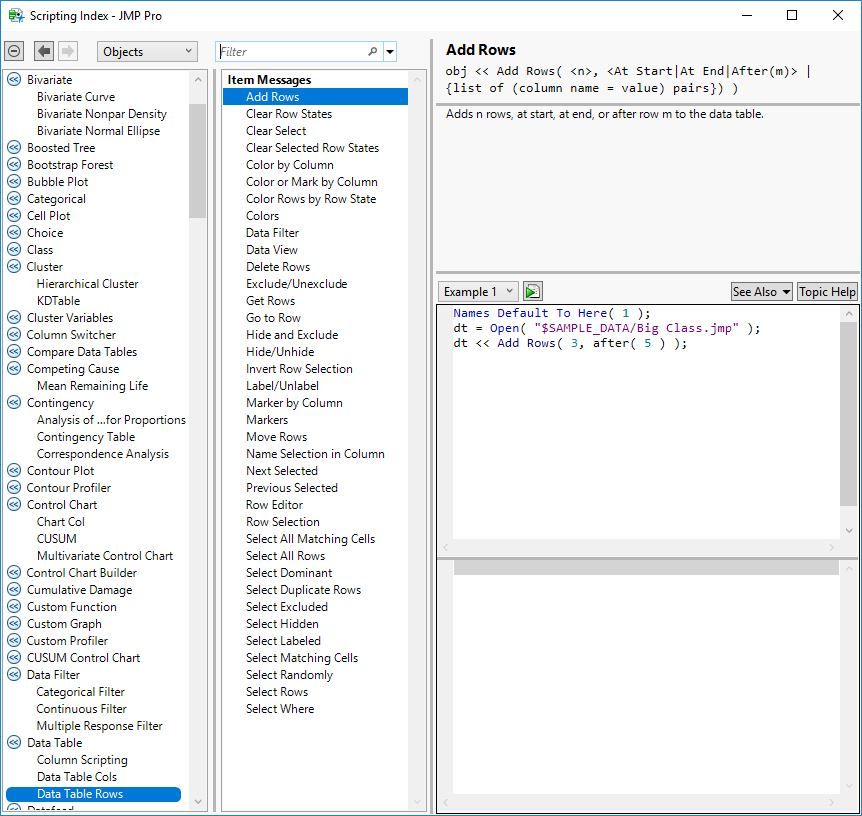
The << Add Rows message to the data table will do what you want. The optional After argument identifies the location, so you can space the insertions every 4 rows.
Use the For() function to iterate over the data table. The iteration will be easiest if you start at the end and insert on the way to the top. The insertions will each length the data table and complicate the counting if you start at the top.


- Mark as New
- Bookmark
- Subscribe
- Mute
- Subscribe to RSS Feed
- Get Direct Link
- Report Inappropriate Content
Re: Add rows every x rows
Just to add to @Mark_Bailey suggestion, here is a real simple example
names default to here(1);
dt=open("$SAMPLE_DATA/big class.jmp");

For(i=N Rows(dt),i>=1,i=i-4,
	dt << add rows(1, after(i))
);
- Mark as New
- Bookmark
- Subscribe
- Mute
- Subscribe to RSS Feed
- Get Direct Link
- Report Inappropriate Content
Re: Add rows every x rows
When I run the code, I get the following error:
Name Unresolved: after in access or evaluation of 'after' , after( i ) /*###*/argument is wrong type in access or evaluation of 'after' , after( i ) /*###*/
In the following script, error marked by /*###*/
Names Default To Here( 1 );
dt = Open( "$SAMPLE_DATA/big class.jmp" );
For( i = N Rows( dt ), i >= 1, i = i - 4,
dt << add rows( 1, after( i ) /*###*/ )
);
Loughlin Consulting
- Mark as New
- Bookmark
- Subscribe
- Mute
- Subscribe to RSS Feed
- Get Direct Link
- Report Inappropriate Content
Re: Add rows every x rows
It works for me:
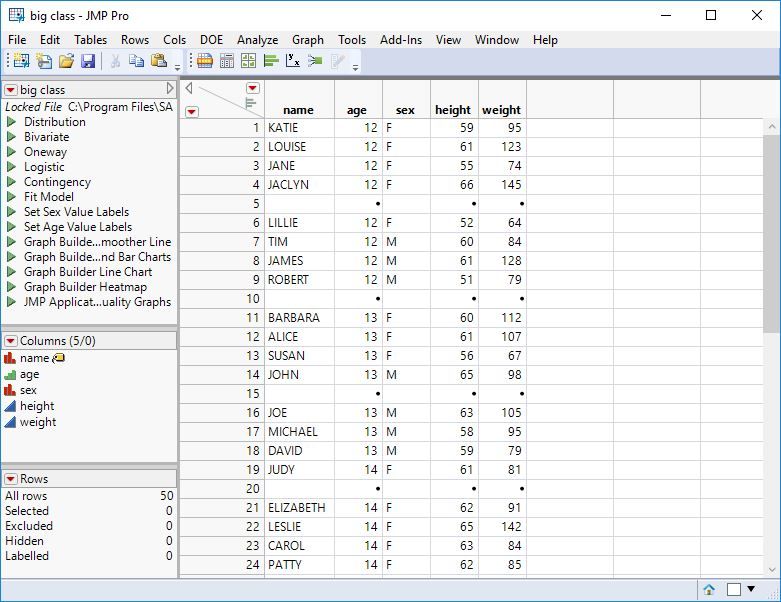
Names Default To Here( 1 );
dt = Open( "$SAMPLE_DATA/big class.jmp" );
For( i = N Rows( dt ), i >= 1, i = i - 4,
	dt << Add Rows( 1, After( i ) )
);- Mark as New
- Bookmark
- Subscribe
- Mute
- Subscribe to RSS Feed
- Get Direct Link
- Report Inappropriate Content
Re: Add rows every x rows
I am running JMP13 but I don't think that is the cause of the issue. Think I will contact tech support.
Loughlin Consulting
- Mark as New
- Bookmark
- Subscribe
- Mute
- Subscribe to RSS Feed
- Get Direct Link
- Report Inappropriate Content
Re: Add rows every x rows
I bet you are using JMP 13 or earlier. The "After" capability was added in JMP 14. Here is alternative way to do what you need
names default to here(1);
dt=open("$SAMPLE_DATA/big class.jmp");

dt4 = New Table("Results");

For(i=1,i<=n rows(dt), i=i+3,
	dt<<select where(Row()>=i & Row()<=i+3);
	dtTemp = dt << subset(selected rows(1), selected cols(0));
	dt4 << concatenate(dtTemp, append to first table);
	dt4 << add rows(1);
	close( dtTemp, nosave );
);
- Mark as New
- Bookmark
- Subscribe
- Mute
- Subscribe to RSS Feed
- Get Direct Link
- Report Inappropriate Content
Re: Add rows every x rows
That did the trick. Thanx.
Loughlin Consulting
Recommended Articles
- © 2025 JMP Statistical Discovery LLC. All Rights Reserved.
- Terms of Use
- Privacy Statement
- Contact Us