cancel
Showing results for 
Show  only  | Search instead for 
Did you mean: 
  • JMP will suspend normal business operations for our Winter Holiday beginning on Wednesday, Dec. 24, 2025, at 5:00 p.m. ET (2:00 p.m. ET for JMP Accounts Receivable).
    Regular business hours will resume at 9:00 a.m. EST on Friday, Jan. 2, 2026.
  • We’re retiring the File Exchange at the end of this year. The JMP Marketplace is now your destination for add-ins and extensions.

Discussions

Solve problems, and share tips and tricks with other JMP users.
%3CLINGO-SUB%20id%3D%22lingo-sub-714219%22%20slang%3D%22en-US%22%20mode%3D%22NONE%22%3EConfiguraci%C3%B3n%20de%20Acrobat%20OCR%20para%20preparar%20archivos%20PDF%20para%20importar%20utilizando%20el%20asistente%20de%20importaci%C3%B3n%20de%20PDF%3C%2FLINGO-SUB%3E%3CLINGO-BODY%20id%3D%22lingo-body-714219%22%20slang%3D%22en-US%22%20mode%3D%22NONE%22%3E%3CP%3ESolo%20comparto%20un%20problema%20que%20tuve%20con%20Adobe%20Acrobat%20y%20el%20Asistente%20de%20importaci%C3%B3n%20de%20PDF%20JMP%20en%20caso%20de%20que%20otros%20encuentren%20el%20mismo%20problema.%3C%2FP%3E%3CP%3EHace%20unos%20meses%20tuve%20un%20flujo%20de%20trabajo%20en%20el%20que%20necesitaba%20realizar%20OCR%20en%20archivos%20PDF%20en%20Acrobat%20(Pro)%20antes%20de%20poder%20usar%20el%20Asistente%20de%20importaci%C3%B3n%20de%20PDF%20para%20extraer%20datos%20de%20los%20archivos%20PDF%20a%20JMP%3B%20esto%20hab%C3%ADa%20estado%20funcionando%20bien%20durante%20mucho%20tiempo.%3C%2FP%3E%3CP%3ECuando%20intent%C3%A9%20esto%20nuevamente%20la%20semana%20pasada%2C%20tuve%20un%20problema%20por%20el%20cual%20muchas%20p%C3%A1ginas%20aparec%C3%ADan%20medio%20cortadas%20(lado%20izquierdo%20o%20derecho)%20en%20la%20vista%20del%20Asistente%20de%20importaci%C3%B3n%2C%20aunque%20parec%C3%ADa%20que%20JMP%20pod%C3%ADa%20ver%20los%20datos%20fuera%20de%20la%20pantalla%2C%20es%20decir%2C%20hab%C3%ADa%20tablas%20superpuestas.%20el%20borde%20en%20el%20medio%20de%20una%20columna%2C%20pero%20no%20hab%C3%ADa%20un%20borde%20de%20mesa%20grueso%20en%20el%20borde%20de%20la%20columna.%3C%2FP%3E%3CP%3EDespu%C3%A9s%20de%20muchas%20pruebas%20y%20errores%2C%20me%20di%20cuenta%20de%20que%20la%20configuraci%C3%B3n%20de%20salida%20(que%20se%20encuentra%20en%20Escanear%20y%20OCR%20-%26gt%3B%20Reconocer%20texto%20-%26gt%3B%20Configuraci%C3%B3n)%20de%20alguna%20manera%20hab%C3%ADa%20cambiado%20a%20%22Imagen%20buscable%20(exacta)%22%2C%20ya%20sea%20sin%20darme%20cuenta%20o%20como%20resultado%20de%20una%20actualizaci%C3%B3n.%3C%2FP%3E%3CP%3ECambiar%20esta%20configuraci%C3%B3n%20nuevamente%20a%20%22Imagen%20con%20capacidad%20de%20b%C3%BAsqueda%22%20corrigi%C3%B3%20este%20problema%3A%20no%20m%C3%A1s%20p%C3%A1ginas%20cortadas.%3C%2FP%3E%3CP%3E%26nbsp%3B%3C%2FP%3E%3CP%3Ejoel%3C%2FP%3E%3CP%3E%26nbsp%3B%3C%2FP%3E%3CP%3E%3CSPAN%20class%3D%22lia-inline-image-display-wrapper%20lia-image-align-inline%22%20image-alt%3D%22jc510_2_0-1704751209626.png%22%20style%3D%22width%3A%20400px%3B%22%3E%3CSPAN%20class%3D%22lia-inline-image-display-wrapper%22%20image-alt%3D%22jc510_2_0-1704751209626.png%22%20style%3D%22width%3A%20400px%3B%22%3E%3CSPAN%20class%3D%22lia-inline-image-display-wrapper%22%20image-alt%3D%22jc510_2_0-1704751209626.png%22%20style%3D%22width%3A%20400px%3B%22%3E%3CSPAN%20class%3D%22lia-inline-image-display-wrapper%22%20image-alt%3D%22jc510_2_0-1704751209626.png%22%20style%3D%22width%3A%20400px%3B%22%3E%3Cspan%20class%3D%22lia-inline-image-display-wrapper%22%20image-alt%3D%22jc510_2_0-1704751209626.png%22%20style%3D%22width%3A%20400px%3B%22%3E%3Cimg%20src%3D%22https%3A%2F%2Fcommunity.jmp.com%2Ft5%2Fimage%2Fserverpage%2Fimage-id%2F60230i4FE6972CE4351013%2Fimage-size%2Fmedium%3Fv%3Dv2%26amp%3Bpx%3D400%22%20role%3D%22button%22%20title%3D%22jc510_2_0-1704751209626.png%22%20alt%3D%22jc510_2_0-1704751209626.png%22%20%2F%3E%3C%2Fspan%3E%3C%2FSPAN%3E%3C%2FSPAN%3E%3C%2FSPAN%3E%3C%2FSPAN%3E%3C%2FP%3E%3CP%3E%26nbsp%3B%3C%2FP%3E%3C%2FLINGO-BODY%3E%3CLINGO-LABS%20id%3D%22lingo-labs-714219%22%20slang%3D%22en-US%22%20mode%3D%22NONE%22%3E%3CLINGO-LABEL%3EAcceso%20a%20los%20datos%3C%2FLINGO-LABEL%3E%3C%2FLINGO-LABS%3E%0A%20%0A%20%0A%20%20%3CLINGO-SUB%20id%3D%22lingo-sub-867520%22%20slang%3D%22en-US%22%20mode%3D%22UPDATE%22%3ERe%3A%20Configuraci%C3%B3n%20de%20OCR%20de%20Acrobat%20para%20preparar%20archivos%20PDF%20para%20importarlos%20mediante%20el%20asistente%20de%20importaci%C3%B3n%20de%20PDF%3C%2FLINGO-SUB%3E%0A%20%20%3CLINGO-BODY%20id%3D%22lingo-body-867520%22%20slang%3D%22en-US%22%20mode%3D%22UPDATE%22%3E%0A%20%20%20%3CP%3EGracias%20por%20compartir.%20Yo%20tambi%C3%A9n%20trabajo%20a%20menudo%20con%20el%20formato%20OCR.%20Por%20cierto%2C%20hace%20poco%20me%20recomendaron%20el%20conversor%20de%20PDF%20con%20OCR%20%3CA%20href%3D%22https%3A%2F%2Fpdfguru.com%2Fpdf-ocr%22%20target%3D%22_blank%22%20rel%3D%22nofollow%20noopener%20noreferrer%22%3Ehttps%3A%2F%2Fpdfguru.com%2Fpdf-ocr%3C%2FA%3E%20y%20lo%20estoy%20probando.%20Puedo%20decir%20que%20es%20muy%20bueno%20por%20su%20facilidad%20de%20uso.%20Y%2C%20sin%20duda%2C%20una%20gran%20ventaja%20es%20que%20funciona%20en%20l%C3%ADnea%2C%20as%C3%AD%20que%20no%20es%20necesario%20instalar%20ning%C3%BAn%20software%20adicional.%3C%2FP%3E%0A%20%20%3C%2FLINGO-BODY%3E
Choose Language Hide Translation Bar
jc510_2
Level III

Acrobat OCR settings for preparing PDFs for import using the PDF import wizard

Just sharing an issue I had with Adobe Acrobat and the JMP PDF Import Wizard in case others come across the same problem.

A few months ago I had a workflow where I needed to perform OCR on PDFs in Acrobat (Pro) before I could use the PDF Import Wizard to pull data from the PDFs into JMP - this had been working fine for a long time.

When I tried this again last week I had an issue where many pages would be half cut off (left or right side) in the Import Wizard view, even though it appeared JMP could see the off-screen data - i.e., there were tables overlapping the edge in the middle of a column, but there was no thick table border at the edge of the column.

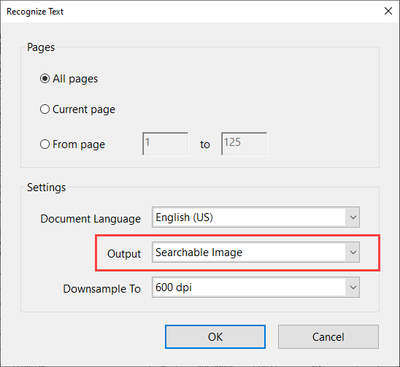
After much trial and error, I realized that the output setting (found in Scan & OCR -> Recognize Text -> Settings) had somehow changed to "Searchable Image (Exact)" either inadvertently by me or as the result of an update.

Changing this setting back to "Searchable Image" corrected this issue - no more cut off pages.


Joel
 

jc510_2_0-1704751209626.png


0 REPLIES 0

Recommended Articles