Just sharing an issue I had with Adobe Acrobat and the JMP PDF Import Wizard in case others come across the same problem.
A few months ago I had a workflow where I needed to perform OCR on PDFs in Acrobat (Pro) before I could use the PDF Import Wizard to pull data from the PDFs into JMP - this had been working fine for a long time.
When I tried this again last week I had an issue where many pages would be half cut off (left or right side) in the Import Wizard view, even though it appeared JMP could see the off-screen data - i.e., there were tables overlapping the edge in the middle of a column, but there was no thick table border at the edge of the column.
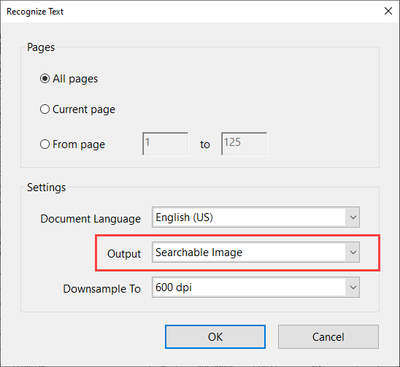
After much trial and error, I realized that the output setting (found in Scan & OCR -> Recognize Text -> Settings) had somehow changed to "Searchable Image (Exact)" either inadvertently by me or as the result of an update.
Changing this setting back to "Searchable Image" corrected this issue - no more cut off pages.
Joel