- JMP will suspend normal business operations for our Winter Holiday beginning on Wednesday, Dec. 24, 2025, at 5:00 p.m. ET (2:00 p.m. ET for JMP Accounts Receivable).
Regular business hours will resume at 9:00 a.m. EST on Friday, Jan. 2, 2026. - We’re retiring the File Exchange at the end of this year. The JMP Marketplace is now your destination for add-ins and extensions.
- Subscribe to RSS Feed
- Mark Topic as New
- Mark Topic as Read
- Float this Topic for Current User
- Bookmark
- Subscribe
- Mute
- Printer Friendly Page
Discussions
Solve problems, and share tips and tricks with other JMP users.- JMP User Community
- :
- Discussions
- :
- About Tables "Transpose" function

- Mark as New
- Bookmark
- Subscribe
- Mute
- Subscribe to RSS Feed
- Get Direct Link
- Report Inappropriate Content
About Tables "Transpose" function
Dear Sirs
I have question about the function for “ Transpose”.
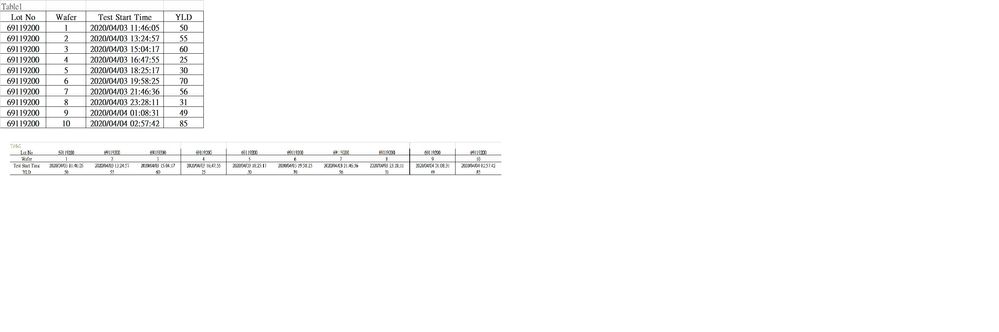
I would like the same action as excel easily..Table1->Table2.
But JMP Transpose not allow different data type transfer at same time…so I need to modify items one by one (Num. Char.)
Once I need modify over hundreds of them, it takes long time.
Question1: How to transpose data without modify data type?
Question2: How to change data type synchronize?
Accepted Solutions


- Mark as New
- Bookmark
- Subscribe
- Mute
- Subscribe to RSS Feed
- Get Direct Link
- Report Inappropriate Content
Re: About Tables "Transpose" function
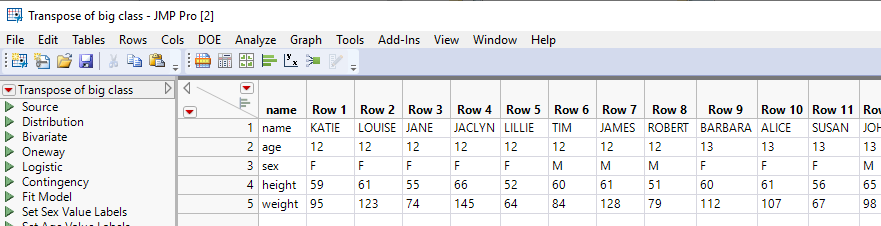
I am assuming your need to transpose the data, is in order to either directly display it in that order, or else to move the data back into excel. So based upon that, it is really a fairly simple task to transpose your data.
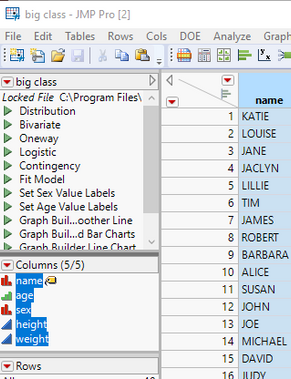
- Go to your data table, and in the Column Panel, select all of the columns you are going to tranpose
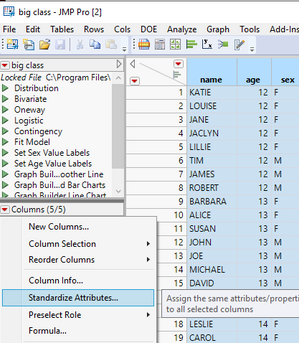
- In the Columns Panel, click on the red triangle, and select "Standardize Attributes"
- In the Standardize Columns Attributes dialog box, click on the Attributes down arrow and select "Data Type". Make sure the Data Type is set to Character, and then click OK All selected columns are now character columns
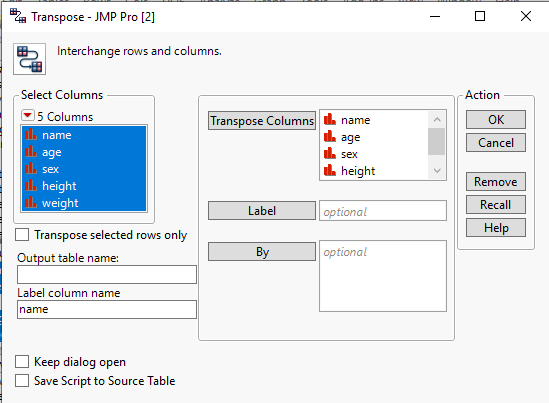
- Go to Tables==>Transpose and place all of the columns to be transposed into the transpose selection box. Make sure to remove any default value from the Label selection box.
- Your data will now be transposed as you wanted it
- Mark as New
- Bookmark
- Subscribe
- Mute
- Subscribe to RSS Feed
- Get Direct Link
- Report Inappropriate Content
Re: About Tables "Transpose" function
I am assuming your need to transpose the data, is in order to either directly display it in that order, or else to move the data back into excel. So based upon that, it is really a fairly simple task to transpose your data.
- Go to your data table, and in the Column Panel, select all of the columns you are going to tranpose
- In the Columns Panel, click on the red triangle, and select "Standardize Attributes"
- In the Standardize Columns Attributes dialog box, click on the Attributes down arrow and select "Data Type". Make sure the Data Type is set to Character, and then click OK All selected columns are now character columns
- Go to Tables==>Transpose and place all of the columns to be transposed into the transpose selection box. Make sure to remove any default value from the Label selection box.
- Your data will now be transposed as you wanted it
- Mark as New
- Bookmark
- Subscribe
- Mute
- Subscribe to RSS Feed
- Get Direct Link
- Report Inappropriate Content
Re: About Tables "Transpose" function
Dear TXNELSON
Many Thanks
You answer me the question by Step3. Change all data type to Character.
In the Standardize Columns Attributes dialog box, click on the Attributes down arrow and select "Data Type". Make sure the Data Type is set to Character, and then click OK All selected columns are now character columns
- Mark as New
- Bookmark
- Subscribe
- Mute
- Subscribe to RSS Feed
- Get Direct Link
- Report Inappropriate Content
Re: About Tables "Transpose" function
Dear TXNELSON
One more question,
Can this action saved as script?
In the Standardize Columns Attributes dialog box, click on the Attributes down arrow and select "Data Type". Make sure the Data Type is set to Character, and then click OK All selected columns are now character columns

- Mark as New
- Bookmark
- Subscribe
- Mute
- Subscribe to RSS Feed
- Get Direct Link
- Report Inappropriate Content
Re: About Tables "Transpose" function
Hi,
You may want to read the discussion by Mark Bailey (LINK) about the differences between JMP and Excel. Indeed, the data structure used by JMP makes your transposition rather incongruous (i.e. your resulting table cannot be used in any analysis provided in JMP).
Hence the question might be about the ultimate goal of your transposition: is it for display purpose, is it used as an input by another program, or is it to conduct a specific operation within JMP?
Let us know what you are trying to achieve and the JMP community might be able to help.
Best,
TS
Recommended Articles
- © 2025 JMP Statistical Discovery LLC. All Rights Reserved.
- Terms of Use
- Privacy Statement
- Contact Us