- Discovery Summit 2026: Early User Edition - September 23-24.Register. It's free.
- Graph Builder Toolbar streamlines interactive graphing. Creates shortcuts on Report and GraphBuilder Helpers toolbars. Download and install the extension.
- Subscribe to RSS Feed
- Mark Topic as New
- Mark Topic as Read
- Float this Topic for Current User
- Bookmark
- Subscribe
- Mute
- Printer Friendly Page
Discussions
Solve problems, and share tips and tricks with other JMP users.- User Community
- :
- Discussions
- :
- Re: 怎样用脚本实现粘贴?

- Mark as New
- Bookmark
- Subscribe
- Mute
- Subscribe to RSS Feed
- Get Direct Link
- Report Inappropriate Content
怎样用脚本实现粘贴?
我按下面的脚本将第一列的带列名复制。
如何用脚本将复制内容到其他表中带列名粘贴?
dt = Open( "$SAMPLE_DATA/Big Class.jmp" );
dt << Clear Select();
dt << Select Columns( 1 );
Current Data Table() << Bring Window To Front;
Main Menu( "Copy With Column Names" );
dt << Select Where( Row() == 1 );
d3 = dt << Subset( Selected Rows( 1 ), selected columns( 0 ) );
Current Data Table( d3 );
d3 << Select Columns( 1 );
Current Data Table() << Bring Window To Front;
Main Menu( "Paste With Column Names" );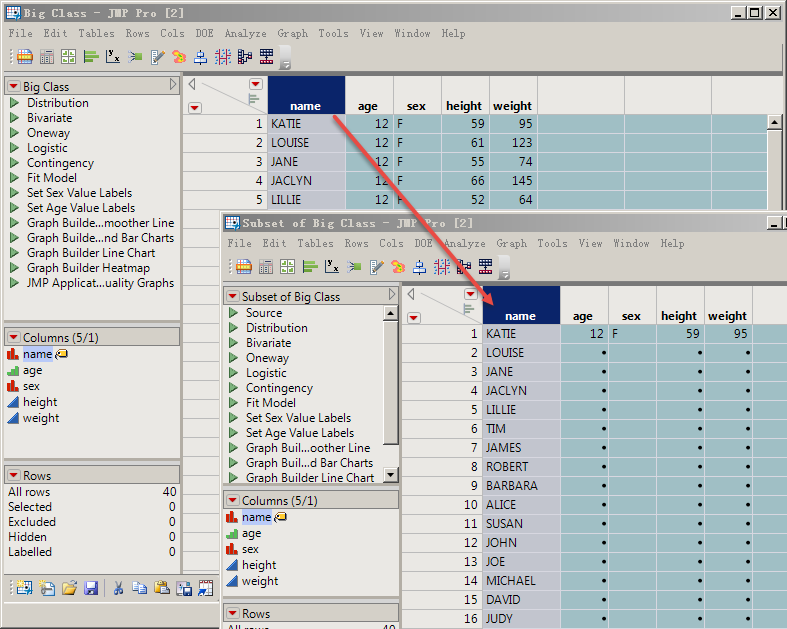
简单的问题、我却不能实现。谢谢!
Accepted Solutions


- Mark as New
- Bookmark
- Subscribe
- Mute
- Subscribe to RSS Feed
- Get Direct Link
- Report Inappropriate Content
Re: 怎样用脚本实现粘贴?
Extracting the script from a column, creates a script that will recreate a new column. If you want to move values from one data table into a column in another table, where the column already exists, you might want to use something like the code below
dt = Open( "$SAMPLE_DATA/Big Class.jmp" );
theValues = column(dt, 1) << get values;

dt << Select Where( Row() == 1 );
d3 = dt << Subset( Selected Rows( 1 ), selected columns( 0 ) );
d3 << add rows(nitems(theValues)-1);
column(d3,1) << set values(theValues);- Mark as New
- Bookmark
- Subscribe
- Mute
- Subscribe to RSS Feed
- Get Direct Link
- Report Inappropriate Content
Re: 怎样用脚本实现粘贴?
Apparently, the
Main Menu( "Paste With Column Names" );is not implemented. However, the following code will perform the same function
names default to here(1);
dt = Open( "$SAMPLE_DATA/Big Class.jmp" );
theScript = column(dt,1) << get script;
d3 = new table("new");
theScript;- Mark as New
- Bookmark
- Subscribe
- Mute
- Subscribe to RSS Feed
- Get Direct Link
- Report Inappropriate Content
Re: 怎样用脚本实现粘贴?
感谢专家!
我试着这样修改代码、但它是创建新列来粘贴。
dt = Open( "$SAMPLE_DATA/Big Class.jmp" );
theScript = column(dt,1) << get script;

dt << Select Where( Row() == 1 );
d3 = dt << Subset( Selected Rows( 1 ), selected columns( 0 ) );
Current Data Table( d3 );
d3 << Select Columns( 1 );

theScript;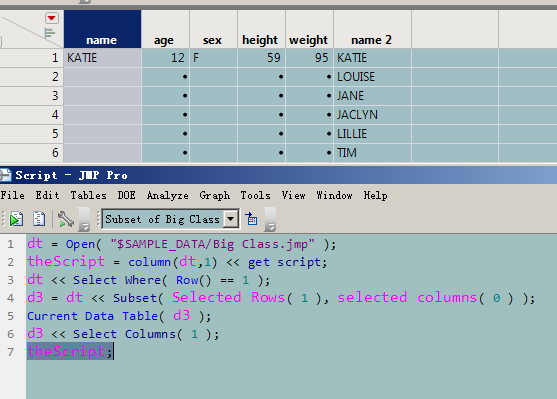
- Mark as New
- Bookmark
- Subscribe
- Mute
- Subscribe to RSS Feed
- Get Direct Link
- Report Inappropriate Content
Re: 怎样用脚本实现粘贴?
最新版的脚本录制虽然有改进、但还是很多操作是不能录制为脚本的。
- Mark as New
- Bookmark
- Subscribe
- Mute
- Subscribe to RSS Feed
- Get Direct Link
- Report Inappropriate Content
Re: 怎样用脚本实现粘贴?
Extracting the script from a column, creates a script that will recreate a new column. If you want to move values from one data table into a column in another table, where the column already exists, you might want to use something like the code below
dt = Open( "$SAMPLE_DATA/Big Class.jmp" );
theValues = column(dt, 1) << get values;

dt << Select Where( Row() == 1 );
d3 = dt << Subset( Selected Rows( 1 ), selected columns( 0 ) );
d3 << add rows(nitems(theValues)-1);
column(d3,1) << set values(theValues);Recommended Articles
- © 2026 JMP Statistical Discovery LLC. All Rights Reserved.
- Terms of Use
- Privacy Statement
- Contact Us