cancel
Showing results for 
Show  only  | Search instead for 
Did you mean: 

Uncharted

%3CLINGO-SUB%20id%3D%22lingo-sub-265419%22%20slang%3D%22en-US%22%20mode%3D%22NONE%22%20mode%3D%22NONE%22%20mode%3D%22NONE%22%3EElenco%20dei%20file%20recenti%20di%20JMP%20(Windows)%3C%2FLINGO-SUB%3E%3CLINGO-BODY%20id%3D%22lingo-body-265419%22%20slang%3D%22en-US%22%20mode%3D%22NONE%22%20mode%3D%22NONE%22%20mode%3D%22NONE%22%3E%3CP%3EQuesto%20esempio%20usa%3CEM%3E%20Eseguire%20il%20programma%3C%2FEM%3E%20per%20leggere%20il%20registro%20di%20Windows%20per%20ottenere%20i%20file%20nell'elenco%20dei%20file%20recenti%20di%20JMP.%3C%2FP%3E%3CPRE%3E%3CCODE%20class%3D%22%20language-jsl%22%3Etemp%3Drunprogram(executable(%22reg%22)%2Coptions(%7B%22query%22%2C%22%5C%5B%22HKCU%5CSoftware%5CSAS%20Institute%20Inc.%5CJMP%5CRecent%5CFiles%22%5D%5C%22%7D)%2Creadfunction(%22text%22))%3B%0Anames%20%3D%20%7B%7D%3B%0A%2F%2F%20typical%20line%3A%20%22%20%20%20%20File7%20%20%20%20REG_SZ%20%20%20%20C%3A%5CUsers%5Cv1%5CDesktop%5CNanami01.jrn%22%0Apatmatch(temp%2Cpatrepeat(patregex(%22%5Cs%2BFile%5Cd%2B%5Cs%2BREG_SZ%5Cs%2B%22)%2Bpatbreak(%22%5C!n%5C!r%22)%26gt%3B%26gt%3Bpath%2Bpattest(insertinto(names%2Cpath)%3B1)))%3B%0Ashow(names%2Cnitems(names))%3C%2FCODE%3E%3C%2FPRE%3E%3CP%3E%3CSTRONG%3Enomi%20%3D%20%7B%22F%3A%5CFileSnapper%5CAdditional.jsl%22%2C%20%22F%3A%5CFileSnapper%5CmakeAddin.jsl%22%2C%20%22F%3A%5Crectangula%5Cvirusmap3.jsl%22%2C%20%22F%3A%5Crectangula%5Cvirusmap2.jsl%22%2C%20%22F%3A%20%5Cturtle%5Cdrawing.jmpprj%22%2C%20%22F%3A%5CAVI%5Cvideo.jmpprj%22%2C%20%22C%3A%5CUsers%5Cv1%5CDesktop%5CNanami01.jrn%22%2C%20%22F%3A%5Cchess%5CchessPlay.jsl%22%2C%20...%3C%2FSTRONG%3E%3C%2FP%3E%3CP%3E%26nbsp%3B%3C%2FP%3E%3CP%3EIL%3CEM%3E%20patmatch%3C%2FEM%3E%20la%20funzione%20salta%20il%20testo%20iniziale%20non%20corrispondente%2C%20quindi%20aggiunge%20i%20file%20a%3CEM%3E%20nomi%3C%2FEM%3E%20finch%C3%A9%20lo%20schema%20si%20ripete.%20Se%20il%20registro%20contenesse%20altri%20valori%20(non%20so%20perch%C3%A9%20lo%20farebbe)%20potresti%20dover%20rendere%20il%20pattern%20pi%C3%B9%20sofisticato%20per%20saltare%20le%20chiavi%20sconosciute%20e%20continuare.%3C%2FP%3E%3CP%3E%26nbsp%3B%3C%2FP%3E%3CP%3EL'esecuzione%20del%20comando%20reg%20query%20in%20una%20finestra%20di%20comando%20%C3%A8%20simile%20a%20questa%3C%2FP%3E%3CP%3E%3CSPAN%20class%3D%22lia-inline-image-display-wrapper%20lia-image-align-inline%22%20image-alt%3D%22Capture1.PNG%22%20style%3D%22width%3A%20760px%3B%22%3E%3CSPAN%20class%3D%22lia-inline-image-display-wrapper%22%20image-alt%3D%22Capture1.PNG%22%20style%3D%22width%3A%20760px%3B%22%3E%3CSPAN%20class%3D%22lia-inline-image-display-wrapper%22%20image-alt%3D%22Capture1.PNG%22%20style%3D%22width%3A%20760px%3B%22%3E%3CSPAN%20class%3D%22lia-inline-image-display-wrapper%22%20image-alt%3D%22Capture1.PNG%22%20style%3D%22width%3A%20760px%3B%22%3E%3Cspan%20class%3D%22lia-inline-image-display-wrapper%22%20image-alt%3D%22Capture1.PNG%22%20style%3D%22width%3A%20760px%3B%22%3E%3Cimg%20src%3D%22https%3A%2F%2Fcommunity.jmp.com%2Ft5%2Fimage%2Fserverpage%2Fimage-id%2F23849i04B8B7764BCD01C0%2Fimage-size%2Flarge%3Fv%3Dv2%26amp%3Bpx%3D999%22%20role%3D%22button%22%20title%3D%22Capture1.PNG%22%20alt%3D%22Capture1.PNG%22%20%2F%3E%3C%2Fspan%3E%3C%2FSPAN%3E%3C%2FSPAN%3E%3C%2FSPAN%3E%3C%2FSPAN%3E%3C%2FP%3E%3CP%3E%3CEM%3Efunzione%20di%20lettura%3C%2FEM%3E%20(%22testo%22)%20restituisce%20lo%20stesso%20testo%20al%20file%3CEM%3E%20temp%3C%2FEM%3E%20variabile.%3C%2FP%3E%3CP%3E%26nbsp%3B%3C%2FP%3E%3C%2FLINGO-BODY%3E%3CLINGO-TEASER%20id%3D%22lingo-teaser-265419%22%20slang%3D%22en-US%22%3E%3CP%3E%3CSPAN%20class%3D%22lia-inline-image-display-wrapper%20lia-image-align-inline%22%20image-alt%3D%22Capture0.png%22%20style%3D%22width%3A%20419px%3B%22%3E%3CSPAN%20class%3D%22lia-inline-image-display-wrapper%22%20image-alt%3D%22Capture0.png%22%20style%3D%22width%3A%20419px%3B%22%3E%3CSPAN%20class%3D%22lia-inline-image-display-wrapper%22%20image-alt%3D%22Capture0.png%22%20style%3D%22width%3A%20419px%3B%22%3E%3CSPAN%20class%3D%22lia-inline-image-display-wrapper%22%20image-alt%3D%22Capture0.png%22%20style%3D%22width%3A%20419px%3B%22%3E%3Cspan%20class%3D%22lia-inline-image-display-wrapper%22%20image-alt%3D%22Capture0.png%22%20style%3D%22width%3A%20419px%3B%22%3E%3Cimg%20src%3D%22https%3A%2F%2Fcommunity.jmp.com%2Ft5%2Fimage%2Fserverpage%2Fimage-id%2F23848i5C89294476FF847D%2Fimage-size%2Flarge%3Fv%3Dv2%26amp%3Bpx%3D999%22%20role%3D%22button%22%20title%3D%22Capture0.png%22%20alt%3D%22Capture0.png%22%20%2F%3E%3C%2Fspan%3E%3C%2FSPAN%3E%3C%2FSPAN%3E%3C%2FSPAN%3E%3C%2FSPAN%3E%3C%2FP%3E%3CP%3EOttieni%20l'elenco%20dei%20file%20recenti%20di%20JMP%20dal%20registro%20di%20Windows%3C%2FP%3E%3C%2FLINGO-TEASER%3E%3CLINGO-SUB%20id%3D%22lingo-sub-265663%22%20slang%3D%22en-US%22%20mode%3D%22NONE%22%20mode%3D%22NONE%22%20mode%3D%22NONE%22%3ERe%3A%20Elenco%20dei%20file%20recenti%20di%20JMP%20(Windows)%3C%2FLINGO-SUB%3E%3CLINGO-BODY%20id%3D%22lingo-body-265663%22%20slang%3D%22en-US%22%20mode%3D%22NONE%22%20mode%3D%22NONE%22%20mode%3D%22NONE%22%3E%3CP%3EGrazie!%20%C3%88%20pi%C3%B9%20semplice%20di%20un%20altro%20approccio%20che%20ho%20provato%20che%20era%20pi%C3%B9%20fragile.%3C%2FP%3E%3CP%3EHo%20anche%20guardato%3CA%20href%3D%22https%3A%2F%2Fcommunity.jmp.com%2Ft5%2FDiscussions%2FWindows-10-Recent-Files-and-Folders-Pointing-to-the-quot-Quick%2Fm-p%2F257446%23U257446%22%20class%3D%22lia-mention-container-editor-message%20lia-img-icon-forum-thread%20lia-fa-icon%20lia-fa-forum%20lia-fa-thread%20lia-fa%22%20target%3D%22_blank%22%3E%20File%20e%20cartelle%20recenti%20di%20Windows%2010%3A%20indica%20l'elenco%20di%20file%20e%20cartelle%20%22Accesso%20rapido%22%20in%20uno%20script%20JSL%3F%3C%2FA%3E%3CA%20href%3D%22https%3A%2F%2Fcommunity.jmp.com%2Ft5%2Fuser%2Fviewprofilepage%2Fuser-id%2F1888%22%20target%3D%22_blank%22%3E%40Phil_Kay%3C%2FA%3E%20che%20mi%20ha%20avvicinato%20a%20informazioni%20simili%2C%20ma%20per%20i%20file%20.LNK%20che%2C%3CEM%3E%20in%20qualche%20modo%3C%2FEM%3E%20%2C%20puntano%20ai%20file%20effettivi.%20Nel%20mio%20caso%20ho%20bisogno%20del%20percorso%20del%20file%20di%20destinazione%20e%20non%20so%20come%20ottenere%20il%20percorso%20da%20un%20.LNK%20usando%20JSL.%3C%2FP%3E%3C%2FLINGO-BODY%3E%3CLINGO-SUB%20id%3D%22lingo-sub-265636%22%20slang%3D%22en-US%22%20mode%3D%22NONE%22%20mode%3D%22NONE%22%20mode%3D%22NONE%22%3ERe%3A%20Elenco%20dei%20file%20recenti%20di%20JMP%20(Windows)%3C%2FLINGO-SUB%3E%3CLINGO-BODY%20id%3D%22lingo-body-265636%22%20slang%3D%22en-US%22%20mode%3D%22NONE%22%20mode%3D%22NONE%22%20mode%3D%22NONE%22%3E%3CP%3EBene%2C%20%C3%A8%20molto%20bello%20e%20compatto.Ho%20potuto%20vedere%20che%20questo%20%C3%A8%20utile%20nella%20creazione%20di%20una%20finestra%20di%20dialogo%20personalizzata%20per%20la%20selezione%20dei%20file.%26nbsp%3B%26nbsp%3B%3C%2FP%3E%3C%2FLINGO-BODY%3E
Choose Language Hide Translation Bar
Craige_Hales
Super User
JMP's Recent File List (Windows)

This example uses Run Program to read the windows registry to get the files in JMP's recent file list.

temp=runprogram(executable("reg"),options({"query","\["HKCU\Software\SAS Institute Inc.\JMP\Recent\Files"]\"}),readfunction("text"));
names = {};
// typical line: "    File7    REG_SZ    C:\Users\v1\Desktop\Nanami01.jrn"
patmatch(temp,patrepeat(patregex("\s+File\d+\s+REG_SZ\s+")+patbreak("\!n\!r")>>path+pattest(insertinto(names,path);1)));
show(names,nitems(names))

names = {"F:\FileSnapper\Additional.jsl", "F:\FileSnapper\makeAddin.jsl", "F:\rectangula\virusmap3.jsl", "F:\rectangula\virusmap2.jsl", "F:\turtle\drawing.jmpprj", "F:\AVI\video.jmpprj", "C:\Users\v1\Desktop\Nanami01.jrn", "F:\chess\chessPlay.jsl", ...


The patmatch function skips over leading, non-matching text, then adds files to names as long as the pattern repeats. If the registry contained some other values (I don't know why it would) you might have to make the pattern more sophisticated to skip unknown keys and continue.


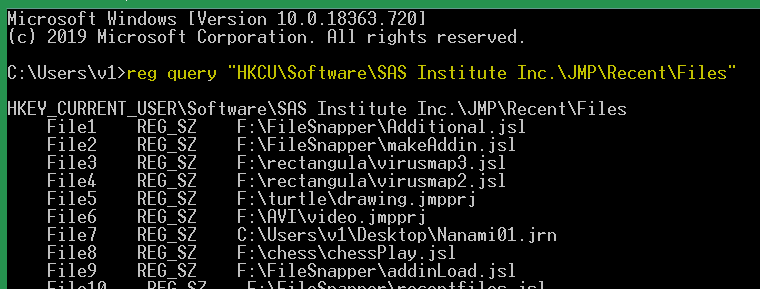
Running the reg query command in a command window looks like this
Capture1.PNG

readfunction("text") returns that same text to the temp variable.


Last Modified: May 9, 2020 9:08 AM
Comments
