Build a network based model to describe the impact that multiple predictor variables have on an outcome and to make predictions of a categorical outcome (classify) or a continuous outcome.
Neural Networks
- From an open JMP® data table, select Analyze > Predictive Modeling > Neural.
- Select a response variable from Select Columns and click Y, Response. Here we chose ‘Price’.
- Select explanatory variable(s) from Select Columns and click X, Factor. Here we chose 6 variables (‘Carat Weight’ – ‘Cut’). Note: JMP Pro allows you to specify a validation column.
- Click OK.
- In the resulting Model Launch window: In JMP Pro (Dialog box shown top right):
- Specify the Holdback Proportion or the number of Folds if a validation column was not specified in the previous dialog box.
- Specify the hidden layer structure by entering the number of TanH, Linear and Gaussian functions to use in each layer.
- If using boosting, specify the number of models and the learning rate.Select the desired fitting options, and click Go.
In JMP (Second from top):
- Select the validation method (Excluded Rows Holdback, Holdback, KFold).
- Specify the Holdback Proportion or the number of Folds.
- Specify the number of Hidden Nodes, and click Go.
JMP and JMP Pro will generate fit statistics for both the training and validation data. For categorical responses, a Confusion matrix and Confusion Rates matrix are also generated. The cutoff values can be changed via the Decision Threshold tool for a binary outcome variable.
Tips:
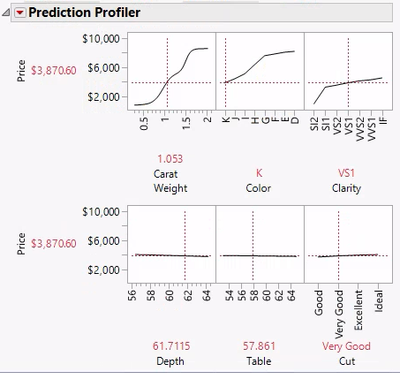
- Use red triangle options (for the model) to view estimates, save formulas, display a plot of the Actual vs Predicted values, and display model profilers (shown here). To view a saved formula: In the column panel of the data table, click the plus sign next to the name of the desired hidden layer.
 Diamonds Data.jmp (Help > Sample Data Folder)


Visit Predictive and Specialized Models > Neural Networks in JMP Help to learn more.