Turn on suggestions
Auto-suggest helps you quickly narrow down your search results by suggesting possible matches as you type.
Options
- Subscribe
- Mark as read
- Mark as new
Learn JMP Events
Events designed to further your knowledge and exploration of JMP.- JMP User Community
- :
- Learn JMP
- :
- Learn JMP Events
- :
- Automating Analyses and Reporting without Writing Code
Automating Analyses and Reporting without Writing Code

JMP Automation is performing a sequence of actions with one click. Automation usually includes data import, data cleaning, and reporting and creates a routine that enables other users to perform the same work. The workflow is also easy to modify to rerun on new data.
The manufacturing case study has 4 technicians who measure a standard part each day to monitor their measurement system. The standard part has a diameter of exactly 50 mm. Each day's measurements are recorded in the bottom row of a csv file.
The goal is to create reports saved as a JMP script (pipelinedata.jsl) and a JMP Add-In (.jmpaddin) called Measurement Report, both of which can be re-run and shared.
See how to:
- Understand requirements
- Source data is consistent so one can operate on the same file each time, or use the same database query
- Do not change important column names and data types should not be changed; however, you can update data by adding rows
- If the automation is used by multiple users, the source data must be accessible by all
- Find log file to make sure there is nothing in it using View>Log
- Perform the desired work using point-and-click
- Import CSV
- Cleanup data - name the table; stack data format dates, create new formula column
- Build Graph Builder and save script to log
- Build Fit Y by X reports and save script to Log
- Extract the script from the Log window (View > Log)
- Remove Launch platform options from Log using red triangle >Action Recording> Platform Launch
- Save the script to a script window from Log red triangle (Save Script>To Script Window)
- Save the script (pipeline.jsl) to desktop
- Exit JMP to start new session and check script by double clicking .jsl file to open and run
- Add new row to update data table
- Save the script to an add-in for distribution to others (File > New > Add-In) who have JMP and have access to the files in the location required by the .jsl file
- Tips
- Start from a fresh JMP session to avoid capturing unwanted steps
- Many JMP platforms, especially those in the Tables menu, create data tables as output. Use the platform options to assign a name for output data tables. JMP's default names (Untitled1, Untitled2, etc.) may be unreliable in future runs.
- Before saving the script from the log, turn off the Platform Launch steps from the red triangle menu.
- If these requirements for simple automation are too restrictive, then it's time to learn some basic jsl coding
- Add comments, notes to yourself to make it easy for you to remember what you did, or for someone else to interpret your work
- To run scripts on a schedule
- Use Windows Scheduler to launch script
- For autorun, start script with //!
- End script with Quit() to exit JMP
Questions from the session answered by Jordan Hiller @Jordan_Hiller and Christian Bille @ChristianBille.
Q: Can I connect to MS SQL database, so I can get live data?
A: Yes, the process would be the same. Connecting to SQL is even better as the sources stays the same. this is done through the query builder. Here is info about connecting: https://www.jmp.com/support/help/en/16.2/#page/jmp/select-tables-from-a-sql-database.shtml
Q: Is there some info/resources on re-organizing the data, if the source data contains multiple formats (such as transpose, making separate one column into two columns)?
A: Yes, here is the start of documentation you can scroll through:
Q: Can you automate acquisition of a data set on the cloud?
A: If the permissions are set correctly and your organization allows that, you can automate access to a shared server of any kind.
Q: Is there a "run on open" option?
Y: Yes, add this to your script: autorun //!
Q: Why can't I just send the script to anybody in the organization? Why the extra step of making in add-in?
A: The add-in step is fully optional, but is a nice way to ensure less human error.
Q: If you navigate to your .jsl file, is the add-in independent of that file, so that if you delete the original .jsl the add-in will still work?
A: Yes, the script is embedded in the add-in.
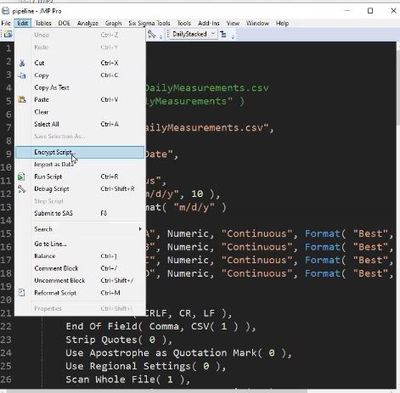
Q: Is it possible to see the backend code for an add-in?
A: The .jsl file is included in the add-in folder. It can also be opened and encrypted.
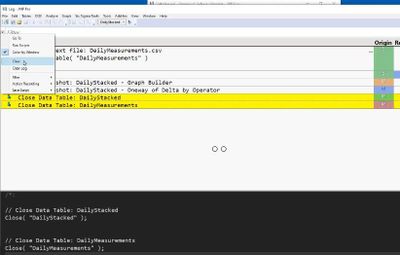
Q: Can I delete something from the log?
A: Yes, highlight it in the Log, go to the Log right triangle, and then click Clear.
Q: Can I edit the Log file?
A: Yes, each section is delineated, and you can copy/cut and paste.
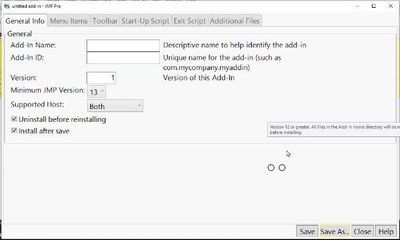
Q: What can I do if I know I need a minimum JMP version for my script?
A: You can set the Minimum JMP version for your add-in and then it will only install on JMP versions that meet that minimum.
Q: What is the impact of the different platform preferences on the output of an analysis?
A: The .jsl file will defer to the preferences of the person launching the script; in most cases different preferences will not break a script that is run, but the appearance of the report may look slightly different than when the script was written.
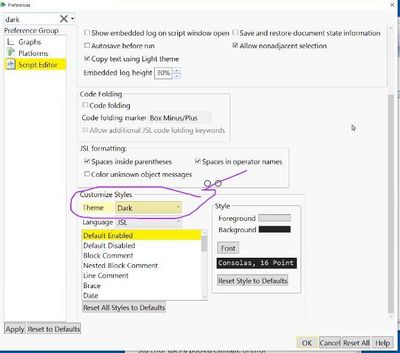
Q: How to you get a black log?
A: Preferences> Script Editor>Customize Styles>Theme>Dark.
Resources
- Steal this Code Discovery Summit presentation and video by Jordan Hiller
- Data Cleaning Script Assistant Add-In
Start:
Tue, Mar 15, 2022 02:00 PM EDT
End:
Tue, Mar 15, 2022 03:00 PM EDT
0 Comments

- © 2026 JMP Statistical Discovery LLC. All Rights Reserved.
- Terms of Use
- Privacy Statement
- Contact Us