cancel
Showing results for 
Show  only  | Search instead for 
Did you mean: 

Laura Higgins' Blog

%3CLINGO-SUB%20id%3D%22lingo-sub-417222%22%20slang%3D%22en-US%22%20mode%3D%22NONE%22%20mode%3D%22NONE%22%20mode%3D%22NONE%22%3EBetreff%3A%20Wie%20kann%20ich...%20Eine%20benutzerdefinierte%20Symbolleistenverkn%C3%BCpfung%20erstellen%3F%20Kann%20ich%20das%20mit%20einer%20Katze%20machen%3F%20Ja!%3C%2FLINGO-SUB%3E%3CLINGO-BODY%20id%3D%22lingo-body-417222%22%20slang%3D%22en-US%22%20mode%3D%22NONE%22%20mode%3D%22NONE%22%20mode%3D%22NONE%22%3E%3CP%3EHaben%20Sie%20versucht%2C%20Speichern%20unter%20zum%20Projektabschnitt%20der%20Symbolleiste%20hinzuzuf%C3%BCgen%3FIch%20kann%20Ihre%20Methode%20nicht%20zum%20Laufen%20bringen%2C%20um%20mein%20Leben%20zu%20retten.Habe%20das%20auf%20meinem%20Mac%20in%2030%20Sekunden%20erledigt.Seufz%20...%20auf%20einem%20PC%20scheint%20alles%20schwieriger%20zu%20sein.%26nbsp%3B%26nbsp%3B%3C%2FP%3E%3C%2FLINGO-BODY%3E%3CLINGO-SUB%20id%3D%22lingo-sub-274071%22%20slang%3D%22en-US%22%20mode%3D%22NONE%22%20mode%3D%22NONE%22%20mode%3D%22NONE%22%3EWie%20mache%20ich...%20Eine%20benutzerdefinierte%20Symbolleistenverkn%C3%BCpfung%20erstellen%3F%20Kann%20ich%20das%20mit%20einer%20Katze%20machen%3F%20Ja!%3C%2FLINGO-SUB%3E%3CLINGO-BODY%20id%3D%22lingo-body-274071%22%20slang%3D%22en-US%22%20mode%3D%22NONE%22%20mode%3D%22NONE%22%20mode%3D%22NONE%22%3E%3CP%3E%3CFONT%20size%3D%224%22%3EW%C3%BCnschen%20Sie%20sich%20eine%20eigene%20Symbolleiste%20mit%20Verkn%C3%BCpfungen%3F%20Oder%20einer%20Symbolleiste%20eine%20benutzerdefinierte%20Verkn%C3%BCpfung%20hinzuf%C3%BCgen%3F%20Ich%20zeige%20dir%2C%20wie%20es%20geht!%3C%2FFONT%3E%3C%2FP%3E%0A%3CP%3E%26nbsp%3B%3C%2FP%3E%0A%3CP%3E%3CFONT%20size%3D%224%22%3EEs%20gibt%20viele%20integrierte%20Symbolleisten%20f%C3%BCr%20die%20kontextbezogenen%20Tools%20von%20JMP.%20Sie%20sind%20wie%20die%20oberste%20Men%C3%BCreihe%20in%20JMP%20organisiert.%3CSPAN%20class%3D%22lia-inline-image-display-wrapper%20lia-image-align-inline%22%20image-alt%3D%22Screen%20Shot%202020-06-18%20at%206.38.25%20PM.png%22%20style%3D%22width%3A%20999px%3B%22%3E%3CSPAN%20class%3D%22lia-inline-image-display-wrapper%22%20image-alt%3D%22Screen%20Shot%202020-06-18%20at%206.38.25%20PM.png%22%20style%3D%22width%3A%20999px%3B%22%3E%3CSPAN%20class%3D%22lia-inline-image-display-wrapper%22%20image-alt%3D%22Screen%20Shot%202020-06-18%20at%206.38.25%20PM.png%22%20style%3D%22width%3A%20999px%3B%22%3E%3CSPAN%20class%3D%22lia-inline-image-display-wrapper%22%20image-alt%3D%22Screen%20Shot%202020-06-18%20at%206.38.25%20PM.png%22%20style%3D%22width%3A%20999px%3B%22%3E%3Cspan%20class%3D%22lia-inline-image-display-wrapper%22%20image-alt%3D%22Screen%20Shot%202020-06-18%20at%206.38.25%20PM.png%22%20style%3D%22width%3A%20999px%3B%22%3E%3Cimg%20src%3D%22https%3A%2F%2Fcommunity.jmp.com%2Ft5%2Fimage%2Fserverpage%2Fimage-id%2F24699i45C32BB8E4518FAE%2Fimage-size%2Flarge%3Fv%3Dv2%26amp%3Bpx%3D999%22%20role%3D%22button%22%20title%3D%22Screen%20Shot%202020-06-18%20at%206.38.25%20PM.png%22%20alt%3D%22Screen%20Shot%202020-06-18%20at%206.38.25%20PM.png%22%20%2F%3E%3C%2Fspan%3E%3C%2FSPAN%3E%3C%2FSPAN%3E%3C%2FSPAN%3E%3C%2FSPAN%3E%3C%2FFONT%3E%3C%2FP%3E%0A%3CP%3E%26nbsp%3B%3C%2FP%3E%0A%3CP%3E%26nbsp%3B%3C%2FP%3E%0A%3CP%3E%3CFONT%20size%3D%224%22%3EW%C3%A4hlen%20wir%20eine%20Symbolleiste%20aus%2C%20die%20ge%C3%A4ndert%20werden%20soll.%20Ich%20m%C3%B6chte%20die%20Kategorie%20%E2%80%9EConsumer%20Research%E2%80%9C%20zur%20Symbolleiste%20hinzuf%C3%BCgen%2C%20da%20ich%20sie%20h%C3%A4ufig%20verwende.%20Sie%20k%C3%B6nnen%20sehen%2C%20dass%20die%20Auswahl%20der%20in%20den%20Standardsymbolleisten%20vorhandenen%20Elemente%20nur%205%20Elemente%20enth%C3%A4lt%3A%3CSPAN%20class%3D%22lia-inline-image-display-wrapper%20lia-image-align-inline%22%20image-alt%3D%22Screen%20Shot%202020-06-18%20at%206.44.14%20PM.png%22%20style%3D%22width%3A%20410px%3B%22%3E%3CSPAN%20class%3D%22lia-inline-image-display-wrapper%22%20image-alt%3D%22Screen%20Shot%202020-06-18%20at%206.44.14%20PM.png%22%20style%3D%22width%3A%20410px%3B%22%3E%3CSPAN%20class%3D%22lia-inline-image-display-wrapper%22%20image-alt%3D%22Screen%20Shot%202020-06-18%20at%206.44.14%20PM.png%22%20style%3D%22width%3A%20410px%3B%22%3E%3CSPAN%20class%3D%22lia-inline-image-display-wrapper%22%20image-alt%3D%22Screen%20Shot%202020-06-18%20at%206.44.14%20PM.png%22%20style%3D%22width%3A%20410px%3B%22%3E%3Cspan%20class%3D%22lia-inline-image-display-wrapper%22%20image-alt%3D%22Screen%20Shot%202020-06-18%20at%206.44.14%20PM.png%22%20style%3D%22width%3A%20410px%3B%22%3E%3Cimg%20src%3D%22https%3A%2F%2Fcommunity.jmp.com%2Ft5%2Fimage%2Fserverpage%2Fimage-id%2F24701i39781554C7E325F6%2Fimage-size%2Flarge%3Fv%3Dv2%26amp%3Bpx%3D999%22%20role%3D%22button%22%20title%3D%22Screen%20Shot%202020-06-18%20at%206.44.14%20PM.png%22%20alt%3D%22Screen%20Shot%202020-06-18%20at%206.44.14%20PM.png%22%20%2F%3E%3C%2Fspan%3E%3C%2FSPAN%3E%3C%2FSPAN%3E%3C%2FSPAN%3E%3C%2FSPAN%3E%3C%2FFONT%3E%3C%2FP%3E%0A%3CP%3E%26nbsp%3B%3C%2FP%3E%0A%3CP%3E%3CFONT%20size%3D%224%22%3EIch%20gehe%20zu%20%E2%80%9EAnpassen%3A%20Men%C3%BCs%20und%20Symbolleisten%E2%80%9C%20(das%20stimmt%20%E2%80%93%20Sie%20k%C3%B6nnen%20auch%20Ihre%20Men%C3%BCs%20anpassen!)%20im%20Men%C3%BC%20%E2%80%9EAnsicht%E2%80%9C%20(nur%20in%20Windows).%3C%2FFONT%3E%3C%2FP%3E%0A%3CP%3E%3CFONT%20size%3D%224%22%3E%3CSPAN%20class%3D%22lia-inline-image-display-wrapper%20lia-image-align-inline%22%20image-alt%3D%22Screen%20Shot%202020-06-18%20at%206.52.08%20PM.png%22%20style%3D%22width%3A%20999px%3B%22%3E%3CSPAN%20class%3D%22lia-inline-image-display-wrapper%22%20image-alt%3D%22Screen%20Shot%202020-06-18%20at%206.52.08%20PM.png%22%20style%3D%22width%3A%20999px%3B%22%3E%3CSPAN%20class%3D%22lia-inline-image-display-wrapper%22%20image-alt%3D%22Screen%20Shot%202020-06-18%20at%206.52.08%20PM.png%22%20style%3D%22width%3A%20999px%3B%22%3E%3CSPAN%20class%3D%22lia-inline-image-display-wrapper%22%20image-alt%3D%22Screen%20Shot%202020-06-18%20at%206.52.08%20PM.png%22%20style%3D%22width%3A%20999px%3B%22%3E%3Cspan%20class%3D%22lia-inline-image-display-wrapper%22%20image-alt%3D%22Screen%20Shot%202020-06-18%20at%206.52.08%20PM.png%22%20style%3D%22width%3A%20999px%3B%22%3E%3Cimg%20src%3D%22https%3A%2F%2Fcommunity.jmp.com%2Ft5%2Fimage%2Fserverpage%2Fimage-id%2F24702iAA213970A3FFC8D0%2Fimage-size%2Flarge%3Fv%3Dv2%26amp%3Bpx%3D999%22%20role%3D%22button%22%20title%3D%22Screen%20Shot%202020-06-18%20at%206.52.08%20PM.png%22%20alt%3D%22Screen%20Shot%202020-06-18%20at%206.52.08%20PM.png%22%20%2F%3E%3C%2Fspan%3E%3C%2FSPAN%3E%3C%2FSPAN%3E%3C%2FSPAN%3E%3C%2FSPAN%3E%3C%2FFONT%3E%3C%2FP%3E%0A%3CP%3E%26nbsp%3B%3C%2FP%3E%0A%3CP%3E%3CFONT%20size%3D%224%22%3EDer%20Men%C3%BC-%20und%20Symbolleisten-Editor%20verf%C3%BCgt%20oben%20links%20%C3%BCber%20einen%20separaten%20Abschnitt%20f%C3%BCr%20Men%C3%BCs%20und%20darunter%20f%C3%BCr%20Symbolleisten.%20Ich%20werde%20der%20Analyse-Symbolleiste%20ein%20Element%20hinzuf%C3%BCgen.%20%C3%96ffnen%20Sie%20die%20Symbolleiste%20%E2%80%9EAnalysieren%E2%80%9C%20und%20klicken%20Sie%20mit%20der%20rechten%20Maustaste%20auf%20etwas%2C%20um%20es%20der%20Symbolleiste%20hinzuzuf%C3%BCgen.%20Ich%20habe%20mit%20der%20rechten%20Maustaste%20auf%20ein%20Trennzeichen%20geklickt.%3C%2FFONT%3E%3C%2FP%3E%0A%3CP%3E%3CFONT%20size%3D%224%22%3E%3CSPAN%20class%3D%22lia-inline-image-display-wrapper%20lia-image-align-inline%22%20image-alt%3D%22Screen%20Shot%202020-06-18%20at%206.58.27%20PM.png%22%20style%3D%22width%3A%20999px%3B%22%3E%3CSPAN%20class%3D%22lia-inline-image-display-wrapper%22%20image-alt%3D%22Screen%20Shot%202020-06-18%20at%206.58.27%20PM.png%22%20style%3D%22width%3A%20999px%3B%22%3E%3CSPAN%20class%3D%22lia-inline-image-display-wrapper%22%20image-alt%3D%22Screen%20Shot%202020-06-18%20at%206.58.27%20PM.png%22%20style%3D%22width%3A%20999px%3B%22%3E%3CSPAN%20class%3D%22lia-inline-image-display-wrapper%22%20image-alt%3D%22Screen%20Shot%202020-06-18%20at%206.58.27%20PM.png%22%20style%3D%22width%3A%20999px%3B%22%3E%3Cspan%20class%3D%22lia-inline-image-display-wrapper%22%20image-alt%3D%22Screen%20Shot%202020-06-18%20at%206.58.27%20PM.png%22%20style%3D%22width%3A%20999px%3B%22%3E%3Cimg%20src%3D%22https%3A%2F%2Fcommunity.jmp.com%2Ft5%2Fimage%2Fserverpage%2Fimage-id%2F24704iE1DC61E7457A9D38%2Fimage-size%2Flarge%3Fv%3Dv2%26amp%3Bpx%3D999%22%20role%3D%22button%22%20title%3D%22Screen%20Shot%202020-06-18%20at%206.58.27%20PM.png%22%20alt%3D%22Screen%20Shot%202020-06-18%20at%206.58.27%20PM.png%22%20%2F%3E%3C%2Fspan%3E%3C%2FSPAN%3E%3C%2FSPAN%3E%3C%2FSPAN%3E%3C%2FSPAN%3E%3C%2FFONT%3E%3C%2FP%3E%0A%3CP%3E%26nbsp%3B%3C%2FP%3E%0A%3CP%3E%3CFONT%20size%3D%224%22%3EIch%20werde%20mein%20neues%20Element%20sp%C3%A4ter%20einf%C3%BCgen%2C%20also%20habe%20ich%20%E2%80%9EEinf%C3%BCgen%20nach%E2%80%9C%20ausgew%C3%A4hlt.%20Ich%20habe%20%E2%80%9EBefehl%E2%80%9C%20ausgew%C3%A4hlt%20und%20Sie%20k%C3%B6nnen%20Trennzeichen%20hinzuf%C3%BCgen%2C%20um%20die%20%C3%9Cbersichtlichkeit%20zu%20verbessern!%3C%2FFONT%3E%3C%2FP%3E%0A%3CP%3E%3CFONT%20size%3D%224%22%3EDaraufhin%20%C3%B6ffnet%20sich%20rechts%20ein%20neues%20Fenster%20voller%20Funktionen!%20%26nbsp%3B%3C%2FFONT%3E%3C%2FP%3E%0A%3CP%3E%3CFONT%20size%3D%224%22%3ESie%20k%C3%B6nnen%20ihm%20einen%20Namen%20geben%2C%20JSL%20ausf%C3%BChren%2C%20ein%20benutzerdefiniertes%20ICON%20ausw%C3%A4hlen%20usw.%3C%2FFONT%3E%3C%2FP%3E%0A%3CP%3E%3CFONT%20size%3D%224%22%3E%3CSPAN%20class%3D%22lia-inline-image-display-wrapper%20lia-image-align-inline%22%20image-alt%3D%22Screen%20Shot%202020-06-18%20at%207.01.51%20PM.png%22%20style%3D%22width%3A%20991px%3B%22%3E%3CSPAN%20class%3D%22lia-inline-image-display-wrapper%22%20image-alt%3D%22Screen%20Shot%202020-06-18%20at%207.01.51%20PM.png%22%20style%3D%22width%3A%20991px%3B%22%3E%3CSPAN%20class%3D%22lia-inline-image-display-wrapper%22%20image-alt%3D%22Screen%20Shot%202020-06-18%20at%207.01.51%20PM.png%22%20style%3D%22width%3A%20991px%3B%22%3E%3CSPAN%20class%3D%22lia-inline-image-display-wrapper%22%20image-alt%3D%22Screen%20Shot%202020-06-18%20at%207.01.51%20PM.png%22%20style%3D%22width%3A%20991px%3B%22%3E%3Cspan%20class%3D%22lia-inline-image-display-wrapper%22%20image-alt%3D%22Screen%20Shot%202020-06-18%20at%207.01.51%20PM.png%22%20style%3D%22width%3A%20991px%3B%22%3E%3Cimg%20src%3D%22https%3A%2F%2Fcommunity.jmp.com%2Ft5%2Fimage%2Fserverpage%2Fimage-id%2F24705iB8139E66FBC5FBFD%2Fimage-size%2Flarge%3Fv%3Dv2%26amp%3Bpx%3D999%22%20role%3D%22button%22%20title%3D%22Screen%20Shot%202020-06-18%20at%207.01.51%20PM.png%22%20alt%3D%22Screen%20Shot%202020-06-18%20at%207.01.51%20PM.png%22%20%2F%3E%3C%2Fspan%3E%3C%2FSPAN%3E%3C%2FSPAN%3E%3C%2FSPAN%3E%3C%2FSPAN%3E%3C%2FFONT%3E%3C%2FP%3E%0A%3CP%3E%26nbsp%3B%3C%2FP%3E%0A%3CP%3E%3CFONT%20size%3D%224%22%3ESie%20sehen%20also%2C%20wie%20flexibel%20das%20ist!%3C%2FFONT%3E%3C%2FP%3E%0A%3CP%3E%26nbsp%3B%3C%2FP%3E%0A%3CP%3E%3CFONT%20size%3D%224%22%3EAber%20warte!%20Ich%20m%C3%B6chte%20etwas%20hinzuf%C3%BCgen%2C%20das%20bereits%20existiert!%20Muss%20ich%20das%20alles%20ausf%C3%BCllen%3F%20Nein!%20Wir%20werden%20das%2C%20was%20wir%20wollen%2C%20aus%20dem%20Men%C3%BCbereich%20kopieren%20und%20in%20eine%20Symbolleiste%20einf%C3%BCgen!%3C%2FFONT%3E%3C%2FP%3E%0A%3CP%3E%26nbsp%3B%3C%2FP%3E%0A%3CP%3E%3CFONT%20size%3D%224%22%3EIch%20gehe%20nach%20oben%20in%20den%20Men%C3%BCbereich%20auf%20der%20linken%20Seite%20und%20klicke%20mit%20der%20rechten%20Maustaste%20auf%20das%2C%20was%20ich%20m%C3%B6chte%20%E2%80%93%20die%20Plattform%20%E2%80%9EVerbraucherforschung%E2%80%9C%20-%26gt%3B%20%E2%80%9EKategorische%20Plattform%E2%80%9C%2C%20klicke%20mit%20der%20rechten%20Maustaste%20auf%20dieses%20Symbol%20und%20w%C3%A4hle%20%E2%80%9EKopieren%E2%80%9C.%3C%2FFONT%3E%3C%2FP%3E%0A%3CP%3E%3CFONT%20size%3D%224%22%3E%3CSPAN%20class%3D%22lia-inline-image-display-wrapper%20lia-image-align-inline%22%20image-alt%3D%22Screen%20Shot%202020-06-18%20at%207.06.19%20PM.png%22%20style%3D%22width%3A%20999px%3B%22%3E%3CSPAN%20class%3D%22lia-inline-image-display-wrapper%22%20image-alt%3D%22Screen%20Shot%202020-06-18%20at%207.06.19%20PM.png%22%20style%3D%22width%3A%20999px%3B%22%3E%3CSPAN%20class%3D%22lia-inline-image-display-wrapper%22%20image-alt%3D%22Screen%20Shot%202020-06-18%20at%207.06.19%20PM.png%22%20style%3D%22width%3A%20999px%3B%22%3E%3CSPAN%20class%3D%22lia-inline-image-display-wrapper%22%20image-alt%3D%22Screen%20Shot%202020-06-18%20at%207.06.19%20PM.png%22%20style%3D%22width%3A%20999px%3B%22%3E%3Cspan%20class%3D%22lia-inline-image-display-wrapper%22%20image-alt%3D%22Screen%20Shot%202020-06-18%20at%207.06.19%20PM.png%22%20style%3D%22width%3A%20999px%3B%22%3E%3Cimg%20src%3D%22https%3A%2F%2Fcommunity.jmp.com%2Ft5%2Fimage%2Fserverpage%2Fimage-id%2F24706i86080B52F97AAD3B%2Fimage-size%2Flarge%3Fv%3Dv2%26amp%3Bpx%3D999%22%20role%3D%22button%22%20title%3D%22Screen%20Shot%202020-06-18%20at%207.06.19%20PM.png%22%20alt%3D%22Screen%20Shot%202020-06-18%20at%207.06.19%20PM.png%22%20%2F%3E%3C%2Fspan%3E%3C%2FSPAN%3E%3C%2FSPAN%3E%3C%2FSPAN%3E%3C%2FSPAN%3E%3C%2FFONT%3E%3C%2FP%3E%0A%3CP%3E%26nbsp%3B%3C%2FP%3E%0A%3CP%3E%3CFONT%20size%3D%224%22%3EDann%20gehe%20ich%20zur%C3%BCck%20zu%20meinem%20Symbolleistenbereich%2C%20w%C3%A4hle%20die%20Stelle%20aus%2C%20an%20der%20meine%20Kategorie%20angezeigt%20werden%20soll%2C%20klicke%20mit%20der%20rechten%20Maustaste%20und%20w%C3%A4hle%20%E2%80%9EEinf%C3%BCgen%E2%80%9C.%20Wieder%20klickte%20ich%20auf%20das%20Trennzeichen.%3C%2FFONT%3E%3C%2FP%3E%0A%3CP%3E%3CFONT%20size%3D%224%22%3E%3CSPAN%20class%3D%22lia-inline-image-display-wrapper%20lia-image-align-inline%22%20image-alt%3D%22Screen%20Shot%202020-06-18%20at%207.08.50%20PM.png%22%20style%3D%22width%3A%20999px%3B%22%3E%3CSPAN%20class%3D%22lia-inline-image-display-wrapper%22%20image-alt%3D%22Screen%20Shot%202020-06-18%20at%207.08.50%20PM.png%22%20style%3D%22width%3A%20999px%3B%22%3E%3CSPAN%20class%3D%22lia-inline-image-display-wrapper%22%20image-alt%3D%22Screen%20Shot%202020-06-18%20at%207.08.50%20PM.png%22%20style%3D%22width%3A%20999px%3B%22%3E%3CSPAN%20class%3D%22lia-inline-image-display-wrapper%22%20image-alt%3D%22Screen%20Shot%202020-06-18%20at%207.08.50%20PM.png%22%20style%3D%22width%3A%20999px%3B%22%3E%3Cspan%20class%3D%22lia-inline-image-display-wrapper%22%20image-alt%3D%22Screen%20Shot%202020-06-18%20at%207.08.50%20PM.png%22%20style%3D%22width%3A%20999px%3B%22%3E%3Cimg%20src%3D%22https%3A%2F%2Fcommunity.jmp.com%2Ft5%2Fimage%2Fserverpage%2Fimage-id%2F24707i2D85165270B7A970%2Fimage-size%2Flarge%3Fv%3Dv2%26amp%3Bpx%3D999%22%20role%3D%22button%22%20title%3D%22Screen%20Shot%202020-06-18%20at%207.08.50%20PM.png%22%20alt%3D%22Screen%20Shot%202020-06-18%20at%207.08.50%20PM.png%22%20%2F%3E%3C%2Fspan%3E%3C%2FSPAN%3E%3C%2FSPAN%3E%3C%2FSPAN%3E%3C%2FSPAN%3E%3C%2FFONT%3E%3C%2FP%3E%0A%3CP%3E%26nbsp%3B%3C%2FP%3E%0A%3CP%3E%3CFONT%20size%3D%224%22%3EWie%20Sie%20sehen%2C%20kann%20ich%20an%20dieser%20Stelle%20weitere%20Anpassungen%20vornehmen%2C%20wenn%20ich%20m%C3%B6chte.%20M%C3%B6chten%20Sie%20eine%20Analyse%20durchf%C3%BChren%2C%20indem%20Sie%20auf%20ein%20Bild%20Ihrer%20Katze%20klicken%3F%20Du%20kannst!%20Verwenden%20Sie%20einfach%20ein%20Bild%20anstelle%20des%20Standardsymbols.%3C%2FFONT%3E%3C%2FP%3E%0A%3CP%3E%3CSPAN%20class%3D%22lia-inline-image-display-wrapper%20lia-image-align-inline%22%20image-alt%3D%22Screen%20Shot%202020-06-18%20at%207.10.49%20PM.png%22%20style%3D%22width%3A%20999px%3B%22%3E%3CSPAN%20class%3D%22lia-inline-image-display-wrapper%22%20image-alt%3D%22Screen%20Shot%202020-06-18%20at%207.10.49%20PM.png%22%20style%3D%22width%3A%20999px%3B%22%3E%3CSPAN%20class%3D%22lia-inline-image-display-wrapper%22%20image-alt%3D%22Screen%20Shot%202020-06-18%20at%207.10.49%20PM.png%22%20style%3D%22width%3A%20999px%3B%22%3E%3CSPAN%20class%3D%22lia-inline-image-display-wrapper%22%20image-alt%3D%22Screen%20Shot%202020-06-18%20at%207.10.49%20PM.png%22%20style%3D%22width%3A%20999px%3B%22%3E%3Cspan%20class%3D%22lia-inline-image-display-wrapper%22%20image-alt%3D%22Screen%20Shot%202020-06-18%20at%207.10.49%20PM.png%22%20style%3D%22width%3A%20999px%3B%22%3E%3Cimg%20src%3D%22https%3A%2F%2Fcommunity.jmp.com%2Ft5%2Fimage%2Fserverpage%2Fimage-id%2F24712i9ABDCAAF96ACD460%2Fimage-size%2Flarge%3Fv%3Dv2%26amp%3Bpx%3D999%22%20role%3D%22button%22%20title%3D%22Screen%20Shot%202020-06-18%20at%207.10.49%20PM.png%22%20alt%3D%22Screen%20Shot%202020-06-18%20at%207.10.49%20PM.png%22%20%2F%3E%3C%2Fspan%3E%3C%2FSPAN%3E%3C%2FSPAN%3E%3C%2FSPAN%3E%3C%2FSPAN%3E%3C%2FP%3E%0A%3CP%3E%26nbsp%3B%3C%2FP%3E%0A%3CP%3E%3CFONT%20size%3D%224%22%3EIch%20habe%20ein%20Bild%20einer%20Kattunkatze%20ausgew%C3%A4hlt%2C%20da%20sie%20in%20ihrer%20genetischen%20Ausstattung%20technisch%20gesehen%20kategorisch%20sind%20(naja%2C%3CA%20title%3D%22Kalikokatzen%22%20href%3D%22https%3A%2F%2Fen.wikipedia.org%2Fwiki%2FCalico_cat%22%20target%3D%22_blank%22%20rel%3D%22noopener%20nofollow%20noreferrer%22%3E%20genetisches%20Mosaik%20f%C3%BCr%20das%20X-Chromosom%3C%2FA%3E%20%2C%20um%20genau%20zu%20sein.)%3C%2FFONT%3E%3C%2FP%3E%0A%3CP%3E%3CFONT%20size%3D%224%22%3E%3CSPAN%20class%3D%22lia-inline-image-display-wrapper%20lia-image-align-inline%22%20image-alt%3D%22Screen%20Shot%202020-06-18%20at%207.20.17%20PM.png%22%20style%3D%22width%3A%20412px%3B%22%3E%3CSPAN%20class%3D%22lia-inline-image-display-wrapper%22%20image-alt%3D%22Screen%20Shot%202020-06-18%20at%207.20.17%20PM.png%22%20style%3D%22width%3A%20412px%3B%22%3E%3CSPAN%20class%3D%22lia-inline-image-display-wrapper%22%20image-alt%3D%22Screen%20Shot%202020-06-18%20at%207.20.17%20PM.png%22%20style%3D%22width%3A%20412px%3B%22%3E%3CSPAN%20class%3D%22lia-inline-image-display-wrapper%22%20image-alt%3D%22Screen%20Shot%202020-06-18%20at%207.20.17%20PM.png%22%20style%3D%22width%3A%20412px%3B%22%3E%3Cspan%20class%3D%22lia-inline-image-display-wrapper%22%20image-alt%3D%22Screen%20Shot%202020-06-18%20at%207.20.17%20PM.png%22%20style%3D%22width%3A%20412px%3B%22%3E%3Cimg%20src%3D%22https%3A%2F%2Fcommunity.jmp.com%2Ft5%2Fimage%2Fserverpage%2Fimage-id%2F24709i584035188C1F16D2%2Fimage-size%2Flarge%3Fv%3Dv2%26amp%3Bpx%3D999%22%20role%3D%22button%22%20title%3D%22Screen%20Shot%202020-06-18%20at%207.20.17%20PM.png%22%20alt%3D%22Screen%20Shot%202020-06-18%20at%207.20.17%20PM.png%22%20%2F%3E%3C%2Fspan%3E%3C%2FSPAN%3E%3C%2FSPAN%3E%3C%2FSPAN%3E%3C%2FSPAN%3E%3C%2FFONT%3E%3C%2FP%3E%0A%3CP%3E%3CFONT%20size%3D%224%22%3EEs%20ist%20ziemlich%20klein%2C%20aber%20es%20ist%20meine%20neue%20Lieblings-Symbolleistenanpassung!%3C%2FFONT%3E%3C%2FP%3E%3C%2FLINGO-BODY%3E%3CLINGO-TEASER%20id%3D%22lingo-teaser-274071%22%20slang%3D%22en-US%22%3E%3CP%3E%3CFONT%20size%3D%224%22%3EW%C3%BCnschen%20Sie%20sich%20eine%20eigene%20Verkn%C3%BCpfung%20in%20der%20Symbolleiste%3F%20Ich%20zeige%20dir%2C%20wie%20man%20einen%20macht!%3C%2FFONT%3E%3C%2FP%3E%3C%2FLINGO-TEASER%3E%3CLINGO-LABS%20id%3D%22lingo-labs-274071%22%20slang%3D%22en-US%22%20mode%3D%22NONE%22%20mode%3D%22NONE%22%20mode%3D%22NONE%22%3E%3CLINGO-LABEL%3EInhaltsorganisation%3C%2FLINGO-LABEL%3E%3CLINGO-LABEL%3EMassenanpassung%3C%2FLINGO-LABEL%3E%3C%2FLINGO-LABS%3E
Choose Language Hide Translation Bar
How do I... Make a Custom Toolbar Shortcut? Can I do it with a cat? Yes!

Do you wish you had your own toolbar with shortcuts? Or add a custom shortcut to a toolbar? Let me show you how to do it!


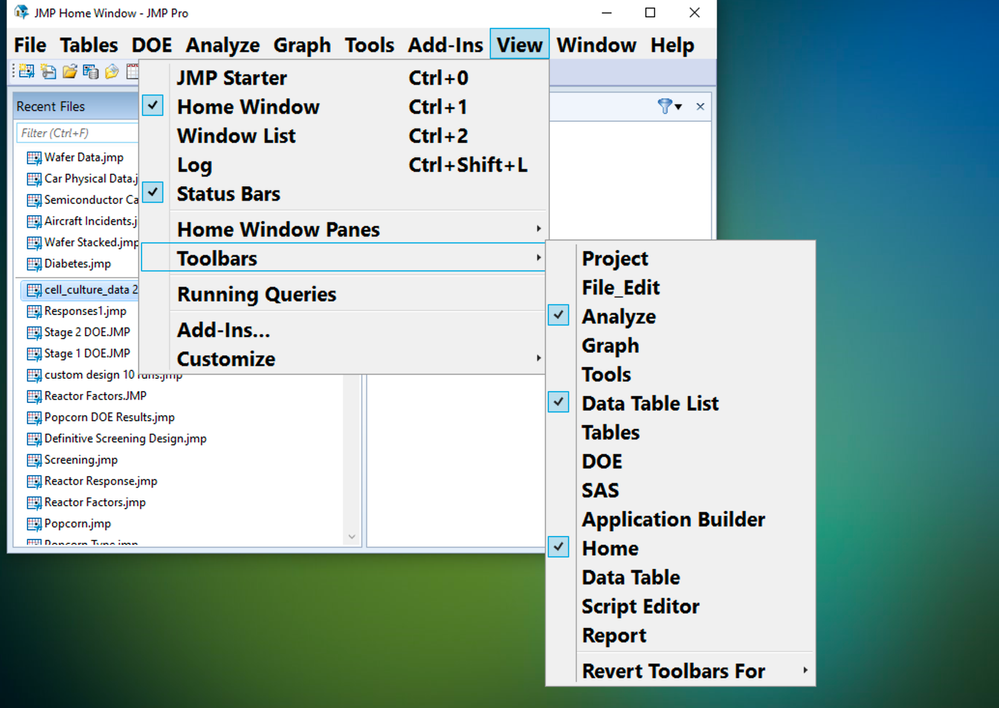
There's lots of built in Toolbars, for JMP's contextual tools. They are organized like the top row of menus in JMP.Screen Shot 2020-06-18 at 6.38.25 PM.png


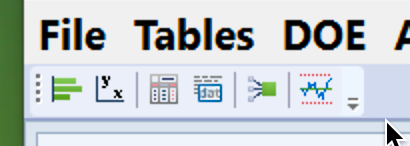
Let's pick one toolbar to change. I want to add the Consumer Research Categorical to the toolbar, because I use it frequently. You can see the selection of items present in the default toolbars contains just 5 items: Screen Shot 2020-06-18 at 6.44.14 PM.png
 

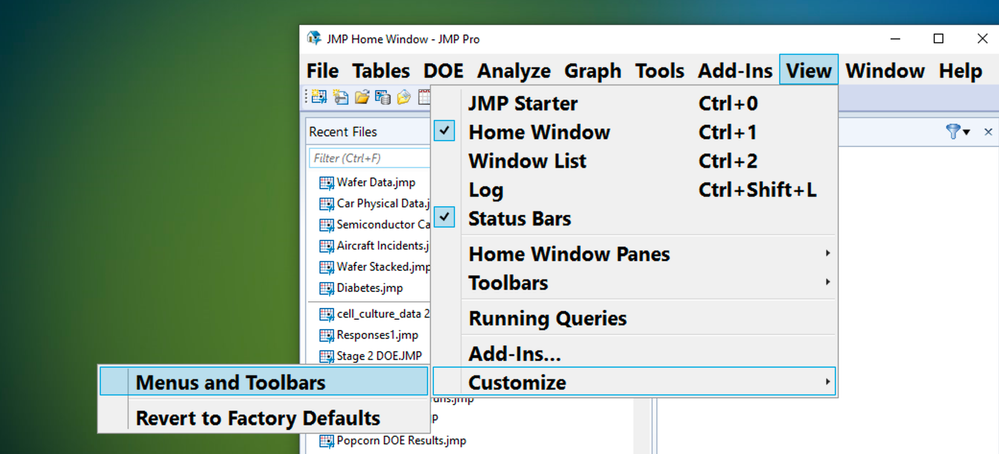
I'm going to navigate to Customize: Menus and Toolbars (that's right - you can customize your Menu's too!) under the View menu (in Windows only). 
Screen Shot 2020-06-18 at 6.52.08 PM.png


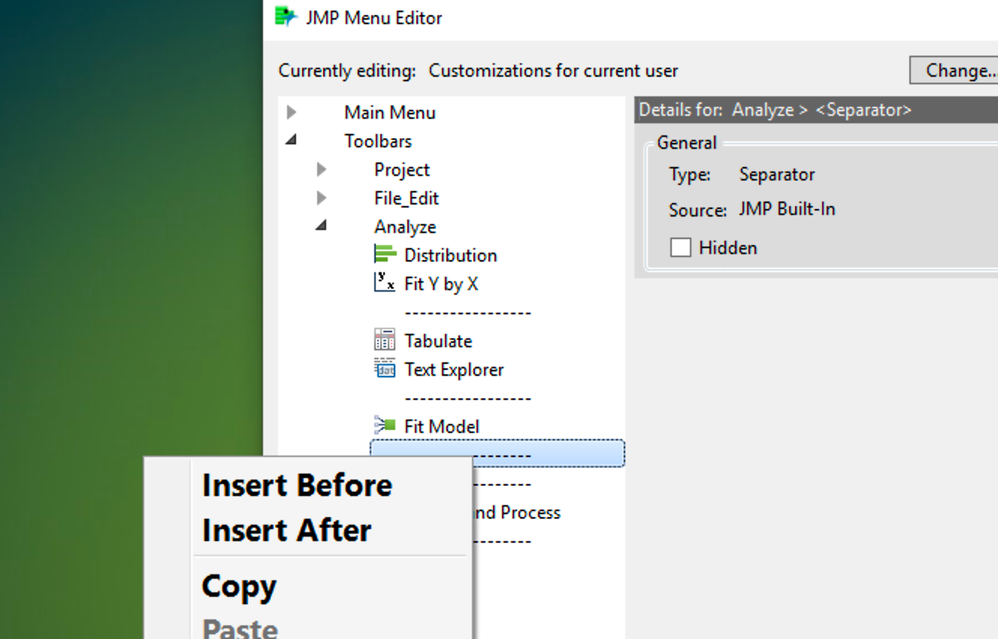
The Menu and Toolbar Editor has a separate section for Menus at the top on the left, and toolbars under it. I'm going to add an item to the Analyze Toolbar. Open the Analyze toolbar and RIGHT CLICK on something to add to the toolbar. I right clicked on a separator. 
Screen Shot 2020-06-18 at 6.58.27 PM.png


I'm going to insert my new item after, so I picked "Insert After". I picked "Command", and you can add separators to help keep things neat!

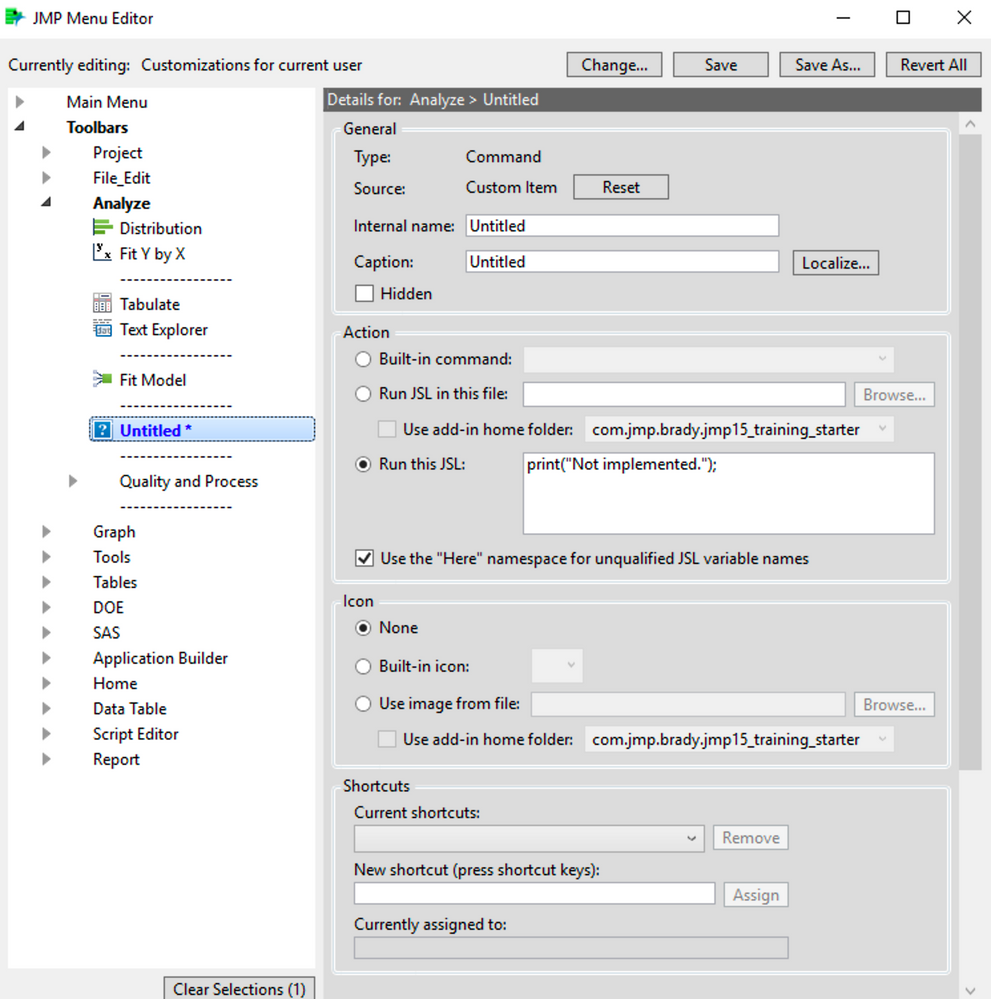
That brings up a new window on the right that's full of features!  

You can give it a name, runs JSL, pick a custom ICON, etc. 
Screen Shot 2020-06-18 at 7.01.51 PM.png


So you can see how flexible this is!


But wait! I want to add something that already exists! Do I have to fill all that in? Nope! We are going to copy and paste what we want from the menu section into a toolbar! 


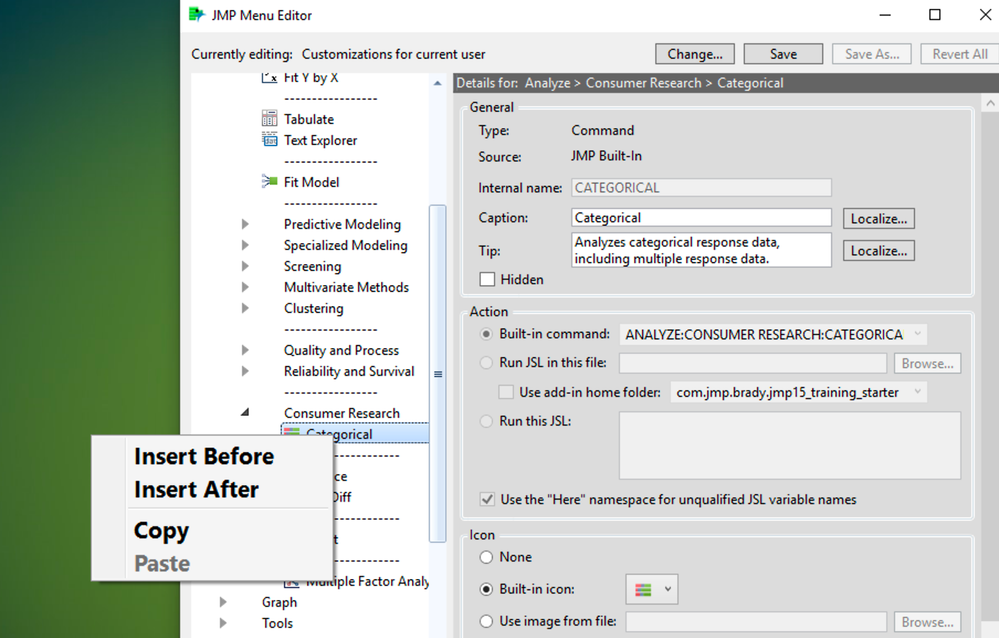
I'm going to navigate up into the Menu section on the left, and right click on what I want - the Consumer Research -> Categorical platform, and right click on that icon and select "copy".
Screen Shot 2020-06-18 at 7.06.19 PM.png


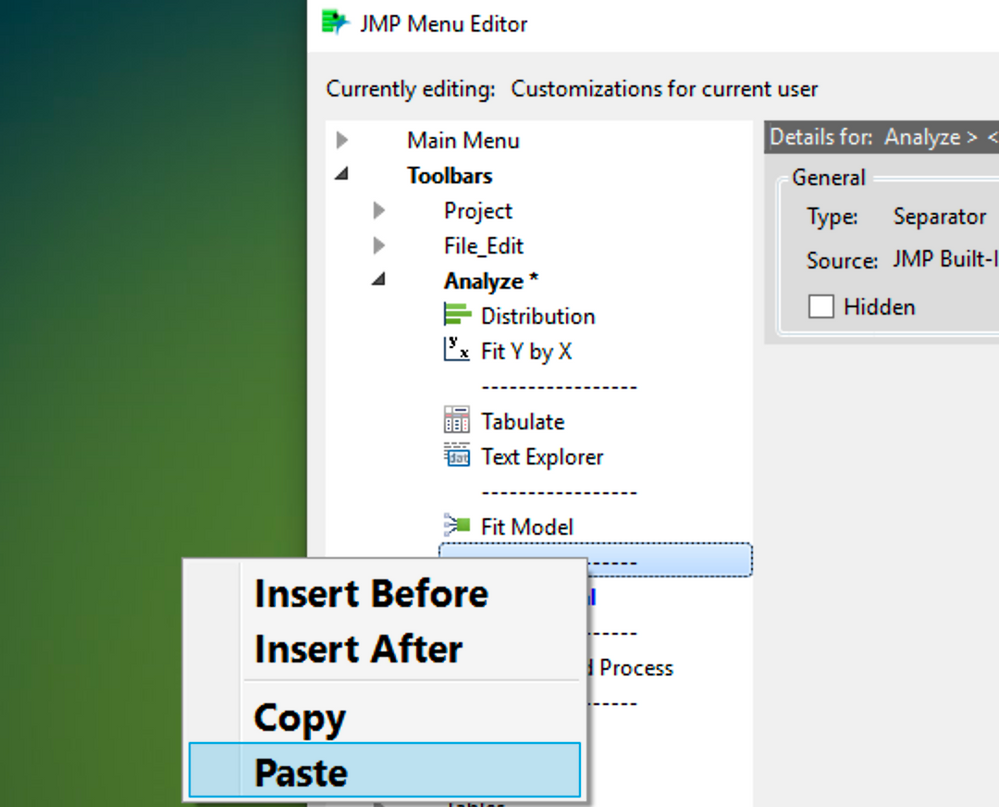
Then I go back to my Toolbar section, pick the location I want my Categorical to appear, and right click and select "Paste". Again I clicked on the separator. 
Screen Shot 2020-06-18 at 7.08.50 PM.png


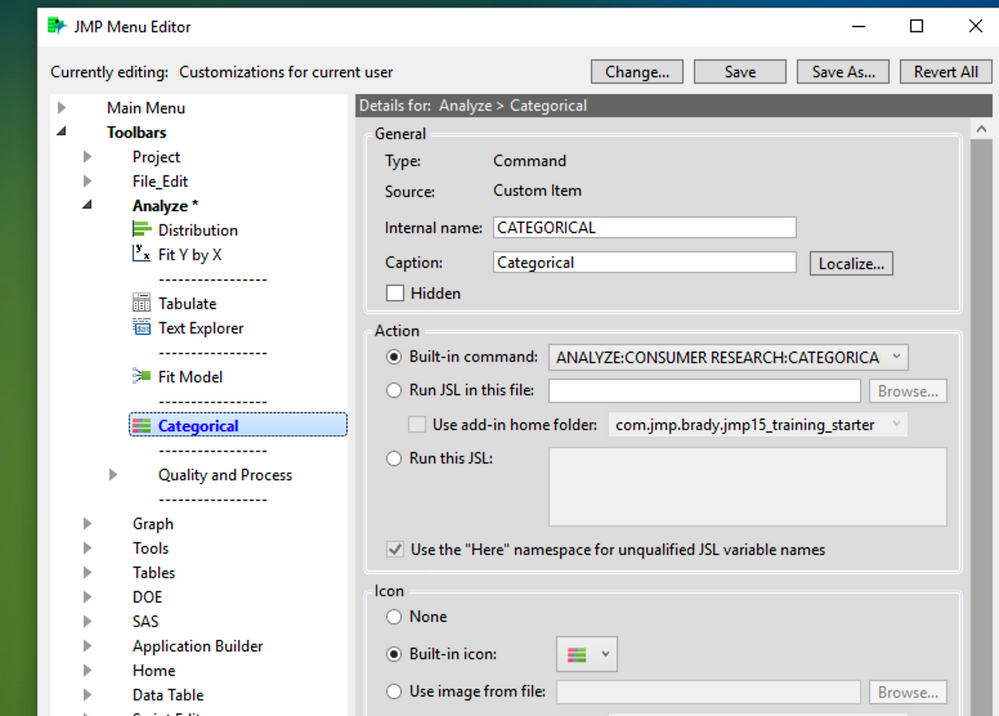
You can see I can do further customization if I'd like at this point. Want to run an analysis by clicking on a picture of your cat? You can! Just use an image instead of the default icon.
Screen Shot 2020-06-18 at 7.10.49 PM.png


I picked a picture of a calico cat, since they are technically categorical in their genetic make-up (well, genetic mosaic for the X chromosome, to be exact.)
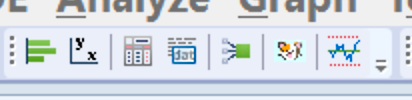
Screen Shot 2020-06-18 at 7.20.17 PM.png

It's pretty small, but it's my new favorite toolbar customization!

Last Modified: Dec 21, 2023 2:01 PM
Comments