- JMP will suspend normal business operations for our Winter Holiday beginning on Wednesday, Dec. 24, 2025, at 5:00 p.m. ET (2:00 p.m. ET for JMP Accounts Receivable).
Regular business hours will resume at 9:00 a.m. EST on Friday, Jan. 2, 2026. - We’re retiring the File Exchange at the end of this year. The JMP Marketplace is now your destination for add-ins and extensions.
- Subscribe to RSS Feed
- Mark as New
- Mark as Read
- Bookmark
- Subscribe
- Printer Friendly Page
- Report Inappropriate Content
JSL Cookbook
- JMP User Community
- :
- JSL Cookbook
- :
- Accessing Information using REST/API – Getting Started
This recipe will focus on JSL’s ability to access information through a REST API. We’ll be using Apple’s publicly available iTunes API. We’ll build a small dialog box for user input using associative arrays to implement cascading combo boxes.
- REST/API
- Dialog Boxes
- Associative Arrays
Difficulty – Hard
Video Length – 6:08
- Accessing information via a RESTful API requires four general elements: access authorization, a base URL, an endpoint, and parameter key/query values. This last element is likely the most important and requires knowledge of how to form the parameter key or query. This information should be provided by the API builder but is at times missing or incomplete. Occasionally, a bit of trial and error is needed. We will use Apple’s iTunes API because it is relatively simple, requiring no authorization and combines the base URL, search endpoint and parameter key(s) in a single query string. Details on forming the parameter key can be found here. We will use four of the parameter keys: term, media, entity, and attribute. Only term is required (country, despite being marked as required, can be omitted). It takes a text string as input. The other three use values from a list
- To make searches more user friendly, we will build a dialog box. It will use four input fields, one for text string input, the other three using combo boxes. The general layout will look like this:
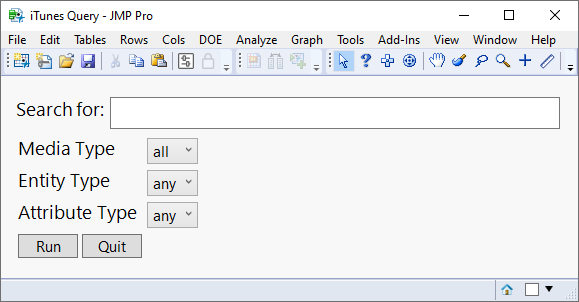
- New Window creates the dialog. It requires a text string as its first argument. The string is used for the window title.
Names Default to Here(1);
New Window("iTunes Query");
- We’ll use Border Box as the outermost container so we can add 15 pixels of space to the sides of the dialog. Because border boxes can only take a single element, we will combine everything that follows in V List Box.
New Window(
  "iTunes Query",
  Border Box(
    Top(15),Bottom(15),Left(15),Right(15),
    V List Box(
    )
  )
);
- Add a Text Box to the top to store a warning if the user fails to supply the required search string. Organize the “Search for:” text string and Text Edit Box horizontally by putting them in a H List Box. Use Line Up Box to align the text strings and combo boxes in two columns. The first argument to Line Up Box indicates the number of columns to use. Arrange the button boxes horizontally and center them. We can add spacer boxes to add space between dialog box elements.
dialog = New Window(
	"iTunes Query",
	Border Box(
      Top(15),Bottom(15),Left(15),Right(15),
      V List Box(
			Text Box(""),
         H List Box(Text Box("Search for: "), Text Edit Box(""),
         Line Up Box(N Col(2),
            Text Box("Media Type "    ),Combo Box({}),
            Text Box("Entity Type "   ),Combo Box({}),
            Text Box("Attribute Type "),Combo Box({})
         ),
        H Center Box( H List Box(Button Box("Run"),Button Box("Quit")))
      )
   )
);
- To make the font bigger, we can use the Set Font Size message inside the box constructors. Set the font size for all the text and text edit boxes to 14. When multiple messages are used inside a constructor, they should be separated with commas. Along with the Set Font Size message, change the style of the warning message box to Bold
Text Box("",<<Set Font Size(14),<<Set Font Style(Bold))and set the wrap width of the Text Edit Box to 450
Text Edit Box("",<<Set Width(450),<<Set Font Size(14)))
- The first argument to Combo Box supplies the items populating the box. It must be to a list or evaluate to a list.
- We will use a variable to store the list for the Media box. The values will be put at the top of the script to make them easier to access. The value that is selected for this combo box will determine what can go into the other two, so we need a script to execute when a selection is made. The script will be an expression stored in a block of code associated with the variable changeMediaType. We’ll also add a variable reference to the combo box to make it easier to access.
cbMedia = Combo Box(mediaValues,Eval(changeMediaType)) - The values for the Entity and Attribute combo boxes will depend on the Media Type selection. We can use Associative Array to store the values, making them easier to retrieve.
cbEntities   = Combo Box(aaEntities["all"])
cbAttributes = Combo Box(aaAttributes["all"])
aaEntities and aaAttributes are associative arrays and will be defined explicitly at the top of the script. As with the Media combo box, we’ll want to associate these two combo boxes with variables.
- We will use a variable to store the list for the Media box. The values will be put at the top of the script to make them easier to access. The value that is selected for this combo box will determine what can go into the other two, so we need a script to execute when a selection is made. The script will be an expression stored in a block of code associated with the variable changeMediaType. We’ll also add a variable reference to the combo box to make it easier to access.
- Most dialog box components taking user input can be given a script as their final argument. The script is executed when a user engages the object in some manner specific to the object type. For button boxes, this happens when the button is clicked. We will need a script for both buttons. For the Run button, the script will be stored in the expression associated with the variable runClick. It will be used to run the iTunes API query. The Quit button closes the dialog box.
Button Box("Run",Eval(clickRun))
Button Box("Quit",dialog<<Close Window)
- The key for both associative arrays, mediaValues, is the list we will use the Media Type combo box.
mediaValues = {"all","music","movie","podcast","tvShow","ebook","software"};These values are a subset of values from the API information provided at the link given above.
- The values for entityLists are taken from in Table 2-1, given here. The values for attributeLists are found at the same location.
entityLists = {
   {"any","movie","album","allArtist","podcast","musicVideo","mix","audiobook","tvSeason","allTrack"},
   {"any","audiobookAuthor","audiobook"},
	{"any","ebook"},
	{"any","movieArtist","movie"},
	{"any","musicArtist", "musicTrack", "album", "musicVideo", "mix", "song"},
	{"any","genreIndex","artistTerm","albumTerm","ratingIndex","songTerm"},
	{"any","podcastAuthor","podcast"},
	{"any","genreIndex","artistTerm","shortFilmTerm","ratingIndex","descriptionTerm"},
	{"any","software","iPadSoftware","macSoftware"},
	{"any","tvEpisode","tvSeason"}
};
attributeLists = {
   {"any","actorTerm","languageTerm","allArtistTerm","tvEpisodeTerm","shortFilmTerm",
    "directorTerm","releaseYearTerm","titleTerm","featureFilmTerm","ratingIndex",
    "keywordsTerm","descriptionTerm","authorTerm","genreIndex","mixTerm",
    "allTrackTerm","artistTerm","composerTerm","tvSeasonTerm","producerTerm",
    "ratingTerm","songTerm","movieArtistTerm","showTerm","movieTerm","albumTerm"
   },
   {"any","titleTerm", "authorTerm", "genreIndex", "ratingIndex"},
	{"any"},
	{"any","actorTerm","genreIndex","artistTerm","shortFilmTerm","producerTerm","ratingTerm",
	 "directorTerm","releaseYearTerm","featureFilmTerm","movieArtistTerm","movieTerm",
	 "ratingIndex","descriptionTerm"
	},
	{"any","mixTerm","genreIndex","artistTerm","composerTerm","albumTerm","ratingIndex","songTerm"},
	{"any","genreIndex","artistTerm","albumTerm","ratingIndex","songTerm"},
	{"any","titleTerm","languageTerm","authorTerm","genreIndex","artistTerm","ratingIndex",
    "keywordsTerm","descriptionTerm"
   },
	{"any","genreIndex","artistTerm","shortFilmTerm","ratingIndex","descriptionTerm"},
	{"any","softwareDeveloper"},
	{"any","genreIndex","tvEpisodeTerm","showTerm","tvSeasonTerm","ratingIndex","descriptionTerm"}
};

aaEntities   = Associative Array(mediaValues,entityLists);
aaAttributes = Associative Array(mediaValues,attributeLists);
any is added as the first element of all lists to correspond to any item from the list.
- We will use an expression to update the Entity and Attribute combo boxes where the Media combo box is change. Using associative arrays makes this simple
changeMediaType = Expr(
	cbEntities   << Set Items(aaEntities[cbMedia << Get Selected]);
	cbAttributes << Set Items(aaAttributes[cbMedia << Get Selected]);
);
The list used to populate either outline box for a given media type is associated with the key of the appropriate associative array. The keys are the values used in the Media combo box.
- The API needs the space and asterisk (*) to be represented by + and *, respectively, so we’ll change them from their URL encoded values
The last thing left to do is pull together the user input and send the HTTP request to the API. Everything will be contained in the expression clickRun = Expr(...)searchString = Regex(searchString,"%20","+",Global Replace); searchString = Regex(searchString,"%2A","*",Global Replace);- Start by checking if the user has supplied the required search string. If not, post a warning and stop.
If(Is Missing(searchString), tbWarning << Set Text("A search string must be given"), - As a reminder, the iTunes API combines the base URL, endpoint, and search parameters. The resulting text string will look like this:
"https://itunes.apple.com/search?" || "term=" || searchString || "&media=" || mediaValue || "&entity=" || entityValue || "&attribute=" || attributeValuemediaValue, entityValue, and attributeValue can all be taken directly from the combo box text. If all is selected for mediaValue, we can ignore the line. Likewise, if any is selected for entityValue or attributeValue. searchString is required.
- To build searchString, we start by converting it to URL encoding
searchString = tebSearchTerm << Get Text; searchString = Encode URI(searchString); - Putting everything together with conditional If statements to account for cases when we can ignore media, entity, or attribute:
baseURL ||= "term="||searchString; If(cbMedia << Get > 1, baseURL ||= "&media=" || (cbMedia << Get Selected)); If(cbEntities << Get > 1, baseURL ||= "&entity=" || (cbEntities << Get Selected)); If(cbAttributes << Get > 1, baseURL ||= "&attribute=" || (cbAttributes << Get Selected)); - At a minimum, New HTTP Request requires two arguments, URL and Method, giving the request query and operation, respectively. It acts like an expression and is not executed until it is messaged by Send.
outData = New HTTP Request(
  URL(baseURL),
  Method("GET")
) << Send;
JSON To Data Table(outData);
The iTunes API returns JSON formatted data which is converted to a JMP data table with the JSON to Data Table function.
A completed version of the recipe can be found below.
Hints for Success:
- Information about an API is as good as what is provided by its creator. You will likely need a bit of trial and error to get things to work.
- Create a dialog box sketch before writing the code.
- Associative arrays comprised of lists can be used to build cascading combo box when the value from one combo box is used as the key for
- Start by checking if the user has supplied the required search string. If not, post a warning and stop.

Don,
In the coming weeks I will be needing the use of REST API statements to access tables in a SQL server database, as such I found your post most interesting.
I followed along and created my JSL script but ran into a problem with the Associative Array see code below.
aaEntities   = Associative Array(mediaValues, entityLists);
aaAttributes = Associative Array(mediaValues, attributeLists);
I get the following error, see image below.

I'm not sure where to go next to resolve this error, can you point me in the right direction?
The entire code is below, this is untested as of yet, due to the above error.
Best regards
John
Names Default to Here(1);
mediaValues = {"all","music","movie","podcast","tvShow","ebook","software"};
entityLists = {
   {"any","movie","album","allArtist","podcast","musicVideo","mix","audiobook","tvSeason","allTrack"},
   {"any","audiobookAuthor","audiobook"},
	{"any","ebook"},
	{"any","movieArtist","movie"},
	{"any","musicArtist", "musicTrack", "album", "musicVideo", "mix", "song"},
	{"any","genreIndex","artistTerm","albumTerm","ratingIndex","songTerm"},
	{"any","podcastAuthor","podcast"},
	{"any","genreIndex","artistTerm","shortFilmTerm","ratingIndex","descriptionTerm"},
	{"any","software","iPadSoftware","macSoftware"},
	{"any","tvEpisode","tvSeason"}
};
attributeLists = {
   {"any","actorTerm","languageTerm","allArtistTerm","tvEpisodeTerm","shortFilmTerm",
    "directorTerm","releaseYearTerm","titleTerm","featureFilmTerm","ratingIndex",
    "keywordsTerm","descriptionTerm","authorTerm","genreIndex","mixTerm",
    "allTrackTerm","artistTerm","composerTerm","tvSeasonTerm","producerTerm",
    "ratingTerm","songTerm","movieArtistTerm","showTerm","movieTerm","albumTerm"
   },
   {"any","titleTerm", "authorTerm", "genreIndex", "ratingIndex"},
	{"any"},
	{"any","actorTerm","genreIndex","artistTerm","shortFilmTerm","producerTerm","ratingTerm",
	 "directorTerm","releaseYearTerm","featureFilmTerm","movieArtistTerm","movieTerm",
	 "ratingIndex","descriptionTerm"
	},
	{"any","mixTerm","genreIndex","artistTerm","composerTerm","albumTerm","ratingIndex","songTerm"},
	{"any","genreIndex","artistTerm","albumTerm","ratingIndex","songTerm"},
	{"any","titleTerm","languageTerm","authorTerm","genreIndex","artistTerm","ratingIndex",
    "keywordsTerm","descriptionTerm"
   },
	{"any","genreIndex","artistTerm","shortFilmTerm","ratingIndex","descriptionTerm"},
	{"any","softwareDeveloper"},
	{"any","genreIndex","tvEpisodeTerm","showTerm","tvSeasonTerm","ratingIndex","descriptionTerm"}
};
aaEntities   = Associative Array(mediaValues, entityLists);
aaAttributes = Associative Array(mediaValues, attributeLists);


changeMediaType = Expr(
	cbEntities   << Set Items(aaEntities[cbMedia << Get Selected]);
	cbAttributes << Set Items(aaAttributes[cbMedia << Get Selected]);
);
clickRun = Expr(
	searchString = Trim(tebSearchTerm << Get Text()); // Remove any whitespace
	If( Is Missing(searchString),
		tbWarning << Set Text("A search string must be given"),

    // ELSE
    tbWarning << Set Text("");
    baseURL = "https://itunes.apple.com/search?";
    searchString = Encode URI(searchString);
    searchString = Regex(searchString, "%20", "+", Global Replace); // Replace %20 encoding with + for
    searchString = Regex(searchString, "%2A", "*", Global Replace); // Replace %2A encoding with *
    baseURL ||= "term"||searchString;

    If(cbMedia      << Get > 1, baseURL ||= "&media="     || (cbMedia      << Get Selected));
	If(cbEntities   << Get > 1, baseURL ||= "&entity="    || (cbEntities   << Get Selected));
	If(cbAttributes << Get > 1, baseURL ||= "&attribute=" || (cbAttributes << Get Selected));
	outData = New HTTP Request(
	URL(baseURL),
	Method("GET")
	) << Send;
	JSON To Data Table(outData);
	);
);

dialog = New Window(
	"iTunes Query",
	Border Box(
		Top(15), Bottom(15), Left(15), Right(15),
		V List Box(
		tbWarning = Text Box("", << Set Font Size(14), << Set Font Style(Bold)),
		Space Box(Size(0,5)),
			H List Box(Text Box("Search for: "), << Set font Size(14)), tebSearchTerm = Text Edit Box("", << Set Width(450), << Set Font Size14))),
			Spacer Box(Size(0,5)),
			Line Up Box(N Col(2),
				Text Box("Media Type ", << Set Font Size(14)), cbMedia = Combo Box(mediaValues, Eval(changeMediaType)),
				Text Box("Entity Type ", << Set Font Size(14)), cbEntities = Combo Box(aaEntities["all"]),
				Text Box("Attribute Type ", << Set Font Size(14), cbAttributes = Combo Box(aaAttributes["all"])
			),
			H Center Box( H List box(Button Box("Run", clickRun()), Button Box("Quit", dialog << Close Window)))
		),
		Button Box("Run", Eval(clickRun)),
		Button Box("Quit", dialog << Close Window)
);
Recommended Articles
- © 2026 JMP Statistical Discovery LLC. All Rights Reserved.
- Terms of Use
- Privacy Statement
- Contact Us