cancel
Showing results for 
Show  only  | Search instead for 
Did you mean: 

JMPer Cable

A technical blog for JMP users of all levels, full of how-to's, tips and tricks, and detailed information on JMP features
%3CLINGO-SUB%20id%3D%22lingo-sub-29839%22%20slang%3D%22en-US%22%20mode%3D%22NONE%22%20mode%3D%22NONE%22%20mode%3D%22NONE%22%3EGuardar%20gr%C3%A1ficos%2C%20tablas%20e%20informes%20en%20JMP%3C%2FLINGO-SUB%3E%3CLINGO-BODY%20id%3D%22lingo-body-29839%22%20slang%3D%22en-US%22%20mode%3D%22NONE%22%20mode%3D%22NONE%22%20mode%3D%22NONE%22%3E%3CP%3EGuardar%20y%20compartir%20su%20salida%20desde%20JMP%20es%20f%C3%A1cil.%20A%20continuaci%C3%B3n%20se%20muestran%20algunas%20formas%20sencillas%20de%20guardar%20resultados%20tabulares%20y%2Fo%20gr%C3%A1ficos%20en%20JMP.%3C%2FP%3E%0A%3CH3%20id%3D%22toc-hId-1155366424%22%20id%3D%22toc-hId-1161561088%22%20id%3D%22toc-hId-1161561088%22%20id%3D%22toc-hId-1161561088%22%20id%3D%22toc-hId-1161561088%22%3E%3CSTRONG%3EM%C3%A9todo%201%3A%20copiar%20y%20pegar%3C%2FSTRONG%3E%3C%2FH3%3E%0A%3CP%3ECuando%20copia%20informaci%C3%B3n%20de%20JMP%2C%20puede%20usar%20%22Copiar%22%20en%20el%20men%C3%BA%20Editar%20o%20Control-C%20(o%20Comando-C%20en%20Mac).%20La%20informaci%C3%B3n%20se%20copia%20en%20su%20portapapeles%20y%20se%20puede%20pegar%20en%20una%20variedad%20de%20aplicaciones.%3C%2FP%3E%0A%3CP%3ESi%20desea%20guardar%20el%20resultado%20completo%20del%20informe%20con%20gr%C3%A1ficos%2C%20simplemente%20elija%3CSTRONG%3E%20Editar%20%26gt%3B%20Copiar%3C%2FSTRONG%3E%20para%20almacenar%20la%20ventana%20activa%20en%20el%20portapapeles%20y%20luego%20pegar%20los%20resultados%20en%20su%20documento.%3C%2FP%3E%0A%3CP%3ETambi%C3%A9n%20puede%20guardar%20solo%20una%20parte%20de%20los%20resultados%20eligiendo%20la%20herramienta%20de%20selecci%C3%B3n%20(o%20herramienta%20%22fat-plus%22)%20en%20la%20barra%20de%20herramientas%20(o%3CSTRONG%20style%3D%22font-family%3A%20inherit%3B%22%3E%20Herramientas%26gt%3BSelecci%C3%B3n)%3C%2FSTRONG%3E%3CSPAN%20style%3D%22font-family%3A%20inherit%3B%22%3E%20y%20luego%20haciendo%20clic%20en%20la%20tabla%2C%20columna%20o%20gr%C3%A1fico%20que%20desea%20guardar.%20Luego%20copia%20y%20pega%20como%20antes.%3C%2FSPAN%3E%3C%2FP%3E%0A%3CP%3E%3CSPAN%20class%3D%22lia-inline-image-display-wrapper%20lia-image-align-center%22%20image-alt%3D%22tools.png%22%20style%3D%22width%3A%20999px%3B%22%3E%3CSPAN%20class%3D%22lia-inline-image-display-wrapper%22%20image-alt%3D%22tools.png%22%20style%3D%22width%3A%20999px%3B%22%3E%3CSPAN%20class%3D%22lia-inline-image-display-wrapper%22%20image-alt%3D%22tools.png%22%20style%3D%22width%3A%20999px%3B%22%3E%3CSPAN%20class%3D%22lia-inline-image-display-wrapper%22%20image-alt%3D%22tools.png%22%20style%3D%22width%3A%20999px%3B%22%3E%3Cspan%20class%3D%22lia-inline-image-display-wrapper%22%20image-alt%3D%22tools.png%22%20style%3D%22width%3A%20999px%3B%22%3E%3Cimg%20src%3D%22https%3A%2F%2Fcommunity.jmp.com%2Ft5%2Fimage%2Fserverpage%2Fimage-id%2F17748i338B231426764D87%2Fimage-size%2Flarge%3Fv%3Dv2%26amp%3Bpx%3D999%22%20role%3D%22button%22%20title%3D%22tools.png%22%20alt%3D%22tools.png%22%20%2F%3E%3C%2Fspan%3E%3C%2FSPAN%3E%3C%2FSPAN%3E%3C%2FSPAN%3E%3C%2FSPAN%3E%3C%2FP%3E%0A%3CP%3E%26nbsp%3B%3C%2FP%3E%0A%3CP%3EPor%20ejemplo%3A%3C%2FP%3E%0A%3CP%3Ea.%20Desde%20cualquier%20ventana%20de%20salida%20de%20JMP%2C%20haga%20clic%20en%20la%20herramienta%20de%20selecci%C3%B3n%20en%20la%20barra%20de%20herramientas%20(el%20plus%20gordo)%3C%2FP%3E%0A%3CP%3Eb.%20Haga%20clic%20en%20el%20contenido%20que%20desea%20copiar.%20El%20contenido%20seleccionado%20est%C3%A1%20resaltado.%20Para%20extender%20una%20selecci%C3%B3n%2C%20mantenga%20presionada%20la%20tecla%20May%C3%BAs%3C%2FP%3E%0A%3CP%3EC.%20Hacer%20clic%3CSTRONG%3E%20Editar%20%26gt%3B%20Copiar%2C%20o%20Clic%20derecho%20%26gt%3B%20Copiar%3C%2FSTRONG%3E%3C%2FP%3E%0A%3CP%3E%26nbsp%3B%3C%2FP%3E%0A%3CP%3E%3CSPAN%20class%3D%22lia-inline-image-display-wrapper%20lia-image-align-center%22%20image-alt%3D%22select-copy.gif%22%20style%3D%22width%3A%20749px%3B%22%3E%3CSPAN%20class%3D%22lia-inline-image-display-wrapper%22%20image-alt%3D%22select-copy.gif%22%20style%3D%22width%3A%20749px%3B%22%3E%3CSPAN%20class%3D%22lia-inline-image-display-wrapper%22%20image-alt%3D%22select-copy.gif%22%20style%3D%22width%3A%20749px%3B%22%3E%3CSPAN%20class%3D%22lia-inline-image-display-wrapper%22%20image-alt%3D%22select-copy.gif%22%20style%3D%22width%3A%20749px%3B%22%3E%3Cspan%20class%3D%22lia-inline-image-display-wrapper%22%20image-alt%3D%22select-copy.gif%22%20style%3D%22width%3A%20749px%3B%22%3E%3Cimg%20src%3D%22https%3A%2F%2Fcommunity.jmp.com%2Ft5%2Fimage%2Fserverpage%2Fimage-id%2F17753iCD64137A602F0963%2Fimage-dimensions%2F749x356%3Fv%3Dv2%22%20width%3D%22749%22%20height%3D%22356%22%20role%3D%22button%22%20title%3D%22select-copy.gif%22%20alt%3D%22select-copy.gif%22%20%2F%3E%3C%2Fspan%3E%3C%2FSPAN%3E%3C%2FSPAN%3E%3C%2FSPAN%3E%3C%2FSPAN%3E%3C%2FP%3E%0A%3CP%3E%26nbsp%3B%3C%2FP%3E%0A%3CP%3Ed.%20Abre%20el%20programa%20donde%20deseas%20pegar%20el%20contenido.%20En%20un%3CSTRONG%3E%20Mac%3C%2FSTRONG%3E%20seleccione%20Pegar.%20En%3CSTRONG%3E%20ventanas%2C%3C%2FSTRONG%3E%20Si%20utiliza%20un%20producto%20de%20Microsoft%20Office%2C%20como%20Word%20o%20PowerPoint%2C%20seleccione%3CSTRONG%3E%20Pegar%26gt%3BPegado%20especial.%3C%2FSTRONG%3E%20De%20la%20lista%2C%20seleccione%3CSTRONG%3E%20Imagen%20(metarchivo%20mejorado).%3C%2FSTRONG%3ESeleccionando%3CSTRONG%3E%20Imagen%20(metarchivo%20mejorado)%2C%3C%2FSTRONG%3E%20tienes%20la%20capacidad%20de%20hacer%20crecer%20y%20reducir%20la%20imagen%2C%20desagrupar%20la%20imagen%20para%20manipularla.%20Esta%20opci%C3%B3n%20tambi%C3%A9n%20ocupa%20menos%20espacio%20de%20almacenamiento.%20Una%20vez%20que%20la%20imagen%20se%20haya%20pegado%20en%20su%20aplicaci%C3%B3n%2C%20si%20hace%20clic%20derecho%20dentro%20de%20la%20imagen%20y%20selecciona%20Editar%20imagen%2C%20tendr%C3%A1%20la%20capacidad%20de%20manipular%20esa%20imagen.%3C%2FP%3E%0A%3CP%3E%3CSPAN%20class%3D%22lia-inline-image-display-wrapper%20lia-image-align-center%22%20image-alt%3D%22savinggraphs2.JPG%22%20style%3D%22width%3A%20387px%3B%22%3E%3CSPAN%20class%3D%22lia-inline-image-display-wrapper%22%20image-alt%3D%22savinggraphs2.JPG%22%20style%3D%22width%3A%20387px%3B%22%3E%3CSPAN%20class%3D%22lia-inline-image-display-wrapper%22%20image-alt%3D%22savinggraphs2.JPG%22%20style%3D%22width%3A%20387px%3B%22%3E%3CSPAN%20class%3D%22lia-inline-image-display-wrapper%22%20image-alt%3D%22savinggraphs2.JPG%22%20style%3D%22width%3A%20387px%3B%22%3E%3Cspan%20class%3D%22lia-inline-image-display-wrapper%22%20image-alt%3D%22savinggraphs2.JPG%22%20style%3D%22width%3A%20387px%3B%22%3E%3Cimg%20src%3D%22https%3A%2F%2Fcommunity.jmp.com%2Ft5%2Fimage%2Fserverpage%2Fimage-id%2F7238i80918466517E8650%2Fimage-size%2Fmedium%3Fv%3Dv2%26amp%3Bpx%3D400%22%20role%3D%22button%22%20title%3D%22savinggraphs2.JPG%22%20alt%3D%22savinggraphs2.JPG%22%20%2F%3E%3C%2Fspan%3E%3C%2FSPAN%3E%3C%2FSPAN%3E%3C%2FSPAN%3E%3C%2FSPAN%3E%3C%2FP%3E%0A%3CP%3E%26nbsp%3B%3C%2FP%3E%0A%3CH3%20id%3D%22toc-hId-2042870105%22%20id%3D%22toc-hId-2049064769%22%20id%3D%22toc-hId-2049064769%22%20id%3D%22toc-hId-2049064769%22%20id%3D%22toc-hId-2049064769%22%3EM%C3%A9todo%202%3A%3CSTRONG%3E%20Guardar%20un%20informe%20completo%3C%2FSTRONG%3E%3C%2FH3%3E%0A%3CP%3ESeleccionar%3CSTRONG%3E%20Archivo%26gt%3BGuardar%20(%3C%2FSTRONG%3E%20o%3CSTRONG%3E%20Archivo%20%26gt%3B%20Exportar%3C%2FSTRONG%3E%20en%20una%20Mac).%20Este%20m%C3%A9todo%20le%20permite%20guardar%20el%20resultado%20de%20su%20informe%20personalizado%20como%20un%20gr%C3%A1fico%2C%20una%20presentaci%C3%B3n%20de%20PowerPoint%2C%20un%20documento%20de%20Word%2C%20un%20archivo%20RTF%20o%20HTML%20interactivo.%20El%20formato%20de%20texto%20es%20el%20%C3%BAnico%20formato%20que%20no%20guarda%20gr%C3%A1ficos.%20Usar%20Archivo%20%26gt%3B%20Guardar%20(tanto%20en%20Mac%20como%20en%20Windows)%20tambi%C3%A9n%20le%20permite%20guardar%20su%20informe%20como%20JRP%2C%20un%20archivo%20de%20informe%20JMP%2C%20que%20puede%20incrustar%20sus%20datos%20o%20vincularlos%20a%20los%20datos%20originales.%20Este%20informe%20se%20puede%20compartir%20con%20otras%20personas%20que%20tengan%20JMP%20para%20que%20puedan%20interactuar%20con%20su%20informe.%3C%2FP%3E%0A%3CH3%20id%3D%22toc-hId--1364593510%22%20id%3D%22toc-hId--1358398846%22%20id%3D%22toc-hId--1358398846%22%20id%3D%22toc-hId--1358398846%22%20id%3D%22toc-hId--1358398846%22%3EM%C3%A9todo%203%3A%3CSTRONG%3E%20Guardar%20selecci%C3%B3n%20como%3C%2FSTRONG%3E%3C%2FH3%3E%0A%3CP%3ETambi%C3%A9n%20puede%20guardar%20gr%C3%A1ficos%20o%20tablas%20seleccionados%20eligiendo%3CSTRONG%3E%20Editar%26gt%3BGuardar%20selecci%C3%B3n%20como%20(%3C%2FSTRONG%3E%20o%20en%20una%20Mac%2C%20mantenga%20presionada%20la%20tecla%20Control%20y%20seleccione%3CSTRONG%3E%20Archivo%20%26gt%3B%20Guardar%20selecci%C3%B3n%20como%3C%2FSTRONG%3E%20).%20Esta%20opci%C3%B3n%20le%20permite%20guardar%20el%20elemento%20seleccionado%20como%20un%20gr%C3%A1fico%20en%20una%20variedad%20de%20formatos%2C%20incluidos%20png%2C%20jpeg%2C%20svg%2C%20eps%2C%20pdf%2C%20tiff%20y%20gif.%3C%2FP%3E%0A%3CH3%20id%3D%22toc-hId--477089829%22%20id%3D%22toc-hId--470895165%22%20id%3D%22toc-hId--470895165%22%20id%3D%22toc-hId--470895165%22%20id%3D%22toc-hId--470895165%22%3EM%C3%A9todo%204%3A%3CSTRONG%3E%20Llevar%20un%20diario%3C%2FSTRONG%3E%3C%2FH3%3E%0A%3CP%3ESeleccionar%3CSTRONG%3E%20Editar%26gt%3BDiario.%20%3C%2FSTRONG%3EEsto%20producir%C3%A1%20una%20versi%C3%B3n%20est%C3%A1tica%20del%20informe%20en%20una%20nueva%20ventana.%20Esto%20es%20%C3%BAtil%20cuando%20desea%20compartir%20la%20salida%20en%20formato%20JMP%2C%20pero%20no%20desea%20compartir%20los%20datos%20subyacentes.%20Los%20diarios%20contienen%20los%20gr%C3%A1ficos%2C%20tablas%20y%20gui%C3%B3n%20del%20informe%2C%20pero%20no%20los%20datos.%20Seleccione%20Archivo%20%26gt%3B%20Guardar%20para%20guardar%20este%20diario.%3C%2FP%3E%0A%3CP%3EPara%20obtener%20m%C3%A1s%20informaci%C3%B3n%20sobre%20c%C3%B3mo%20guardar%20tablas%20de%20datos%2C%20gr%C3%A1ficos%20e%20informes%2C%20consulte%3CA%20href%3D%22https%3A%2F%2Fwww.jmp.com%2Fsupport%2Fhelp%2F14-2%2Fsave-and-share-data.shtml%23%22%20target%3D%22_self%22%20rel%3D%22noopener%20noreferrer%22%3E%20%22Guardar%20y%20compartir%20datos%22%3C%2FA%3E%20en%20la%20documentaci%C3%B3n%20del%20JMP.%3C%2FP%3E%3C%2FLINGO-BODY%3E%3CLINGO-TEASER%20id%3D%22lingo-teaser-29839%22%20slang%3D%22en-US%22%3E%3CP%3EGuardar%20y%20compartir%20su%20salida%20desde%20JMP%20es%20f%C3%A1cil.%20A%20continuaci%C3%B3n%20se%20muestran%20algunas%20formas%20sencillas%20de%20guardar%20resultados%20tabulares%20y%2Fo%20gr%C3%A1ficos%20en%20JMP.%3C%2FP%3E%3C%2FLINGO-TEASER%3E%3CLINGO-SUB%20id%3D%22lingo-sub-46686%22%20slang%3D%22en-US%22%20mode%3D%22NONE%22%20mode%3D%22NONE%22%20mode%3D%22NONE%22%3ERe%3A%20Guardar%20gr%C3%A1ficos%2C%20tablas%20e%20informes%20en%20JMP%3C%2FLINGO-SUB%3E%3CLINGO-BODY%20id%3D%22lingo-body-46686%22%20slang%3D%22en-US%22%20mode%3D%22NONE%22%20mode%3D%22NONE%22%20mode%3D%22NONE%22%3E%3CP%3E%3CSTRONG%3EDebo%20estar%20de%20acuerdo%20con%20pattheplant%3C%2FSTRONG%3E%3C%2FP%3E%3CP%3EPas%C3%A9%20meses%20sin%20saber%20que%20hab%C3%ADa%20un%20men%C3%BA%20oculto%2C%20pas%C3%A9%20una%20hora%20descubriendo%20c%C3%B3mo%20guardar%20gr%C3%A1ficos%20en%20svg%20y%20encontr%C3%A9%20este%20men%C3%BA...%20pff%20%3A'(%3C%2FP%3E%3C%2FLINGO-BODY%3E%3CLINGO-SUB%20id%3D%22lingo-sub-31586%22%20slang%3D%22en-US%22%20mode%3D%22NONE%22%20mode%3D%22NONE%22%20mode%3D%22NONE%22%3EXan%20Gregg%20escribi%C3%B3%3A%20Hola%20Julian%2C%20espero%20poder%20sacarte%20de%20aqu%C3%AD...%3C%2FLINGO-SUB%3E%3CLINGO-BODY%20id%3D%22lingo-body-31586%22%20slang%3D%22en-US%22%20mode%3D%22NONE%22%20mode%3D%22NONE%22%20mode%3D%22NONE%22%3E%3CP%3E%3CSTRONG%3EXan%20Gregg%3C%2FSTRONG%3E%20escribi%C3%B3%3A%3C%2FP%3E%3CP%3EHola%20Julian%2C%20%C2%A1espero%20poder%20sacarte%20del%20abismo!%3C%2FP%3E%3CP%3E%3C%2FP%3E%3CP%3EPuede%20exportar%20s%C3%B3lo%20las%20partes%20de%20un%20informe%20que%20desee%20utilizando%20el%20cursor%20de%20selecci%C3%B3n%20%22fat%20plus%22.%20Entonces%20s%C3%B3lo%20se%20exportan%20esas%20piezas.%20Para%20que%20pueda%20seleccionar%20todo%20excepto%20el%20t%C3%ADtulo%20del%20esquema.%20Hay%20otra%20forma%20complicada%20de%20hacerlo%2C%20que%20es%20hacer%20doble%20clic%20en%20el%20t%C3%ADtulo%20y%20dejarlo%20vac%C3%ADo%20y%20todo%20desaparecer%C3%A1.%20Simplemente%20no%20me%20preguntes%20c%C3%B3mo%20recuperarlo.%3C%2FP%3E%3CP%3E%3C%2FP%3E%3CP%3EPara%20la%20fuente%20del%20t%C3%ADtulo%20del%20eje%2C%20esa%20funcionalidad%20se%20enmascar%C3%B3%20inadvertidamente%20en%20Graph%20Builder.%20Se%20solucionar%C3%A1%20en%20el%20pr%C3%B3ximo%20JMP%2012%2C%20pero%20una%20soluci%C3%B3n%20alternativa%20para%20JMP%2010%20es%20registrar%20primero%20el%20informe%20en%20un%20diario.%20Luego%20puede%20hacer%20clic%20derecho%20en%20el%20t%C3%ADtulo%20del%20eje%20para%20cambiar%20la%20fuente%20y%20exportar%20desde%20all%C3%AD.%20Si%20necesita%20un%20informe%20en%20vivo%2C%20tambi%C3%A9n%20existen%20soluciones%20alternativas%20de%20secuencias%20de%20comandos%20dentro%20de%20Graph%20Builder.%3C%2FP%3E%3CP%3E%3C%2FP%3E%3CP%3EPor%20cierto%2C%20no%20olvides%20el%3CA%20href%3D%22http%3A%2F%2Fcommunity.jmp.com%2F%22%20target%3D%22_blank%22%3E%20Comunidad%20JMP%3C%2FA%3E%20sitio%20de%20discusi%C3%B3n%20la%20pr%C3%B3xima%20vez%20que%20est%C3%A9s%20atascado.%3C%2FP%3E%3C%2FLINGO-BODY%3E%3CLINGO-SUB%20id%3D%22lingo-sub-31585%22%20slang%3D%22en-US%22%20mode%3D%22NONE%22%20mode%3D%22NONE%22%20mode%3D%22NONE%22%3EJulian%20escribi%C3%B3%3A%20Estoy%20usando%20JMP%20Pro%2010%20para%20Mac.%20Puedo%20exportar...%3C%2FLINGO-SUB%3E%3CLINGO-BODY%20id%3D%22lingo-body-31585%22%20slang%3D%22en-US%22%20mode%3D%22NONE%22%20mode%3D%22NONE%22%20mode%3D%22NONE%22%3E%3CP%3E%3CSTRONG%3EJulian%3C%2FSTRONG%3E%20escribi%C3%B3%3A%3C%2FP%3E%3CP%3EEstoy%20usando%20JMP%20Pro%2010%20para%20Mac.%3C%2FP%3E%3CP%3E%3C%2FP%3E%3CP%3EPuedo%20exportar%20gr%C3%A1ficos%2C%20no%20hay%20problema.%20Pero%20en%20cada%20gr%C3%A1fico%20exportado%20aparece%20el%20encabezado%20del%20men%C3%BA.%20Es%20esta%20barra%20gris%C3%A1cea%20con%20una%20flecha%20roja%20que%20dice%20%22Graph%20Builder%22.%20%C2%BFC%C3%B3mo%20es%20posible%20exportar%20gr%C3%A1ficos%20sin%20la%20barra%20de%20men%C3%BA%20desplegable%20incluida%20en%20el%20archivo%20de%20imagen%3F%3C%2FP%3E%3CP%3E%3C%2FP%3E%3CP%3EMientras%20estamos%20en%20eso%3A%20tambi%C3%A9n%20tengo%20problemas%20para%20cambiar%20el%20tama%C3%B1o%20de%20fuente%20de%20las%20etiquetas%20de%20mis%20ejes%20X%20e%20Y.%20Puedo%20cambiar%20el%20tama%C3%B1o%20de%20fuente%20de%20las%20marcas%20de%20mi%20eje%2C%20pero%20eso%20es%20todo.%3C%2FP%3E%3CP%3E%3C%2FP%3E%3CP%3E%C2%A1Cualquier%20ayuda%20es%20muy%20apreciada%20ya%20que%20estoy%20al%20borde%20de%20la%20frustraci%C3%B3n!%3C%2FP%3E%3C%2FLINGO-BODY%3E%3CLINGO-SUB%20id%3D%22lingo-sub-31584%22%20slang%3D%22en-US%22%20mode%3D%22NONE%22%20mode%3D%22NONE%22%20mode%3D%22NONE%22%3EBen%20escribi%C3%B3%3A%20pic%3D%20Trazado%20de%20contorno(%20X(%20%3Ax%2C%20%3Ay%20)%2C%20Y(%20%3Az%20)%2C%20Mostrar...%3C%2FLINGO-SUB%3E%3CLINGO-BODY%20id%3D%22lingo-body-31584%22%20slang%3D%22en-US%22%20mode%3D%22NONE%22%20mode%3D%22NONE%22%20mode%3D%22NONE%22%3E%3CP%3E%3CSTRONG%3Eben%3C%2FSTRONG%3E%20escribi%C3%B3%3A%3C%2FP%3E%3CP%3E%3CCITE%3E%3C%2FCITE%3E%3C%2FP%3E%3CP%3Efoto%3D%3C%2FP%3E%3CP%3EDibujo%20de%20contorno(%3C%2FP%3E%3CP%3EX(%20%3Ax%2C%20%3Ay%20)%2C%3C%2FP%3E%3CP%3EY(%20%3Az%20)%2C%3C%2FP%3E%3CP%3EMostrar%20puntos%20de%20datos%20(0)%2C%3C%2FP%3E%3CP%3ERellenar%20%C3%A1reas(%201%20)%2C%3C%2FP%3E%3CP%3EEtiquetar%20contornos%20(0)%2C%3C%2FP%3E%3CP%3ETransformar%20(%22Ninguno%22)%2C%3C%2FP%3E%3CP%3EEspecificar%20contornos%20(%3C%2FP%3E%3CP%3EM%C3%ADn(%200)%2C%3C%2FP%3E%3CP%3EM%C3%A1ximo%20(100)%2C%3C%2FP%3E%3CP%3Enorte(7)%3C%2FP%3E%3CP%3E%3C%2FP%3E%3CP%3E)%3B%3C%2FP%3E%3CP%3E)%3B%3C%2FP%3E%3CP%3E%3C%2FP%3E%3CP%3EFoto%3C%2FP%3E%3C%2FLINGO-BODY%3E%3CLINGO-SUB%20id%3D%22lingo-sub-31583%22%20slang%3D%22en-US%22%20mode%3D%22NONE%22%20mode%3D%22NONE%22%20mode%3D%22NONE%22%3EBen%20escribi%C3%B3%3A%20Esto%20funcion%C3%B3%20para%20m%C3%AD%3A%20pic%3D%20Trazado%20de%20contorno(%20X(%20%3Ax%2C...%3C%2FLINGO-SUB%3E%3CLINGO-BODY%20id%3D%22lingo-body-31583%22%20slang%3D%22en-US%22%20mode%3D%22NONE%22%20mode%3D%22NONE%22%20mode%3D%22NONE%22%3E%3CP%3E%3CSTRONG%3Eben%3C%2FSTRONG%3E%20escribi%C3%B3%3A%3C%2FP%3E%3CP%3EEsto%20funcion%C3%B3%20para%20m%C3%AD%3A%3C%2FP%3E%3CP%3E%3C%2FP%3E%3CP%3Efoto%20%3D%3C%2FP%3E%3CP%3EDibujo%20de%20contorno(%3C%2FP%3E%3CP%3EX(%20%3Ax%2C%20%3Ay%20)%2C%3C%2FP%3E%3CP%3EY(%20%3Az%20)%2C%3C%2FP%3E%3CP%3EMostrar%20puntos%20de%20datos%20(0)%2C%3C%2FP%3E%3CP%3ERellenar%20%C3%A1reas(%201%20)%2C%3C%2FP%3E%3CP%3EEtiquetar%20contornos%20(0)%2C%3C%2FP%3E%3CP%3ETransformar%20(%22Ninguno%22)%2C%3C%2FP%3E%3CP%3EEspecificar%20contornos%20(%3C%2FP%3E%3CP%3EM%C3%ADn(%2010%20)%2C%3C%2FP%3E%3CP%3EM%C3%A1ximo(%2010%20)%2C%3C%2FP%3E%3CP%3Enorte(7)%3C%2FP%3E%3CP%3E)%3B%3C%2FP%3E%3CP%3E)%3B%3C%2FP%3E%3CP%3E%3C%2FP%3E%3CP%3Efoto%26lt%3B%3C%2FP%3E%3C%2FLINGO-BODY%3E%3CLINGO-SUB%20id%3D%22lingo-sub-31582%22%20slang%3D%22en-US%22%20mode%3D%22NONE%22%20mode%3D%22NONE%22%20mode%3D%22NONE%22%3ENicole%20escribi%C3%B3%3A%20%C2%A1Gracias!%20%C2%A1%C2%A1%C2%A1Esto%20me%20ayud%C3%B3%20mucho!!!%3C%2FLINGO-SUB%3E%3CLINGO-BODY%20id%3D%22lingo-body-31582%22%20slang%3D%22en-US%22%20mode%3D%22NONE%22%20mode%3D%22NONE%22%20mode%3D%22NONE%22%3E%3CP%3E%3CSTRONG%3Enicole%3C%2FSTRONG%3E%20escribi%C3%B3%3A%3C%2FP%3E%3CP%3E%C2%A1Gracias!%20%C2%A1%C2%A1%C2%A1Esto%20me%20ayud%C3%B3%20mucho!!!%3C%2FP%3E%3C%2FLINGO-BODY%3E%3CLINGO-SUB%20id%3D%22lingo-sub-31581%22%20slang%3D%22en-US%22%20mode%3D%22NONE%22%20mode%3D%22NONE%22%20mode%3D%22NONE%22%3EFethon%20Naoum%20escribi%C3%B3%3A%20Mary%2C%20%C2%A1tu%20publicaci%C3%B3n%20respondi%C3%B3%20a%20mi%20pregunta!...%3C%2FLINGO-SUB%3E%3CLINGO-BODY%20id%3D%22lingo-body-31581%22%20slang%3D%22en-US%22%20mode%3D%22NONE%22%20mode%3D%22NONE%22%20mode%3D%22NONE%22%3E%3CP%3E%3CSTRONG%3EFet%C3%B3n%20Naoum%3C%2FSTRONG%3E%20escribi%C3%B3%3A%3C%2FP%3E%3CP%3EMar%C3%ADa%2C%20tu%20publicaci%C3%B3n%20respondi%C3%B3%20mi%20pregunta!%20Recientemente%20actualic%C3%A9%20de%20JMP%208%20a%20JMP%2011%20y%20estaba%20realmente%20desconcertado%20sobre%20c%C3%B3mo%20guardar%20gr%C3%A1ficos%2C%20etc.%20Revis%C3%A9%20publicaciones%20antiguas%20en%20l%C3%ADnea%20y%20descubr%C3%AD%20esta.%3C%2FP%3E%3CP%3E%C2%A1Gracias!%3C%2FP%3E%3C%2FLINGO-BODY%3E%3CLINGO-SUB%20id%3D%22lingo-sub-31580%22%20slang%3D%22en-US%22%20mode%3D%22NONE%22%20mode%3D%22NONE%22%20mode%3D%22NONE%22%3EEmily%20escribi%C3%B3%3A%20No%20puedo%20guardar%20todos%20mis%20gr%C3%A1ficos%20como%20JMP%20r...%3C%2FLINGO-SUB%3E%3CLINGO-BODY%20id%3D%22lingo-body-31580%22%20slang%3D%22en-US%22%20mode%3D%22NONE%22%20mode%3D%22NONE%22%20mode%3D%22NONE%22%3E%3CP%3E%3CSTRONG%3Eemily%3C%2FSTRONG%3E%20escribi%C3%B3%3A%3C%2FP%3E%3CP%3ENo%20puedo%20guardar%20todos%20mis%20gr%C3%A1ficos%20como%20un%20informe%20JMP.%20Tengo%20una%20tabla%20de%20datos%20de%20aproximadamente%20700%20registros%20y%20he%20generado%203%20gr%C3%A1ficos%20de%20ajuste%20bivariado%20(Ajustar%20Y%20por%20X)%20basados%20en%20las%203%20%C3%A1reas%20de%20estudio.%20He%20cambiado%20el%20formato%20de%20la%20manera%20que%20quiero%20para%20un%20documento%2C%20etc.%2C%20y%20me%20gustar%C3%ADa%20guardar%20todo%20para%20no%20tener%20que%20seguir%20regenerando%20y%20reformateando%20los%20gr%C3%A1ficos.%20Pero%20cuando%20elijo%20%22Guardar%20como%22%20para%20guardar%20el%20informe%20JMP%2C%20solo%20guarda%201%20de%20mis%20gr%C3%A1ficos%2C%20y%20la%20tabla%20de%20datos%20que%20incorporo%20solo%20guarda%20los%20datos%20de%201%20de%20las%20%C3%A1reas%20de%20estudio.%20%C2%A1Borra%20todo%20lo%20dem%C3%A1s!%3C%2FP%3E%3CP%3E%3C%2FP%3E%3CP%3EIntent%C3%A9%20%22Seleccionar%20todo%22%20y%20me%20asegur%C3%A9%20de%20que%20todas%20las%20filas%20de%20mi%20tabla%20JMP%20est%C3%A9n%20seleccionadas%20o%20ninguna%20antes%20de%20guardar%20el%20informe%20JMP.%20A%C3%BAn%20as%C3%AD%2C%20solo%20se%20guardan%201%20gr%C3%A1fico%20y%20solo%20las%20filas%20de%20datos%20para%201%20%C3%A1rea%20de%20estudio.%20Intent%C3%A9%20Editar%26gt%3BSeleccionar%20todo%20en%20las%20opciones%20del%20men%C3%BA%20Ajustar%20gr%C3%A1ficos%20Y%20por%20X%2C%20pero%20a%C3%BAn%20as%C3%AD%20solo%20se%20guardan%201%20gr%C3%A1fico%20y%20los%20datos%20correspondientes.%20%C2%BFNo%20entiendo%20por%20qu%C3%A9%20sucede%20esto%3F%3C%2FP%3E%3CP%3E%3C%2FP%3E%3CP%3EEstoy%20usando%20JMP%20Pro%2010.%20He%20logrado%20guardar%20estos%203%20gr%C3%A1ficos%20en%20otros%20archivos%20JRP%2C%20pero%20por%20alguna%20raz%C3%B3n%20ahora%20no%20me%20funciona.%20%C2%BFQuiz%C3%A1s%20una%20actualizaci%C3%B3n%20o%20cambio%20en%20esta%20versi%C3%B3n%20m%C3%A1s%20nueva%3F%3C%2FP%3E%3CP%3E%3C%2FP%3E%3CP%3E%C2%A1Cualquier%20ayuda%20o%20consejo%20ser%C3%ADa%20genial!%3C%2FP%3E%3C%2FLINGO-BODY%3E%3CLINGO-SUB%20id%3D%22lingo-sub-31579%22%20slang%3D%22en-US%22%20mode%3D%22NONE%22%20mode%3D%22NONE%22%20mode%3D%22NONE%22%3EMary%20Loveless%20escribi%C3%B3%3A%20Definitivamente%20puedes%20guardar%20informes%20JMP...%3C%2FLINGO-SUB%3E%3CLINGO-BODY%20id%3D%22lingo-body-31579%22%20slang%3D%22en-US%22%20mode%3D%22NONE%22%20mode%3D%22NONE%22%20mode%3D%22NONE%22%3E%3CP%3E%3CSTRONG%3EMar%C3%ADa%20sin%20amor%3C%2FSTRONG%3E%20escribi%C3%B3%3A%3C%2FP%3E%3CP%3EDefinitivamente%20puede%20guardar%20informes%20JMP%20mediante%20secuencias%20de%20comandos.%20Pero%20en%20cuanto%20a%20una%20forma%20de%20guardar%20muchas%20tablas%20de%20datos%20generadas%20mediante%20secuencias%20de%20comandos%2C%20no%20estoy%20seguro.%3C%2FP%3E%3CP%3E%3C%2FP%3E%3CP%3ES%C3%A9%20que%20las%20sugerencias%20a%20continuaci%C3%B3n%20no%20son%20una%20forma%20automatizada%2C%20pero%20es%20una%20forma%20de%20capturar%20una%20imagen%20de%20sus%20tablas%20de%20datos.%3C%2FP%3E%3CP%3E%3C%2FP%3E%3CP%3EPuede%20guardar%20la%20tabla%20de%20datos%20en%20un%20diario%20y%2C%20mediante%20secuencias%20de%20comandos%2C%20crear%20una%20imagen%20de%20esa%20manera.%20Estos%20son%20los%20pasos%20para%20colocar%20la%20tabla%20de%20datos%20en%20un%20diario%3A%3C%2FP%3E%3CP%3E1.%20Tener%20un%20diario%20abierto%3C%2FP%3E%3CP%3E2.%20Haga%20que%20la%20tabla%20de%20datos%20sea%20la%20vista%20activa%20(es%20lo%20que%20est%C3%A1%20viendo)%3C%2FP%3E%3CP%3E3.%20Vaya%20al%20men%C3%BA%3A%20Editar%20%26gt%3B%20Diario%3C%2FP%3E%3CP%3EEsto%20colocar%C3%A1%20las%20columnas%20de%20su%20tabla%20de%20datos%20en%20el%20diario.%20Luego%20utiliza%20las%20funciones%20de%20diario%20para%20crear%20la%20vista%20que%20desea.%3C%2FP%3E%3CP%3E%3C%2FP%3E%3CP%3E%C2%BFEs%20esta%20tabla%20de%20datos%20guardada%20la%20salida%20dentro%20del%20diario%20lo%20que%20est%C3%A1s%20buscando%20crear%3F%3C%2FP%3E%3CP%3E%3C%2FP%3E%3CP%3EOtra%20opci%C3%B3n%20es%20utilizar%20una%20herramienta%20como%20Snag%20it%20o%20PrtSc%20(Imprimir%20pantalla)%20para%20tomar%20una%20instant%C3%A1nea%20de%20la%20tabla%20de%20datos%20y%20luego%20guardarla%20en%20el%20formato%20que%20desee%2C%20por%20ejemplo%2C%20jpeg%2C%20gif%20u%20otro.%3C%2FP%3E%3CP%3E%3C%2FP%3E%3CP%3E%C2%BFPuedes%20describirme%20por%20qu%C3%A9%20quieres%20una%20imagen%20de%20tu%20tabla%20de%20datos%3F%3C%2FP%3E%3CP%3E%3C%2FP%3E%3CP%3EEn%20cuanto%20a%20poder%20automatizar%20este%20proceso%2C%20necesitar%C3%A9%20algo%20de%20tiempo%20para%20investigar...%3C%2FP%3E%3C%2FLINGO-BODY%3E%3CLINGO-SUB%20id%3D%22lingo-sub-31578%22%20slang%3D%22en-US%22%20mode%3D%22NONE%22%20mode%3D%22NONE%22%20mode%3D%22NONE%22%3ELenny%20escribi%C3%B3%3A%20Tengo%20el%20mismo%20problema%20que%20Jason%20Martin%2C%20estoy...%3C%2FLINGO-SUB%3E%3CLINGO-BODY%20id%3D%22lingo-body-31578%22%20slang%3D%22en-US%22%20mode%3D%22NONE%22%20mode%3D%22NONE%22%20mode%3D%22NONE%22%3E%3CP%3E%3CSTRONG%3Elenny%3C%2FSTRONG%3E%20escribi%C3%B3%3A%3C%2FP%3E%3CP%3ETengo%20el%20mismo%20problema%20que%20Jason%20Martin%2C%20estoy%20usando%20JMP%209%20y%20hay%20alguna%20manera%20de%20incluir%20en%20el%20script%20una%20forma%20de%20guardar%20muchas%20tablas%20generadas%20como%20una%20imagen.%3C%2FP%3E%3C%2FLINGO-BODY%3E%3CLINGO-SUB%20id%3D%22lingo-sub-31577%22%20slang%3D%22en-US%22%20mode%3D%22NONE%22%20mode%3D%22NONE%22%20mode%3D%22NONE%22%3Epattheplant%20escribi%C3%B3%3A%20Totalmente%20de%20acuerdo%20con%20las%20publicaciones%20anteriores....%3C%2FLINGO-SUB%3E%3CLINGO-BODY%20id%3D%22lingo-body-31577%22%20slang%3D%22en-US%22%20mode%3D%22NONE%22%20mode%3D%22NONE%22%20mode%3D%22NONE%22%3E%3CP%3E%3CSTRONG%3Eplanta%20de%20camino%3C%2FSTRONG%3E%20escribi%C3%B3%3A%3C%2FP%3E%3CP%3ECompletamente%20de%20acuerdo%20con%20las%20publicaciones%20anteriores.%20El%20uso%20de%20JMP%2010%20y%20la%20ocultaci%C3%B3n%20autom%C3%A1tica%20del%20men%C3%BA%20de%20guardar%20me%20hicieron%20pasar%20m%C3%A1s%20de%20una%20hora%20dando%20vueltas%20en%20c%C3%ADrculos%20en%20el%20men%C3%BA%20de%20ayuda.%20%22Funci%C3%B3n%22%20completamente%20est%C3%BApida%20para%20ocultar%20una%20barra%20de%20herramientas%20esencial%20sin%20indicaciones.%20Tampoco%20crea%20que%20esta%20ser%C3%A1%20la%20%C3%BAltima%20queja%20que%20escuchar%C3%A1.%20%C2%A1No%20es%20un%20buen%20comienzo%20JMP%2C%20no%20es%20un%20buen%20comienzo!%3C%2FP%3E%3C%2FLINGO-BODY%3E%3CLINGO-SUB%20id%3D%22lingo-sub-31576%22%20slang%3D%22en-US%22%20mode%3D%22NONE%22%20mode%3D%22NONE%22%20mode%3D%22NONE%22%3ERuth%20escribi%C3%B3%3A%20Estoy%20usando%20JMP%2010%20en%20Windows%20y%20en%20una%20biblioteca%20universitaria...%3C%2FLINGO-SUB%3E%3CLINGO-BODY%20id%3D%22lingo-body-31576%22%20slang%3D%22en-US%22%20mode%3D%22NONE%22%20mode%3D%22NONE%22%20mode%3D%22NONE%22%3E%3CP%3E%3CSTRONG%3EPiedad%3C%2FSTRONG%3E%20escribi%C3%B3%3A%3C%2FP%3E%3CP%3EEstoy%20usando%20JMP%2010%20en%20Windows%20y%20un%20colega%20me%20mostr%C3%B3%20c%C3%B3mo%20mantener%20los%20men%C3%BAs%20visibles%20en%20todo%20momento.%20Vaya%20a%20Archivo%20%26gt%3B%20Preferencias%20%26gt%3B%20Espec%C3%ADfico%20de%20Windows.%20Luego%2C%20cerca%20de%20la%20parte%20inferior%2C%20cambie%20%22Ocultar%20men%C3%BA%20y%20barras%20de%20herramientas%20autom%C3%A1ticamente%22%20a%20Nunca.%3C%2FP%3E%3CP%3E%C2%A1Espero%20que%20esto%20ayude!%3C%2FP%3E%3C%2FLINGO-BODY%3E%3CLINGO-SUB%20id%3D%22lingo-sub-31575%22%20slang%3D%22en-US%22%20mode%3D%22NONE%22%20mode%3D%22NONE%22%20mode%3D%22NONE%22%3EErich%20Zorn%20escribi%C3%B3%3A%20Estoy%20usando%20JMP%20Pro%2010.0%20y%20estaba%20teniendo...%3C%2FLINGO-SUB%3E%3CLINGO-BODY%20id%3D%22lingo-body-31575%22%20slang%3D%22en-US%22%20mode%3D%22NONE%22%20mode%3D%22NONE%22%20mode%3D%22NONE%22%3E%3CP%3E%3CSTRONG%3EErich%20Zorn%3C%2FSTRONG%3E%20escribi%C3%B3%3A%3C%2FP%3E%3CP%3EEstoy%20usando%20JMP%20Pro%2010.0%20y%20me%20estaba%20divirtiendo%20much%C3%ADsimo%20descubriendo%20c%C3%B3mo%20simplemente%20guardar%20un%20gr%C3%A1fico%20como%20un%20archivo%20de%20imagen%20para%20incluirlo%20en%20una%20presentaci%C3%B3n.%20La%20documentaci%C3%B3n%20de%20ayuda%20fue%20completamente%20in%C3%BAtil.%20Me%20alegro%20de%20haber%20encontrado%20el%20comentario%20de%20Mary%20arriba%2C%20o%20me%20habr%C3%ADa%20perdido%20para%20siempre.%20%C2%BFLa%20%22caracter%C3%ADstica%22%20del%20trigo%20oculta%20el%20men%C3%BA%20en%20todas%20las%20ventanas%20excepto%20en%20la%20pantalla%20de%20inicio%3F%20Una%20caracter%C3%ADstica%20in%C3%BAtil%20y%20muy%20frustrante%20por%20decir%20lo%20menos.%3C%2FP%3E%3C%2FLINGO-BODY%3E%3CLINGO-SUB%20id%3D%22lingo-sub-31574%22%20slang%3D%22en-US%22%20mode%3D%22NONE%22%20mode%3D%22NONE%22%20mode%3D%22NONE%22%3EStephen%20Deason%20escribi%C3%B3%3A%20Mar%C3%ADa%2C%20gracias.%20El%20men%C3%BA%20es%20alto...%3C%2FLINGO-SUB%3E%3CLINGO-BODY%20id%3D%22lingo-body-31574%22%20slang%3D%22en-US%22%20mode%3D%22NONE%22%20mode%3D%22NONE%22%20mode%3D%22NONE%22%3E%3CP%3E%3CSTRONG%3EEsteban%20Deason%3C%2FSTRONG%3E%20escribi%C3%B3%3A%3C%2FP%3E%3CP%3EMar%C3%ADa%2C%3C%2FP%3E%3CP%3E%3C%2FP%3E%3CP%3EGracias.%20Que%20el%20men%C3%BA%20est%C3%A9%20oculto%20de%20forma%20predeterminada%20es%20una%20%22caracter%C3%ADstica%22%20extremadamente%20frustrante.%20En%20respuesta%20a%20su%20mensaje%20anterior%3A%20agradezco%20su%20consejo%3B%20era%20exactamente%20lo%20que%20necesitaba%20saber.%3C%2FP%3E%3CP%3E%3C%2FP%3E%3CP%3ESi%20forma%20parte%20del%20equipo%20de%20JMP%2C%20%C2%BFpodr%C3%ADa%20informarle%20a%20su%20equipo%20que%2C%20en%20el%20futuro%2C%20cambios%20como%20este%20(en%20la%20GUI)%20deben%20ir%20seguidos%20adecuadamente%20de%20cambios%20en%20la%20documentaci%C3%B3n%20de%20ayuda%3F%3C%2FP%3E%3CP%3E%3C%2FP%3E%3CP%3EGracias.%3C%2FP%3E%3CP%3E%3C%2FP%3E%3CP%3Eesteban%3C%2FP%3E%3C%2FLINGO-BODY%3E%3CLINGO-SUB%20id%3D%22lingo-sub-31573%22%20slang%3D%22en-US%22%20mode%3D%22NONE%22%20mode%3D%22NONE%22%20mode%3D%22NONE%22%3EJason%20Martin%20escribi%C3%B3%3A%20Tengo%20aproximadamente%2040%20tramas%20que%20son%20gen...%3C%2FLINGO-SUB%3E%3CLINGO-BODY%20id%3D%22lingo-body-31573%22%20slang%3D%22en-US%22%20mode%3D%22NONE%22%20mode%3D%22NONE%22%20mode%3D%22NONE%22%3E%3CP%3E%3CSTRONG%3EJason%20Mart%C3%ADn%3C%2FSTRONG%3E%20escribi%C3%B3%3A%3C%2FP%3E%3CP%3ETengo%20aproximadamente%2040%20gr%C3%A1ficos%20que%20se%20generan%20usando%20un%20script%20en%20JMP%208%20y%20JMP%209.%20%C2%BFHay%20alguna%20manera%20de%20guardar%20todo%20esto%20de%20forma%20masiva%3F%20Me%20estoy%20aburriendo%20bastante%20de%20guardar%20cada%20uno%20a%20la%20vez.%3C%2FP%3E%3C%2FLINGO-BODY%3E%3CLINGO-SUB%20id%3D%22lingo-sub-31572%22%20slang%3D%22en-US%22%20mode%3D%22NONE%22%20mode%3D%22NONE%22%20mode%3D%22NONE%22%3EMary%20Loveless%20escribi%C3%B3%3A%20La%20barra%20de%20men%C3%BA%20en%20JMP%209%20desaparece%2C%20as%C3%AD%20que...%3C%2FLINGO-SUB%3E%3CLINGO-BODY%20id%3D%22lingo-body-31572%22%20slang%3D%22en-US%22%20mode%3D%22NONE%22%20mode%3D%22NONE%22%20mode%3D%22NONE%22%3E%3CP%3E%3CSTRONG%3EMar%C3%ADa%20sin%20amor%3C%2FSTRONG%3E%20escribi%C3%B3%3A%3C%2FP%3E%3CP%3ELa%20barra%20de%20men%C3%BA%20en%20JMP%209%20desaparece%2C%20por%20lo%20que%20la%20herramienta%20de%20Selecci%C3%B3n%20que%20permite%20copiar%20y%20pegar%20la%20salida%20JMP%20(el%20signo%20m%C3%A1s%20grueso)%20est%C3%A1%20oculta.%20Para%20ver%20la%20barra%20de%20men%C3%BA%2C%20haga%20clic%20en%20la%20tecla%20alt.%20Luego%2C%20use%20la%20herramienta%20de%20selecci%C3%B3n%20para%20seleccionar%20el%20resultado%20que%20desea%20copiar.%20Adem%C3%A1s%2C%20ver%C3%A1%20otras%20opciones%20de%20men%C3%BA%2C%20como%20Archivo%20%26gt%3B%20Guardar%20como.%3C%2FP%3E%3CP%3E%3C%2FP%3E%3CP%3EPara%20su%20informaci%C3%B3n%2C%20puede%20cambiar%20las%20preferencias%20de%20JMP%20para%20que%20el%20men%C3%BA%20siempre%20se%20muestre%20si%20el%20men%C3%BA%20oculto%20le%20molesta%3B%20vaya%20a%20Archivo%20%26gt%3B%20Preferencias%20%26gt%3B%20Espec%C3%ADfico%20de%20Windows.%20Hay%20una%20opci%C3%B3n%20aproximadamente%20a%202%2F3%20del%20camino%20hacia%20abajo%20que%20controla%20esto.%20De%20esta%20manera%20su%20men%C3%BA%20ser%C3%A1%20visible%20en%20todas%20las%20ventanas%20JMP%20abiertas.%3C%2FP%3E%3CP%3E%3C%2FP%3E%3CP%3ED%C3%A9jame%20saber%20si%20he%20respondido%20a%20tu(s)%20pregunta(s).%3C%2FP%3E%3CP%3E%3C%2FP%3E%3CP%3E--Mar%C3%ADa%3C%2FP%3E%3C%2FLINGO-BODY%3E%3CLINGO-SUB%20id%3D%22lingo-sub-31571%22%20slang%3D%22en-US%22%20mode%3D%22NONE%22%20mode%3D%22NONE%22%20mode%3D%22NONE%22%3EKendra%20Seaman%20escribi%C3%B3%3A%20Tengo%20el%20mismo%20problema%20que%20Morga...%3C%2FLINGO-SUB%3E%3CLINGO-BODY%20id%3D%22lingo-body-31571%22%20slang%3D%22en-US%22%20mode%3D%22NONE%22%20mode%3D%22NONE%22%20mode%3D%22NONE%22%3E%3CP%3E%3CSTRONG%3EKendra%20Seaman%3C%2FSTRONG%3E%20escribi%C3%B3%3A%3C%2FP%3E%3CP%3ETengo%20el%20mismo%20problema%20que%20Morgan.%20Estamos%20usando%20la%20versi%C3%B3n%20para%20estudiantes%20de%20JMP%20y%20no%20podemos%20exportar%20gr%C3%A1ficos.%20En%20la%20versi%C3%B3n%20para%20Mac%20de%20JMP%209%20puede%20exportar%20informes%20como%20archivos%20de%20texto%2C%20archivos%20de%20imagen%2C%20archivos%20HTML%20o%20archivos%20RTF.%20%C2%BFC%C3%B3mo%20podemos%20hacer%20esto%20en%20la%20versi%C3%B3n%20para%20PC%20de%20JMP%209%3F%20%C2%A1Gracias!%3C%2FP%3E%3C%2FLINGO-BODY%3E%3CLINGO-SUB%20id%3D%22lingo-sub-31570%22%20slang%3D%22en-US%22%20mode%3D%22NONE%22%20mode%3D%22NONE%22%20mode%3D%22NONE%22%3EMorgan%20Zeliff%20escribi%C3%B3%3A%20He%20tenido%20el%20mismo%20problema%20que%20Lyanne...%3C%2FLINGO-SUB%3E%3CLINGO-BODY%20id%3D%22lingo-body-31570%22%20slang%3D%22en-US%22%20mode%3D%22NONE%22%20mode%3D%22NONE%22%20mode%3D%22NONE%22%3E%3CP%3E%3CSTRONG%3EMorgan%20Zeliff%3C%2FSTRONG%3E%20escribi%C3%B3%3A%3C%2FP%3E%3CP%3EHe%20tenido%20el%20mismo%20problema%20que%20Lyanne.%20No%20tengo%20forma%20de%20guardar%20los%20gr%C3%A1ficos%20que%20hago.%20Tampoco%20tengo%20forma%20de%20exportarlos%20como%20archivos%20de%20imagen.%20Sin%20embargo%2C%20no%20tengo%20una%20versi%C3%B3n%20de%20demostraci%C3%B3n%20de%20JMP%2C%20tengo%20JMP%20Pro%209%20y%20una%20licencia%20temporal.%3C%2FP%3E%3CP%3E%3C%2FP%3E%3CP%3EEl%20problema%20es%20que%20no%20hay%20barra%20de%20men%C3%BA%20en%20ninguna%20de%20las%20ventanas%20en%20las%20que%20se%20realizan%20los%20gr%C3%A1ficos.%20Tengo%20un%20amigo%20con%20una%20Mac%20que%20no%20tiene%20este%20problema%2C%20pero%20para%20mi%20PC%20parece%20ser%20un%20problema.%20%C2%A1Me%20encantar%C3%ADa%20cualquier%20ayuda%20que%20alguien%20pueda%20ofrecer!%3C%2FP%3E%3C%2FLINGO-BODY%3E%3CLINGO-SUB%20id%3D%22lingo-sub-31569%22%20slang%3D%22en-US%22%20mode%3D%22NONE%22%20mode%3D%22NONE%22%20mode%3D%22NONE%22%3ELyanne%20escribi%C3%B3%3A%20Debo%20decir%20que%20se%20guarda%20cualquier%20resultado%20(gr%C3%A1fico%2C%20ajuste...%3C%2FLINGO-SUB%3E%3CLINGO-BODY%20id%3D%22lingo-body-31569%22%20slang%3D%22en-US%22%20mode%3D%22NONE%22%20mode%3D%22NONE%22%20mode%3D%22NONE%22%3E%3CP%3E%3CSTRONG%3ELyanne%3C%2FSTRONG%3E%20escribi%C3%B3%3A%3C%2FP%3E%3CP%3EDebo%20decir%20que%20guardar%20cualquier%20resultado%20(gr%C3%A1fico%2C%20direcci%C3%B3n%20del%20modelo%20de%20ajuste%2C%20resultado%20del%20an%C3%A1lisis)%20no%20es%20nada%20sencillo%20ni%20f%C3%A1cil%20de%20usar.%20Ni%20siquiera%20pod%C3%ADa%20entender%20c%C3%B3mo%20hacerlo.%20En%20JMP%207%20Todo%20lo%20que%20ten%C3%ADa%20que%20hacer%20era%20tener%20abierta%20la%20ventana%20en%20cuesti%C3%B3n%2C%20hacer%20clic%20y%20presionar%20%22guardar%20como%22%20en%20%22Archivo%22....%3C%2FP%3E%3CP%3E%C2%BFMe%20estoy%20perdiendo%20de%20algo%3F%20%C2%BFEs%20esto%20porque%20tengo%20una%20versi%C3%B3n%20demo%20ahora%20mismo%3F%3C%2FP%3E%3CP%3E%3C%2FP%3E%3C%2FLINGO-BODY%3E
Choose Language Hide Translation Bar
Saving graphs, tables and reports in JMP

Saving and sharing your output from JMP is easy. Here are some simple ways to save both tabular output and/or graphs in JMP.

Method 1: Copy and Paste

When you copy information from JMP, you can either use “Copy” from the Edit menu or Control-C (or Command-C on the Mac). The information is copied to your clipboard and can be pasted in a variety of applications.

If you want to save the whole report output with graphs, simply choose Edit > Copy to store the active window to the clipboard and then paste the results in your document.

You can also save just a portion of the results by choosing the Selection Tool (or “fat-plus" tool) from the toolbar (or Tools>Selection) and then clicking on the table, column or graph you would like to save. You then copy and paste as before.

tools.png


For example:

a. From any JMP output window, click on the selection tool in the toolbar (the fat plus)

b. Click on the content you want to copy. The selected content is highlighted. To extend a selection, hold the Shift key

c. Click Edit > Copy,  or Right Click > Copy
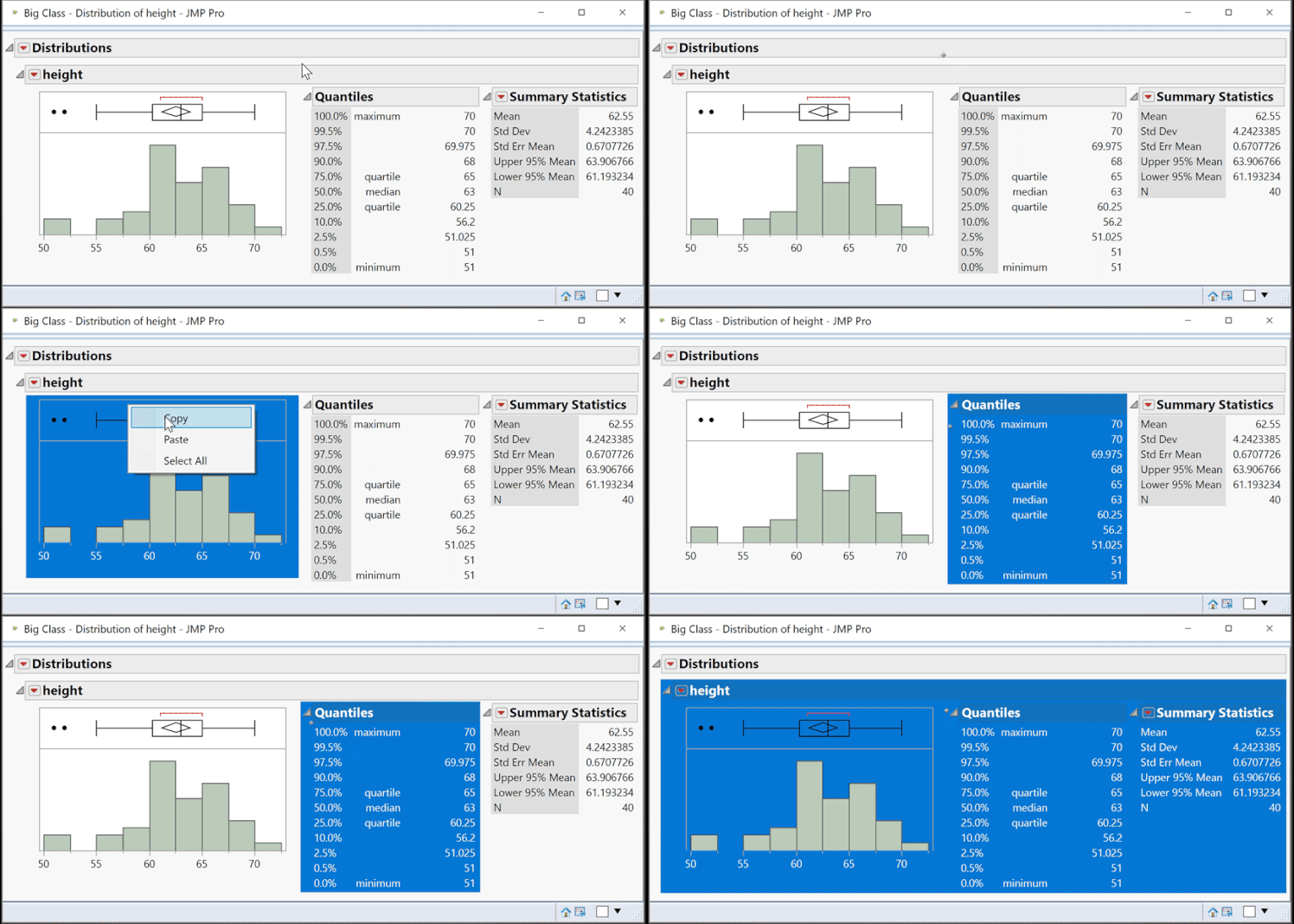
 

select-copy.gif


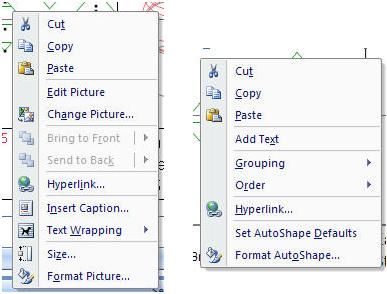
d. Open the program where you’d like to paste the content. On a Mac select Paste. On Windows, if using a Microsoft Office product, such as Word or PowerPoint, select Paste>Paste Special. From the list, select Picture (Enhanced Metafile). By selecting Picture (Enhanced Metafile), you have the ability to grow and shrink the image, ungroup the image for manipulation. This options also takes up less storage space. Once the image has been pasted in your application, if you right-click within the image and select Edit Picture, you then have the ability to manipulate that image.
savinggraphs2.JPG


Method 2: Saving an Entire Report

Select File>Save (or File > Export on a Mac). This method allows you to save your customized report output as a graphic, PowerPoint presentation, Word document, RTF file, or Interactive HTML. The text format is the only format that doesn't save graphs. Using File > Save (on both Mac and Windows) also allows you save your report as a JRP, a JMP Report File, which can either embed your data, or link to the original data. This report can be shared with others who have JMP so they can interact with your report.

Method 3: Save Selection As

You can also save selected graphs or tables by choosing Edit>Save Selection As (or on a Mac, hold the Control key, and select File > Save Selection As). This option allows you to save the selected item as a graphic in a variety of formats, including png, jpeg, svg, eps, pdf, tiff, and gif.

Method 4: Journaling

Select Edit>Journal. This will produce a static version of the report in a new window. This is useful when you want to share the output in JMP format, but do not want to share the underlying data. Journals contain the graphics, tables, and script of the report, but not the data. Select File > Save to save this Journal. 

To learn more about saving data tables, graphics and reports, refer "Save and Share Data" in the JMP documentation.

Last Modified: Jun 14, 2019 8:41 AM
Comments