cancel
Showing results for 
Show  only  | Search instead for 
Did you mean: 

JMPer Cable

A technical blog for JMP users of all levels, full of how-to's, tips and tricks, and detailed information on JMP features
%3CLINGO-SUB%20id%3D%22lingo-sub-48718%22%20slang%3D%22en-US%22%20mode%3D%22NONE%22%20mode%3D%22NONE%22%20mode%3D%22NONE%22%3EManipulating%20and%20managing%20your%20specification%20limits%3C%2FLINGO-SUB%3E%3CLINGO-BODY%20id%3D%22lingo-body-48718%22%20slang%3D%22en-US%22%20mode%3D%22NONE%22%20mode%3D%22NONE%22%20mode%3D%22NONE%22%3E%3CP%3EDo%20you%20work%20with%20specification%20limits%3F%20Do%20you%20struggle%20with%20finding%20convenient%20ways%20to%20manage%20the%20specification%20limit%20information%3F%20Have%20you%20struggled%20with%20getting%20this%20information%20in%20the%20proper%20format%3F%20If%20so%2C%20the%20new%20%3CA%20href%3D%22https%3A%2F%2Fwww.jmp.com%2Fen_us%2Fsoftware%2Fnew-release%2Fnew-in-jmp-and-jmp-pro.html%23quality-engineering-improvements%22%20target%3D%22_self%22%20rel%3D%22noopener%20noreferrer%22%3EManage%20Spec%20Limits%3C%2FA%3E%20feature%20in%20%3CA%20href%3D%22https%3A%2F%2Fwww.jmp.com%2Fen_us%2Fsoftware%2Fnew-release%2Fnew-in-jmp-and-jmp-pro.html%3Futm_campaign%3Daw%26amp%3Butm_source%3Dbl%26amp%3Butm_medium%3Dreferral%22%20target%3D%22_self%22%20rel%3D%22noopener%20noreferrer%22%3EJMP%2014%3C%2FA%3E%20will%20save%20you%20a%20lot%20of%20work%20and%20time.%20This%20blog%20post%20details%20some%20of%20the%20key%20features%20that%20can%20be%20found%20in%20this%20new%20platform.%3C%2FP%3E%0A%3CH3%20id%3D%22toc-hId-1157182651%22%20id%3D%22toc-hId-1161558263%22%20id%3D%22toc-hId-1161558263%22%20id%3D%22toc-hId-1161558263%22%20id%3D%22toc-hId-1161558263%22%3EUse%20a%20spec%20limits%20table%20to%20create%20spec%20limits%20column%20properties%3C%2FH3%3E%0A%3CP%3EAre%20your%20specification%20limits%20currently%20stored%20in%20a%20spec%20limits%20data%20table%3F%20Would%20you%20like%20to%20move%20this%20information%20into%20spec%20limit%20column%20properties%20for%20another%20table%3F%20An%20%3CA%20href%3D%22https%3A%2F%2Fcommunity.jmp.com%2Ft5%2FJMP-Add-Ins%2FWrite-Limits-to-a-Data-Table-from-a-Limits-Table%2Fta-p%2F35790%22%20target%3D%22_self%22%3Eadd-in%3C%2FA%3E%20was%20written%20by%20Jim%20Nelson%2C%20one%20of%20our%20experienced%20users%2C%20to%20do%20this%20very%20thing.%20Beginning%20with%20%3CA%20href%3D%22https%3A%2F%2Fwww.jmp.com%2Fen_us%2Fsoftware%2Fnew-release%2Fnew-in-jmp-and-jmp-pro.html%3Futm_campaign%3Daw%26amp%3Butm_source%3Dbl%26amp%3Butm_medium%3Dreferral%22%20target%3D%22_self%22%20rel%3D%22noopener%20noreferrer%22%3EJMP%2014%3C%2FA%3E%2C%20the%20Manage%20Spec%20Limits%20platform%20provides%20this%20functionality.%3C%2FP%3E%0A%3CP%3ELet's%20try%20this%20on%20an%20example.%20Start%20by%26nbsp%3Bopening%20Cities.jmp%20and%20CitySpecLimits.jmp%20found%20in%20the%20%3CA%20href%3D%22https%3A%2F%2Fwww.jmp.com%2Fen_us%2Fsoftware%2Fdata-analysis-software.html%3Futm_campaign%3Daw%26amp%3Butm_source%3Dbl%26amp%3Butm_medium%3Dreferral%22%20target%3D%22_self%22%20rel%3D%22noopener%20noreferrer%22%3EJMP%3C%2FA%3E%20sample%20data%20folder.%3C%2FP%3E%0A%3CPRE%3E%3CCODE%20class%3D%22%20language-jsl%22%3EOpen(%E2%80%9C%24SAMPLE_DATA%2FCities.jmp%E2%80%9D)%3B%0AOpen(%E2%80%9C%24SAMPLE_DATA%2FCitySpecLimits.jmp%E2%80%9D)%3B%0A%3C%2FCODE%3E%3C%2FPRE%3E%0A%3CUL%3E%0A%3CLI%3EWith%20Cities.jmp%20as%20the%20active%20data%20table%2C%20choose%20Analyze-%26gt%3BQuality%20and%20Process-%26gt%3BManage%20Spec%20Limits.%3C%2FLI%3E%0A%3CLI%3ESelect%20OZONE%2C%20CO%2C%20SO2%2C%20and%20NO%20and%20click%20Process%20Variables.%26nbsp%3B%3C%2FLI%3E%0A%3CLI%3EClick%20OK.%3C%2FLI%3E%0A%3C%2FUL%3E%0A%3CP%3E%3CSPAN%20class%3D%22lia-inline-image-display-wrapper%20lia-image-align-center%22%20image-alt%3D%22Manage%20Spec%20Limits%20Dialog%22%20style%3D%22width%3A%20458px%3B%22%3E%3CSPAN%20class%3D%22lia-inline-image-display-wrapper%22%20image-alt%3D%22Manage%20Spec%20Limits%20Dialog%22%20style%3D%22width%3A%20458px%3B%22%3E%3CSPAN%20class%3D%22lia-inline-image-display-wrapper%22%20image-alt%3D%22Manage%20Spec%20Limits%20Dialog%22%20style%3D%22width%3A%20458px%3B%22%3E%3CSPAN%20class%3D%22lia-inline-image-display-wrapper%22%20image-alt%3D%22Manage%20Spec%20Limits%20Dialog%22%20style%3D%22width%3A%20458px%3B%22%3E%3Cspan%20class%3D%22lia-inline-image-display-wrapper%22%20image-alt%3D%22Manage%20Spec%20Limits%20Dialog%22%20style%3D%22width%3A%20458px%3B%22%3E%3Cimg%20src%3D%22https%3A%2F%2Fcommunity.jmp.com%2Ft5%2Fimage%2Fserverpage%2Fimage-id%2F8697iBA37F81CDDAED1CE%2Fimage-size%2Flarge%3Fv%3Dv2%26amp%3Bpx%3D999%22%20role%3D%22button%22%20title%3D%22managespeca.png%22%20alt%3D%22Manage%20Spec%20Limits%20Dialog%22%20%2F%3E%3Cspan%20class%3D%22lia-inline-image-caption%22%20onclick%3D%22event.preventDefault()%3B%22%3EManage%20Spec%20Limits%20Dialog%3C%2Fspan%3E%3C%2Fspan%3E%3CSPAN%20class%3D%22lia-inline-image-caption%22%20onclick%3D%22event.preventDefault()%3B%22%3EManage%20Spec%20Limits%20Dialog%3C%2FSPAN%3E%3C%2FSPAN%3E%3CSPAN%20class%3D%22lia-inline-image-caption%22%20onclick%3D%22event.preventDefault()%3B%22%3EManage%20Spec%20Limits%20Dialog%3C%2FSPAN%3E%3C%2FSPAN%3E%3CSPAN%20class%3D%22lia-inline-image-caption%22%20onclick%3D%22event.preventDefault()%3B%22%3EManage%20Spec%20Limits%20Dialog%3C%2FSPAN%3E%3C%2FSPAN%3E%3CSPAN%20class%3D%22lia-inline-image-caption%22%20onclick%3D%22event.preventDefault()%3B%22%3EManage%20Spec%20Limits%20Dialog%3C%2FSPAN%3E%3C%2FSPAN%3E%3C%2FP%3E%0A%3CUL%3E%0A%3CLI%3EClick%20Load%20from%20Limits%20Table.%3C%2FLI%3E%0A%3CLI%3ESelect%20CitySpecLimits.%3C%2FLI%3E%0A%3CLI%3EClick%20OK.%3C%2FLI%3E%0A%3C%2FUL%3E%0A%3CP%3E%3CSPAN%20class%3D%22lia-inline-image-display-wrapper%20lia-image-align-center%22%20image-alt%3D%22Choose%20limits%20table%22%20style%3D%22width%3A%20720px%3B%22%3E%3CSPAN%20class%3D%22lia-inline-image-display-wrapper%22%20image-alt%3D%22Choose%20limits%20table%22%20style%3D%22width%3A%20720px%3B%22%3E%3CSPAN%20class%3D%22lia-inline-image-display-wrapper%22%20image-alt%3D%22Choose%20limits%20table%22%20style%3D%22width%3A%20720px%3B%22%3E%3CSPAN%20class%3D%22lia-inline-image-display-wrapper%22%20image-alt%3D%22Choose%20limits%20table%22%20style%3D%22width%3A%20720px%3B%22%3E%3Cspan%20class%3D%22lia-inline-image-display-wrapper%22%20image-alt%3D%22Choose%20limits%20table%22%20style%3D%22width%3A%20720px%3B%22%3E%3Cimg%20src%3D%22https%3A%2F%2Fcommunity.jmp.com%2Ft5%2Fimage%2Fserverpage%2Fimage-id%2F8707iAF408936143424AB%2Fimage-size%2Flarge%3Fv%3Dv2%26amp%3Bpx%3D999%22%20role%3D%22button%22%20title%3D%22managespecsb.png%22%20alt%3D%22Choose%20limits%20table%22%20%2F%3E%3Cspan%20class%3D%22lia-inline-image-caption%22%20onclick%3D%22event.preventDefault()%3B%22%3EChoose%20limits%20table%3C%2Fspan%3E%3C%2Fspan%3E%3CSPAN%20class%3D%22lia-inline-image-caption%22%20onclick%3D%22event.preventDefault()%3B%22%3EChoose%20limits%20table%3C%2FSPAN%3E%3C%2FSPAN%3E%3CSPAN%20class%3D%22lia-inline-image-caption%22%20onclick%3D%22event.preventDefault()%3B%22%3EChoose%20limits%20table%3C%2FSPAN%3E%3C%2FSPAN%3E%3CSPAN%20class%3D%22lia-inline-image-caption%22%20onclick%3D%22event.preventDefault()%3B%22%3EChoose%20limits%20table%3C%2FSPAN%3E%3C%2FSPAN%3E%3CSPAN%20class%3D%22lia-inline-image-caption%22%20onclick%3D%22event.preventDefault()%3B%22%3EChoose%20limits%20table%3C%2FSPAN%3E%3C%2FSPAN%3E%3C%2FP%3E%0A%3CUL%3E%0A%3CLI%3ETo%20save%20this%20information%20as%20column%20properties%2C%20click%20the%20%E2%80%9CSave%20to%20Column%20Properties%E2%80%9D%20button%20found%20at%20the%20bottom%20of%20the%20report%20window.%3C%2FLI%3E%0A%3C%2FUL%3E%0A%3CH3%20id%3D%22toc-hId-2044686332%22%20id%3D%22toc-hId-2049061944%22%20id%3D%22toc-hId-2049061944%22%20id%3D%22toc-hId-2049061944%22%20id%3D%22toc-hId-2049061944%22%3EShow%20Limits%20column%20property%3C%2FH3%3E%0A%3CP%3EI%E2%80%99ve%20often%20heard%20from%20users%20that%20they%20have%20many%20columns%20with%20specification%20limits%20and%20they%20need%20to%20check%20the%20box%20%E2%80%9CShow%20as%20graph%20reference%20lines%E2%80%9D%20for%20all%20of%20them.%20A%20colleague%20of%20mine%2C%20%3CA%20href%3D%22https%3A%2F%2Fcommunity.jmp.com%2Ft5%2Fuser%2Fviewprofilepage%2Fuser-id%2F4386%22%20target%3D%22_self%22%3EByron%20Wingerd%3C%2FA%3E%20wrote%20a%20%3CA%20href%3D%22https%3A%2F%2Fcommunity.jmp.com%2Ft5%2FByron-Wingerd-s-Blog%2FSpec-Limit-Lines-on-Graphs%2Fba-p%2F33317%22%20target%3D%22_self%22%3Eblog%20post%3C%2FA%3E%20that%20shows%20how%20to%20use%20JSL%20to%20accomplish%20this%20task.%3C%2FP%3E%0A%3CP%3EBeginning%20with%20JMP%2014%2C%20we%20have%20made%20this%20even%20easier%20with%20the%20Manage%20Spec%20Limits%20platform.%20To%20see%20an%20example%20of%20how%20to%20use%20this%20new%20feature%2C%20open%20Semiconductor%20Capability%20found%20in%20the%20sample%20data%20folder.%3C%2FP%3E%0A%3CPRE%3E%3CCODE%20class%3D%22%20language-jsl%22%3EOpen(%E2%80%9C%24SAMPLE_DATA%2FSemiconductor%20Capability.jmp%E2%80%9D)%3B%3C%2FCODE%3E%3C%2FPRE%3E%0A%3CUL%3E%0A%3CLI%3EGo%20to%20Analyze-%26gt%3BQuality%20and%20Process-%26gt%3BManage%20Spec%20Limits.%3C%2FLI%3E%0A%3CLI%3EChoose%20the%20Processes%20group%20and%20click%20Process%20Variables.%3C%2FLI%3E%0A%3C%2FUL%3E%0A%3CP%3E%3CSPAN%20class%3D%22lia-inline-image-display-wrapper%20lia-image-align-center%22%20image-alt%3D%22Manage%20Spec%20Limits%20Dialog%22%20style%3D%22width%3A%20488px%3B%22%3E%3CSPAN%20class%3D%22lia-inline-image-display-wrapper%22%20image-alt%3D%22Manage%20Spec%20Limits%20Dialog%22%20style%3D%22width%3A%20488px%3B%22%3E%3CSPAN%20class%3D%22lia-inline-image-display-wrapper%22%20image-alt%3D%22Manage%20Spec%20Limits%20Dialog%22%20style%3D%22width%3A%20488px%3B%22%3E%3CSPAN%20class%3D%22lia-inline-image-display-wrapper%22%20image-alt%3D%22Manage%20Spec%20Limits%20Dialog%22%20style%3D%22width%3A%20488px%3B%22%3E%3Cspan%20class%3D%22lia-inline-image-display-wrapper%22%20image-alt%3D%22Manage%20Spec%20Limits%20Dialog%22%20style%3D%22width%3A%20488px%3B%22%3E%3Cimg%20src%3D%22https%3A%2F%2Fcommunity.jmp.com%2Ft5%2Fimage%2Fserverpage%2Fimage-id%2F8708i59CB47335CA65AE4%2Fimage-size%2Flarge%3Fv%3Dv2%26amp%3Bpx%3D999%22%20role%3D%22button%22%20title%3D%22managespecsc.png%22%20alt%3D%22Manage%20Spec%20Limits%20Dialog%22%20%2F%3E%3Cspan%20class%3D%22lia-inline-image-caption%22%20onclick%3D%22event.preventDefault()%3B%22%3EManage%20Spec%20Limits%20Dialog%3C%2Fspan%3E%3C%2Fspan%3E%3CSPAN%20class%3D%22lia-inline-image-caption%22%20onclick%3D%22event.preventDefault()%3B%22%3EManage%20Spec%20Limits%20Dialog%3C%2FSPAN%3E%3C%2FSPAN%3E%3CSPAN%20class%3D%22lia-inline-image-caption%22%20onclick%3D%22event.preventDefault()%3B%22%3EManage%20Spec%20Limits%20Dialog%3C%2FSPAN%3E%3C%2FSPAN%3E%3CSPAN%20class%3D%22lia-inline-image-caption%22%20onclick%3D%22event.preventDefault()%3B%22%3EManage%20Spec%20Limits%20Dialog%3C%2FSPAN%3E%3C%2FSPAN%3E%3CSPAN%20class%3D%22lia-inline-image-caption%22%20onclick%3D%22event.preventDefault()%3B%22%3EManage%20Spec%20Limits%20Dialog%3C%2FSPAN%3E%3C%2FSPAN%3E%3C%2FP%3E%0A%3CUL%3E%0A%3CLI%3EClick%20OK.%3C%2FLI%3E%0A%3C%2FUL%3E%0A%3CP%3EFrom%20the%20information%20contained%20in%20the%20Spec%20Limits%20column%20property%2C%20the%20LSL%2C%20Target%2C%20and%20USL%20are%20filled%20in.%20The%20box%20on%20the%20far%20right%20titled%20%22Show%20Limits%22%20corresponds%20to%20the%20%E2%80%9CShow%20as%20Graph%20Reference%20Lines%E2%80%9D%20option%20found%20in%20the%20spec%20limits%20column%20property.%20It%20would%20be%20time-consuming%20to%20check%20these%20boxes%20one%20at%20a%20time.%3C%2FP%3E%0A%3CUL%3E%0A%3CLI%3ETo%20check%20all%20of%20the%20boxes%2C%20click%20on%20the%20red%20triangle%20next%20to%20Manage%20Spec%20Limits%20and%20choose%20Show%20Limits%20All.%3C%2FLI%3E%0A%3C%2FUL%3E%0A%3CP%3E%3CSPAN%20class%3D%22lia-inline-image-display-wrapper%20lia-image-align-center%22%20image-alt%3D%22Show%20Limits%20All%22%20style%3D%22width%3A%20460px%3B%22%3E%3CSPAN%20class%3D%22lia-inline-image-display-wrapper%22%20image-alt%3D%22Show%20Limits%20All%22%20style%3D%22width%3A%20460px%3B%22%3E%3CSPAN%20class%3D%22lia-inline-image-display-wrapper%22%20image-alt%3D%22Show%20Limits%20All%22%20style%3D%22width%3A%20460px%3B%22%3E%3CSPAN%20class%3D%22lia-inline-image-display-wrapper%22%20image-alt%3D%22Show%20Limits%20All%22%20style%3D%22width%3A%20460px%3B%22%3E%3Cspan%20class%3D%22lia-inline-image-display-wrapper%22%20image-alt%3D%22Show%20Limits%20All%22%20style%3D%22width%3A%20460px%3B%22%3E%3Cimg%20src%3D%22https%3A%2F%2Fcommunity.jmp.com%2Ft5%2Fimage%2Fserverpage%2Fimage-id%2F8709i8CA31180819A0853%2Fimage-size%2Flarge%3Fv%3Dv2%26amp%3Bpx%3D999%22%20role%3D%22button%22%20title%3D%22managespecsd.png%22%20alt%3D%22Show%20Limits%20All%22%20%2F%3E%3Cspan%20class%3D%22lia-inline-image-caption%22%20onclick%3D%22event.preventDefault()%3B%22%3EShow%20Limits%20All%3C%2Fspan%3E%3C%2Fspan%3E%3CSPAN%20class%3D%22lia-inline-image-caption%22%20onclick%3D%22event.preventDefault()%3B%22%3EShow%20Limits%20All%3C%2FSPAN%3E%3C%2FSPAN%3E%3CSPAN%20class%3D%22lia-inline-image-caption%22%20onclick%3D%22event.preventDefault()%3B%22%3EShow%20Limits%20All%3C%2FSPAN%3E%3C%2FSPAN%3E%3CSPAN%20class%3D%22lia-inline-image-caption%22%20onclick%3D%22event.preventDefault()%3B%22%3EShow%20Limits%20All%3C%2FSPAN%3E%3C%2FSPAN%3E%3CSPAN%20class%3D%22lia-inline-image-caption%22%20onclick%3D%22event.preventDefault()%3B%22%3EShow%20Limits%20All%3C%2FSPAN%3E%3C%2FSPAN%3E%3C%2FP%3E%0A%3CUL%3E%0A%3CLI%3ETo%20save%20this%20selection%20back%20to%20the%20data%20table%2C%20click%20%E2%80%9CSave%20to%20Column%20Properties%2C%E2%80%9D%20which%20appears%20at%20the%20bottom%20of%20the%20report%20window.%3C%2FLI%3E%0A%3C%2FUL%3E%0A%3CP%3ENow%20when%20we%20look%20at%20the%20spec%20limits%20column%20property%20for%20NPN1%2C%20we%20see%20that%20%E2%80%9CShow%20as%20graph%20reference%20lines%E2%80%9D%20has%20been%20checked.%3CBR%20%2F%3E%3CBR%20%2F%3E%3C%2FP%3E%0A%3CP%3E%3CSPAN%20class%3D%22lia-inline-image-display-wrapper%20lia-image-align-center%22%20image-alt%3D%22NPN1%20Spec%20Limits%20Column%20Property%22%20style%3D%22width%3A%20396px%3B%22%3E%3CSPAN%20class%3D%22lia-inline-image-display-wrapper%22%20image-alt%3D%22NPN1%20Spec%20Limits%20Column%20Property%22%20style%3D%22width%3A%20396px%3B%22%3E%3CSPAN%20class%3D%22lia-inline-image-display-wrapper%22%20image-alt%3D%22NPN1%20Spec%20Limits%20Column%20Property%22%20style%3D%22width%3A%20396px%3B%22%3E%3CSPAN%20class%3D%22lia-inline-image-display-wrapper%22%20image-alt%3D%22NPN1%20Spec%20Limits%20Column%20Property%22%20style%3D%22width%3A%20396px%3B%22%3E%3Cspan%20class%3D%22lia-inline-image-display-wrapper%22%20image-alt%3D%22NPN1%20Spec%20Limits%20Column%20Property%22%20style%3D%22width%3A%20396px%3B%22%3E%3Cimg%20src%3D%22https%3A%2F%2Fcommunity.jmp.com%2Ft5%2Fimage%2Fserverpage%2Fimage-id%2F8710i34C231F570647871%2Fimage-size%2Flarge%3Fv%3Dv2%26amp%3Bpx%3D999%22%20role%3D%22button%22%20title%3D%22managespecse.png%22%20alt%3D%22NPN1%20Spec%20Limits%20Column%20Property%22%20%2F%3E%3Cspan%20class%3D%22lia-inline-image-caption%22%20onclick%3D%22event.preventDefault()%3B%22%3ENPN1%20Spec%20Limits%20Column%20Property%3C%2Fspan%3E%3C%2Fspan%3E%3CSPAN%20class%3D%22lia-inline-image-caption%22%20onclick%3D%22event.preventDefault()%3B%22%3ENPN1%20Spec%20Limits%20Column%20Property%3C%2FSPAN%3E%3C%2FSPAN%3E%3CSPAN%20class%3D%22lia-inline-image-caption%22%20onclick%3D%22event.preventDefault()%3B%22%3ENPN1%20Spec%20Limits%20Column%20Property%3C%2FSPAN%3E%3C%2FSPAN%3E%3CSPAN%20class%3D%22lia-inline-image-caption%22%20onclick%3D%22event.preventDefault()%3B%22%3ENPN1%20Spec%20Limits%20Column%20Property%3C%2FSPAN%3E%3C%2FSPAN%3E%3CSPAN%20class%3D%22lia-inline-image-caption%22%20onclick%3D%22event.preventDefault()%3B%22%3ENPN1%20Spec%20Limits%20Column%20Property%3C%2FSPAN%3E%3C%2FSPAN%3E%3C%2FP%3E%0A%3CH3%20id%3D%22toc-hId--1362777283%22%20id%3D%22toc-hId--1358401671%22%20id%3D%22toc-hId--1358401671%22%20id%3D%22toc-hId--1358401671%22%20id%3D%22toc-hId--1358401671%22%3EControl%20the%20number%20of%20decimal%20places%20for%20your%20spec%20limits%3C%2FH3%3E%0A%3CP%3ESometimes%20your%20specification%20limits%20may%20be%20stored%20with%20more%20decimal%20places%20than%20you%20desire.%20You%20can%20use%20the%20%E2%80%9CRound%20Decimals%E2%80%9D%20option%20in%20Manage%20Spec%20Limits%20to%20alter%20the%20number%20of%20decimal%20places.%3C%2FP%3E%0A%3CUL%3E%0A%3CLI%3EUsing%20the%20example%20above%2C%20from%20the%20red%20triangle%20next%20to%20Manage%20Spec%20Limits%2C%20choose%20%E2%80%9CRound%20Decimals.%E2%80%9D%3C%2FLI%3E%0A%3CLI%3EEnter%201%20into%20the%20box.%3C%2FLI%3E%0A%3CLI%3EClick%20OK.%3C%2FLI%3E%0A%3C%2FUL%3E%0A%3CP%3E%3CSPAN%20class%3D%22lia-inline-image-display-wrapper%20lia-image-align-center%22%20image-alt%3D%22Rounded%20to%201%20decimal%22%20style%3D%22width%3A%20459px%3B%22%3E%3CSPAN%20class%3D%22lia-inline-image-display-wrapper%22%20image-alt%3D%22Rounded%20to%201%20decimal%22%20style%3D%22width%3A%20459px%3B%22%3E%3CSPAN%20class%3D%22lia-inline-image-display-wrapper%22%20image-alt%3D%22Rounded%20to%201%20decimal%22%20style%3D%22width%3A%20459px%3B%22%3E%3CSPAN%20class%3D%22lia-inline-image-display-wrapper%22%20image-alt%3D%22Rounded%20to%201%20decimal%22%20style%3D%22width%3A%20459px%3B%22%3E%3Cspan%20class%3D%22lia-inline-image-display-wrapper%22%20image-alt%3D%22Rounded%20to%201%20decimal%22%20style%3D%22width%3A%20459px%3B%22%3E%3Cimg%20src%3D%22https%3A%2F%2Fcommunity.jmp.com%2Ft5%2Fimage%2Fserverpage%2Fimage-id%2F8711i154B3C33BA49C90A%2Fimage-size%2Flarge%3Fv%3Dv2%26amp%3Bpx%3D999%22%20role%3D%22button%22%20title%3D%22managespecsf.png%22%20alt%3D%22Rounded%20to%201%20decimal%22%20%2F%3E%3Cspan%20class%3D%22lia-inline-image-caption%22%20onclick%3D%22event.preventDefault()%3B%22%3ERounded%20to%201%20decimal%3C%2Fspan%3E%3C%2Fspan%3E%3CSPAN%20class%3D%22lia-inline-image-caption%22%20onclick%3D%22event.preventDefault()%3B%22%3ERounded%20to%201%20decimal%3C%2FSPAN%3E%3C%2FSPAN%3E%3CSPAN%20class%3D%22lia-inline-image-caption%22%20onclick%3D%22event.preventDefault()%3B%22%3ERounded%20to%201%20decimal%3C%2FSPAN%3E%3C%2FSPAN%3E%3CSPAN%20class%3D%22lia-inline-image-caption%22%20onclick%3D%22event.preventDefault()%3B%22%3ERounded%20to%201%20decimal%3C%2FSPAN%3E%3C%2FSPAN%3E%3CSPAN%20class%3D%22lia-inline-image-caption%22%20onclick%3D%22event.preventDefault()%3B%22%3ERounded%20to%201%20decimal%3C%2FSPAN%3E%3C%2FSPAN%3E%3C%2FP%3E%0A%3CUL%3E%0A%3CLI%3EYou%20can%20then%20choose%20to%20%E2%80%9CSave%20to%20Column%20Properties%E2%80%9D%20or%20choose%20one%20of%20the%20Save%20Table%20options%20found%20at%20the%20bottom%20of%20the%20report%20window.%3C%2FLI%3E%0A%3C%2FUL%3E%0A%3CH3%20id%3D%22toc-hId--475273602%22%20id%3D%22toc-hId--470897990%22%20id%3D%22toc-hId--470897990%22%20id%3D%22toc-hId--470897990%22%20id%3D%22toc-hId--470897990%22%3ECreate%20a%20spec%20limits%20table%20from%20your%20column%20properties%3C%2FH3%3E%0A%3CP%3EAre%20your%20specification%20limits%20stored%20as%20column%20properties%3F%20Do%20you%20need%20to%20share%20just%20the%20spec%20limits%20with%20a%20colleague%3F%20Do%20you%20need%20to%20use%20those%20specification%20limits%20on%20another%20data%20table%3F%20This%20is%20now%20easily%26nbsp%3Baccomplished%20with%20buttons%20in%20the%20Manage%20Spec%20Limits%20platform.%20From%20the%20Manage%20Spec%20Limits%20window%20above%2C%20click%20on%20the%20button%20for%20either%20%E2%80%9CSave%20to%20Tall%20Spec%20Limits%20Table%E2%80%9D%20or%20%E2%80%9CSave%20to%20Wide%20Spec%20Limits%20Table.%E2%80%9D%20Depending%20on%20which%20option%20you%20choose%2C%20you%20get%20either%20a%20tall%20or%20wide%20specification%20limits%20data%20table.%20You%20can%20then%20share%20this%20data%20table%20with%20a%20colleague%20or%20use%20this%20spec%20limits%20data%20table%20on%20a%20different%20data%20set.%3C%2FP%3E%0A%3CH3%20id%3D%22toc-hId-412230079%22%20id%3D%22toc-hId-416605691%22%20id%3D%22toc-hId-416605691%22%20id%3D%22toc-hId-416605691%22%20id%3D%22toc-hId-416605691%22%3EConclusions%3C%2FH3%3E%0A%3CP%3EThe%20new%20Manage%20Spec%20Limits%20platform%20allows%20you%20to%20easily%20manipulate%20your%20spec%20limit%20information.%20You%20can%20create%20spec%20limits%20column%20properties%20from%20a%20spec%20limits%20table%2C%20you%20can%20check%20%E2%80%9CShow%20as%20Graph%20Reference%20Lines%E2%80%9D%20for%20many%20column%20properties%20at%20once%2C%20you%20can%20control%20the%20number%20of%20decimal%20places%20your%20spec%20limits%20have%2C%20and%20you%20can%20create%20spec%20limits%20tables%20from%20your%20column%20properties.%3C%2FP%3E%3C%2FLINGO-BODY%3E%3CLINGO-TEASER%20id%3D%22lingo-teaser-48718%22%20slang%3D%22en-US%22%3E%3CP%3EDo%20you%20struggle%20with%20finding%20convenient%20ways%20to%20manage%20the%20specification%20limit%20information%3F%20Manage%20Spec%20Limits%20in%20JMP%2014%20saves%20you%20work%20and%20time.%26nbsp%3B%3CSPAN%20class%3D%22lia-inline-image-display-wrapper%20lia-image-align-inline%22%20image-alt%3D%22manage_spec_limits.png%22%20style%3D%22width%3A%20459px%3B%22%3E%3CSPAN%20class%3D%22lia-inline-image-display-wrapper%22%20image-alt%3D%22manage_spec_limits.png%22%20style%3D%22width%3A%20459px%3B%22%3E%3CSPAN%20class%3D%22lia-inline-image-display-wrapper%22%20image-alt%3D%22manage_spec_limits.png%22%20style%3D%22width%3A%20459px%3B%22%3E%3CSPAN%20class%3D%22lia-inline-image-display-wrapper%22%20image-alt%3D%22manage_spec_limits.png%22%20style%3D%22width%3A%20459px%3B%22%3E%3Cspan%20class%3D%22lia-inline-image-display-wrapper%22%20image-alt%3D%22manage_spec_limits.png%22%20style%3D%22width%3A%20459px%3B%22%3E%3Cimg%20src%3D%22https%3A%2F%2Fcommunity.jmp.com%2Ft5%2Fimage%2Fserverpage%2Fimage-id%2F9994i090432061316652E%2Fimage-size%2Flarge%3Fv%3Dv2%26amp%3Bpx%3D999%22%20role%3D%22button%22%20title%3D%22manage_spec_limits.png%22%20alt%3D%22manage_spec_limits.png%22%20%2F%3E%3C%2Fspan%3E%3C%2FSPAN%3E%3C%2FSPAN%3E%3C%2FSPAN%3E%3C%2FSPAN%3E%3C%2FP%3E%0A%3CP%3E%26nbsp%3B%3C%2FP%3E%3C%2FLINGO-TEASER%3E%3CLINGO-SUB%20id%3D%22lingo-sub-529803%22%20slang%3D%22en-US%22%20mode%3D%22NONE%22%20mode%3D%22NONE%22%20mode%3D%22NONE%22%3ERe%3A%20Manipulating%20and%20managing%20your%20specification%20limits%3C%2FLINGO-SUB%3E%3CLINGO-BODY%20id%3D%22lingo-body-529803%22%20slang%3D%22en-US%22%20mode%3D%22NONE%22%20mode%3D%22NONE%22%20mode%3D%22NONE%22%3E%3CP%3E%3CA%20href%3D%22https%3A%2F%2Fcommunity.jmp.com%2Ft5%2Fuser%2Fviewprofilepage%2Fuser-id%2F42586%22%20target%3D%22_blank%22%3E%40Vijaya%3C%2FA%3E%26nbsp%3BWithout%20your%20data%20tables%20it%20is%20almost%20impossible%20to%20determine%20what%20it%20is%20you%20are%20trying%20to%20do.%26nbsp%3B%20It%20sounds%20like%20you%20have%202%20data%20tables.%26nbsp%3B%20One%20data%20table%20contains%20your%20new%20data.%26nbsp%3B%20The%20second%20data%20table%20is%20a%20limits%20data%20table.%26nbsp%3B%20The%20limits%20data%20table%20must%20be%20in%20the%20appropriate%20limits%20table%20format%20(such%20as%20the%20one%20in%20the%20example%20above).%26nbsp%3B%20You%20will%26nbsp%3B%20need%20to%20use%20the%20JSL%20code%20I%20gave%20in%20my%20comment%20posted%20at%26nbsp%3B%3CSPAN%20class%3D%22local-date%22%3E04-03-2018%3C%2FSPAN%3E%3CSPAN%3E%26nbsp%3B%3C%2FSPAN%3E%3CSPAN%20class%3D%22local-time%22%3E01%3A24%20PM%20(above).%26nbsp%3B%20You%20must%20use%20the%20command%26nbsp%3B%3C%2FSPAN%3E%3C%2FP%3E%0A%3CPRE%3ELoad%20from%20Limits%20Table(dtLimits)%3C%2FPRE%3E%0A%3CP%3E%26nbsp%3Bwhere%20dtLimits%20is%20the%20reference%20to%20your%20limits%20data%20table.%3C%2FP%3E%3C%2FLINGO-BODY%3E%3CLINGO-SUB%20id%3D%22lingo-sub-529477%22%20slang%3D%22en-US%22%20mode%3D%22NONE%22%20mode%3D%22NONE%22%20mode%3D%22NONE%22%3ERe%3A%20Manipulating%20and%20managing%20your%20specification%20limits%3C%2FLINGO-SUB%3E%3CLINGO-BODY%20id%3D%22lingo-body-529477%22%20slang%3D%22en-US%22%20mode%3D%22NONE%22%20mode%3D%22NONE%22%20mode%3D%22NONE%22%3E%3CP%3EHi%20Tonya%20%2C%26nbsp%3B%3C%2FP%3E%0A%3CP%3E%26nbsp%3B%3C%2FP%3E%0A%3CP%3EI%20have%20recently%20joined%20this%20community%20and%20i%20am%20completely%20novice%20in%20JSL%20%2C%20as%20i%20have%20received%20a%20requirement%20to%20automate%20was%20looking%20for%20answer%20to%20my%20issue%20which%20is%26nbsp%3B%3C%2FP%3E%0A%3CP%3E%2F%3C%2FP%3E%0A%3CPRE%3E%3CCODE%20class%3D%22%20language-jsl%22%3E%2F%20Launch%20platform%3A%20Manage%20Spec%20Limits%0AManage%20Spec%20Limits(%0AProcess%20Variables(%0A%3A%22Assay%20(HPLC)%20(labelled%20amount)%26gt%3BAssay%20(HPLC)%20(labelled%20amount)%20MPC015271%20(KM-1484)%26gt%3B%25%20Active%20Content%22n%2C%0A%3A%22Mean%26gt%3BDissolution%20(HPLC)%20(within%2020%20minutes)%20(labelled%20amount)%20-%20HK%20market%20MPC015270%20(KM-1483)%26gt%3BMean%22n%2C%0A%3A%22Mean%26gt%3BDissolution%20(HPLC)%20(within%2030%20minutes)%20(labelled%20amount)%20-%20DCP%2C%20FR%20markets%20MPC015270%20(KM-1483)%26gt%3BMean%22n%2C%0A%3A%0A%22Mean%26gt%3BDissolution%20(HPLC)%20(within%2030%20minutes)%20(labelled%20amount)%20MPC015270%20(KM-1483)%26gt%3BMean%22n%0A)%0A)%3B%0A%0A%2F%2F%20Report%20snapshot%3A%2074023535_BI%20stability%20data_Sheet1%20-%20Manage%20Spec%20Limits%0AData%20Table(%2274023535_BI%20stability%20data_Sheet1%22)%20%26lt%3B%26lt%3B%0AManage%20Spec%20Limits(%0AProcess%20Variables(%0A%3A%22Assay%20(HPLC)%20(labelled%20amount)%26gt%3BAssay%20(HPLC)%20(labelled%20amount)%20MPC015271%20(KM-1484)%26gt%3B%25%20Active%20Content%22n%2C%0A%3A%22Mean%26gt%3BDissolution%20(HPLC)%20(within%2020%20minutes)%20(labelled%20amount)%20-%20HK%20market%20MPC015270%20(KM-1483)%26gt%3BMean%22n%2C%0A%3A%22Mean%26gt%3BDissolution%20(HPLC)%20(within%2030%20minutes)%20(labelled%20amount)%20-%20DCP%2C%20FR%20markets%20MPC015270%20(KM-1483)%26gt%3BMean%22n%2C%0A%3A%0A%22Mean%26gt%3BDissolution%20(HPLC)%20(within%2030%20minutes)%20(labelled%20amount)%20MPC015270%20(KM-1483)%26gt%3BMean%22n%0A)%0A)%3B%0A%0Adt%20%3D%20Data%20Table%20(%2274023535_BI%20stability%20specifications_Sheet1%22)%3B%0A%0Adt2%20%3D%20Data%20Table%20(%2274023535_BI%20stability%20data_Sheet1%22)%3B%0A%0Adt3%20%3D%20dt2%20%26lt%3B%26lt%3B%20Manage%20Spec%20Limits(%20Y(%20%3A%22Assay%20(HPLC)%20(labelled%20amount)%26gt%3BAssay%20(HPLC)%20(labelled%20amount)%20MPC015271%20(KM-1484)%26gt%3B%25%20Active%20Content%22n%2C%20%3A%22Mean%26gt%3BDissolution%20(HPLC)%20(within%2020%20minutes)%20(labelled%20amount)%20-%20HK%20market%20MPC015270%20(KM-1483)%26gt%3BMean%22n%2C%20%3A%22Mean%26gt%3BDissolution%20(HPLC)%20(within%2030%20minutes)%20(labelled%20amount)%20-%20DCP%2C%20FR%20markets%20MPC015270%20(KM-1483)%26gt%3BMean%22n%2C%20%3A%22Mean%26gt%3BDissolution%20(HPLC)%20(within%2030%20minutes)%20(labelled%20amount)%20MPC015270%20(KM-1483)%26gt%3BMean%22n%20)%2C%20Load%20from%20Limits%20Table(%2274023535_BI%20stability%20specifications_Sheet1.jmp%22)%2C%20Save%20to%20Column%20Properties%20(1)%20)%3B%0A%0Adt3%20%26lt%3B%26lt%3B%20close%20window%3B%3C%2FCODE%3E%3C%2FPRE%3E%0A%3CP%3E%26nbsp%3B%3C%2FP%3E%0A%3CP%3E%26nbsp%3B%3C%2FP%3E%0A%3CP%3Eit%20is%20opening%20the%20manage%20spec%20limits%20window%20but%20not%20loading%20data%20from%20the%20specification%20sheet%26nbsp%3B%3C%2FP%3E%0A%3CP%3E%26nbsp%3B%3C%2FP%3E%0A%3CP%3E%26nbsp%3B%3C%2FP%3E%0A%3CP%3E%26nbsp%3B%3C%2FP%3E%0A%3CP%3EP.S%20i%20am%20absolutely%20new%20to%20this.%3C%2FP%3E%3C%2FLINGO-BODY%3E%3CLINGO-SUB%20id%3D%22lingo-sub-244417%22%20slang%3D%22en-US%22%20mode%3D%22NONE%22%20mode%3D%22NONE%22%20mode%3D%22NONE%22%3ERe%3A%20Manipulating%20and%20managing%20your%20specification%20limits%3C%2FLINGO-SUB%3E%3CLINGO-BODY%20id%3D%22lingo-body-244417%22%20slang%3D%22en-US%22%20mode%3D%22NONE%22%20mode%3D%22NONE%22%20mode%3D%22NONE%22%3E%3CP%3EI'm%20glad%20you%20were%20able%20to%20get%20your%20code%20working%20as%20desired.%3C%2FP%3E%3C%2FLINGO-BODY%3E%3CLINGO-SUB%20id%3D%22lingo-sub-244393%22%20slang%3D%22en-US%22%20mode%3D%22NONE%22%20mode%3D%22NONE%22%20mode%3D%22NONE%22%3ERe%3A%20Manipulating%20and%20managing%20your%20specification%20limits%3C%2FLINGO-SUB%3E%3CLINGO-BODY%20id%3D%22lingo-body-244393%22%20slang%3D%22en-US%22%20mode%3D%22NONE%22%20mode%3D%22NONE%22%20mode%3D%22NONE%22%3E%3CPRE%3E%3CCODE%20class%3D%22%20language-jsl%22%3Edt%20%3D%20Data%20Table%20(%22Table_B%22)%3B%0A%0Adt2%20%3D%20Data%20Table%20(%22Table_A%22)%3B%0A%0Adt3%20%3D%20dt2%20%26lt%3B%26lt%3B%20Manage%20Spec%20Limits(%20Y(%20%3ABVIA_RES%2C%20%3ARDR_RES%2C%20%3ATAD_RES%2C%20%3AWELGR_RES%20)%2C%20Load%20from%20Limits%20Table(%22Table_B.jmp%22)%2C%20Save%20to%20Column%20Properties%20(1)%20)%3B%0A%0Adt3%20%26lt%3B%26lt%3B%20close%20window%3B%3C%2FCODE%3E%3C%2FPRE%3E%3CP%3EHi%20Tonya.%3C%2FP%3E%3CP%3E%26nbsp%3B%3C%2FP%3E%3CP%3EEverything%20is%20sorted%20out.%20Many%20thanks%3C%2FP%3E%3CP%3E%26nbsp%3B%3C%2FP%3E%3C%2FLINGO-BODY%3E%3CLINGO-SUB%20id%3D%22lingo-sub-243977%22%20slang%3D%22en-US%22%20mode%3D%22NONE%22%20mode%3D%22NONE%22%20mode%3D%22NONE%22%3ERe%3A%20Manipulating%20and%20managing%20your%20specification%20limits%3C%2FLINGO-SUB%3E%3CLINGO-BODY%20id%3D%22lingo-body-243977%22%20slang%3D%22en-US%22%20mode%3D%22NONE%22%20mode%3D%22NONE%22%20mode%3D%22NONE%22%3E%3CP%3EI%20see%20two%20issues.%3C%2FP%3E%0A%3CP%3E1)%20dt%20has%20been%20assigned%20to%20both%26nbsp%3B%3CSPAN%20style%3D%22display%3A%20inline%20!important%3B%20float%3A%20none%3B%20background-color%3A%20%23ffffff%3B%20color%3A%20black%3B%20direction%3A%20ltr%3B%20font-family%3A%20Consolas%2CMonaco%2C'Andale%20Mono'%2C'Ubuntu%20Mono'%2Cmonospace%3B%20font-size%3A%20inherit%3B%20font-style%3A%20normal%3B%20font-variant%3A%20normal%3B%20font-weight%3A%20300%3B%20letter-spacing%3A%20normal%3B%20line-height%3A%201.5%3B%20-ms-hyphens%3A%20none%3B%20orphans%3A%202%3B%20overflow-wrap%3A%20normal%3B%20text-align%3A%20left%3B%20text-decoration%3A%20none%3B%20text-indent%3A%200px%3B%20text-shadow%3A%200px%201px%20white%3B%20text-transform%3A%20none%3B%20-webkit-text-stroke-width%3A%200px%3B%20white-space%3A%20pre%3B%20word-break%3A%20normal%3B%20word-spacing%3A%20normal%3B%22%3ESpecs_Limits%20and%20Table_A.%20%3C%2FSPAN%3E%3C%2FP%3E%0A%3CP%3E%3CSPAN%20style%3D%22display%3A%20inline%20!important%3B%20float%3A%20none%3B%20background-color%3A%20%23ffffff%3B%20color%3A%20black%3B%20direction%3A%20ltr%3B%20font-family%3A%20Consolas%2CMonaco%2C'Andale%20Mono'%2C'Ubuntu%20Mono'%2Cmonospace%3B%20font-size%3A%20inherit%3B%20font-style%3A%20normal%3B%20font-variant%3A%20normal%3B%20font-weight%3A%20300%3B%20letter-spacing%3A%20normal%3B%20line-height%3A%201.5%3B%20-ms-hyphens%3A%20none%3B%20orphans%3A%202%3B%20overflow-wrap%3A%20normal%3B%20text-align%3A%20left%3B%20text-decoration%3A%20none%3B%20text-indent%3A%200px%3B%20text-shadow%3A%200px%201px%20white%3B%20text-transform%3A%20none%3B%20-webkit-text-stroke-width%3A%200px%3B%20white-space%3A%20pre%3B%20word-break%3A%20normal%3B%20word-spacing%3A%20normal%3B%22%3E2)Load%20from%20Limits%20Table(%20Specs_Limits%20)%20should%20be%20Load%20from%20Limits%20Table(%22Specs_Limits.jmp%22)%3C%2FSPAN%3E%3C%2FP%3E%0A%3CP%3E%26nbsp%3B%3C%2FP%3E%0A%3CP%3E%3CSPAN%20style%3D%22display%3A%20inline%20!important%3B%20float%3A%20none%3B%20background-color%3A%20%23ffffff%3B%20color%3A%20black%3B%20direction%3A%20ltr%3B%20font-family%3A%20Consolas%2CMonaco%2C'Andale%20Mono'%2C'Ubuntu%20Mono'%2Cmonospace%3B%20font-size%3A%20inherit%3B%20font-style%3A%20normal%3B%20font-variant%3A%20normal%3B%20font-weight%3A%20300%3B%20letter-spacing%3A%20normal%3B%20line-height%3A%201.5%3B%20-ms-hyphens%3A%20none%3B%20orphans%3A%202%3B%20overflow-wrap%3A%20normal%3B%20text-align%3A%20left%3B%20text-decoration%3A%20none%3B%20text-indent%3A%200px%3B%20text-shadow%3A%200px%201px%20white%3B%20text-transform%3A%20none%3B%20-webkit-text-stroke-width%3A%200px%3B%20white-space%3A%20pre%3B%20word-break%3A%20normal%3B%20word-spacing%3A%20normal%3B%22%3EBecause%20you%20specified%20Spec_Limits%2C%20JMP%20is%20looking%20for%20a%20variable%20named%20Spec_Limits%20which%20does%20not%20exist.%20%3C%2FSPAN%3E%3C%2FP%3E%3C%2FLINGO-BODY%3E%3CLINGO-SUB%20id%3D%22lingo-sub-243908%22%20slang%3D%22en-US%22%20mode%3D%22NONE%22%20mode%3D%22NONE%22%20mode%3D%22NONE%22%3ERe%3A%20Manipulating%20and%20managing%20your%20specification%20limits%3C%2FLINGO-SUB%3E%3CLINGO-BODY%20id%3D%22lingo-body-243908%22%20slang%3D%22en-US%22%20mode%3D%22NONE%22%20mode%3D%22NONE%22%20mode%3D%22NONE%22%3E%3CP%3EHi%20Byron%2C%3C%2FP%3E%3CP%3E%26nbsp%3B%3C%2FP%3E%3CP%3EI%20did%20it%2C%20but%20still%20the%20error%20is%20same.%20Any%20other%20suggestion%20%3F%3C%2FP%3E%3CP%3E%26nbsp%3B%3C%2FP%3E%3CP%3EThanks.%3C%2FP%3E%3CP%3E%26nbsp%3B%3C%2FP%3E%3C%2FLINGO-BODY%3E%3CLINGO-SUB%20id%3D%22lingo-sub-243664%22%20slang%3D%22en-US%22%20mode%3D%22NONE%22%20mode%3D%22NONE%22%20mode%3D%22NONE%22%3ERe%3A%20Manipulating%20and%20managing%20your%20specification%20limits%3C%2FLINGO-SUB%3E%3CLINGO-BODY%20id%3D%22lingo-body-243664%22%20slang%3D%22en-US%22%20mode%3D%22NONE%22%20mode%3D%22NONE%22%20mode%3D%22NONE%22%3E%3CP%3EThe%20first%20thing%20I%20would%20try%3A%3C%2FP%3E%0A%3CP%3ESave%20the%20Script%20and%20the%20two%20data%20tables%20to%20the%20same%20folder.%3C%2FP%3E%0A%3CP%3E%26nbsp%3B%3C%2FP%3E%3C%2FLINGO-BODY%3E%3CLINGO-SUB%20id%3D%22lingo-sub-243559%22%20slang%3D%22en-US%22%20mode%3D%22NONE%22%20mode%3D%22NONE%22%20mode%3D%22NONE%22%3ERe%3A%20Manipulating%20and%20managing%20your%20specification%20limits%3C%2FLINGO-SUB%3E%3CLINGO-BODY%20id%3D%22lingo-body-243559%22%20slang%3D%22en-US%22%20mode%3D%22NONE%22%20mode%3D%22NONE%22%20mode%3D%22NONE%22%3E%3CPRE%3E%26nbsp%3B%3C%2FPRE%3E%3CP%3EData%20table%20--%3C%2FP%3E%3CP%3E%26nbsp%3B%3C%2FP%3E%3CP%3E%3CSPAN%20class%3D%22lia-inline-image-display-wrapper%20lia-image-align-inline%22%20image-alt%3D%22Hari_0-1580313303952.png%22%20style%3D%22width%3A%20400px%3B%22%3E%3CSPAN%20class%3D%22lia-inline-image-display-wrapper%22%20image-alt%3D%22Hari_0-1580313303952.png%22%20style%3D%22width%3A%20337px%3B%22%3E%3CSPAN%20class%3D%22lia-inline-image-display-wrapper%22%20image-alt%3D%22Hari_0-1580313303952.png%22%20style%3D%22width%3A%20337px%3B%22%3E%3CSPAN%20class%3D%22lia-inline-image-display-wrapper%22%20image-alt%3D%22Hari_0-1580313303952.png%22%20style%3D%22width%3A%20337px%3B%22%3E%3Cspan%20class%3D%22lia-inline-image-display-wrapper%22%20image-alt%3D%22Hari_0-1580313303952.png%22%20style%3D%22width%3A%20337px%3B%22%3E%3Cimg%20src%3D%22https%3A%2F%2Fcommunity.jmp.com%2Ft5%2Fimage%2Fserverpage%2Fimage-id%2F21376iDFEE80E14E868D39%2Fimage-size%2Fmedium%3Fv%3Dv2%26amp%3Bpx%3D400%22%20role%3D%22button%22%20title%3D%22Hari_0-1580313303952.png%22%20alt%3D%22Hari_0-1580313303952.png%22%20%2F%3E%3C%2Fspan%3E%3C%2FSPAN%3E%3C%2FSPAN%3E%3C%2FSPAN%3E%3C%2FSPAN%3E%3C%2FP%3E%3CP%3E%26nbsp%3B%3C%2FP%3E%3CP%3ESpecs%20Table%20--%3C%2FP%3E%3CP%3E%3CSPAN%20class%3D%22lia-inline-image-display-wrapper%20lia-image-align-inline%22%20image-alt%3D%22image.png%22%20style%3D%22width%3A%20488px%3B%22%3E%3CSPAN%20class%3D%22lia-inline-image-display-wrapper%22%20image-alt%3D%22image.png%22%20style%3D%22width%3A%20488px%3B%22%3E%3CSPAN%20class%3D%22lia-inline-image-display-wrapper%22%20image-alt%3D%22image.png%22%20style%3D%22width%3A%20488px%3B%22%3E%3CSPAN%20class%3D%22lia-inline-image-display-wrapper%22%20image-alt%3D%22image.png%22%20style%3D%22width%3A%20488px%3B%22%3E%3Cspan%20class%3D%22lia-inline-image-display-wrapper%22%20image-alt%3D%22image.png%22%20style%3D%22width%3A%20488px%3B%22%3E%3Cimg%20src%3D%22https%3A%2F%2Fcommunity.jmp.com%2Ft5%2Fimage%2Fserverpage%2Fimage-id%2F21377i6156E5FF39994EC6%2Fimage-size%2Flarge%3Fv%3Dv2%26amp%3Bpx%3D999%22%20role%3D%22button%22%20title%3D%22image.png%22%20alt%3D%22image.png%22%20%2F%3E%3C%2Fspan%3E%3C%2FSPAN%3E%3C%2FSPAN%3E%3C%2FSPAN%3E%3C%2FSPAN%3E%3C%2FP%3E%3CP%3E%26nbsp%3B%3C%2FP%3E%3CDIV%20class%3D%22mceNonEditable%20lia-copypaste-placeholder%22%3E%26nbsp%3B%3C%2FDIV%3E%3CDIV%20class%3D%22mceNonEditable%20lia-copypaste-placeholder%22%3E%26nbsp%3B%3C%2FDIV%3E%3CP%3EScript%20using%20--%26nbsp%3B%3C%2FP%3E%3CPRE%3E%3CCODE%20class%3D%22%20language-jsl%22%3Edt%20%3D%20Data%20Table%20(%22Specs_Limits%22)%3B%0A%0Adt%20%3D%20Data%20Table%20(%22Table_A%22)%3B%0A%0Adt%20%26lt%3B%26lt%3B%20Manage%20Spec%20Limits(%20Y(%20%3ABVIA_RES%2C%20%3ARDR_RES%2C%20%3ATAD_RES%2C%20%3AWELGR_RES%20)%2C%20Load%20from%20Limits%20Table(Specs_Limits)%20)%3B%3C%2FCODE%3E%3C%2FPRE%3E%3CP%3EError%20---%26nbsp%3B%3C%2FP%3E%3CP%3EAny%20help%20%3F%3C%2FP%3E%3CDIV%20class%3D%22mceNonEditable%20lia-copypaste-placeholder%22%3E%26nbsp%3B%3C%2FDIV%3E%3CPRE%3E%3CCODE%20class%3D%22%20language-jsl%22%3EName%20Unresolved%3A%20Specs_Limits%20in%20access%20or%20evaluation%20of%20'Specs_Limits'%20%2C%20Specs_Limits%2F*%23%23%23*%2FException%20in%20platform%20launch%20in%20access%20or%20evaluation%20of%20'Manage%20Spec%20Limits'%20%2C%20Manage%20Spec%20Limits(%2F*%23%23%23*%2FY(%20%3ABVIA_RES%2C%20%3ARDR_RES%2C%20%3ATAD_RES%2C%20%3AWELGR_RES%20)%2C%0A%20Load%20from%20Limits%20Table(%20Specs_Limits%20)%0A)%0A%0AIn%20the%20following%20script%2C%20error%20marked%20by%20%2F*%23%23%23*%2F%0AManage%20Spec%20Limits(%0A%20Y(%20%3ABVIA_RES%2C%20%3ARDR_RES%2C%20%3ATAD_RES%2C%20%3AWELGR_RES%20)%2C%0A%20Load%20from%20Limits%20Table(%20Specs_Limits%2F*%23%23%23*%2F%20)%0A)%0AManage%20Spec%20Limits%5B%5D%3C%2FCODE%3E%3C%2FPRE%3E%3CP%3E%26nbsp%3B%3C%2FP%3E%3C%2FLINGO-BODY%3E%3CLINGO-SUB%20id%3D%22lingo-sub-187239%22%20slang%3D%22en-US%22%20mode%3D%22NONE%22%20mode%3D%22NONE%22%20mode%3D%22NONE%22%3ERe%3A%20Manipulating%20and%20managing%20your%20specification%20limits%3C%2FLINGO-SUB%3E%3CLINGO-BODY%20id%3D%22lingo-body-187239%22%20slang%3D%22en-US%22%20mode%3D%22NONE%22%20mode%3D%22NONE%22%20mode%3D%22NONE%22%3E%3CP%3EThe%20Manage%20Spec%20Limits%20platform%20is%20solely%20for%20specification%20limits.%26nbsp%3B%20There%20is%20no%20functionality%20for%20control%20limits%20or%20response%20limits%20in%20this%20platform.%26nbsp%3B%20I%20will%20forward%20your%20request%20to%20the%20developer.%3C%2FP%3E%3C%2FLINGO-BODY%3E%3CLINGO-SUB%20id%3D%22lingo-sub-187073%22%20slang%3D%22en-US%22%20mode%3D%22NONE%22%20mode%3D%22NONE%22%20mode%3D%22NONE%22%3ERe%3A%20Manipulating%20and%20managing%20your%20specification%20limits%3C%2FLINGO-SUB%3E%3CLINGO-BODY%20id%3D%22lingo-body-187073%22%20slang%3D%22en-US%22%20mode%3D%22NONE%22%20mode%3D%22NONE%22%20mode%3D%22NONE%22%3E%3CP%3E%3CA%20href%3D%22https%3A%2F%2Fcommunity.jmp.com%2Ft5%2Fuser%2Fviewprofilepage%2Fuser-id%2F1450%22%20target%3D%22_blank%22%3E%40tonya_mauldin%3C%2FA%3E%26nbsp%3B%20Is%20there%20a%20way%20to%20do%20more%20than%20spec%20limits%3F%20I%20need%20specs%2C%20control%2C%20etc.%20Also%2C%20where%20is%20the%20option%20for%20response%20limits%20in%20the%20_Limitskey%20function.%20The%20get%20_lmitskey%20has%20more%20options%20to%20use%2C%20but%20the%26nbsp%3B%3CA%20href%3D%22https%3A%2F%2Fwww.jmp.com%2Fen_us%2Fsoftware%2Fnew-release%2Fnew-in-jmp-and-jmp-pro.html%23quality-engineering-improvements%22%20target%3D%22_self%22%20rel%3D%22noopener%20noreferrer%22%3EManage%20Spec%20Limits%3C%2FA%3E%3CSPAN%3E%26nbsp%3Bfeature%20doesn't%20not%20use%20all%20these%20options.%3C%2FSPAN%3E%3C%2FP%3E%3CP%3E%26nbsp%3B%3C%2FP%3E%3CP%3E%3CSPAN%3E%3CSPAN%20class%3D%22lia-inline-image-display-wrapper%20lia-image-align-inline%22%20image-alt%3D%22image.png%22%20style%3D%22width%3A%20762px%3B%22%3E%3CSPAN%20class%3D%22lia-inline-image-display-wrapper%22%20image-alt%3D%22image.png%22%20style%3D%22width%3A%20762px%3B%22%3E%3CSPAN%20class%3D%22lia-inline-image-display-wrapper%22%20image-alt%3D%22image.png%22%20style%3D%22width%3A%20762px%3B%22%3E%3CSPAN%20class%3D%22lia-inline-image-display-wrapper%22%20image-alt%3D%22image.png%22%20style%3D%22width%3A%20762px%3B%22%3E%3Cspan%20class%3D%22lia-inline-image-display-wrapper%22%20image-alt%3D%22image.png%22%20style%3D%22width%3A%20762px%3B%22%3E%3Cimg%20src%3D%22https%3A%2F%2Fcommunity.jmp.com%2Ft5%2Fimage%2Fserverpage%2Fimage-id%2F16331iD30851DD9DE7DD25%2Fimage-size%2Flarge%3Fv%3Dv2%26amp%3Bpx%3D999%22%20role%3D%22button%22%20title%3D%22image.png%22%20alt%3D%22image.png%22%20%2F%3E%3C%2Fspan%3E%3C%2FSPAN%3E%3C%2FSPAN%3E%3C%2FSPAN%3E%3C%2FSPAN%3E%3C%2FSPAN%3E%3C%2FP%3E%3C%2FLINGO-BODY%3E%3CLINGO-SUB%20id%3D%22lingo-sub-72180%22%20slang%3D%22en-US%22%20mode%3D%22NONE%22%20mode%3D%22NONE%22%20mode%3D%22NONE%22%3ERe%3A%20Manipulating%20and%20managing%20your%20specification%20limits%3C%2FLINGO-SUB%3E%3CLINGO-BODY%20id%3D%22lingo-body-72180%22%20slang%3D%22en-US%22%20mode%3D%22NONE%22%20mode%3D%22NONE%22%20mode%3D%22NONE%22%3E%3CP%3Eyou%20may%20expand%20the%20code%20to%3A%3C%2FP%3E%3CPRE%3Eobj%3Ddt%26lt%3B%3CMANAGE%20spec%3D%22%22%20limits%3D%22%22%3E%3C%2FMANAGE%3Eobj%20%26lt%3B%26lt%3B%20close%20window%3B%3C%2FPRE%3E%3CP%3E%26nbsp%3B%3C%2FP%3E%3C%2FLINGO-BODY%3E%3CLINGO-SUB%20id%3D%22lingo-sub-54401%22%20slang%3D%22en-US%22%20mode%3D%22NONE%22%20mode%3D%22NONE%22%20mode%3D%22NONE%22%3ERe%3A%20Manipulating%20and%20managing%20your%20specification%20limits%3C%2FLINGO-SUB%3E%3CLINGO-BODY%20id%3D%22lingo-body-54401%22%20slang%3D%22en-US%22%20mode%3D%22NONE%22%20mode%3D%22NONE%22%20mode%3D%22NONE%22%3E%3CP%3EThank%20you%20for%20your%20comments.%26nbsp%3B%20Here%20is%20an%20example%20that%20shows%20how%20to%20script%20the%20platform%20to%20get%20the%20spec%20limits%20from%20another%20table.%3C%2FP%3E%0A%3CP%3E%26nbsp%3B%3C%2FP%3E%0A%3CPRE%3EdtLimits%3DNew%20Table(%20%22Limits%22%2C%0A%20Add%20Rows(%204%20)%2C%0A%20New%20Column(%20%22Variable%22%2C%0A%20%20Character%2C%0A%20%20%22Nominal%22%2C%0A%20%20Set%20Values(%20%7B%22OZONE%22%2C%20%22CO%22%2C%20%22SO2%22%2C%20%22NO%22%7D%20)%0A%20)%2C%0A%20New%20Column(%20%22_LSL%22%2C%0A%20%20Numeric%2C%0A%20%20%22Continuous%22%2C%0A%20%20Format(%20%22Best%22%2C%2012%20)%2C%0A%20%20Set%20Values(%20%5B0.075%2C%205%2C%200.01%2C%200.01%5D%20)%0A%20)%2C%0A%20New%20Column(%20%22_USL%22%2C%0A%20%20Numeric%2C%0A%20%20%22Continuous%22%2C%0A%20%20Format(%20%22Best%22%2C%2012%20)%2C%0A%20%20Set%20Values(%20%5B0.25%2C%2012%2C%200.09%2C%200.04%5D%20)%0A%20)%2C%0A%20New%20Column(%20%22_Target%22%2C%0A%20%20Numeric%2C%0A%20%20%22Continuous%22%2C%0A%20%20Format(%20%22Best%22%2C%2012%20)%2C%0A%20%20Set%20Values(%20%5B0.15%2C%207%2C%200.04%2C%200.025%5D%20)%0A%20)%2C%0A%20New%20Column(%20%22Show%20Limits%22%2C%0A%20%20Numeric%2C%0A%20%20%22Nominal%22%2C%0A%20%20Format(%20%22Best%22%2C%2012%20)%2C%0A%20%20Set%20Values(%20%5B1%2C%201%2C%201%2C%201%5D%20)%0A%20)%0A)%3B%0Adt%20%3D%20Open(%20%22%24SAMPLE_DATA%2FCities.jmp%22%20)%3B%0Aobj%3Ddt%26lt%3B%26lt%3BManage%20Spec%20Limits(%20Y(%20%3AOZONE%2C%20%3ACO%2C%20%3ASO2%2C%20%3ANO%20)%2C%20Load%20from%20Limits%20Table(dtLimits)%20)%3B%0A%3C%2FPRE%3E%3C%2FLINGO-BODY%3E%3CLINGO-SUB%20id%3D%22lingo-sub-54239%22%20slang%3D%22en-US%22%20mode%3D%22NONE%22%20mode%3D%22NONE%22%20mode%3D%22NONE%22%3ERe%3A%20Manipulating%20and%20managing%20your%20specification%20limits%3C%2FLINGO-SUB%3E%3CLINGO-BODY%20id%3D%22lingo-body-54239%22%20slang%3D%22en-US%22%20mode%3D%22NONE%22%20mode%3D%22NONE%22%20mode%3D%22NONE%22%3E%3CP%3EFirst%2C%20thank%20you%20x10%5E9%20for%20this%20new%20platform.%20I%20think%20it's%20positioned%20to%20solve%2099%25%20of%20my%20%26nbsp%3B%22working%20with%20specs%22%20woes.%3C%2FP%3E%0A%3CP%3E%26nbsp%3B%3C%2FP%3E%0A%3CP%3EI%20have%20%26nbsp%3Ba%20quick%20question%20about%20scripting%20the%20platform.%3C%2FP%3E%0A%3CP%3Ein%20the%20scripting%20index%20there%20is%20JSLto%20open%20the%26nbsp%3BManage%20Spec%20Limits%20platform%20(thanks)%3C%2FP%3E%0A%3CPRE%3E%3CCODE%20class%3D%22%20language-jsl%22%3E%3CBR%20%2F%3ENames%20Default%20To%20Here(%201%20)%3B%0Adt%20%3D%20Open(%20%22%24SAMPLE_DATA%2FSemiconductor%20Capability.jmp%22%20)%3B%0Aobj%20%3D%20Manage%20Spec%20Limits(%0A%20Y(%20dt%20%26lt%3B%26lt%3B%20Get%20Column%20Group(%20%22Processes%22%20)%20)%0A)%3B%3C%2FCODE%3E%3C%2FPRE%3E%0A%3CP%3EIf%20my%20table%20doesn't%20have%20specs%20in%20it%2C%20how%20do%20I%20script%20the%20platform%20to%20get%20the%20spec%20limits%20from%20another%20table%3F%3C%2FP%3E%0A%3CP%3E%26nbsp%3B%3C%2FP%3E%3C%2FLINGO-BODY%3E
Choose Language Hide Translation Bar
Manipulating and managing your specification limits

Do you work with specification limits? Do you struggle with finding convenient ways to manage the specification limit information? Have you struggled with getting this information in the proper format? If so, the new Manage Spec Limits feature in JMP 14 will save you a lot of work and time. This blog post details some of the key features that can be found in this new platform.

Use a spec limits table to create spec limits column properties

Are your specification limits currently stored in a spec limits data table? Would you like to move this information into spec limit column properties for another table? An add-in was written by Jim Nelson, one of our experienced users, to do this very thing. Beginning with JMP 14, the Manage Spec Limits platform provides this functionality.

Let's try this on an example. Start by opening Cities.jmp and CitySpecLimits.jmp found in the JMP sample data folder.

Open(“$SAMPLE_DATA/Cities.jmp”);
Open(“$SAMPLE_DATA/CitySpecLimits.jmp”);
  • With Cities.jmp as the active data table, choose Analyze->Quality and Process->Manage Spec Limits.
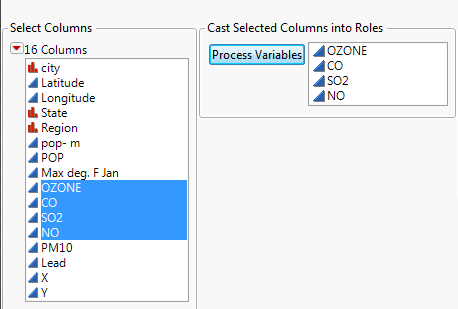
  • Select OZONE, CO, SO2, and NO and click Process Variables. 
  • Click OK.

Manage Spec Limits DialogManage Spec Limits Dialog

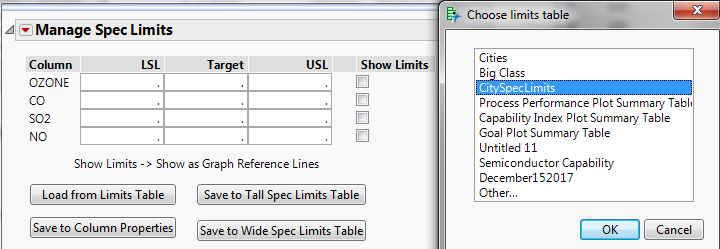
  • Click Load from Limits Table.
  • Select CitySpecLimits.
  • Click OK.

Choose limits tableChoose limits table

  • To save this information as column properties, click the “Save to Column Properties” button found at the bottom of the report window.

Show Limits column property

I’ve often heard from users that they have many columns with specification limits and they need to check the box “Show as graph reference lines” for all of them. A colleague of mine, Byron Wingerd wrote a blog post that shows how to use JSL to accomplish this task.

Beginning with JMP 14, we have made this even easier with the Manage Spec Limits platform. To see an example of how to use this new feature, open Semiconductor Capability found in the sample data folder.

Open(“$SAMPLE_DATA/Semiconductor Capability.jmp”);
  • Go to Analyze->Quality and Process->Manage Spec Limits.
  • Choose the Processes group and click Process Variables.
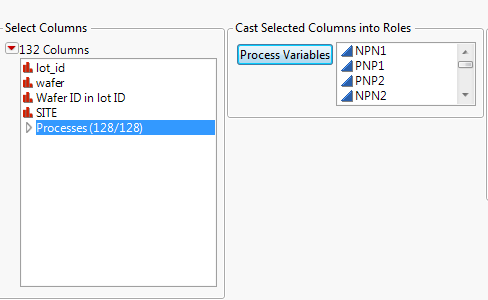
Manage Spec Limits DialogManage Spec Limits Dialog

  • Click OK.

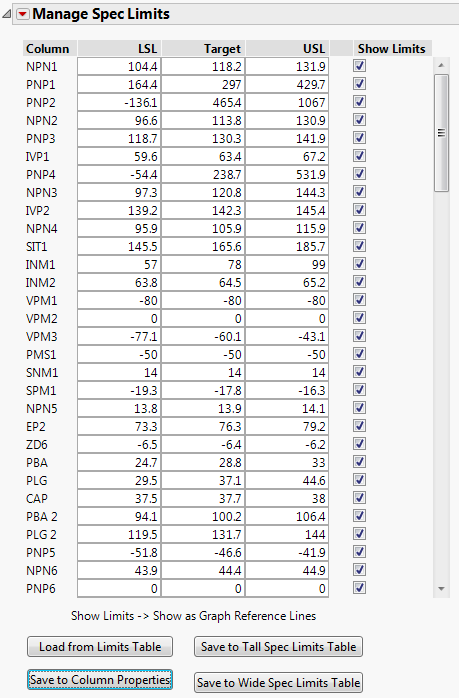
From the information contained in the Spec Limits column property, the LSL, Target, and USL are filled in. The box on the far right titled "Show Limits" corresponds to the “Show as Graph Reference Lines” option found in the spec limits column property. It would be time-consuming to check these boxes one at a time.

  • To check all of the boxes, click on the red triangle next to Manage Spec Limits and choose Show Limits All.
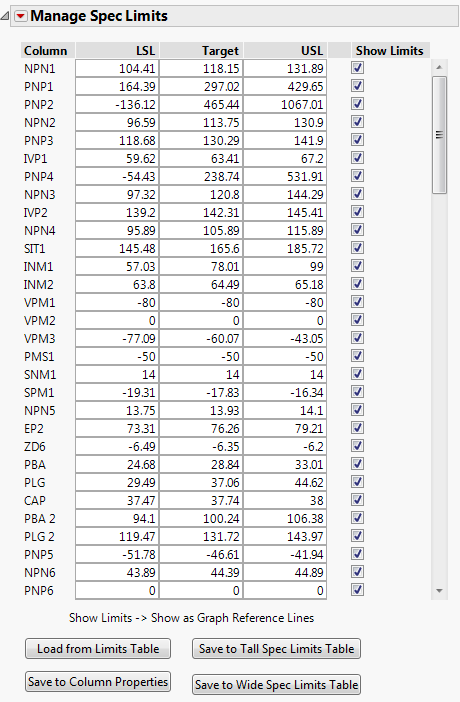
Show Limits AllShow Limits All

  • To save this selection back to the data table, click “Save to Column Properties,” which appears at the bottom of the report window.

Now when we look at the spec limits column property for NPN1, we see that “Show as graph reference lines” has been checked.
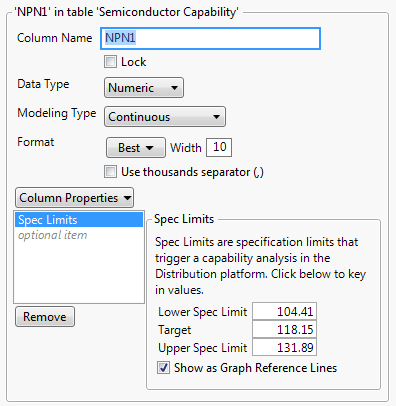
NPN1 Spec Limits Column PropertyNPN1 Spec Limits Column Property

Control the number of decimal places for your spec limits

Sometimes your specification limits may be stored with more decimal places than you desire. You can use the “Round Decimals” option in Manage Spec Limits to alter the number of decimal places.

  • Using the example above, from the red triangle next to Manage Spec Limits, choose “Round Decimals.”
  • Enter 1 into the box.
  • Click OK.

Rounded to 1 decimalRounded to 1 decimal

  • You can then choose to “Save to Column Properties” or choose one of the Save Table options found at the bottom of the report window.

Create a spec limits table from your column properties

Are your specification limits stored as column properties? Do you need to share just the spec limits with a colleague? Do you need to use those specification limits on another data table? This is now easily accomplished with buttons in the Manage Spec Limits platform. From the Manage Spec Limits window above, click on the button for either “Save to Tall Spec Limits Table” or “Save to Wide Spec Limits Table.” Depending on which option you choose, you get either a tall or wide specification limits data table. You can then share this data table with a colleague or use this spec limits data table on a different data set.

Conclusions

The new Manage Spec Limits platform allows you to easily manipulate your spec limit information. You can create spec limits column properties from a spec limits table, you can check “Show as Graph Reference Lines” for many column properties at once, you can control the number of decimal places your spec limits have, and you can create spec limits tables from your column properties.

Last Modified: Mar 21, 2018 12:58 AM
Comments