cancel
Showing results for 
Show  only  | Search instead for 
Did you mean: 
  • JMP Security Notice: CVE-2026-109618 and CVE-2026-109619

    JMP promptly initiated a review of its products, services, and relevant infrastructure for exposure to CVE-2026-109618 and CVE-2026-109619.

    Our assessment of JMP products has not identified exposure to these vulnerabilities. Where remediation was required within supporting environments, appropriate security updates and controls have been applied and validated.

    We have identified no evidence of successful exploitation or unauthorized access to JMP systems or customer information associated with these vulnerabilities.

    JMP continues to monitor the issue and relevant vendor guidance. No action is required by JMP customers at this time.

  • Don’t miss your chance to experience Discovery Summit Europe at our best available rate! Early bird registration through 31 Oct.
  • Graph Builder Toolbar streamlines interactive graphing. Creates shortcuts on Report and GraphBuilder Helpers toolbars. Download and install the extension.

JMP Wish List

We want to hear your ideas for improving JMP. Share them here.
Choose Language Hide Translation Bar

Restore data-grid behavior: Cmd-Opt-Click (or Ctrl-Alt-Click) to select intersections of rows

What inspired this wish list request? In JMP 18 and earlier, holding down Cmd+Option (Mac) or Ctrl+Alt (Windows) while clicking on a column header graph item allowed you to select the intersection of that item with the existing selection. This was an incredibly helpful shortcut when working with large tables and making precise sub-selections. In JMP 19, this functionality is gone. The modified-click now does nothing, breaking that workflow. 


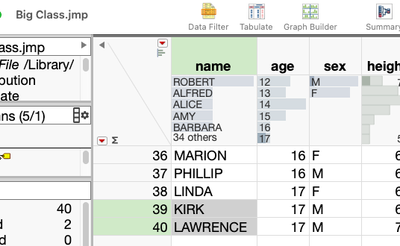
Example use case:  To select all 17-yo males in Big Class, I click on "M" in the row header graph, then cmd-opt-click "17" in the row header graph of the age column.  This is a quick way to isolate a subtable or group of values. Without this, there’s no simple, interactive way to get that intersection, esp. in a large dataset.
 

BHarris_0-1758655036896.png


What is the improvement you would like to see? Please bring back the behavior where Cmd+Opt+Click (or Ctrl+Alt+Click on Windows) sets the selection to the intersection of the clicked header graph rows and the current row selection.  This feature enabled clean and efficient workflows when working with big data tables and visually selecting subsets of data. It doesn’t conflict with other shortcut behaviors and was intuitive once discovered.


Why is this idea important? It enables precise sub-selection in large tables using intuitive modifier keys, making complex table interactions much faster and more visual.


10 Comments
hogi
Level XIII

wow!
An "And" Filter for the Header graphs!

I always wished to have this one. Now it's gone before I can use it ...

hogi
Level XIII
nathan-clark
Level VI

@hogi All great comments / thoughts!

hogi
Level XIII

JMP Support will report this issue as a bug to JMP development group: TS-00246839.

Should be fixed in one of the next bugfixes.


Sarah-Sylvestre
Level V
Status changed to: Yes, Stay Tuned!

This will be restored in 19.1. 

BHarris
Level VII

@Sarah-Sylvestre :  Thank you!

hogi
Level XIII

Thanks a lot for bringing it back.

And CTR + Click is toggling.

BHarris
Level VII

It’s back in 19.1!

I assume this is documented somewhere, but I wasn’t able to find it, so sharing here for anyone interested.

Intersection.  In JMP 19.1, holding Cmd+Option (Mac) or Ctrl+Alt (Windows) and clicking a column header graph item returns the intersection of the current selection and the item clicked. For example, in Big Class, you can select all 14-year-old males by clicking sex = “M” and then Cmd+Option-clicking age = 14.

Union.  Holding Shift while clicking gives the union of selections. For example, to select anyone who is male or 14 years old, select sex = “M” and then Shift-click age = 14.

Inverse.  Holding Cmd (Mac) or Ctrl (Windows) while clicking selects the inverse of the clicked rows relative to the current selection. For example, if all males are selected and you want to switch the selection of 14-year-olds to be the females, Cmd-click age = 14. This deselects the 14-year-old males and selects the 14-year-old females.

Thank you, JMP devs!

BHarris
Level VII

@Sarah-Sylvestre  This can be marked as "Delivered".

Sarah-Sylvestre
Level V
Status changed to: Delivered