cancel
Showing results for 
Show  only  | Search instead for 
Did you mean: 
  • JMP Security Notice: CVE-2026-109618 and CVE-2026-109619

    JMP promptly initiated a review of its products, services, and relevant infrastructure for exposure to CVE-2026-109618 and CVE-2026-109619.

    Our assessment of JMP products has not identified exposure to these vulnerabilities. Where remediation was required within supporting environments, appropriate security updates and controls have been applied and validated.

    We have identified no evidence of successful exploitation or unauthorized access to JMP systems or customer information associated with these vulnerabilities.

    JMP continues to monitor the issue and relevant vendor guidance. No action is required by JMP customers at this time.

  • Don’t miss your chance to experience Discovery Summit Europe at our best available rate! Early bird registration through 31 Oct.
  • Graph Builder Toolbar streamlines interactive graphing. Creates shortcuts on Report and GraphBuilder Helpers toolbars. Download and install the extension.

JMP Wish List

We want to hear your ideas for improving JMP. Share them here.
Choose Language Hide Translation Bar

Have the Window List indicate which Data Tables / Scripts are in an unsaved state

What inspired this wish list request? I often have a large number of windows that accumulate by the end of the day -- these include data tables and scripts.  Many of the tables / scripts are just tests and don't need to be saved, but many are important to save.  It would be nice to quickly see which are unsaved when looking at the window list.  Here is an example -- the black dot indicates that the two corresponding scripts are unsaved:
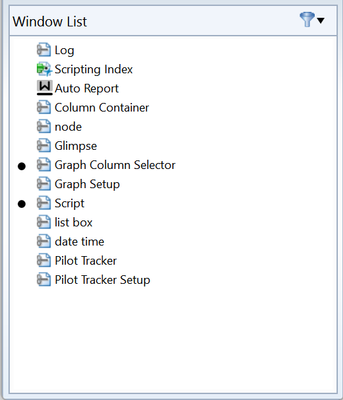
ErraticAttack_0-1684885874761.png


What is the improvement you would like to see? Have an indicator on the window list for unsaved scripts / data tables (and journals or anything else that makes sense)


Why is this idea important? If I simply close JMP and select (Save Individually), I then might have to cancel the save to check if a script has an actual needed change or simply was edited for testing purposes.  I then have to close, select "Save Individually" again, and repeat the process.  It can take 10 minutes sometimes.  It would help greatly if I could see visually which windows are unsaved, the I can simply go through the ones I care about and see if I need to save, then close with a "Save Non".


1 Comment
jthi
Super User