cancel
Showing results for 
Show  only  | Search instead for 
Did you mean: 
  • Sign-in to the JMP Community will be unavailable intermittently Dec. 6-7 due to a system update. Thank you for your understanding!
  • We’re retiring the File Exchange at the end of this year. The JMP Marketplace is now your destination for add-ins and extensions.
  • JMP 19 is here! Learn more about the new features.

JMP Wish List

We want to hear your ideas for improving JMP. Share them here.
Choose Language Hide Translation Bar

Column Property: Inclusive/forced Values (💚)

☑ cool new feature
☑ could help many users!

☑ removes something that feels like a „bug“

☐ nice to have

☐ nobody needs it


#myTop10_2024

-> JMP 19 : )


What inspired this wish list request? 
short:

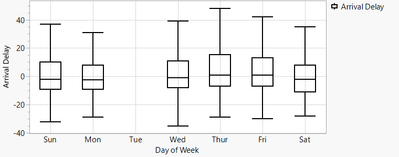
In Jmp it's quite complicated to generate a plot like this!

Inclusive values will fix the issue ...
hogi_3-1709902875272.png


long:

During the Semiconductor Lunch meeting @ Discovery Summit 2024 Europe, we found out that many of us have a similar problem:


GraphBuilder Plots with missing data.


examples:

- date with missing month, day, year ( A way to show a date with no data in graph builder )

- wafer lists with missing wafer (for 25 wafers in a 5x5 grid generated via Wrap, wafer #20 should always be at the same position, independent of how many wafers < 20 are in the data / missing)

- wafermaps with missing dies

- pass / fail

- bins with pre-defined categories (0 occurences for a specific bin)

...


Motivation via date: 

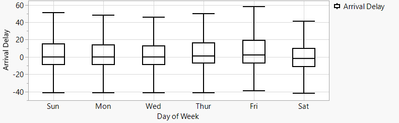
at first glance, nobody will notice that the data for Tuesday is missing - there is not even a label on the axis.
hogi_0-1709901602034.png


To make the missing day appear, one can add a dummy row, Day of Week = Tue, all other entries of the row: missing.

hogi_2-1709902791106.png


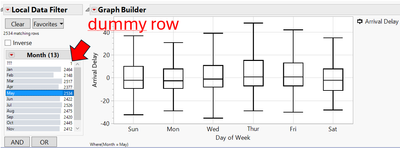
... till somebody uses a data filter - then Tue is gone:
hogi_4-1709903016702.png


The only way to make it work: a dummy row for EVERY (!!!) item in the data filter.
And if the user has a chance to change the column for the data filter: for EVERY item in ANY column the user may pick.
Ouch !!!


What is the improvement you would like to see? 

Please add a column property for inclusive values *) - values which should always show up on the axis.

For days of week: all days of the week :)

For 25 "wafers" in a lot: all numbers from 1 to 25.

For pass/fail : pass and fail . Such that one day when there is a lot with 0 fails the plot will say: fails = 0. Instead of: not showing any number of fails.


Besides usage for axes, also X/Y Group & Wrap should react on the new setting. The same for Overlay and Color.


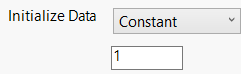
*) "inclusive"? what is the best name for the property? 

- "default value" sounds like 
hogi_0-1711702623483.png

- additional, auxiliary, supplemental suggest that the value is no actual value of the column

- after some discussion, Copilot suggested "inclusive" values - values which should be included, if missing.


Why is this idea important? 

With the new column property INCLUSIVE VALUES,

- missing value information gets visible (!!!)

- the plots can be generated MUCH easier

- the generated plots are "robust" (example with Data Filter!)


other wishes from hogi_2-1702196401638.png

16 Comments
hogi
Level XIII

As discussed on #Discoverysummit2025, it should be easy for JMP to automatically fill "forced value" for everyday lists like days_of_week, months,  ...
JMP sorts such entries automatically - very comfortable! As the information is there, it just has to be accessed via the Force Values interface ...

Status changed to: Yes, Stay Tuned!

Hi @hogi, thank you for sending your feedback to jmpbeta@jmp.com 

That is the best place to send feedback on a feature in the EA. I am updating the status of this feature as it will be in JMP 19. 

hogi
Level XIII

I am very happy with the new functionality, it helps me a lot.
e.g. let's assume we want to plot Physical Activity - but there is no data for Hawaii.
Just use Forced Values - and Hawaii will show up in the plot - with a missing values.

hogi_0-1754757350774.png

View more...
dt = Open( "$SAMPLE_DATA/US Demographics.jmp" );
dtStacked = dt << Stack(
	columns(
		:Population, :Eighth Grade Math, :High School Graduates,
		:Gross State Product, :Vegetable Consumption, :Smokers, :Physical Activity,
		:Obese, :College Degrees, :Alcohol Consumption, :Latitude, :Longitude,
		:Household Income, :IQ
	)
);

dtStacked << Select Where( is missing (:Data) ) << delete rows;

The plot looks quite crowded, so let's split the plot by regions:

hogi_1-1754757580747.png

There is no row in the data table with State = Hawaii, so JMP doesn't know the region. This is why Hawaii shows up in all 4 regions.
... the same happens for all the other states. I was tempted to suggest an extended version of 'Forced Values', but I couldn't work out how to do it. (for values with existing entries, one could ask JMP to use those, don't invent new states in different regions - but how about Hawaii, which is missing in the data table ?!)


This example shows the limitations of Forced Values for the application "show a placeholder in the plot, even if there is no data".
The only way to produce the correct plot is via dummy rows , right?


hogi
Level XIII

forced values for continuous values - see:
https://community.jmp.com/t5/JMP-Wish-List/Column-Property-Inclusive-forced-Values/idc-p/799363/high... 

wow, it made it into the JMP Prioritization Survey 2025!

hogi_0-1756322249488.png

edit: ah, no - refers to another idea ...
see next post.

hogi
Level XIII

Ouch! Just after submitting the last post, I re-read the entry in the survey
hogi_0-1756324588745.png

and thought about this wish:
Graph Builder: missing data option for continuous values 

which asks for something like this:

hogi_1-1756324670356.png


Status changed to: Delivered