cancel
Showing results for 
Show  only  | Search instead for 
Did you mean: 
  • Instantly extract effect sizes, F-ratios, and FDR-adjusted p-values from your models with the Calculate Effects Sizes extension, available now in the JMP Marketplace!
  • New to JMP? Join us Sept. 23-24 for the Early User Edition of Discovery Summit, tailor-made for new users. Register now for free!
  • See how to use the JMP Marketplace – Free tools to expand JMP capabilities. Register. July 10, 2 pm US Eastern Time.

JMP Wish List

We want to hear your ideas for improving JMP. Share them here.
Choose Language Hide Translation Bar

Add right click option to formula editor where you can select the column you want to use inside a function

Currently if you want to add column to a function used in Formula Editor you have to either

  • Drag and drop the column to correct place
  • Select the place you want to add the column into and then double click the column to add it
  • Open the formula as JSL script and write the column reference

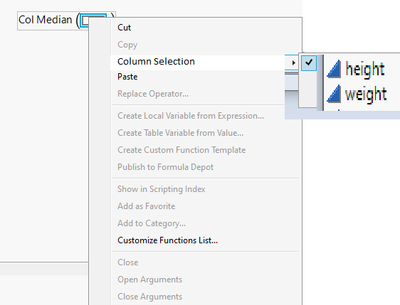
My suggestion is that new option should be added: right click selection for the columns (in best case only valid columns would be showed in the list). Right click menu would make it easier and faster to add new columns to functions, especially when you are writing more complicated ones / want to edit formulas.


JMP does already offer quite a few options in the right-click menu for Formula Editor, but I think column selection would fit there within the first "block". Quick paint example:
jthi_3-1672250241445.png
3 Comments
Status changed to: Acknowledged

Hi @jthi, thank you for your suggestion! We have captured your request and will take it under consideration.

Status changed to: Investigating

We are currently reviewing this request. 

Status changed to: Acknowledged