cancel
Showing results for 
Show  only  | Search instead for 
Did you mean: 
  • Sign-in to the JMP Community will be unavailable intermittently Dec. 6-7 due to a system update. Thank you for your understanding!
  • We’re retiring the File Exchange at the end of this year. The JMP Marketplace is now your destination for add-ins and extensions.
  • JMP 19 is here! Learn more about the new features.

JMP Wish List

We want to hear your ideas for improving JMP. Share them here.
Choose Language Hide Translation Bar

Add Scroll Lock to the Column right click context menu

☐ cool new feature
☐ could help many users!

☐ removes a „bug“

☑ nice to have

☐ nobody needs it


If columns have to be visible all-time, independent of the actual position in the data table. one can lock them on the left.
To do so, one has to select the columns and click on Scroll Lock/Unlock in the Col menu.
https://community.jmp.com/t5/Discussions/Collection-of-quot-funny-quot-JSL-newbie-questions/m-p/5756...


my wish:

Could you please add this command also to the context menu which is opened by selecting columns and right-clicking.

here the command can be found much easier.
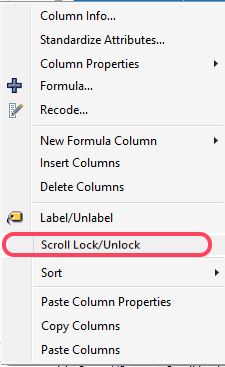
hogi_0-1669915148060.png


7 Comments
Status changed to: Acknowledged

Hi @hogi, thank you for your suggestion! We have captured your request and will take it under consideration.

Status changed to: Investigating
 
Status changed to: Not Planned For Now

@hogi - Although we do not plan to deliver this request now, we are holding onto it for a future release and will update this issue if it becomes a priority. Thank you for the great idea!


hogi
Level XIII

ok, thanks. Then let's wait for jmp 18 :)

fs131416
Level I

What if we have a shortcut key for this function?

hogi
Level XIII

that's a nice idea.
Let's see if the slightly better accessibility will help me to use this nice feature more often :)

hogi_0-1671058730450.png


hogi
Level XIII

I just noticed that the function is also available via right click on a column in the columns menu on the left:

hogi_0-1688850039615.png


So:

  • Cols (main) Menu : function available
  • right click menu context menu for columns (on the top of the table):  function missing
  • right click menu context menu for columns (on the left): function available

--> good enough:
if the user forgets which 2 of the 3 menus have the function, he can try ... and try again ...