- Don’t miss your chance to experience Discovery Summit Europe at our best available rate! Early bird registration through 31 Oct.
- Graph Builder Toolbar streamlines interactive graphing. Creates shortcuts on Report and GraphBuilder Helpers toolbars. Download and install the extension.
JMPer Cable Blog
A technical blog for JMP users of all levels, full of how-to's, tips and tricks, and detailed information on JMP features- User Community
- :
- JMPer Cable Blog
- :
- Teaching with JMP Student Edition: AI enters the classroom - opportunities for i...
- Subscribe to RSS Feed
- Mark as New
- Mark as Read
- Bookmark
- Subscribe
- Printer Friendly Page
- Report Inappropriate Content


Something changed in statistics classrooms a couple of years ago, and it didn’t arrive with a formal announcement. Students started showing up with AI-generated interpretations of their JMP output that was fluent, confident, and sometimes entirely wrong. The analysis was there. The understanding, often, was not.
That gap betweenstrong generation and fragile thinking is now the central challenge in teaching data analysis, but banning AI is not the answer. The real question is whether we are designing assignments that actually require thinking.
In Episode 1 of this blog series, I made the case for what good statistical teaching might look like before AI enters the picture. This episode is about what changes when AI is used and how instructors can use that change rather than just manage it.
The changed classroom reality
Ethan Mollick, whose book “Co-Intelligence” [5] has become required reading for anyone thinking seriously about AI in education, puts it plainly: homework as we know it is over. I think that is roughly correct, but rather than it being a crisis, it’s a design challenge.
Students today are remarkably good at producing answers. What they are less confident about is judging them. They can paste JMP output into a general-purpose AI tool and get back a polished paragraph of interpretation. What they can’t always do is tell whether that interpretation is correct, whether the right model was chosen, whether the assumptions were checked, or whether the conclusion actually follows from the data.
That is where the instructor’s role can shift, transitioning from an information deliverer to becoming more of a reasoning coach. As the focus moves from explaining, such as what a p-value is, instructors should instead be designing learning experiences in which students have to engage with why a particular analysis is appropriate and what the output actually means in context.
Augmentation, not automation
The central design question for any AI tool in education is whether it is being used for automation or augmentation. Automation replaces a human decision. Augmentation supports and improves it. Those functions are not the same thing, and confusing them is the source of most of the anxiety around AI in the classroom.
The goal in statistics education should always be augmentation: AI that helps students think more clearly, not AI that thinks for them. That distinction shapes everything from which tools to use and how to use them, to which assignments can still be trusted to reveal whether learning has happened.
What AI genuinely offers
Before the risks, which are real and are fully examined in Episode 4, it is worth naming how AI actually benefits a statistics course:
- Always available. Students can ask questions at any hour, without waiting for office hours or feeling embarrassed about not following the lecture.
- Infinitely patient. AI will explain the same concept as many times as needed, in as many different ways as requested.
- Frees up class time. When routine procedural questions move outside the classroom, the time that remains can focus on discussion, interpretation, and the kind of ambiguity that AI genuinely cannot resolve.
A different kind of AI: LearnBot in JMP
LearnBot [3] is a free add-in, available for download from the JMP Marketplace and accessible from the Help menu inside JMP Student Edition. It is trained on JMP documentation and learning resources, making it a focused, context-aware tutor rather than a general-purpose chatbot.
LearnBot is a text-based conversational AI, acting as a JMP and statistics tutor. It does not have access to the student’s data or output. Instead, students describe what they see in their own words, and LearnBot responds to that description.
That proximity matters. Rather than switching to a browser tab, the student stays inside the analytical environment with one click, right where the work is happening.
And the act of describing output to LearnBot is itself a learning moment. Before you can ask a good question, you have to find the words for what you are seeing. That articulation is where understanding either reveals itself or breaks down.
Consider a concrete example. A student runs a regression and sees an R² of 0.71 alongside a residual plot with a clear pattern. They type into LearnBot: “My multiple regression model shows an R² of 0.71, but the residual plot has some clear structure or pattern. What does that mean?”
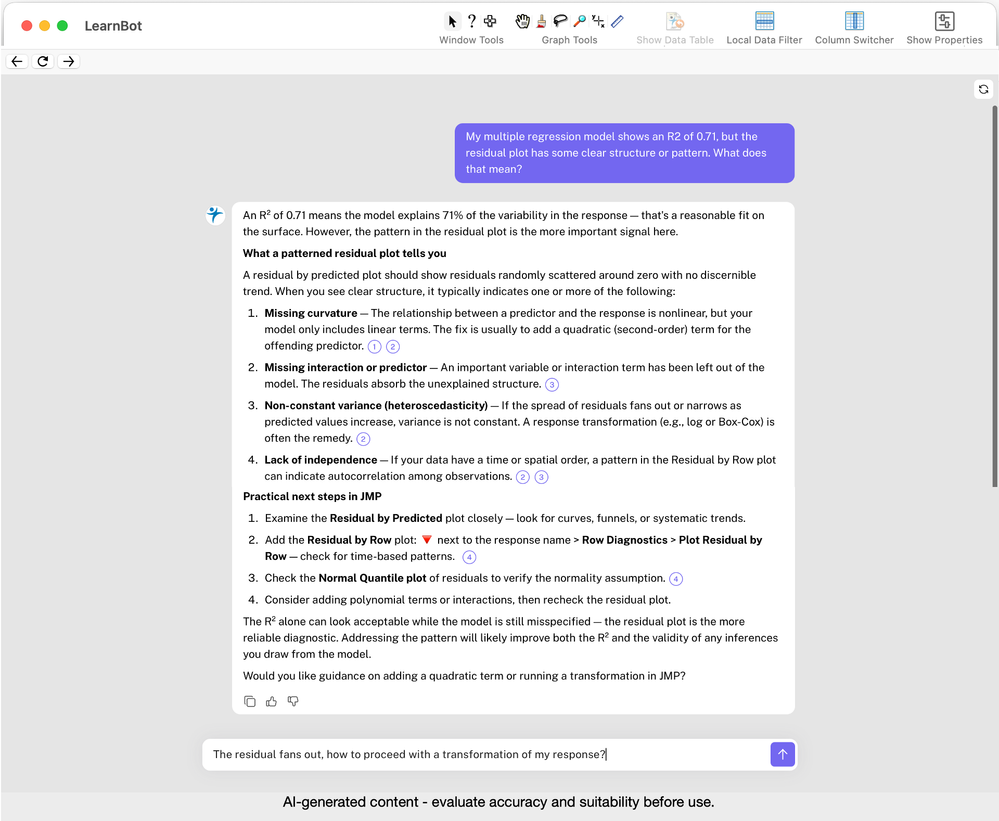
LearnBot explains what a patterned residual plot signals and then asks: “Would you like guidance on adding a quadratic term or running a transformation in JMP?” That follow-up question is the point. The goal is not to give the answer; it is to prompt the next step in the student’s thinking.
Advait Sarkar [4] warns of the risk of becoming “middle managers of our own thoughts,” outsourcing reasoning to AI rather than developing it ourselves. LearnBot is designed to push against exactly that tendency.
“There is a difference between a tool that answers your question and one that helps you ask a better one.” |
The real shift: Assignment design
The biggest change for instructors is not choosing which AI tools to allow but in redesigning assigned tasks. The quality of what a student gets from any AI tool depends heavily on the quality of what they put in. Compare these two prompts:
- ✘ Run a regression and report the R².
- ✔ Compare two models, justify your choice, and identify one assumption you cannot verify.
The second task cannot be outsourced without understanding. JMP’s visual, exploratory workflow naturally invites exactly this kind of interpretation, which is one of the reasons it works well as a teaching environment even when AI is part of the picture.
A smarter classroom
In flipped or hybrid settings, it becomes even more powerful. Students explore data and use AI support to get unstuck before class. Class time then focuses on discussion, judgment, and the kind of real-world ambiguity that no AI currently resolves well.
As JMP’s Russ Wolfinger frames it [6]: AI augments, it does not replace. The instructor’s job is to design the learning environment so that augmentation is what students actually experience, not a shortcut around the thinking they need to do.
Episode 3 goes deeper into JMP Assistant: its concrete analytical workflows, what it can and cannot do, and how to use it in a way that keeps students in the driving seat.
Try this
Install LearnBot [3] from the JMP Marketplace and open it from the Help menu inside JMP Student Edition. Give students a data set and ask them to run an analysis of their choosing. Then ask them to use their own words to describe one result they are uncertain about to LearnBot and bring the exchange to the next class. What they write to LearnBot often reveals more about their understanding than the analysis itself.
References
[1] JMP Academic Program, jmp.com/academic
[2] JMP Student Edition, jmp.com/student
[3] LearnBot (JMP Marketplace), marketplace.jmp.com
[4] Advait Sarkar, “How to stop AI from killing your critical thinking,” TED Talk, 2025
[5] Ethan Mollick, “Co-Intelligence: Living and Working with AI,” Portfolio/Penguin, 2024
[6] Russ Wolfinger, “The Top Seven Ways Scientists and Engineers Should Prepare for the AI-Driven Era,” JMP white paper
[7] GAISE College Report revision (in progress, 2025)
About the author
Volker Kraft is Principal Academic Ambassador (EMEA) at JMP Statistical Discovery (a SAS company), part of the JMP Global Academic Team. Since 2011, he has supported universities across Europe as they integrate JMP into teaching and research. His background is in speech technology research, a field where statistical rigor and engineering pragmatism had to coexist long before AI became a household word. He can be reached via the JMP Community or on LinkedIn.
Episode 2 of 5 • Next: JMP Assistant in practice: What it can do for you
You must be a registered user to add a comment. If you've already registered, sign in. Otherwise, register and sign in.
- © 2026 JMP Statistical Discovery LLC. All Rights Reserved.
- Terms of Use
- Privacy Statement
- Contact Us