- JMP Statement Regarding Critical PHP Remote Code Execution Vulnerabilities (CVE-2026-109618, CVE-2026-109619)
- Don’t miss your chance to experience Discovery Summit Europe at our best available rate! Early bird registration through 31 Oct.
- Graph Builder Toolbar streamlines interactive graphing. Creates shortcuts on Report and GraphBuilder Helpers toolbars. Download and install the extension.
- Subscribe to RSS Feed
- Mark Topic as New
- Mark Topic as Read
- Float this Topic for Current User
- Bookmark
- Subscribe
- Mute
- Printer Friendly Page
Discussions
Solve problems, and share tips and tricks with other JMP users.- User Community
- :
- Discussions
- :
- zoom out in graph builder

- Mark as New
- Bookmark
- Subscribe
- Mute
- Subscribe to RSS Feed
- Get Direct Link
- Report Inappropriate Content
zoom out in graph builder
Hi all,
I am trying to zoom out in the graph builder mode - and have read the instructions.
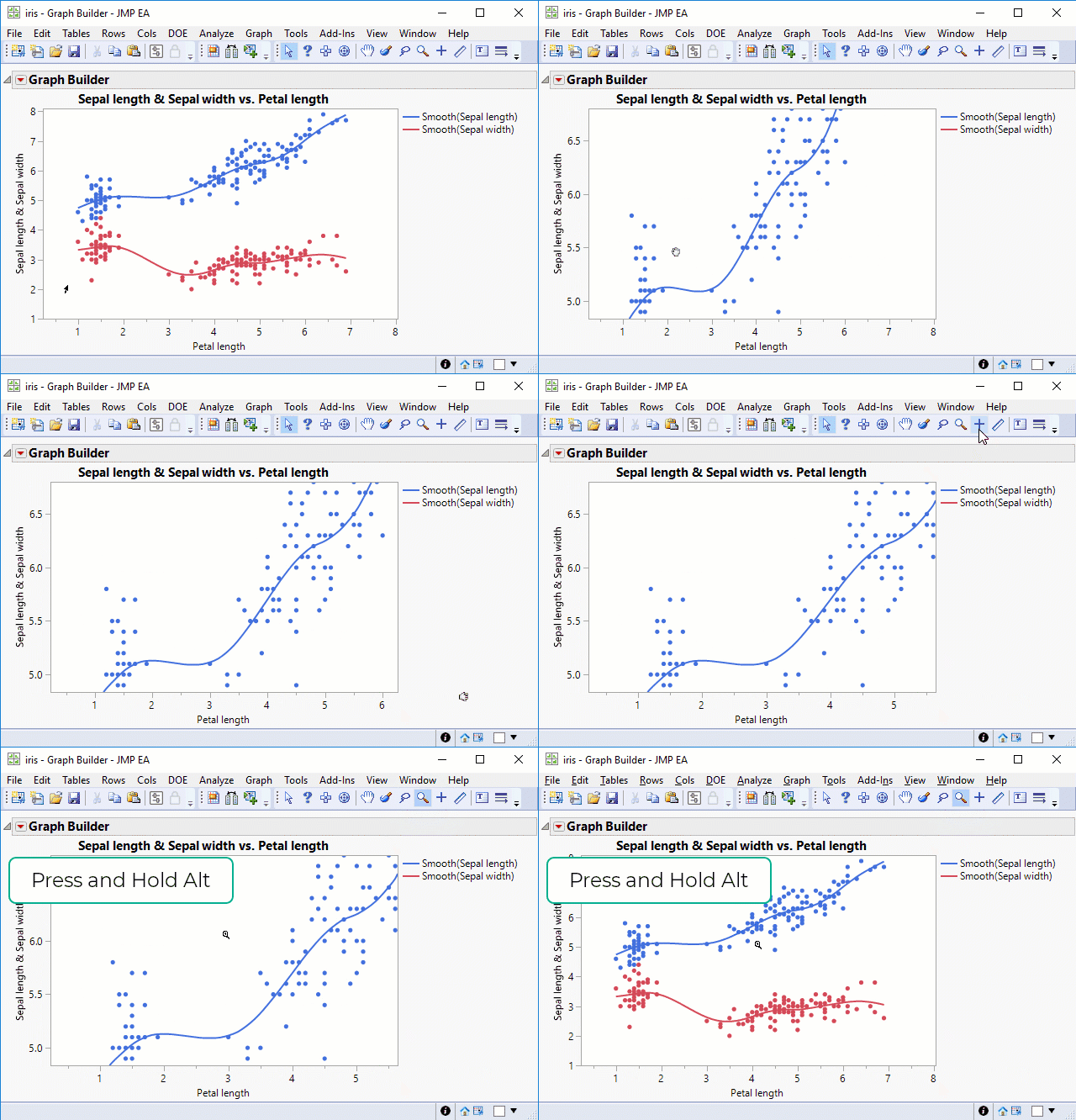
They say just press ALT key twice or hold it while pressing the zoom key once - et voila, you get the original plot back with the original scale restored.
But it never happened to me! I am tweaking the same graph for 5 minutes now and it is frankly very annoying :).
Do I do something wrong or can anybody help with the solution maybe?
I just want to restore the original graph as it was when created.


- Mark as New
- Bookmark
- Subscribe
- Mute
- Subscribe to RSS Feed
- Get Direct Link
- Report Inappropriate Content
Re: zoom out in graph builder
I think it's a double-click of the mouse with the magnifier tool, rather than a double-press of the Alt key. I am also able to use the Alt + single-click to restore the view, testing with JMP 15.2. What version of JMP are you using?
If all else fails, you can always right-click on the axes and choose "Revert Axis". You will need to do this for both X and Y.

- Mark as New
- Bookmark
- Subscribe
- Mute
- Subscribe to RSS Feed
- Get Direct Link
- Report Inappropriate Content
Re: zoom out in graph builder


- Mark as New
- Bookmark
- Subscribe
- Mute
- Subscribe to RSS Feed
- Get Direct Link
- Report Inappropriate Content
Re: zoom out in graph builder
Confirming what @danschikore observed, at least on Windows, using Alt + the magnifier tool seems to reset both axes. An example:
Recommended Articles
- © 2026 JMP Statistical Discovery LLC. All Rights Reserved.
- Terms of Use
- Privacy Statement
- Contact Us