Turn on suggestions
Auto-suggest helps you quickly narrow down your search results by suggesting possible matches as you type.
- Don’t miss your chance to experience Discovery Summit Europe at our best available rate! Early bird registration through 31 Oct.
- Graph Builder Toolbar streamlines interactive graphing. Creates shortcuts on Report and GraphBuilder Helpers toolbars. Download and install the extension.
Options
- Subscribe to RSS Feed
- Mark Topic as New
- Mark Topic as Read
- Float this Topic for Current User
- Bookmark
- Subscribe
- Mute
- Printer Friendly Page
Discussions
Solve problems, and share tips and tricks with other JMP users.- User Community
- :
- Discussions
- :
- using loop to display a tab box inside a tab box

Level I
- Mark as New
- Bookmark
- Subscribe
- Mute
- Subscribe to RSS Feed
- Get Direct Link
- Report Inappropriate Content
using loop to display a tab box inside a tab box
Apr 15, 2019 11:22 AM
(4057 views)
Hi guys , I am trying to display a tab box inside a tab box using loop
Below is my code , however it does not allowa me to use array , only variablee allowed .
New Window( "Result", display = Tab Box() );
For( j = 1, j <= N Items( stepname ), j++,
	step = Substitute( Char( stepname[j] ), "DataTable(\!"Specname=", "" );
	display << Add(
		step,
		main[j] = Tab Box(

		)
	);
1 REPLY 1


Super User (Alumni)
- Mark as New
- Bookmark
- Subscribe
- Mute
- Subscribe to RSS Feed
- Get Direct Link
- Report Inappropriate Content
Re: using loop to display a tab box inside a tab box
Created:
Apr 16, 2019 04:23 AM
| Last Modified: Apr 16, 2019 1:24 AM
(4023 views)
| Posted in reply to message from kuannygoh 04-15-2019
From your brief description, it seems you are trying to display different specs for different steps. The first script shows a method that uses arrays to make a tabbed display of tabs.
Names Default to Here(1);
steps= {"A", "B", "C", "D"};
step_aa = Associative Array(steps);
step_aa["A"] = {"1101", "1102", "1103", "1104"};
step_aa["B"] = {"2101", "2102", "2207", "2068", "270X"};
step_aa["C"] = {"37Z0", "3027", "3133"};
step_aa["D"] = {"4001", "4005", "4517"};

main={};
New Window( "Result", display = Tab Box() );
For( j = 1, j <= N Items( stepname ), j++,
	display << Add(
		steps[j], PanelBox("",
		tb = Tab Box();
	));
	tb << Set OverFlow Enabled(0);
	insert into(main,tb);
);
For( j = 1, j <= N Items( stepname ), j++,
		for(k=1, k<=nitems(step_aa[steps[j]]), k++,
		  main[j] << Add (EvalInsert("Data Table(\!"Specname=^step_aa[steps[j]][k]^\!")"))

		); // add for k
		main[j] << set selected(1); //select the first tab
);
display << set selected(1);

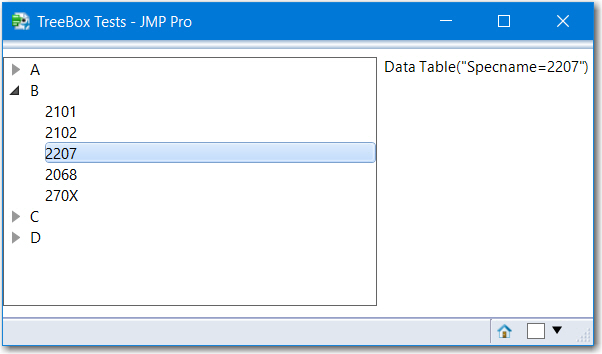
However, I think a better option is to use a Tree with TreeNodes. Below is an example and the resulting display.
Names Default to Here(1);
steps= {"A", "B", "C", "D"};
step_aa = Associative Array(steps);
step_aa["A"] = {"1101", "1102", "1103", "1104"};
step_aa["B"] = {"2101", "2102", "2207", "2068", "270X"};
step_aa["C"] = {"37Z0", "3027", "3133"};
step_aa["D"] = {"4001", "4005", "4517"};


roots = {};
For( j = 1, j <= N Items( steps ), j++,
   root = TreeNode(stepname[j]);
   insert into(roots, root);
);
For( j = 1, j <= N Items( steps ), j++,
   For(k =1, k<=nitems(step_aa[steps[j]]), k++,
      c = Tree Node( step_aa[steps[j]][k] );
      roots[j] << Append(c);
   );
);
New Window( "TreeBox Tests",
	HListBox(
	   tree = Tree Box( roots, Size( 300, 200 ) ),
	   tb = TextBox()
	)
);
tree << Set Node Select Script(
	Function( {thistree, thisnode},
		If( !Is Empty( thisnode ),
		    txt = thisnode << get label;
			tb << set text ( EvalInsert("Data Table(\!"Specname=^txt^\!")") )
		)
	)
);
Recommended Articles
- © 2026 JMP Statistical Discovery LLC. All Rights Reserved.
- Terms of Use
- Privacy Statement
- Contact Us