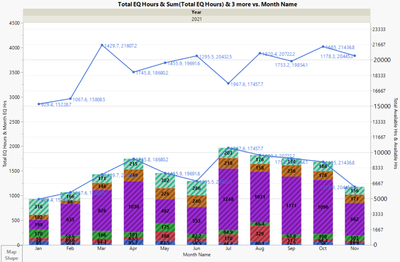
I have looked in the scripting help section and all over this community and haven't found a solution for my problem so hopefully someone can help. I have a graph containing two trend lines and a bar graph and want to label the values of each point but when I set the labels both values show up on each trend line and I can't figure out how to separate the labels. I tried stacking the labelled columns to use overlay to separate them on the graph but I already have a different overlay for the bar graph and couldn't figure out how to use a second overlay to separate the labeled points. I copied my code and a picture of the graph i'm working with here and attached the script i'm running with the data table. Any help or insight is very much appreciated.
Data Table ("Graph Subset"):Month EQ Hrs << Set labelled;
Data Table ("Graph Subset"):Total Available Hrs << Set labelled;

Data Table ("Graph Subset") << select where( :Month == 1 | :Month == 2 |:Month == 3 | :Month == 4 | :Month == 5 | :Month == 6 | :Month == 7 | :Month == 8 | :Month == 9 | :Month == 10 | :Month == 11 | :Month == 12) << label;
Graph Builder(
	Size( 1352, 731 ),
	Variables(
		X( :Month Name ),
		Y( :Total EQ Hours ),
		Y( :Month EQ Hrs, Position( 1 ) ),
		Y( :Total Available Hrs, Position( 1 ), Side( "Right" ) ),
		Y( :Available Hrs, Position( 1 ), Side( "Right" ) ),
		Group X( :Year ),
		Overlay( :ePlexProcess )
	),
	Elements(
		Bar(
			X,
			Y( 1 ),
			Legend( 4 ),
			Bar Style( "Stacked" ),
			Summary Statistic( "Sum" ),
			Label( "Label by Value" )
		),
		Line( X, Y( 1 ), Overlay( 0 ), Legend( 5 ), Summary Statistic( "Sum" ) ),
		Points(
			X,
			Y( 1 ),
			Overlay( 0 ),
			Legend( 6 ),
			Summary Statistic( "Sum" ),
			Jitter( "None" )
		),
		Line( X, Y( 4 ), Overlay( 0 ), Legend( 5 ), Summary Statistic( "Sum" ) ),
		Points(
			X,
			Y( 3 ),
			Overlay( 0 ),
			Legend( 6 ),
			Summary Statistic( "Mean" ),
			Jitter( "None" )
		)
	),
	SendToReport(
		Dispatch( {"Bar"}, "", OutlineBox, {Close( 0 )} ),
		Dispatch( {"Line"}, "", OutlineBox, {Close( 0 )} ),
		Dispatch( {"Line (right)"}, "", OutlineBox, {Close( 0 )} ),
		Dispatch( {}, "Total EQ Hours", ScaleBox, {Max( 4500 )} ),
		Dispatch(
			{},
			"Total Available Hrs",
			ScaleBox,
			{Min( 0 ), Max( 24000 ), Inc( 5000 ), Minor Ticks( 2 ),
			Label Row(
				{Show Major Grid( 1 ), Show Minor Grid( 1 ), Show Minor Labels( 1 ),
				Set Font Size( 12 )}
			)}
		),
		Dispatch(
			{},
			"400",
			ScaleBox,
			{Legend Model( 6, Base( 0, 0, 0, Item ID( "Sum(Total EQ Hours)", 1 ) ) )
			}
		),
		Dispatch(
			{},
			"400",
			LegendBox,
			{Legend Position(
				{4, [0, 1, 2, 3, 4, 5], 5, [7], 6, [9], 5, [7], 6, [9]}
			), Position( {0, 1, 2, 3, 4, 5, 7, 9, 7, 9} )}
		)
	)
);