Turn on suggestions
Auto-suggest helps you quickly narrow down your search results by suggesting possible matches as you type.
- Don’t miss your chance to experience Discovery Summit Europe at our best available rate! Early bird registration through 31 Oct.
- Graph Builder Toolbar streamlines interactive graphing. Creates shortcuts on Report and GraphBuilder Helpers toolbars. Download and install the extension.
Options
- Subscribe to RSS Feed
- Mark Topic as New
- Mark Topic as Read
- Float this Topic for Current User
- Bookmark
- Subscribe
- Mute
- Printer Friendly Page
Discussions
Solve problems, and share tips and tricks with other JMP users.- User Community
- :
- Discussions
- :
- probleme pour afficher la légende

Level VI
- Mark as New
- Bookmark
- Subscribe
- Mute
- Subscribe to RSS Feed
- Get Direct Link
- Report Inappropriate Content
probleme pour afficher la légende
Dec 5, 2023 09:12 AM
(2129 views)
bonjour,
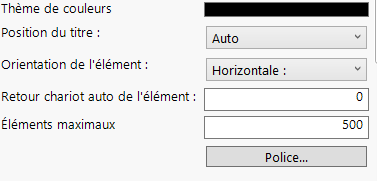
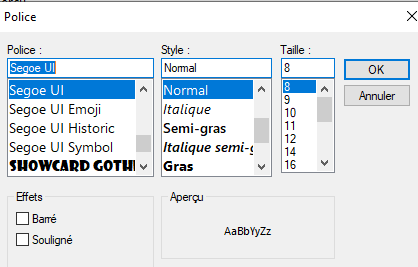
j'ai une légende en bas d'un graphique mais tout ne s'affiche pas.
voir fichiers joints.
comment faire pour avoir la légende complète?
cordialement

2 REPLIES 2


Staff
- Mark as New
- Bookmark
- Subscribe
- Mute
- Subscribe to RSS Feed
- Get Direct Link
- Report Inappropriate Content
Re: probleme pour afficher la légende
Hi @Françoise, could you attach a data table with a script for the graph attached? This might help us better understand what you are asking for.


Super User
- Mark as New
- Bookmark
- Subscribe
- Mute
- Subscribe to RSS Feed
- Get Direct Link
- Report Inappropriate Content
Re: probleme pour afficher la légende
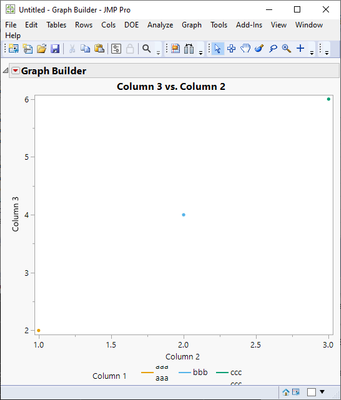
It looks like there could be a row change within the value which is being shown in Legend Box -> it won't fit
Names Default To Here(1);

dt = New Table("Untitled",
	Add Rows(3),
	Compress File When Saved(1),
	New Column("Column 1", Character, "Nominal", Set Values({"aaa
aaa", "bbb", "ccc
ccc
ccc"})),
	New Column("Column 2", Numeric, "Continuous", Format("Best", 12), Set Values([1, 2, 3])),
	New Column("Column 3", Numeric, "Continuous", Format("Best", 12), Set Values([2, 4, 6]))
);

gb = dt << Graph Builder(
	Size(518, 454),
	Show Control Panel(0),
	Legend Position("Bottom"),
	Variables(X(:Column 2), Y(:Column 3), Overlay(:Column 1)),
	Elements(Points(X, Y, Legend(17)), Smoother(X, Y, Legend(18)))
);
-Jarmo
Recommended Articles
- © 2026 JMP Statistical Discovery LLC. All Rights Reserved.
- Terms of Use
- Privacy Statement
- Contact Us