- JMP will suspend normal business operations for our Winter Holiday beginning on Wednesday, Dec. 24, 2025, at 5:00 p.m. ET (2:00 p.m. ET for JMP Accounts Receivable).
Regular business hours will resume at 9:00 a.m. EST on Friday, Jan. 2, 2026. - We’re retiring the File Exchange at the end of this year. The JMP Marketplace is now your destination for add-ins and extensions.
- Subscribe to RSS Feed
- Mark Topic as New
- Mark Topic as Read
- Float this Topic for Current User
- Bookmark
- Subscribe
- Mute
- Printer Friendly Page
Discussions
Solve problems, and share tips and tricks with other JMP users.- JMP User Community
- :
- Discussions
- :
- problem to open excel

- Mark as New
- Bookmark
- Subscribe
- Mute
- Subscribe to RSS Feed
- Get Direct Link
- Report Inappropriate Content
problem to open excel
hi,
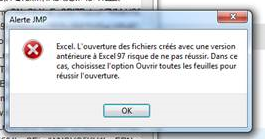
with JMP 15, I have a ne error message. I don't understand what to do.
can someone give me a solution please?
best regards


 Community Manager
- Mark as New
- Bookmark
- Subscribe
- Mute
- Subscribe to RSS Feed
- Get Direct Link
- Report Inappropriate Content
Re: problem to open excel
The English translation of the error message:
Excel, Opening files created with a version earlier than Excel 97 may not be successful. In this case, choose the Open all sheets option to successfully open.
It seems that you've tried to open an Excel file in a format that pre-dates Excel 97. If the file didn't open successfully you may find the Open All Sheets preference helpful.
You'll find this preference from File->Preferences... and the Third-party Data section.
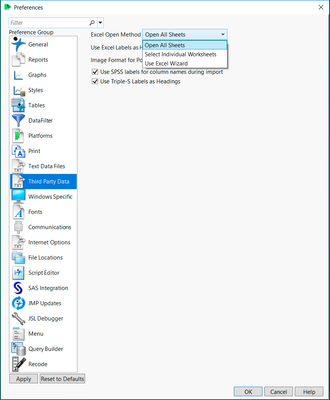
@briancorcoran explained why this may be necessary in RE: Error Opening Excel File.
- Mark as New
- Bookmark
- Subscribe
- Mute
- Subscribe to RSS Feed
- Get Direct Link
- Report Inappropriate Content
Re: problem to open excel
Hi,
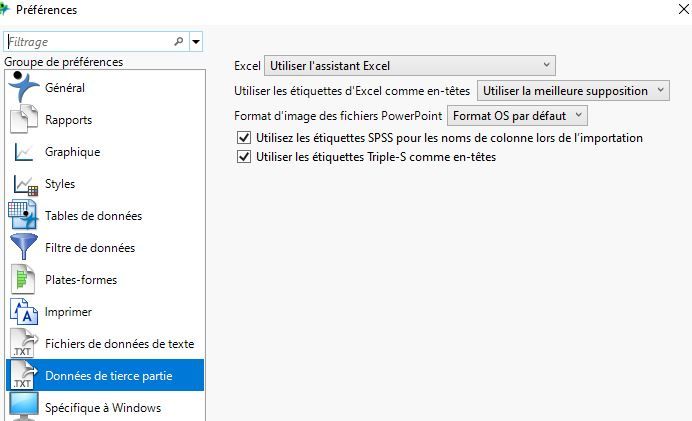
with my Jump (15.2.1), I have no problem to open and you can see my prefernces : excel in the screen image.
the file is an excel office 365 . xlsm.
I shall verify the preferences for the others JMP (there is this problem for 2 colleagues who have JMP 15).
best regards

- Mark as New
- Bookmark
- Subscribe
- Mute
- Subscribe to RSS Feed
- Get Direct Link
- Report Inappropriate Content
Re: problem to open excel
Another idea, depending on where your analysis starts, is to open the original workbook in a newer version of Excel and save it again before importing it in JMP.
Recommended Articles
- © 2025 JMP Statistical Discovery LLC. All Rights Reserved.
- Terms of Use
- Privacy Statement
- Contact Us