- Subscribe to RSS Feed
- Mark Topic as New
- Mark Topic as Read
- Float this Topic for Current User
- Bookmark
- Subscribe
- Mute
- Printer Friendly Page
Discussions
Solve problems, and share tips and tricks with other JMP users.- JMP User Community
- :
- Discussions
- :
- 'n' row average of a column based on a condition from other column -

- Mark as New
- Bookmark
- Subscribe
- Mute
- Subscribe to RSS Feed
- Get Direct Link
- Report Inappropriate Content
'n' row average of a column based on a condition from other column -
Hi All,
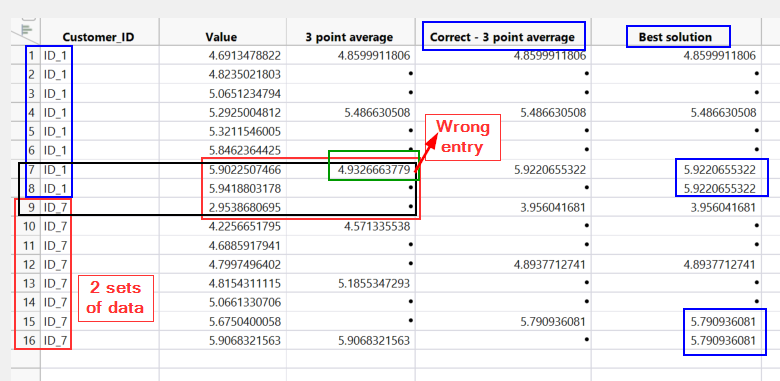
I am looking for 'n' row average (in the attached example, n == 3) based on other coulmn (-- "Customer_ID"). If my row number for each group (customer) is integer multiplier of 'n' i.e. [Row == Integer Constant x n]. My basic formula works fine. But if Row != Integer Constant x n, it takes remaining rows from other group. Which is giving me wrong results.
What I want -
Best Case - Calculate 'n' row average on sort of subset of the data based on Cutomer_ID and for the last remaining rows put the average value from previous averaged value.
Otherwise - leave the empty values as it is.
I tried to put :Customer_ID != Lag(:Customer_ID, -2) but it did not work for me. I can split the table on Customer_ID and then do the calculation but - there are more than 5000 ID and around 20 columns for average to be done. It doesn't seems the best idea !
Any help please ?
Thanks.


- Mark as New
- Bookmark
- Subscribe
- Mute
- Subscribe to RSS Feed
- Get Direct Link
- Report Inappropriate Content
Re: 'n' row average of a column based on a condition from other column -
Here is the formula that I came up with
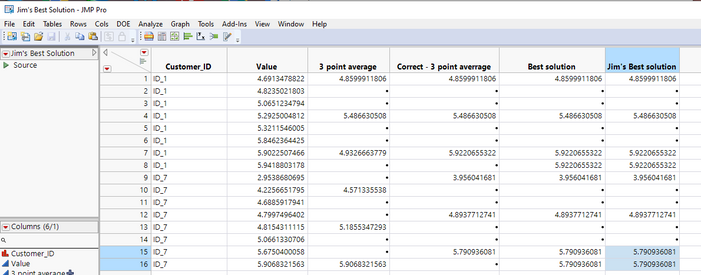
If( Row() == 1 | :Customer_ID != Lag( :Customer_ID ),
	count = 0
);
If( count == 3, count = 0 );
count = count + 1;
If(
	count == 1,
		currentAvg = Col Moving Average( :Value, 1, before = 0, after = 2, :Customer_ID );
		display = currentAvg;,
	:Customer_ID == Lag( :Customer_ID, -2 ), display = .,
	display = currentAvg
);
display;
You need to take the time to read the Scripting Guide found in the JMP Documentation Library available under the Help pull down menu!

- Mark as New
- Bookmark
- Subscribe
- Mute
- Subscribe to RSS Feed
- Get Direct Link
- Report Inappropriate Content
Re: 'n' row average of a column based on a condition from other column -
No idea if this will work in all cases, but it does work with the provided example data:
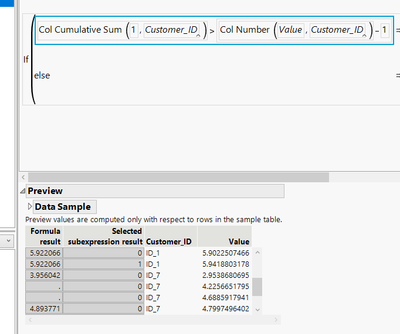
If(Col Cumulative Sum(1, :Customer_ID) > Col Number(:Value, :Customer_ID) - 1,
	Lag(Col Moving Average(:Value, 1, 0, 2, 0, :Customer_ID), 1),
	If(Modulo(Col Cumulative Sum(1, :Customer_ID), 3) == 1,
		Col Moving Average(:Value, 1, 0, 2, 0, :Customer_ID),
		.
	)
)
Check what each of the functions/formulas do from scripting index / scripting guide while checking selected subexpression result from formula editor to understand what it is doing as it is quite messy:
Recommended Articles
- © 2026 JMP Statistical Discovery LLC. All Rights Reserved.
- Terms of Use
- Privacy Statement
- Contact Us