- JMP Statement Regarding Critical PHP Remote Code Execution Vulnerabilities (CVE-2026-109618, CVE-2026-109619)
- Don’t miss your chance to experience Discovery Summit Europe at our best available rate! Early bird registration through 31 Oct.
- Graph Builder Toolbar streamlines interactive graphing. Creates shortcuts on Report and GraphBuilder Helpers toolbars. Download and install the extension.
- Subscribe to RSS Feed
- Mark Topic as New
- Mark Topic as Read
- Float this Topic for Current User
- Bookmark
- Subscribe
- Mute
- Printer Friendly Page
Discussions
Solve problems, and share tips and tricks with other JMP users.- User Community
- :
- Discussions
- :
- Re: map shape definition: show x/y coordinate instead of x/y values

- Mark as New
- Bookmark
- Subscribe
- Mute
- Subscribe to RSS Feed
- Get Direct Link
- Report Inappropriate Content
map shape definition: show x/y coordinate instead of x/y values
hi,
I am trying to define a map shape file for a wafer map.
x/y coordinates has different scales: for example, 1 incremental x means 10mm on the wafer; 1 incremental y means 20mm on the wafer.
I have defined a functional map file and all shapes look correct. However, the x/y axis shows actual values in terms of mm.
I would like the map to look the same and still give the correct shape but x/y axis shows coordinates instead of values. Which means that I want x/y axis to be on different scales.
Anyone can help me? Thx.
Accepted Solutions
- Mark as New
- Bookmark
- Subscribe
- Mute
- Subscribe to RSS Feed
- Get Direct Link
- Report Inappropriate Content
Re: map shape definition: show x/y coordinate instead of x/y values
hi, Mark
Thx for your suggestions.
A simple axis conversion might not work. For example, if I use x_new = x_old/10, y_new = y_old/20. If shifts my x/y differently, and the shape of my wafer map is not a circle anymore.
I figure out a walk-around by myself. In the defined x/y column, I edit column property: axis to not show default ticks. Instead, I re-define my coordinates as reference lines(not show the line though). This works for me since I don't have too many ordinates to define. If it is more complicated coordinate system, we need extra script to handle this part.
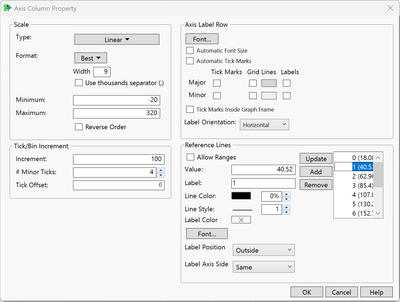
Thx.


- Mark as New
- Bookmark
- Subscribe
- Mute
- Subscribe to RSS Feed
- Get Direct Link
- Report Inappropriate Content
Re: map shape definition: show x/y coordinate instead of x/y values
I suggest you create a pair of new columns with the coordinates derived from the columns of actual values. JMP will not transform values for you automatically in Graph Builder.
- Mark as New
- Bookmark
- Subscribe
- Mute
- Subscribe to RSS Feed
- Get Direct Link
- Report Inappropriate Content
Re: map shape definition: show x/y coordinate instead of x/y values
hi, Mark
Thx for your suggestions.
A simple axis conversion might not work. For example, if I use x_new = x_old/10, y_new = y_old/20. If shifts my x/y differently, and the shape of my wafer map is not a circle anymore.
I figure out a walk-around by myself. In the defined x/y column, I edit column property: axis to not show default ticks. Instead, I re-define my coordinates as reference lines(not show the line though). This works for me since I don't have too many ordinates to define. If it is more complicated coordinate system, we need extra script to handle this part.
Thx.
Recommended Articles
- © 2026 JMP Statistical Discovery LLC. All Rights Reserved.
- Terms of Use
- Privacy Statement
- Contact Us