- JMP will suspend normal business operations for our Winter Holiday beginning on Wednesday, Dec. 24, 2025, at 5:00 p.m. ET (2:00 p.m. ET for JMP Accounts Receivable).
Regular business hours will resume at 9:00 a.m. EST on Friday, Jan. 2, 2026. - We’re retiring the File Exchange at the end of this year. The JMP Marketplace is now your destination for add-ins and extensions.
- Subscribe to RSS Feed
- Mark Topic as New
- Mark Topic as Read
- Float this Topic for Current User
- Bookmark
- Subscribe
- Mute
- Printer Friendly Page
Discussions
Solve problems, and share tips and tricks with other JMP users.- JMP User Community
- :
- Discussions
- :
- looking for a formula

- Mark as New
- Bookmark
- Subscribe
- Mute
- Subscribe to RSS Feed
- Get Direct Link
- Report Inappropriate Content
looking for a formula
Hi,
I have a column with numbers from 1 to 365 (= date number in a year) wich is numeric, ordinal.
I am looking for a formula to create a new column and transform numbers: add zeros (only to have 3 caracters) like for example:
3 => 003,
12 => 012,
80 => 080,
123, 265 don't change.
is there a formula in Jmp to do it?
thanks for your help.
best regards
Accepted Solutions


- Mark as New
- Bookmark
- Subscribe
- Mute
- Subscribe to RSS Feed
- Get Direct Link
- Report Inappropriate Content
Re: looking for a formula
Hi,
Please see the example below. I did this by first creating a new ordinal column (called Column 2) and using a formula to set the values equal to Column 1. I then used a custom data format for Column 2 by going to Column Info and setting the format to custom, using this formula:
If( :value < 10,
	"00" || Char( :value ),
	If( :value < 100,
		"0" || Char( :value ),
		:value
	)
)
Please see the script for the full table below, and let us know if this does what you're looking for.
New Table( "Three digit nominal example",
	Add Rows( 365 ),
	New Column( "Column 1",
		Numeric,
		"Ordinal",
		Format( "Best", 12 ),
		Set Values(
			[1, 2, 3, 4, 5, 6, 7, 8, 9, 10, 11, 12, 13, 14, 15, 16, 17, 18, 19, 20,
			21, 22, 23, 24, 25, 26, 27, 28, 29, 30, 31, 32, 33, 34, 35, 36, 37, 38,
			39, 40, 41, 42, 43, 44, 45, 46, 47, 48, 49, 50, 51, 52, 53, 54, 55, 56,
			57, 58, 59, 60, 61, 62, 63, 64, 65, 66, 67, 68, 69, 70, 71, 72, 73, 74,
			75, 76, 77, 78, 79, 80, 81, 82, 83, 84, 85, 86, 87, 88, 89, 90, 91, 92,
			93, 94, 95, 96, 97, 98, 99, 100, 101, 102, 103, 104, 105, 106, 107, 108,
			109, 110, 111, 112, 113, 114, 115, 116, 117, 118, 119, 120, 121, 122,
			123, 124, 125, 126, 127, 128, 129, 130, 131, 132, 133, 134, 135, 136,
			137, 138, 139, 140, 141, 142, 143, 144, 145, 146, 147, 148, 149, 150,
			151, 152, 153, 154, 155, 156, 157, 158, 159, 160, 161, 162, 163, 164,
			165, 166, 167, 168, 169, 170, 171, 172, 173, 174, 175, 176, 177, 178,
			179, 180, 181, 182, 183, 184, 185, 186, 187, 188, 189, 190, 191, 192,
			193, 194, 195, 196, 197, 198, 199, 200, 201, 202, 203, 204, 205, 206,
			207, 208, 209, 210, 211, 212, 213, 214, 215, 216, 217, 218, 219, 220,
			221, 222, 223, 224, 225, 226, 227, 228, 229, 230, 231, 232, 233, 234,
			235, 236, 237, 238, 239, 240, 241, 242, 243, 244, 245, 246, 247, 248,
			249, 250, 251, 252, 253, 254, 255, 256, 257, 258, 259, 260, 261, 262,
			263, 264, 265, 266, 267, 268, 269, 270, 271, 272, 273, 274, 275, 276,
			277, 278, 279, 280, 281, 282, 283, 284, 285, 286, 287, 288, 289, 290,
			291, 292, 293, 294, 295, 296, 297, 298, 299, 300, 301, 302, 303, 304,
			305, 306, 307, 308, 309, 310, 311, 312, 313, 314, 315, 316, 317, 318,
			319, 320, 321, 322, 323, 324, 325, 326, 327, 328, 329, 330, 331, 332,
			333, 334, 335, 336, 337, 338, 339, 340, 341, 342, 343, 344, 345, 346,
			347, 348, 349, 350, 351, 352, 353, 354, 355, 356, 357, 358, 359, 360,
			361, 362, 363, 364, 365]
		)
	),
	New Column( "Column 2",
		Numeric,
		"Ordinal",
		Format(
			"Custom",
			Formula(
				If( value < 10,
					"00" || Char( value ),
					If( value < 100,
						"0" || Char( value ),
						value
					)
				)
			),
			12,
			0
		),
		Formula( :Column 1 ),
		Set Selected
	)
)

- Mark as New
- Bookmark
- Subscribe
- Mute
- Subscribe to RSS Feed
- Get Direct Link
- Report Inappropriate Content
Re: looking for a formula
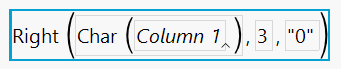
Of course for this example, it needs to be Right() so things are padded on the left.
- Mark as New
- Bookmark
- Subscribe
- Mute
- Subscribe to RSS Feed
- Get Direct Link
- Report Inappropriate Content
Re: looking for a formula
Hi,
Please see the example below. I did this by first creating a new ordinal column (called Column 2) and using a formula to set the values equal to Column 1. I then used a custom data format for Column 2 by going to Column Info and setting the format to custom, using this formula:
If( :value < 10,
	"00" || Char( :value ),
	If( :value < 100,
		"0" || Char( :value ),
		:value
	)
)
Please see the script for the full table below, and let us know if this does what you're looking for.
New Table( "Three digit nominal example",
	Add Rows( 365 ),
	New Column( "Column 1",
		Numeric,
		"Ordinal",
		Format( "Best", 12 ),
		Set Values(
			[1, 2, 3, 4, 5, 6, 7, 8, 9, 10, 11, 12, 13, 14, 15, 16, 17, 18, 19, 20,
			21, 22, 23, 24, 25, 26, 27, 28, 29, 30, 31, 32, 33, 34, 35, 36, 37, 38,
			39, 40, 41, 42, 43, 44, 45, 46, 47, 48, 49, 50, 51, 52, 53, 54, 55, 56,
			57, 58, 59, 60, 61, 62, 63, 64, 65, 66, 67, 68, 69, 70, 71, 72, 73, 74,
			75, 76, 77, 78, 79, 80, 81, 82, 83, 84, 85, 86, 87, 88, 89, 90, 91, 92,
			93, 94, 95, 96, 97, 98, 99, 100, 101, 102, 103, 104, 105, 106, 107, 108,
			109, 110, 111, 112, 113, 114, 115, 116, 117, 118, 119, 120, 121, 122,
			123, 124, 125, 126, 127, 128, 129, 130, 131, 132, 133, 134, 135, 136,
			137, 138, 139, 140, 141, 142, 143, 144, 145, 146, 147, 148, 149, 150,
			151, 152, 153, 154, 155, 156, 157, 158, 159, 160, 161, 162, 163, 164,
			165, 166, 167, 168, 169, 170, 171, 172, 173, 174, 175, 176, 177, 178,
			179, 180, 181, 182, 183, 184, 185, 186, 187, 188, 189, 190, 191, 192,
			193, 194, 195, 196, 197, 198, 199, 200, 201, 202, 203, 204, 205, 206,
			207, 208, 209, 210, 211, 212, 213, 214, 215, 216, 217, 218, 219, 220,
			221, 222, 223, 224, 225, 226, 227, 228, 229, 230, 231, 232, 233, 234,
			235, 236, 237, 238, 239, 240, 241, 242, 243, 244, 245, 246, 247, 248,
			249, 250, 251, 252, 253, 254, 255, 256, 257, 258, 259, 260, 261, 262,
			263, 264, 265, 266, 267, 268, 269, 270, 271, 272, 273, 274, 275, 276,
			277, 278, 279, 280, 281, 282, 283, 284, 285, 286, 287, 288, 289, 290,
			291, 292, 293, 294, 295, 296, 297, 298, 299, 300, 301, 302, 303, 304,
			305, 306, 307, 308, 309, 310, 311, 312, 313, 314, 315, 316, 317, 318,
			319, 320, 321, 322, 323, 324, 325, 326, 327, 328, 329, 330, 331, 332,
			333, 334, 335, 336, 337, 338, 339, 340, 341, 342, 343, 344, 345, 346,
			347, 348, 349, 350, 351, 352, 353, 354, 355, 356, 357, 358, 359, 360,
			361, 362, 363, 364, 365]
		)
	),
	New Column( "Column 2",
		Numeric,
		"Ordinal",
		Format(
			"Custom",
			Formula(
				If( value < 10,
					"00" || Char( value ),
					If( value < 100,
						"0" || Char( value ),
						value
					)
				)
			),
			12,
			0
		),
		Formula( :Column 1 ),
		Set Selected
	)
)

- Mark as New
- Bookmark
- Subscribe
- Mute
- Subscribe to RSS Feed
- Get Direct Link
- Report Inappropriate Content
Re: looking for a formula
This is a useful thing to be able to do, and I come across it quite a lot; it would be nice if there were an in-built function.

- Mark as New
- Bookmark
- Subscribe
- Mute
- Subscribe to RSS Feed
- Get Direct Link
- Report Inappropriate Content
Re: looking for a formula
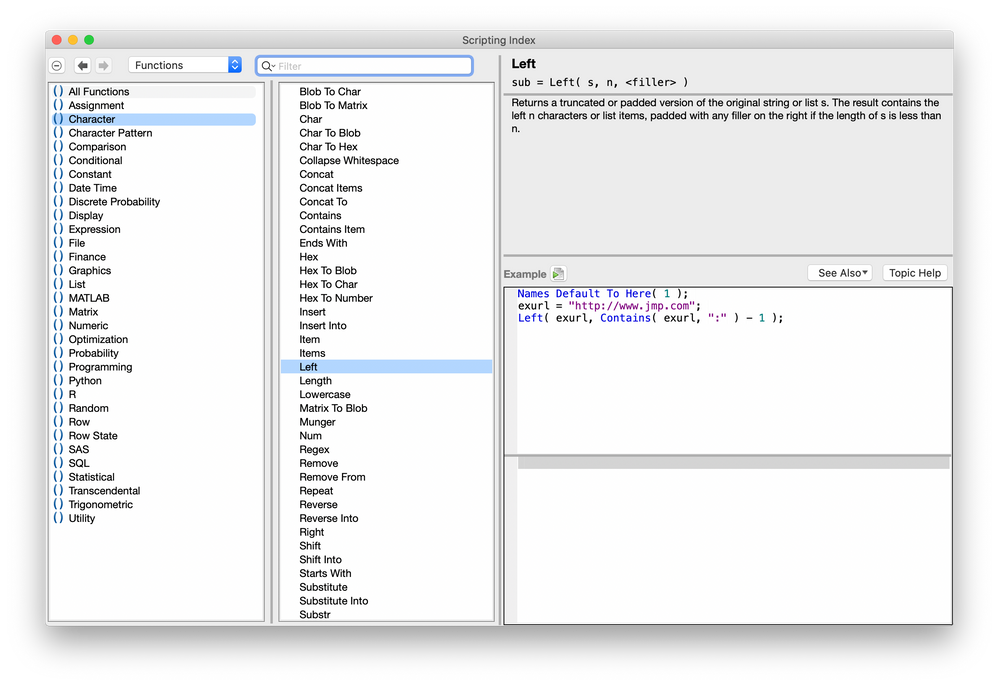
There is a built-in function for this result:
- Mark as New
- Bookmark
- Subscribe
- Mute
- Subscribe to RSS Feed
- Get Direct Link
- Report Inappropriate Content
Re: looking for a formula
Of course for this example, it needs to be Right() so things are padded on the left.
- Mark as New
- Bookmark
- Subscribe
- Mute
- Subscribe to RSS Feed
- Get Direct Link
- Report Inappropriate Content
Re: looking for a formula
Hi,
thanks for your answers.
all the best for everyone !
Recommended Articles
- © 2025 JMP Statistical Discovery LLC. All Rights Reserved.
- Terms of Use
- Privacy Statement
- Contact Us