- Don’t miss your chance to experience Discovery Summit Europe at our best available rate! Early bird registration through 31 Oct.
- Image to Table JMP extension imports single or batch images as data tables. Useful to extract curves from pictures or convert image data to curve data to use in analyses like Functional Data Explorer. Download and install the extension.
- Subscribe to RSS Feed
- Mark Topic as New
- Mark Topic as Read
- Float this Topic for Current User
- Bookmark
- Subscribe
- Mute
- Printer Friendly Page
Discussions
Solve problems, and share tips and tricks with other JMP users.- User Community
- :
- Discussions
- :
- isolating the smallest date difference

- Mark as New
- Bookmark
- Subscribe
- Mute
- Subscribe to RSS Feed
- Get Direct Link
- Report Inappropriate Content
isolating the smallest date difference
i have a large dataset that has a static date on a subject (date of chest CT scan) and i need to find the smallest date difference and keep that row (delete the others). jmp 16.2.0
Example below - i want to keep rows 2 and 4 (the smallest day difference for subject 1 and 2).
subj ID. CT date. lung function date. day difference
1 8/30/18 1/29/18 -213
1 8/30/18 8/31/18 1
1 8/30/18 3/4/19 186
2 12/19/17 11/13/18 329
2 12/19/17 9/3/19 623
2 12/19/17 10/4/21 1385
- Tags:
- Content Organization


- Mark as New
- Bookmark
- Subscribe
- Mute
- Subscribe to RSS Feed
- Get Direct Link
- Report Inappropriate Content
Re: isolating the smallest date difference
Hi @jsolo01 ,
How about adding a new formula column "Col Rank" to rank the day difference according to subj ID.?
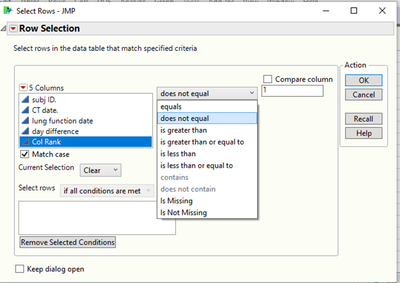
Then, you can select row "Col Rank" not equal to 0 & delete the rows.
For;
subj ID 1, the min day difference is the 2nd row.
subj ID 2, the min day difference is the 4th row
1) Create new formula column: Col Rank
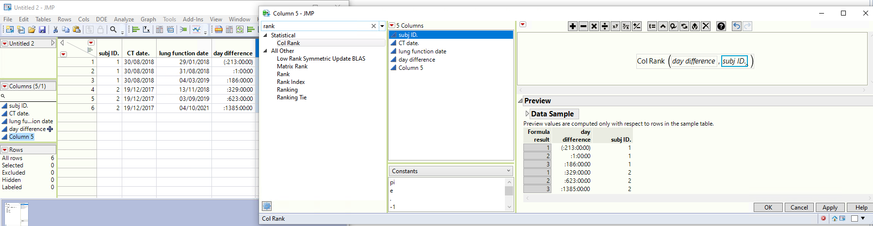
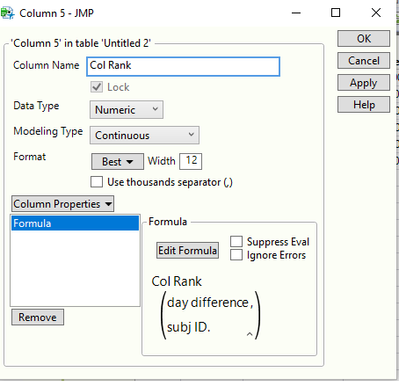
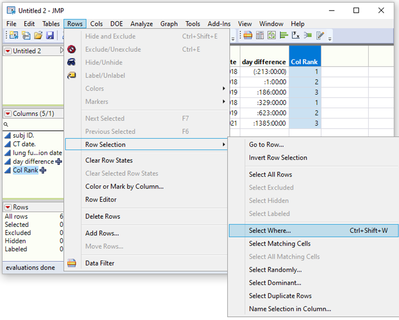
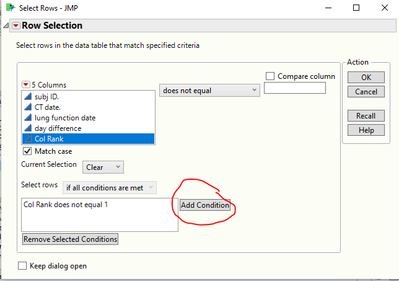
2) Go to Rows > Row Selection > Select Where
3) Define the condition: Col Ran does not equal 1 > click "Add Condition"
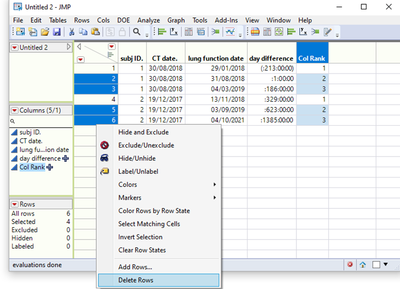
4) Right click the selected rows > Delete Rows
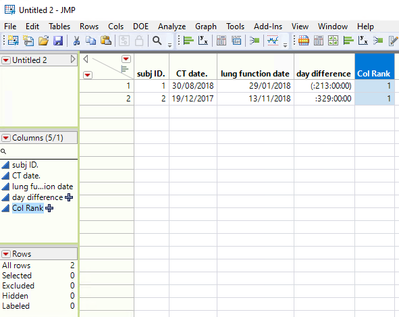
5) Final result as below
Hope it helps.
If it's a repetitive analysis, you can automate the steps through workflow or JSL

- Mark as New
- Bookmark
- Subscribe
- Mute
- Subscribe to RSS Feed
- Get Direct Link
- Report Inappropriate Content
Re: isolating the smallest date difference
Here is my take on a simple way to get what you are asking for; Just a simple script
Names Default To Here( 1 );
dt = Current Data Table();
dt << select where( :day difference == Col Min( :day difference, :subject ID ) );

dt << subset( selected columns( 0 ), selected rows( 1 ) );
- Mark as New
- Bookmark
- Subscribe
- Mute
- Subscribe to RSS Feed
- Get Direct Link
- Report Inappropriate Content
Re: isolating the smallest date difference
Just to extend a little on @WebDesignesCrow interactive solution:
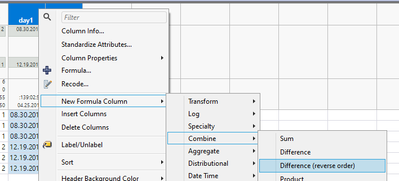
If you don't already have the difference column, you can create it interactively (select both of your dates, right click on the column header and find Difference (reverse order). This will create a new column where the differences are in seconds. If you want to see them in yours/days you can double click on the created column and modify it as needed (such as add division by In Days(1)) but seconds work for this case
Then right click on this new column's header and make absolute value column out of it
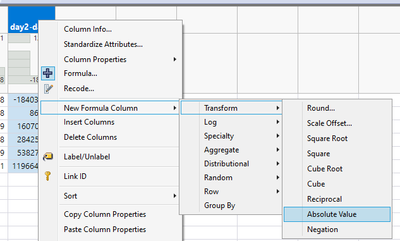
After you have that column, right click on the subjectid column and make it grouping column
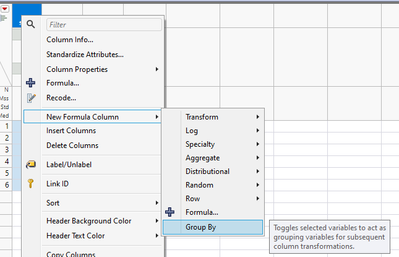
next you can right click on the date difference column and create rank formula (note the grouping)
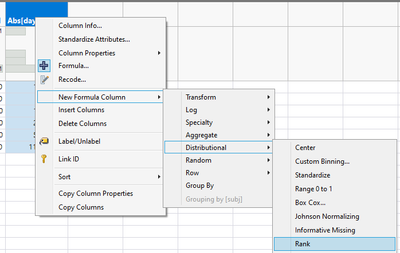
from the final column, right click on one of the "ones", select matching cells
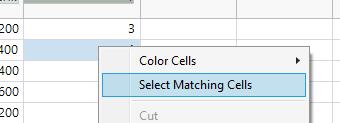
From here you can either create subset using selected rows
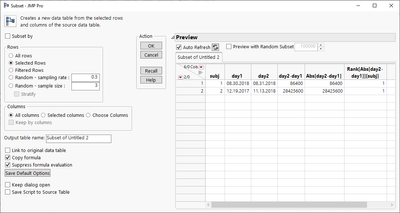
OR right click on the row list, invert selection and after inversion delete rows
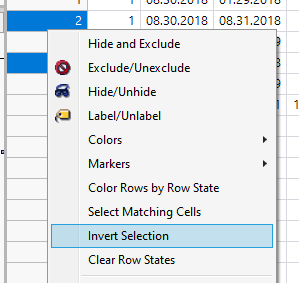
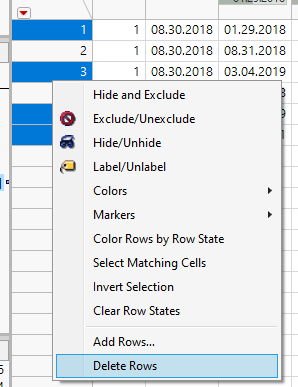
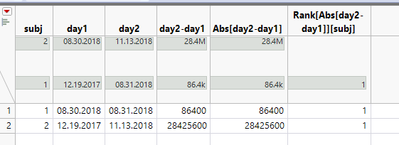
Then if you need to repeat this you can either make a workflow or capture the script from enhanced log
Below is script created by Workflow builder. Only thing it is missing is opening the table as I don't have the table saved (and some column names are incorrect for the same reason) so I added table creation script (workflow is also attached).
Names Default To Here(1);

//Custom Action - Create table 'Untitled 2'
dt = New Table("Untitled 2",
	Add Rows(6),
	Compress File When Saved(1),
	New Column("subj", Numeric, "Continuous", Format("Best", 12), Set Values([1, 1, 1, 2, 2, 2])),
	New Column("day1",
		Numeric,
		"Continuous",
		Format("m/d/y", 12),
		Input Format("m/d/y"),
		Set Values([3618432000, 3618432000, 3618432000, 3596486400, 3596486400, 3596486400])
	),
	New Column("day2",
		Numeric,
		"Continuous",
		Format("m/d/y", 12),
		Input Format("m/d/y"),
		Set Values([3600028800, 3618518400, 3634502400, 3624912000, 3650313600, 3716150400])
	)
);;

//New formula column: day2-day1
Data Table("Untitled 2") << New Formula Column(
	Operation(Category("Combine"), "Difference (reverse order)"),
	Columns(:day1, :day2)
);

//New formula column: Abs[day2-day1]
Data Table("Untitled 2") << New Formula Column(
	Operation(Category("Transform"), "Absolute Value"),
	Columns(:"day2-day1"n)
);

//New formula column: Rank[Abs[day2-day1]][subj]
Data Table("Untitled 2") << New Formula Column(
	Operation(Category("Distributional"), "Rank"),
	Columns(:"Abs[day2-day1]"n),
	Group By(:subj)
);

//Select matching cells
Data Table("Untitled 2") << Select Where(:"Rank[Abs[day2-day1]][subj]"n == 1);

//Subset data table
Data Table("Untitled 2") << Select Where(:"Rank[Abs[day2-day1]][subj]"n == 1) <<
Subset(Selected Rows(1), Selected columns only(0));
Recommended Articles
- © 2026 JMP Statistical Discovery LLC. All Rights Reserved.
- Terms of Use
- Privacy Statement
- Contact Us