- Don’t miss your chance to experience Discovery Summit Europe at our best available rate! Early bird registration through 31 Oct.
- Graph Builder Toolbar streamlines interactive graphing. Creates shortcuts on Report and GraphBuilder Helpers toolbars. Download and install the extension.
- Subscribe to RSS Feed
- Mark Topic as New
- Mark Topic as Read
- Float this Topic for Current User
- Bookmark
- Subscribe
- Mute
- Printer Friendly Page
Discussions
Solve problems, and share tips and tricks with other JMP users.- User Community
- :
- Discussions
- :
- how to reference a Transform Column?

- Mark as New
- Bookmark
- Subscribe
- Mute
- Subscribe to RSS Feed
- Get Direct Link
- Report Inappropriate Content
how to reference a Transform Column?
When I generate a Transform Column by sending Transform Column to a data table, I get the a reference to the Column as a return value.
When I generate a Transform Column by sending Transform Column to a GraphBuilder Object, I get a refernce to a Graph Builder as a return value - no reference to the column :(
So asking this "Column" col2 for it's name doesn't work.
Where can I find more information about referencing transform columns?
e.g. how to get a solid reference to the column (something like :col2).
How good that one doesn't have to reference the column by a symbol. Seems to be OK to use the column name - even OK without quotation marks (!?)
Names Default to Here(1);
dt = Open( "$SAMPLE_DATA/Big Class.jmp" );
gb = dt << Graph Builder();

col1 = dt << Transform Column ("col1Name", Formula(1/:height));
col2 = gb << Transform Column ("col2Name", Formula(1/:height));

Show(Name Expr(col1));
Show(Name Expr(col2));

gb << Variables(X(:height), Y (col1));


// doesnt work :(
gb << Variables(X(:height), Y (col2));

gb << Variables(X(:height), Y ("col2Name")); //works

gb << Variables(X(:height), Y (col2Name));  // works (!?)


Show(col1 << get name());
Show(col2 << get name());

Show(Column(dt, "col1Name"));
Try(Show(Column(dt, "col2Name")), "dt doesn't know the column");
- Mark as New
- Bookmark
- Subscribe
- Mute
- Subscribe to RSS Feed
- Get Direct Link
- Report Inappropriate Content
Re: how to reference a Transform Column?
Jmp Support: TS-00056243
. you cannot reference a transform column created in the platform context. This means you cannot remove it nor replace it. If you want to have a reference to a transform column, you must create the column in the data table context.
So, if you want to change or rename a transform column (in a platform), you have to do it via the GUI - not via JSL.
(# What is not possible via JSL? )
Wish added:
improvements for Transform Column
- Mark as New
- Bookmark
- Subscribe
- Mute
- Subscribe to RSS Feed
- Get Direct Link
- Report Inappropriate Content
Re: how to reference a Transform Column?
In the meantime ...
the only solution seems to be to generate the transform column with table scope , to replace it every time the selection in the local data filter is changed - and to put it back into the Plot every time it gets kicked out.
So it's more like Set each value() than Formula().
On the other hand: it works - just in case you need a plot with a Transform column formula which "automatically" adjusts to changes of the Local Data Filter
To illustrate the idea, I generated a GraphBuilder plot which counts the selected M & F.
Imagine how powerful this approach can be ...
Names Default to Here(1);
dt = Open( "$SAMPLE_DATA/Big Class.jmp" );

colName = "count_"||Char(Random Integer(100000));

Eval(Eval Expr(gb = dt << Graph Builder(
Transform Column(
		Expr(colName),
		"Table Scope", // essential because otherwise the replace(1) won't work
		Formula( Col Number( 1,:sex )  )
	),
		Variables( X( :sex ), Y( Expr(colName) ) ),
	Elements( Bar( X, Y ) ),
	Local Data Filter(Add Filter(columns( :sex, :name )))
)));

ldf = (Current Report()["Local Data Filter"] << get scriptable object);

myRowsOld=[];
fch = Function( {x},
	myRows = ldf << Get Filtered Rows;
	If( not(nrows(myRows)==nrows(myRowsOld))| not(asList(myRows) == asList(myRowsOld)),
		myRowsOld = myRows;
		Eval(
			Substitute(
					Expr(
						dt << Transform Column(
							_colName_,
							//"Table Scope", // gb doesn't understand replace(1) -> we have to talk to the table -> no Table Scope needed
							Formula(
								Col Number( 1, :sex, Contains( _myRows_, Row() ) > 0 )
							),
							Replace( 1 )
						)
					),
				Expr( _myRows_ ), myRows, Expr(_colName_), colName
			)
		);
		gb << add variable({ Column(colName), Role("Y") }); //replacing the transform column removes it automatically from the graph
		dt << Show Transforms();
	);
);

current report() << on close(dt << delete column(colname));

rs = ldf << Make Filter Change Handler( fch );

dt << Show Transforms();
- Mark as New
- Bookmark
- Subscribe
- Mute
- Subscribe to RSS Feed
- Get Direct Link
- Report Inappropriate Content
Re: how to reference a Transform Column?
Benefit of this approach compared to generating a Formula column:
- The Transform column is just temporary, it won't be saved.
comparable:
- with the need to generate the transform column with table scope, it is also visible from other platforms
worse:
- the code got quite lengthy compared to the approach with a real formula column: Re: Transform Column: Bug with excluded rows
For a real formula column, it's enough to update the input list and then the formula will re-evaluate.
With the transform column it's like deleting the column and generating it again.
why?
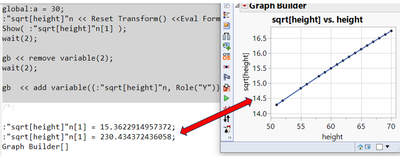
For Transform columns, one can use
<< reset transform()to refresh the values.
but surprisingly, the report doesn't notice the update and shows the old values - even after removing and adding the variable:
Names Default To Here( 1 );
dt = Open( "$SAMPLE_DATA/Big Class.jmp" );

// transform column with table scope
global:a = 2;
dt << Transform Column(
	"sqrt[height]",
	Formula( global:a * Sqrt( :height ) ),
	Replace(1);
);
Show( :"sqrt[height]"n[1] );

gb = Graph Builder(
	Variables( X( :height ), Y( :"sqrt[height]"n ) )
);

global:a = 30;

// clear the cache
:"sqrt[height]"n << Reset Transform();

// new values
Show( :"sqrt[height]"n[1] );
wait(2);

// try to update the GraphBuilder
gb << remove variable(2);
wait(2);

// unfortunately, still the old values !?!?!
gb  << add variable({:"sqrt[height]"n, Role("Y")});

// a new GraphBuilder starts with updated values !
gbnew = Graph Builder(
	Variables( X( :height ), Y( :"sqrt[height]"n ) )
);
A newly generated graph builder report (gbnew) shows the new values.
-> Seems that the first graph builder uses some stored values which are not refreshed when the Transform Column gets refreshed.
- Mark as New
- Bookmark
- Subscribe
- Mute
- Subscribe to RSS Feed
- Get Direct Link
- Report Inappropriate Content
Re: how to reference a Transform Column?
Does this count as a solution?
hm ...
Jmp support [TS-00056243] is very clear:
The short answer is there is not a way to have the transform column change with a change to the Local Data Filter
[one of us] has been working with others in tech support and development on the issue, and no solution is available.
- Mark as New
- Bookmark
- Subscribe
- Mute
- Subscribe to RSS Feed
- Get Direct Link
- Report Inappropriate Content
Re: how to reference a Transform Column?
not a way to have the transform column change with a change to the Local Data Filter
not yet ...
Recommended Articles
- © 2026 JMP Statistical Discovery LLC. All Rights Reserved.
- Terms of Use
- Privacy Statement
- Contact Us