cancel
Showing results for 
Show  only  | Search instead for 
Did you mean: 
  • Learn how to build custom Python data connectors and further customize JMP’s Data Connector Framework with the Python Data Connector Demo, available now in the JMP Marketplace!
  • See how to create experiments to support product design and ID useful product features. Register for June 12 webinar, 2pm US Eastern Time.

Discussions

Solve problems, and share tips and tricks with other JMP users.
Choose Language Hide Translation Bar
Gacem_Seyf
Level I

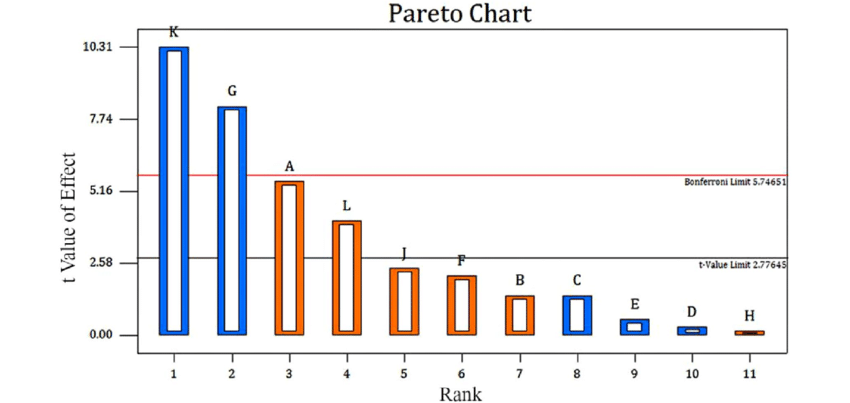
how to create Pareto plot like the following image ?

hello I'm bigginner in using Jmp , I need to create Pareto Plot with the t-value of effect  and the Bonferroni and t-value limits like the following image .

Pareto-chart-showing-effects-of-factors-above-and-below-the-Bonferroni-Limit-absolute.png

Thanks .

1 REPLY 1
jthi
Super User

Re: how to create Pareto plot like the following image ?

Creating bar chart in JMP with reference lines and labels is easy. It might be more difficult to figure out where you can get those specific t-values calculated. Good starting point on how to use JMP (in my opinion) is checking out the help documentation https://www.jmp.com/support/help/en/17.2/, there are also a lot if different videos in community.


This is just an example (I searched scripting index for Bonferroni and used the report the example script creates):
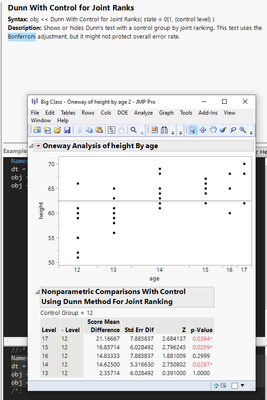
jthi_0-1711435308617.png

I can make the results into data table
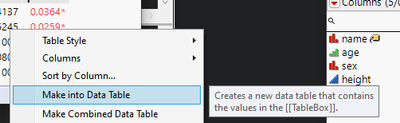
jthi_1-1711435324651.png

Add some extra columns (rank), set labels (column and rows)
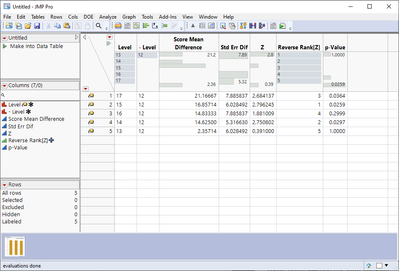
jthi_2-1711435525337.png

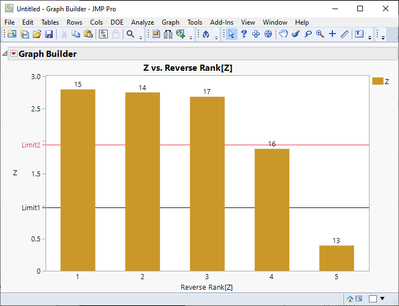
Create bar chart with reference lines
jthi_3-1711435551191.png


-Jarmo

Recommended Articles