JMP Security Notice: CVE-2026-109618 and CVE-2026-109619
JMP promptly initiated a review of its products, services, and relevant infrastructure for exposure to CVE-2026-109618 and CVE-2026-109619.
Our assessment of JMP products has not identified exposure to these vulnerabilities. Where remediation was required within supporting environments, appropriate security updates and controls have been applied and validated.
We have identified no evidence of successful exploitation or unauthorized access to JMP systems or customer information associated with these vulnerabilities.
JMP continues to monitor the issue and relevant vendor guidance. No action is required by JMP customers at this time.
Don’t miss your chance to experience Discovery Summit Europe at our best available rate! Early bird registration through 31 Oct.
Graph Builder Toolbar streamlines interactive graphing. Creates shortcuts on Report and GraphBuilder Helpers toolbars. Download and install the extension.
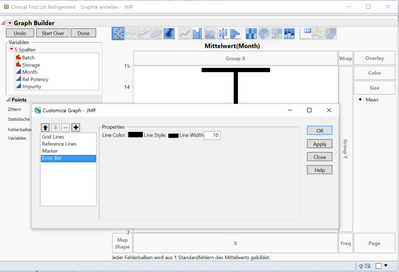
I am working on the Graph Builder and by mistake I changed the error bars, so that only the top and bottom are visible. The vertical connection line is still there, but very thin. I want to make it the same as the caps. Any ideas how?
Created:
Sep 15, 2016 03:34 AM
| Last Modified: Oct 18, 2016 9:02 PM(6141 views)
| Posted in reply to message from leymann1 09-14-2016
I'm not completely sure how this happened. In general you can adjust the line with of the complete error bar by right-clicking into the graph => Customize => Error Bar => Line Width