Don’t miss your chance to experience Discovery Summit Europe at our best available rate! Early bird registration through 31 Oct.
Graph Builder Toolbar streamlines interactive graphing. Creates shortcuts on Report and GraphBuilder Helpers toolbars. Download and install the extension.
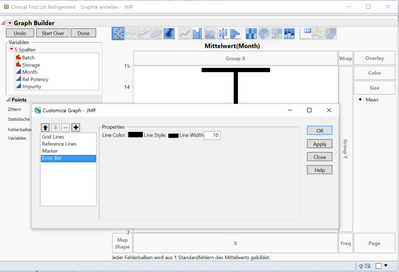
I am working on the Graph Builder and by mistake I changed the error bars, so that only the top and bottom are visible. The vertical connection line is still there, but very thin. I want to make it the same as the caps. Any ideas how?
Created:
Sep 15, 2016 03:34 AM
| Last Modified: Oct 18, 2016 9:02 PM(6149 views)
| Posted in reply to message from leymann1 09-14-2016
I'm not completely sure how this happened. In general you can adjust the line with of the complete error bar by right-clicking into the graph => Customize => Error Bar => Line Width